Extended Wishlist

Several named wish lists for every customer: notes on products, moving products between lists, "Add all to cart" with the chosen options, a link to the list and sending the list by email. The lists of all customers in the admin panel with search and contents.
Reviews: 1
Last update: 12.11.2026 Supports current CS-Cart version
cp-addon-2288
Select the CS-Cart edition on which you will use the add-on.
The update period determines the period of time when you can get access to the new versions of this add-on compatible with the new versions of CS-Cart software released during the chosen period.
To instal the add-on, we will need the FTP access to your server. Please send it along with the order number to sales@cart-power.com once the order is paid.
Shoppers sort saved products into lists and come back for them as a whole order
Extended Wishlist
$60.00

Extended Wishlist - shoppers put an order together in advance and come back for all of it

Instead of one common wish list, every shopper keeps several lists of their own: Gifts, Office, Summer house. A product can get a note, products move from list to list, and a whole list goes to the cart with one button, with the sizes and colours that were chosen. A list is shared by a link or sent by email: the recipient sees the products and prices and can save the list. The store sees the lists of all customers in the admin panel.

Several lists
own names, notes on products, moving products between lists
Add all to cart
with the chosen options; if a product is not added, the store names the reason
Link and email
a public page of the list and sending by email with a limit
CS-Cart 4.17.1 to 4.21.1
CS-Cart and Multi-Vendor, all editions; version 3.1 tested on 4.21.1

What it solves

The core CS-Cart wish list is one per shopper: gifts, things for the home and "see later" products lie together, and a week later nobody remembers why a product was saved. The list grows, it is hard to sort out, and it never reaches the cart.

The add-on turns saved products into selections. A shopper sorts products into lists, writes notes on them and comes back for a whole selection: "Add all to cart" puts the list into the cart with the chosen options. A selection is shared by a link or by email, and one more shopper comes to the store with a ready list.

Lists by occasion

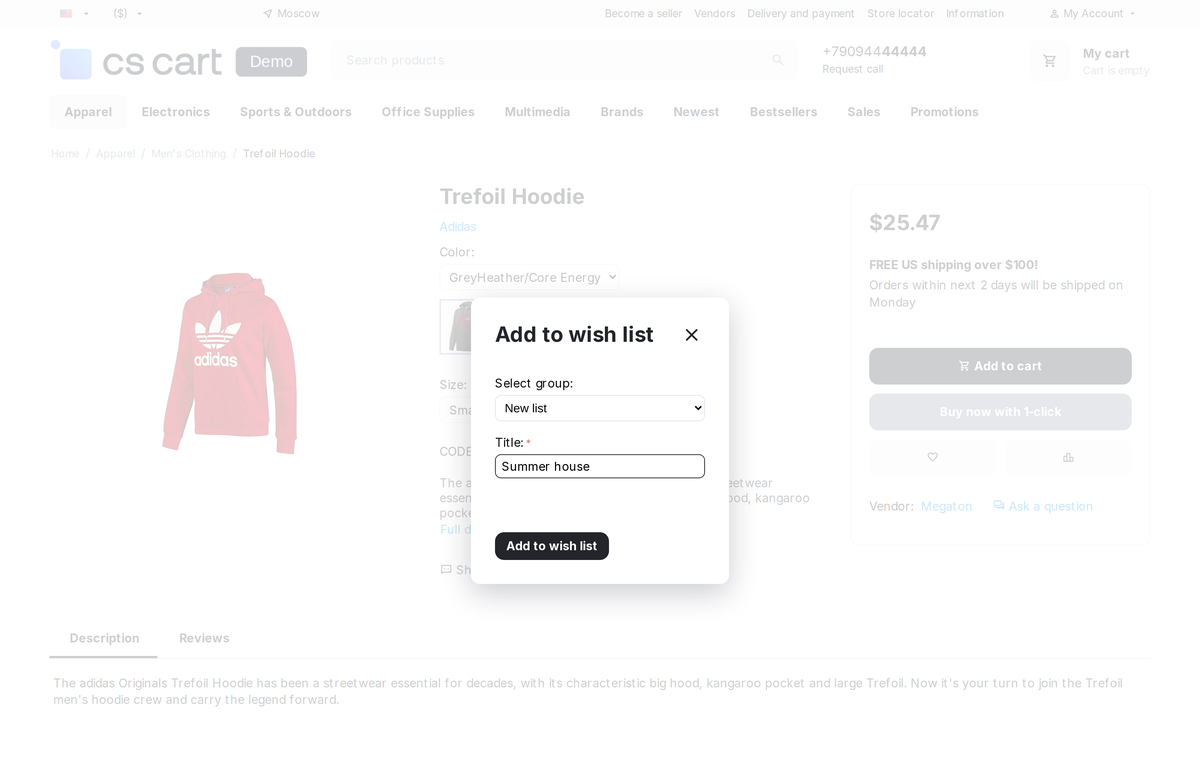
Shoppers create and rename lists themselves. When "Add to wish list" is pressed, the store asks which list to use, and a new list is created right in that window.

Notes on products

"Get the black one", "check the size": the note shows under the product in the list and never reaches the public page of the list.

Add all to cart

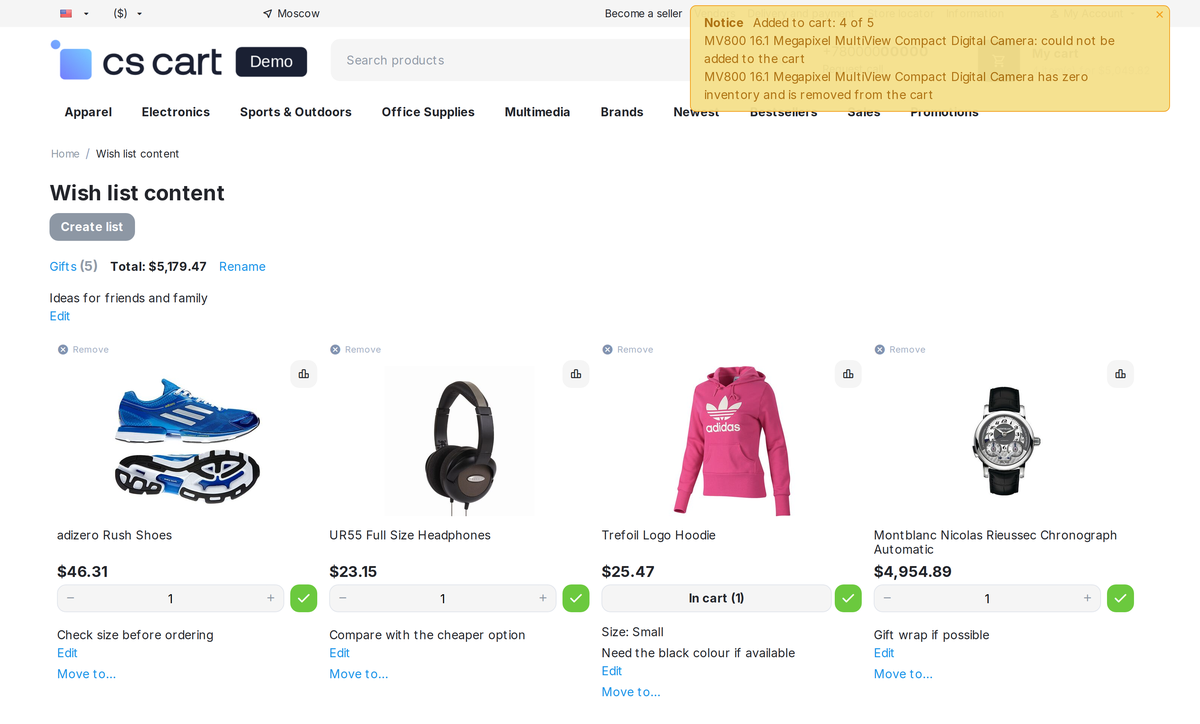
One button and the list is in the cart with the saved options. If a product is out of stock, the shopper sees which one and why.

Visible to the store

The lists of all customers are in the admin panel: search by customer, name and dates, the contents of a list, sending a list to its owner.

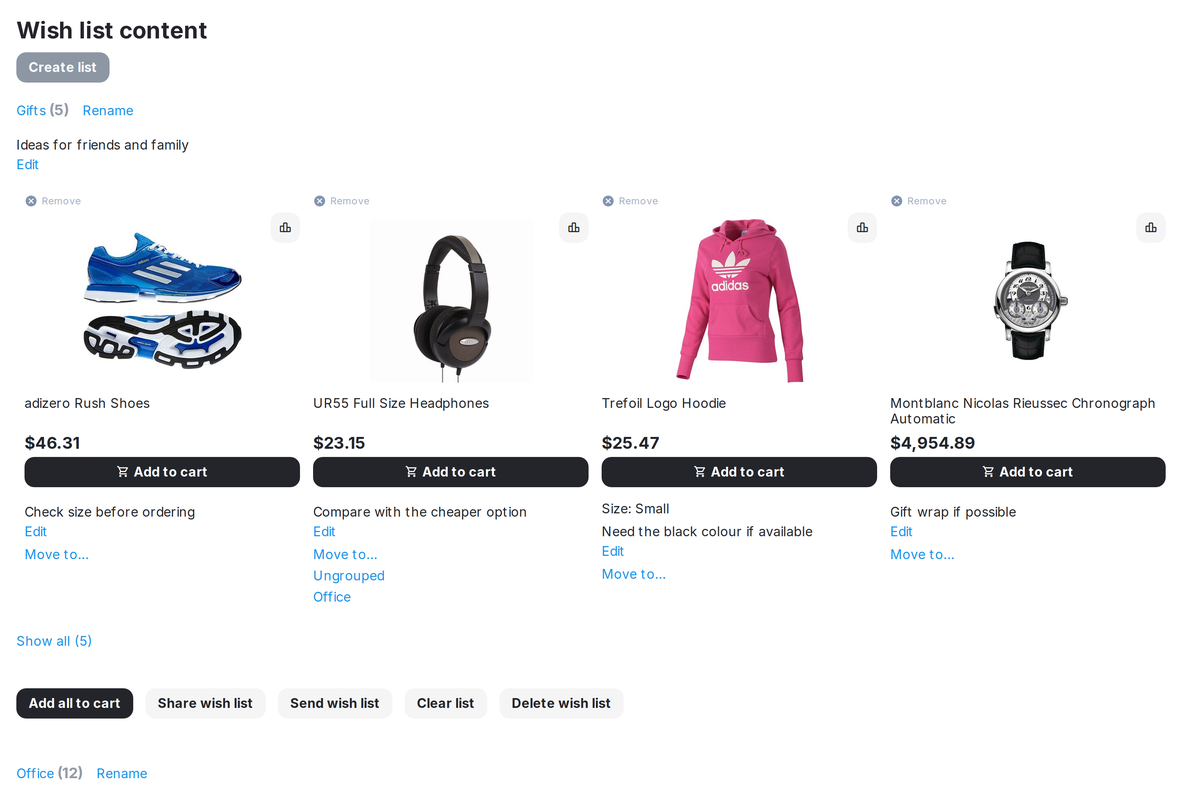
The Wish list page on the demo stand: the Gifts and Office lists, notes and chosen options under the products, an open "Move to", "Show all" and the list buttons.

New in version 3.1

  • •  In UniTheme2 the heart of a product in the catalog, in quick view and on the product page is lit when the product is already in one of the customer's lists. Clicking a lit heart removes the product from the lists, and the store names which ones.
  • •  The wish list counter in the UniTheme2 header changes right after "Add to wish list", without reloading the page.
  • •  After a list is chosen in the "Add to wish list" dialog, the customer stays on the same page and the tab title does not change.
  • •  On the wish list page in UniTheme2 the "Remove" icon in the product card removes the product from the list. Before, it did nothing.
  • •  Ukrainian language added.
The "Add to wish list" window on a product page of the demo stand: choosing a list, the new list "Summer house" is created right in the window.

What version 3 does

  • •  The add-on is rewritten on the new CS-Cart architecture (scheme 4.0). CS-Cart or Multi-Vendor 4.17.1 or newer is required. Lists, products and notes of versions 2.0 and 2.1 move over on update.
  • •  "Add all to cart" puts a list into the cart with the saved options and variations; if a product cannot be added, the store names it and the reason.
  • •  Actions right in the list: "Add to cart", a note, "Move to", delete. Lists are created and renamed on the Wish list page.
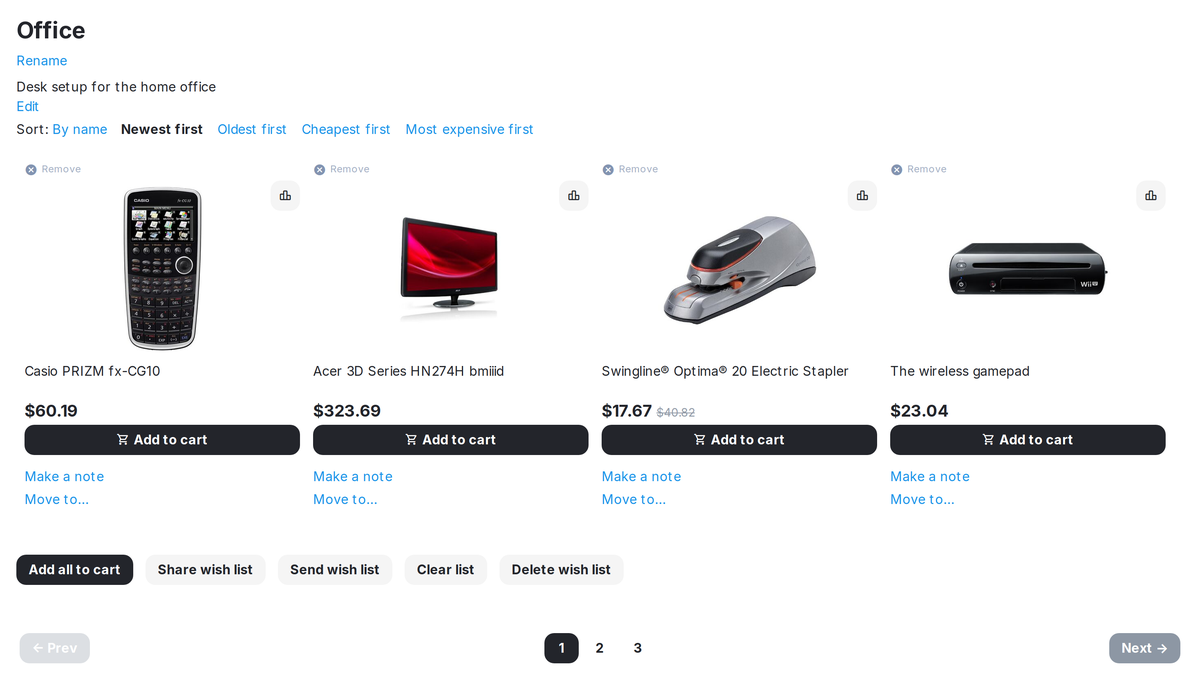
  • •  Large lists: a group shows the configured number of products, the rest open by the "Show all" link on the list page with sorting and pages.
  • •  Sending by email: an email with the list name, products, options, prices and a button that opens this list. The number of emails per session is set by a setting, and the form can be protected with the CS-Cart captcha.
  • •  Public link: a page of the list without the owner's notes, with a "Save to my lists" button; the owner can issue a new link.
  • •  Admin panel: search for lists by customer, name and dates, the contents of a list, sending to the owner, bulk deletion, permissions to view and manage, a tab on the customer profile.
  • •  The core CS-Cart wish list gets the products of the customer's lists, so add-ons that work with saved products see them. Guest lists are kept per visitor and move to the account on sign-in.
After "Add all to cart" on the demo stand: the store tells how many products were added and names the product that is out of stock.

How shoppers see it

The "Add to wish list" button stays where the theme has it: on the product page and in product lists. If a shopper has lists of their own, the store asks where to put the product, or puts it into "Ungrouped" silently, as the setting says. In UniTheme2 the heart of a product is lit when the product is already in the shopper's lists, and clicking it again removes the product from the lists.

On the Wish list page every list is a group of its own: the name, the number of products, the total, the description. A product shows the chosen options, the note and moving to another list. A group shows the configured number of products, the rest open by the "Show all" link on the list page with sorting.

Guests can save products too when allowed: their lists are kept for the configured number of days and move to the account when the guest signs in.

The Office list page on the demo stand: sorting by date, name and price, products with "Add to cart" and "Move to", page navigation.
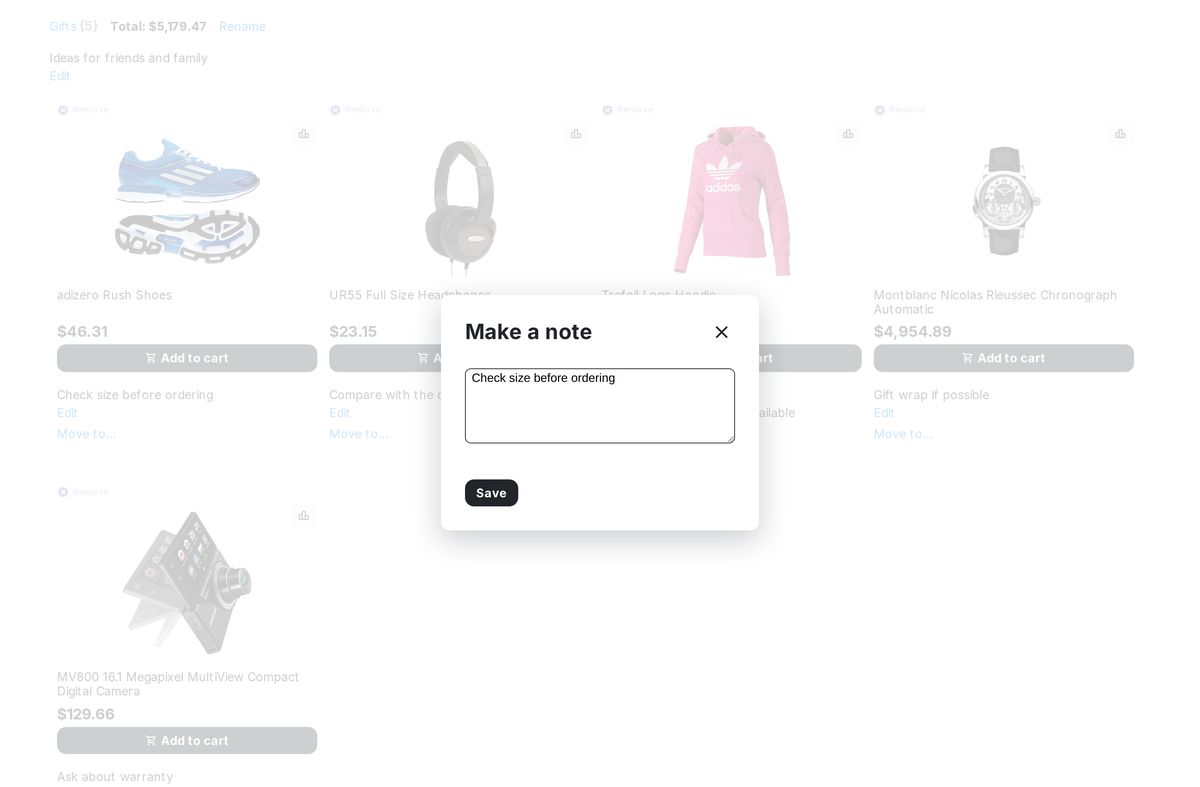
A note on a product: the note window over the Gifts list on the demo stand.
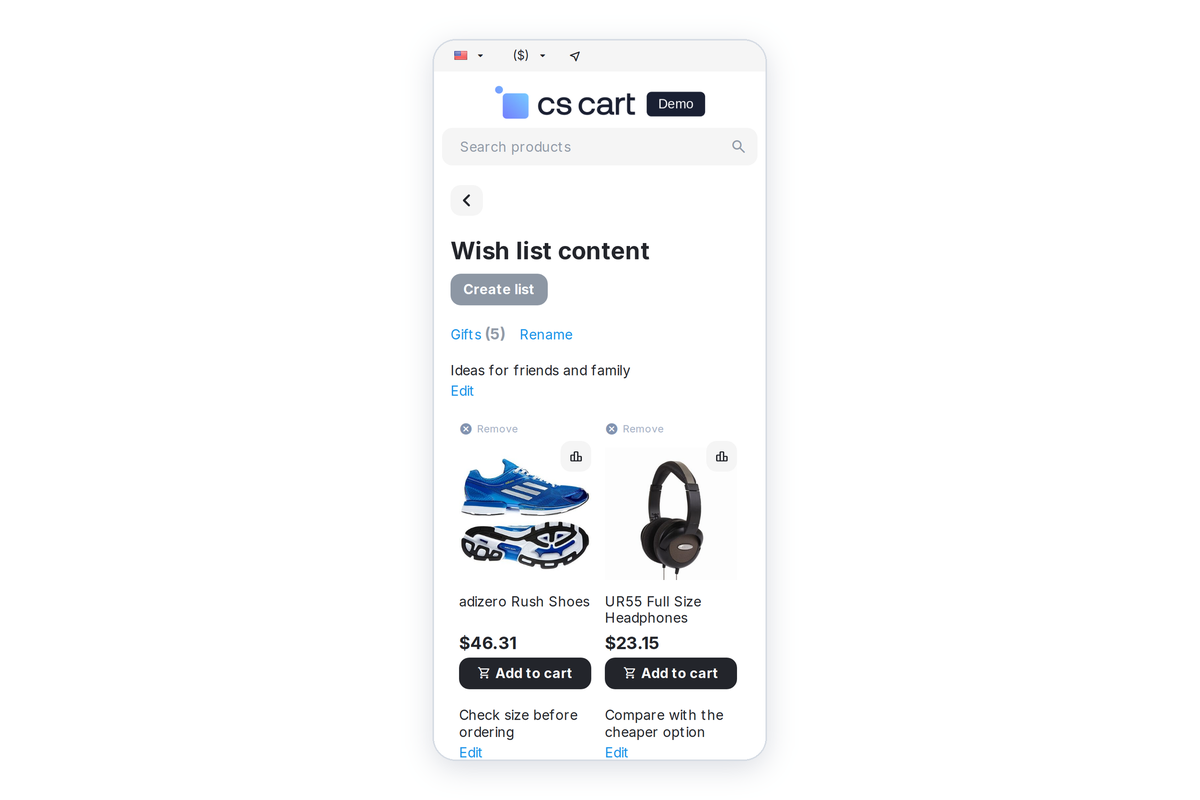
The Wish list page on a phone, Nova theme.

Share and send

"Share wish list" gives a link to the public page of the list. It shows the products and prices but not the owner's notes; the recipient can put the whole list into the cart or save it. The page is closed from indexing, and the owner can issue a new link at any time.

"Send wish list" goes as an email: the list name, products with options and prices and a button that opens this list. So that the form does not become a channel for spam, the number of emails per session is limited by a setting, and the form can be protected with the CS-Cart captcha.

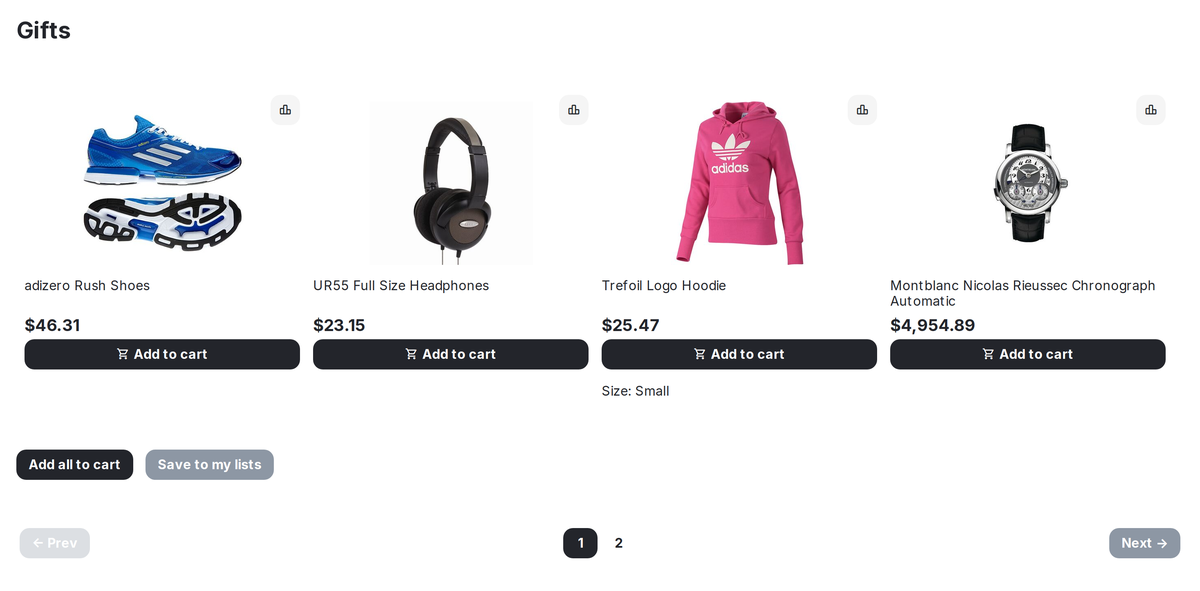
The public page of the Gifts list opened by the link: products and prices without the owner's notes, "Add all to cart" and "Save to my lists".
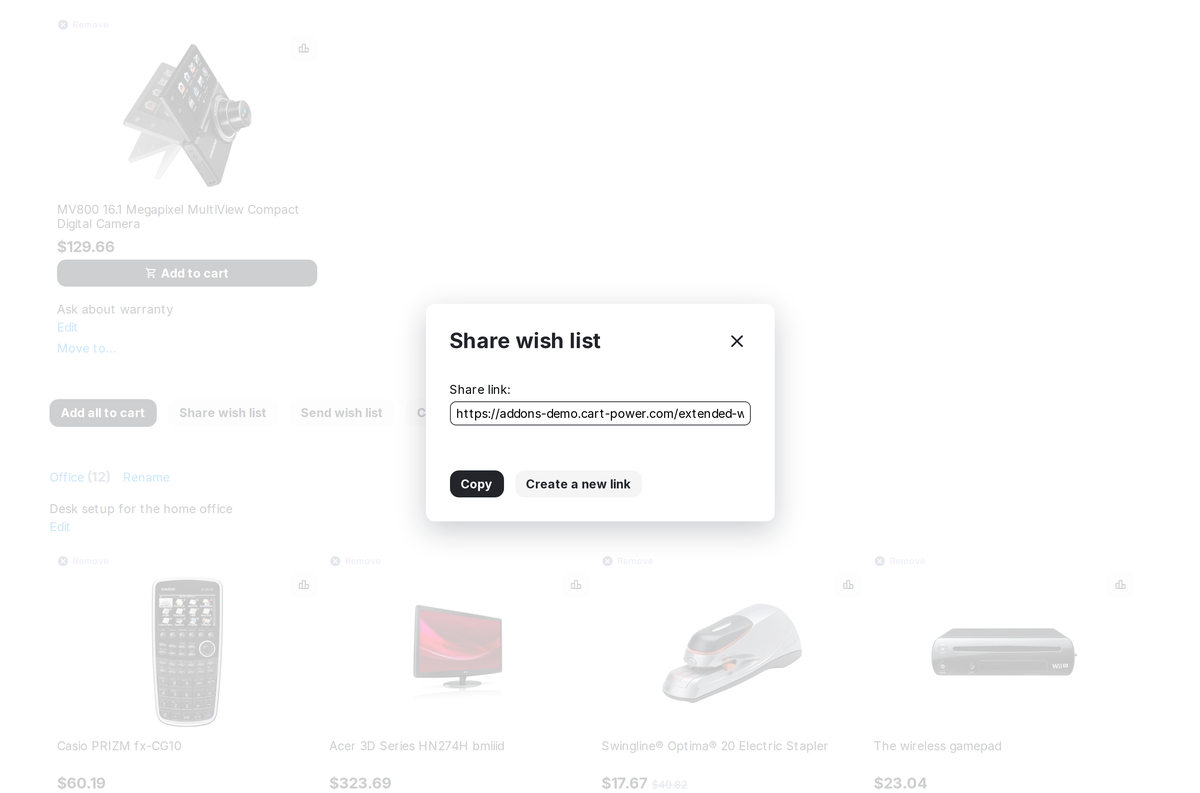
The "Share wish list" window on the demo stand: the link to the list and the new link button.
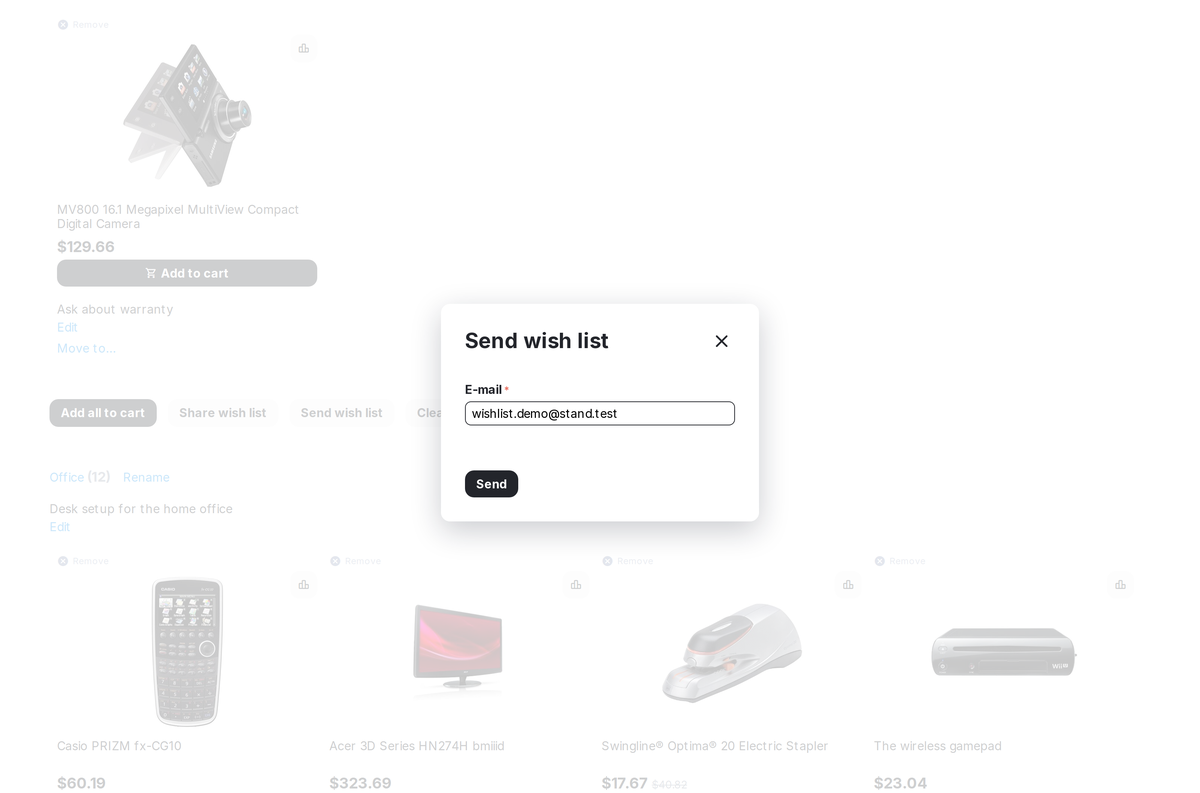
The "Send wish list" window on the demo stand: the address the list email goes to.

Admin panel

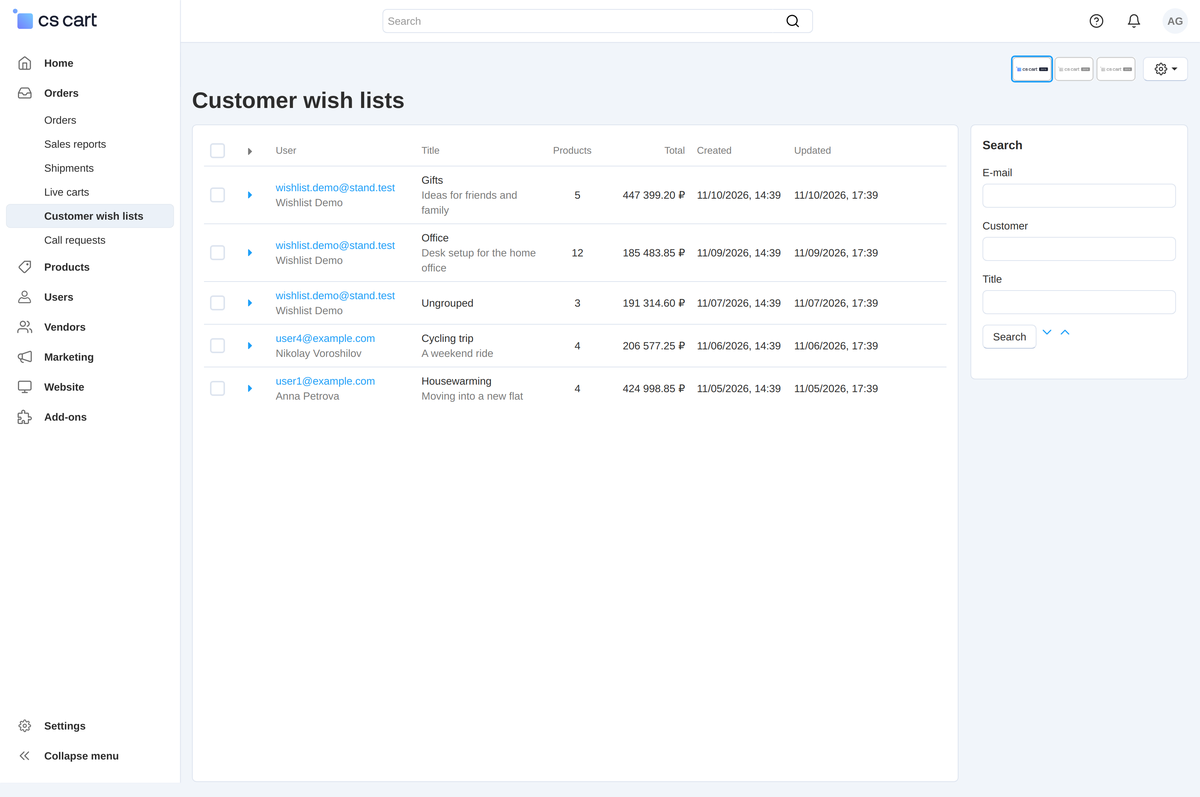
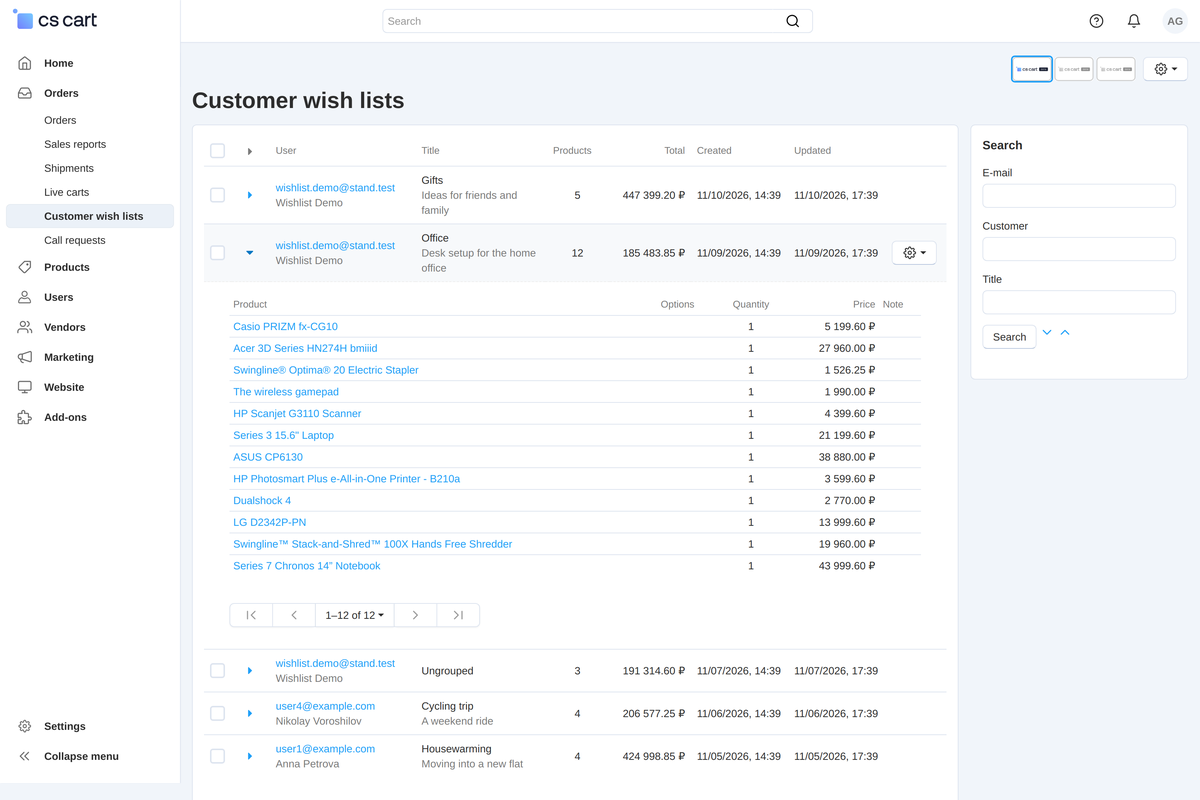
Orders > Customer wish lists: the lists of all customers with search by customer, name and dates. The contents of a list open right in the table: products, options, quantity, price. A list can be sent to its owner by email, and the selected or all found lists can be deleted.

The customer profile gets a tab with a summary of the customer's lists and a link to them. Staff access to the lists is set by the View and Manage permissions.

Customer wish lists in the admin panel of the demo stand: search, customers, names, number of products, creation and update dates.
The open contents of the Office list in the admin panel: products, quantity and prices.

What you can set up

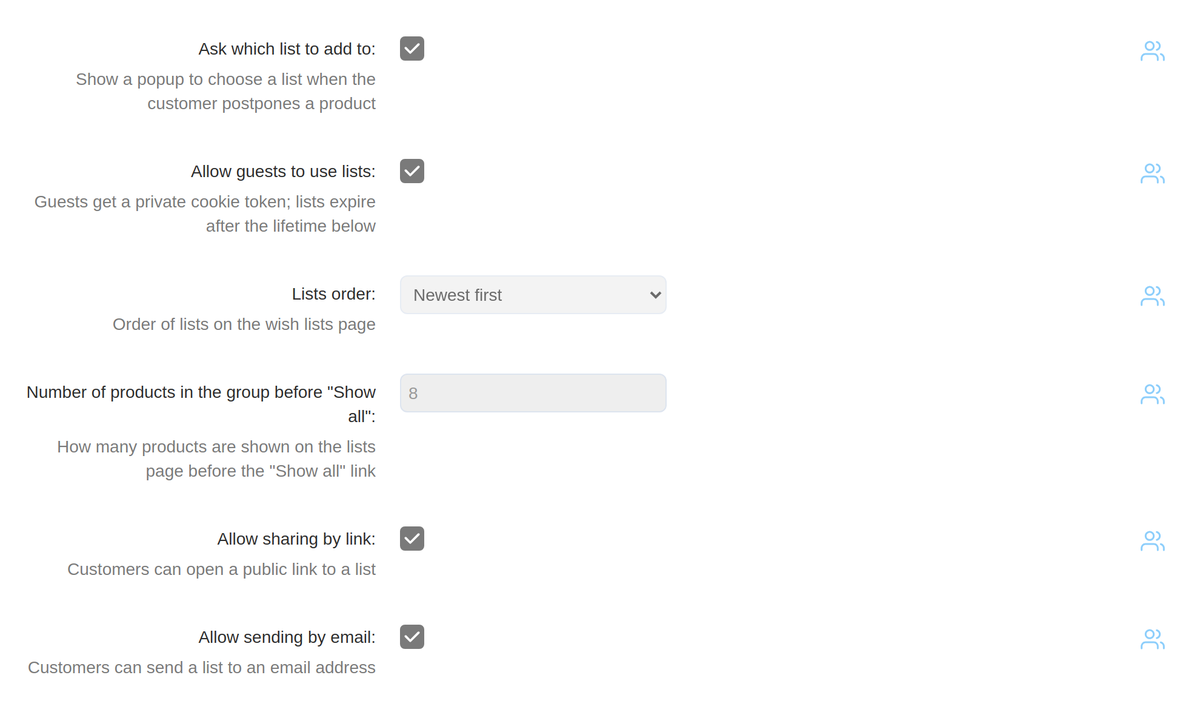
  • •  Adding: whether to ask which list to use; whether guests may use lists and how many days to keep them.
  • •  Order: of lists - by name, newest first or recently updated; of products - by name, date added or price.
  • •  Page size: lists per page, products in a group before "Show all", products per list page.
  • •  Lists: how many lists a customer may create, whether to track product quantity.
  • •  Sharing: the link to a list, sending by email and the limit per session, the "Add all to cart" button.
The add-on settings on the demo stand.

What the add-on does not do

  • •  In Multi-Vendor the customer lists are kept by the store administrator: vendors neither see nor edit them.
  • •  It does not remind shoppers about saved products on its own: price drop or back in stock emails are the job of mailing add-ons that read the core wish list.
  • •  The list total in the admin panel uses base prices, without discounts and group prices; on the storefront a shopper sees their own prices.
  • •  When a guest signs in, the guest's "Ungrouped" list merges with the customer's one, and the link to the guest list stops opening.

Frequently asked questions

What happens to the lists after an update from 2.1?

Lists, products and notes move over; check the order of lists and products in the new settings. The update to 3.1 is tested from versions 2.1 and 3.0 with the Upgrade Center and the add-ons manager on CS-Cart and Multi-Vendor 4.21.1. CS-Cart or Multi-Vendor 4.17.1 or newer is required.

Can guests save products?

Yes, when the "Allow guests to use lists" setting is on. Guest lists are kept for the configured number of days (30 by default) and move to the account on sign-in.

Will the recipient of a link see my notes?

No. The public page of a list has no owner's notes and is closed from indexing. The owner issues a new link in the "Share wish list" window.

Can sending lists turn into a spam channel?

The number of emails per session is set by a setting (5 by default); after it, sending is closed for an hour. The form can be protected with the CS-Cart captcha.

Will other add-ons see the products from the lists?

The products of a customer's lists also go to the core CS-Cart wish list, so add-ons that read it see them.

Does it suit Multi-Vendor?

Yes, the add-on works in all editions of CS-Cart and Multi-Vendor 4.17.1 and newer; version 3.1 is tested on Multi-Vendor 4.21.1, version 3.0 on Multi-Vendor 4.20.1 and 4.21.1 and CS-Cart 4.21.1. The customer lists are seen by the store administrator, vendors have no access to them.

See the add-on on the demo stand. Sign in as wishlist.demo@stand.test / WishlistDemo30 to open three lists with notes. The public link to a list and the customer lists in the admin panel are behind the buttons on the home page of the stand.
Product
  • Store Builder
  • Store Builder Plus
  • Store Builder Ultimate
  • Multi-Vendor
  • Multi-Vendor Plus
  • Multi-Vendor Ultimate
Compatible versions
  • 4.21.2
  • 4.21.1
  • 4.20.1
  • 4.19.1.SP2
  • 4.19.1.SP1
  • 4.19.1
  • 4.18.4
  • 4.18.3
  • 4.18.2.SP1
  • 4.18.2
  • 4.18.1.SP1
  • 4.18.1
  • 4.17.2.SP3
  • 4.17.2.SP2
  • 4.17.2.SP1
  • 4.17.2
  • 4.17.1
Localizations
  • English
  • Украинский
  • Русский
David Oak
Verified purchase
Comment
Excellent extended functionality for the wishlist
  CS-Cart development · in-house team · since 2013 We build, upgrade and

Contact information


CS-Cart development · in-house team · since 2013

We build, upgrade and speed up CS-Cart stores and marketplaces

Analysts, developers, designers, QA and support under one roof — no subcontractors. We ship add-ons you can buy on this page today, and we take on the work that no ready-made add-on covers.

2013

Working with
CS-Cart since

4.98

Rating from
184 reviews

200+

Solutions on this
marketplace

500+

E-commerce projects
delivered

Flagship products

Two add-ons that change how a store performs

Everything else we publish improves one screen. These two change the numbers: how customers find products, and how often they come back.


Add-on · Search & merchandising

Smart Search

Elasticsearch-powered search for large catalogues. The customer types two letters, sees products with images and prices, and buys from the dropdown — even after a typo or with the wrong keyboard layout.

Visitors who use the search bar are 24% of traffic and 44% of revenue, and convert about 2.5× better than people who only browse categories. If search returns nothing, up to 80% of them leave.
Constructor, Beyond Relevance Report 2025; Google Cloud × The Harris Poll, 2023

Catalogue size Sub-second results on 300,000+ products, Multi-Vendor included
Understands Typos, wrong keyboard layout, synonyms, word forms, SKUs, brands and attributes
Reporting Query analytics — what customers search for and which searches return nothing
Deployment Our cloud, or Elasticsearch on your own server

from $35/month

Plans by catalogue size · self-hosted from $1,215 one-time

Plans and details →

Try it on a live catalogue: open the demo store and search with a deliberate typo.


Add-on · Mobile commerce

PowerApp — mobile app for your store

A native iOS and Android app running on your CS-Cart data: the same products, prices, stock, promotions, reward points and orders. There is no second catalogue to maintain — everything stays in the admin panel you already use.

A mobile site brings a customer in once; an app brings them back for free. Push notifications replace the retargeting budget you spend to buy the same customer a second time.

Platforms Native iOS and Android, published under your own developer account
Home screen Built in the admin panel from six block types, the same way you build website pages
Time to launch Under a week from purchase to submission for App Store and Google Play review
Compatibility CS-Cart and Multi-Vendor 4.18–4.20 · 11 client apps already live in the stores

from $790

Buy outright, or $79/month on subscription

Open the add-on page →

Screens, block types and pricing tiers: see how the app is built.

Services

When no add-on solves it, we do the work

Fixed scope, written specification, a named project manager and a warranty on what we ship.

Custom CS-Cart development

Functionality the platform does not have: add-ons, marketplace mechanics, integrations with 1C, CRM, ERP, payment and delivery providers. We start from a written specification, not from an estimate on a phone call. Details →

CS-Cart upgrade

Move to the current version without losing data, custom code or add-ons. We audit every modification first, upgrade on a staging copy, adapt what breaks and switch over with little or no downtime. Details →

Speed and performance optimisation

Conversion falls by about 4.4% for every extra second of load time. We profile the server, the database and the front-end, then fix what actually costs the seconds — and show you the before-and-after numbers. Details →

Design for CS-Cart

Mobile-first storefront design built on CS-Cart's own template structure, so the layout survives the next platform upgrade instead of becoming a migration problem. Details →

SEO for CS-Cart

A technical audit of indexing, duplicates, redirects, structured data and Core Web Vitals — delivered as a prioritised fix list your developers can act on, or that we implement ourselves. Details →

How we work

What you get besides the code

Before we start

We discuss the goal, offer options and write the specification. You approve scope and price before development begins.

While we build

A named project manager reports progress on a fixed schedule. You always know what is in work and what is next.

Before release

A separate QA pass on every release — the developer who wrote the code is not the person who signs it off.

After handover

Documentation for everything we ship, plus a warranty on the modifications and the project.

Tell us what the store needs to do

Describe the task in a couple of sentences and we will come back with options, a scope and a price. The consultation is free, and we will say plainly if a ready-made add-on already solves it.

Write to us here

Use the Ask a question button at the top of this page — it reaches the same team.

Or reach us directly

sales@cart-power.com · cart-power.com
We work in English and Russian.

Client cases, our full add-on catalogue and 184 customer reviews are in the tabs above.

Similar products

Live search and Search history
5.0 (86)
$120.00
Live Search and Search History shows matching products, categories, brands and pages while the shopper types, with a category filter and typo suggestions in the same window. The admin gets four search history reports, synonyms, stop words, featured phrases and speed-up tools for large catalogs.
Live Search
4.9 (48)
$75.00
The customer types and immediately sees products with a photo, a price and an «Add to cart» button, next to categories, brands and store pages. The add-on understands synonyms, word forms and typos, searches by product code and features, puts your chosen products first for the queries that matter and shows what customers did not find. The word index keeps it fast on catalogs of hundreds of thousands of products. No subscription.
One Step Checkout - Simple Layout
5.0 (20)
$119.00
The ultimate checkout experience
Mega Menu
5.0 (20)
$69.00
Adds new functionality in the standard menu. With display similar to Amazon.
Checkout optimisation
5.0 (14)
$53.90
Improve your order placement: remove notification "Email already used", auto registration for customers.
Extended Email Marketing
5.0 (14)
$120.00
Six emails the store sends without you: abandoned cart, wishlist and recently viewed products, a review request after delivery, a birthday greeting and a campaign to an audience. Every email carries the customer's products and a personal promo code, and the admin panel shows the queue, the sending log and the statistics. Since version 1.36 — subscription to Power Blog articles and the mailing about new articles.