JSON-LD Markup

Puts schema.org structured data into the page code: a product offer that follows the rules of Google merchant listings, variations as a ProductGroup, videos as VideoObject, categories with the product list, the company, breadcrumbs, the site search, blog articles, FAQ questions and shoppers' questions. The data comes from products, settings and blocks, so nothing is filled in page by page.
Reviews: 5
Last update: 12.11.2026
cp-addon-2630
Select the CS-Cart edition on which you will use the add-on.
The update period determines the period of time when you can get access to the new versions of this add-on compatible with the new versions of CS-Cart software released during the chosen period.
To instal the add-on, we will need the FTP access to your server. Please send it along with the order number to sales@cart-power.com once the order is paid.
Products, variations, categories, the company and questions in schema.org markup, by the Google listing rules
JSON-LD Markup
$60.00

JSON-LD Markup - so that search engines and AI assistants read your catalogue without guessing

The add-on puts schema.org structured data into store pages. Search engines use it to understand the page: a product with price, availability and delivery terms, its variations and videos, a category with the product list, the company with its address and phone numbers, questions with answers. The data comes from products, settings and blocks of the store, so nothing has to be filled in page by page.

By the Google listing rules
one Offer, strikethrough price, quantity discounts, policies
Variations and vendors
ProductGroup for variations, an offer from every vendor
Videos, categories, questions
VideoObject from video galleries, CollectionPage, FAQ and shoppers' questions
CS-Cart 4.8.2 to 4.21.1
all editions; version 2.5 tested on 4.20.1 and 4.21.1

What it solves

A search engine does not guess what a page is about, it reads structured data: where the price is, whether the product is in stock, who sells it, what the rating is, how many days delivery takes and whether returns are accepted. The built-in CS-Cart markup describes the basics of a product in microdata. The add-on delivers the data in JSON-LD and adds what the built-in markup lacks.

Shoppers never see the markup: it is printed in the page code. So that a product is not described twice, the built-in markup of the SEO add-on is switched off by default.

The whole product

Brand, SKU, GTIN and MPN, condition, colour and material, an offer with price, availability, validity and policies, the seller, the rating and reviews with pros and cons.

Variations and vendors

A product with variations is a ProductGroup with the price and stock of every size or colour; a common product of Multi-Vendor carries an offer from every vendor.

Categories and the company

CollectionPage with the category image and the list of products on the page; Organization or LocalBusiness with the address, phone numbers and opening hours.

Questions, articles, breadcrumbs

FAQPage from the "Cart-Power: FAQ addon" add-on and from plain blocks, shoppers' questions about the product, blog articles, breadcrumbs and the site search.

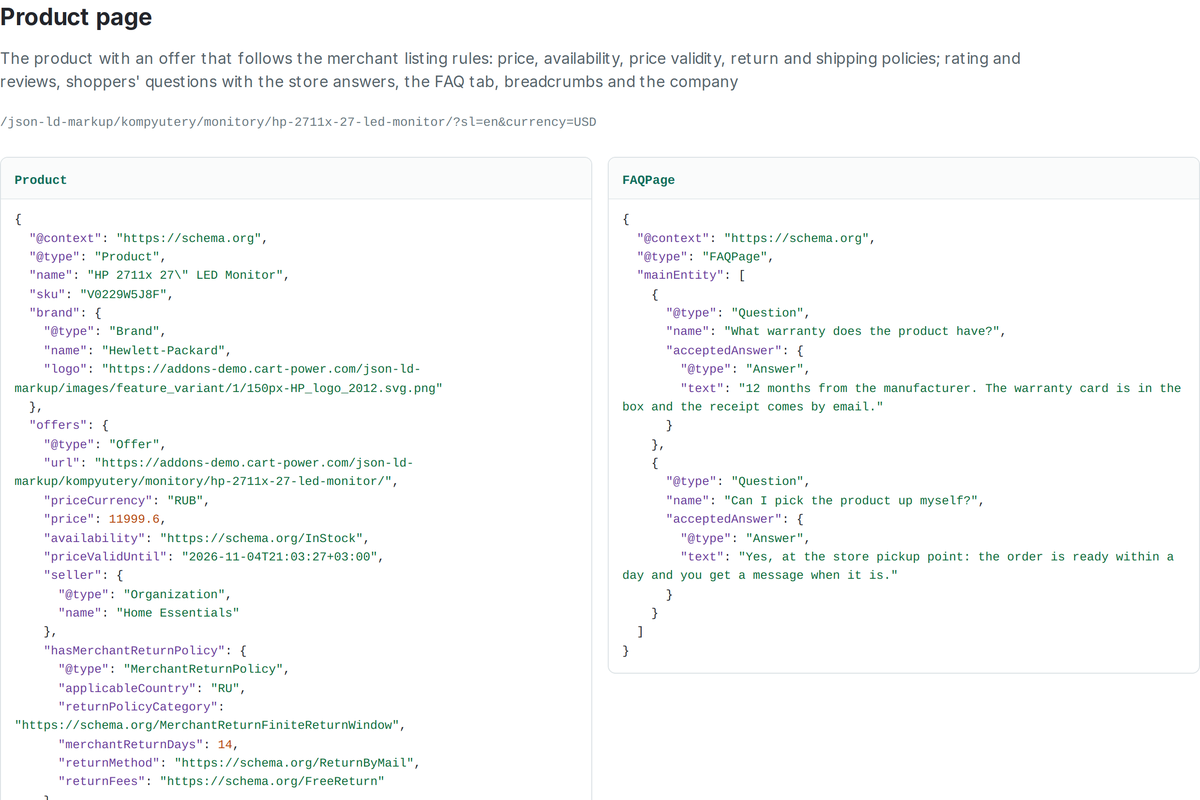
What a search engine gets from a product page on the demo stand: the product with SKU and brand and an offer with price, availability, price validity and the return policy; next to it, the questions from the FAQ tab. Further down in the code: shipping, shoppers' questions and the rating.

Videos: every video as a VideoObject of its own

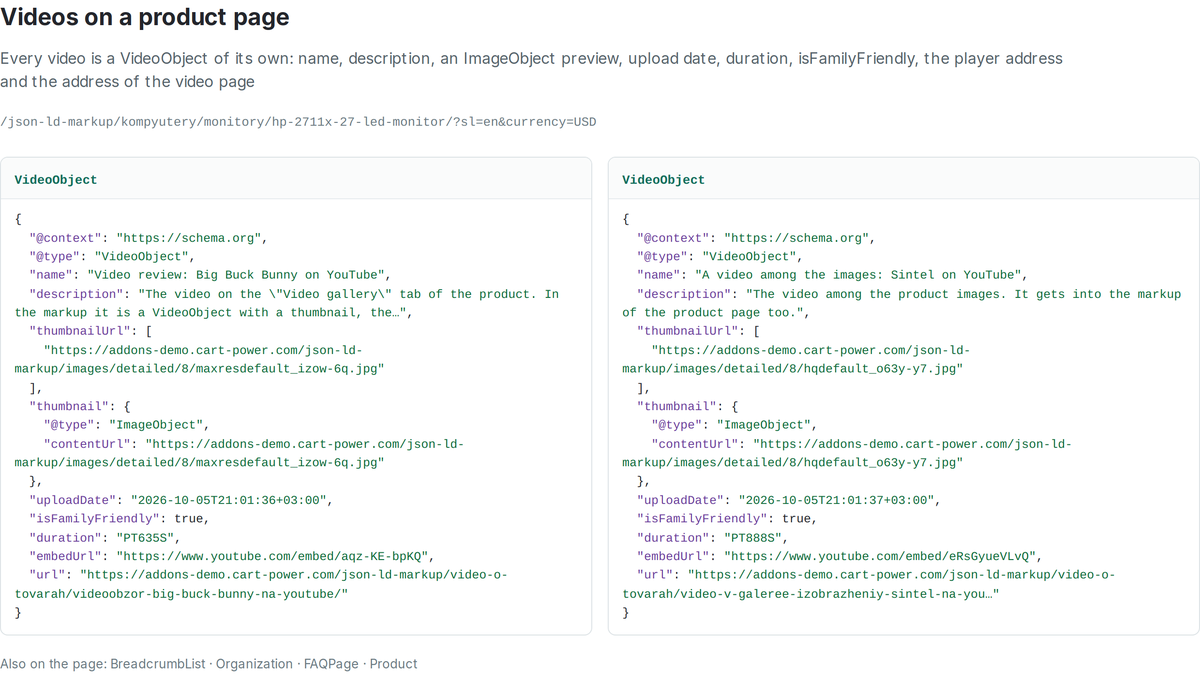
Videos of the "Cart-Power: Video gallery" and "AB: Video gallery of the product" add-ons get into the markup where the shopper sees them: on the product page, both on the tab and among the images, on information pages, in "Cart-Power: Power Blog" articles, on the vendor page and on the page of the video itself. Every video is a VideoObject of its own: name, description, an ImageObject preview, upload date, duration, the YouTube, Rutube, VK Video or file player address and the address of the video page.

A video with no preview, date or address to play it from is left out: search engines do not accept such an object. The "Videos suit any audience" setting fills isFamilyFriendly, which Yandex asks for in every video.

Video markup on a product page of the demo stand: two YouTube videos, from the tab and from the image gallery, each with a preview, duration, isFamilyFriendly, the player address and the video page address.
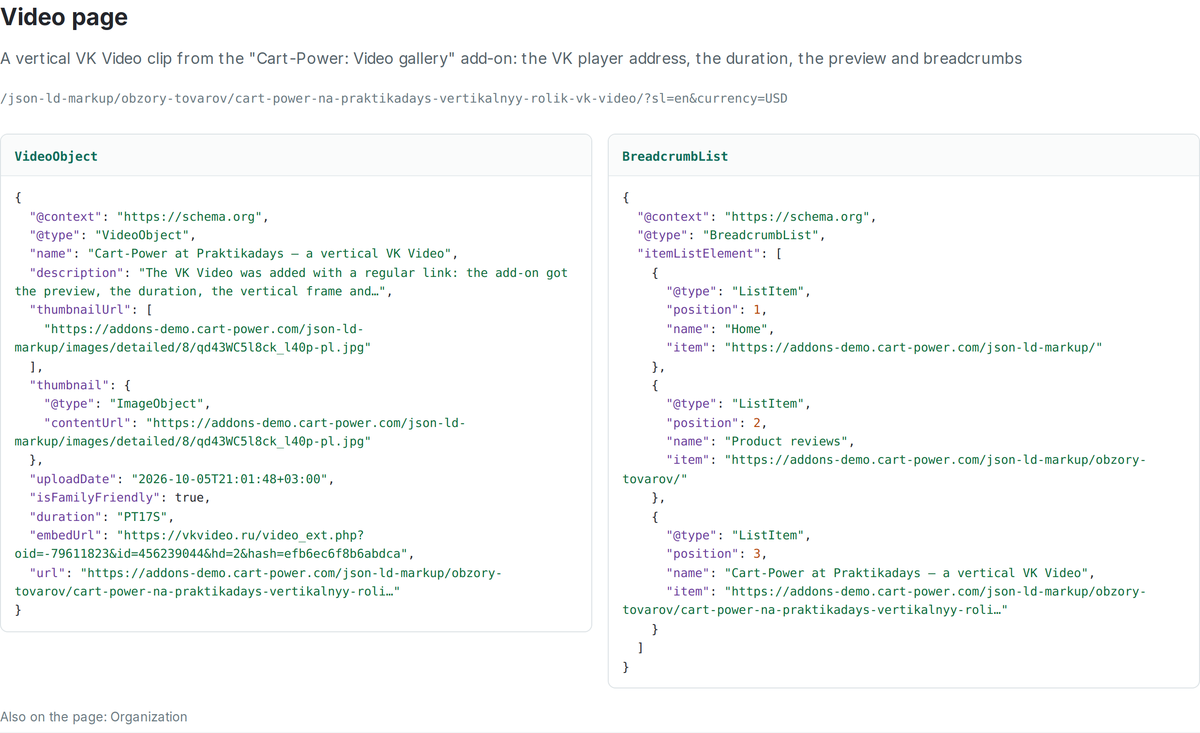
A video page: a vertical VK Video clip from "Cart-Power: Video gallery" with the VK player address, the duration, the preview and breadcrumbs.

New in version 2.5

  • •  The description of products, variations, the blog, articles, FAQ questions and videos in the markup is plain text only. Styles and scripts embedded into a description are cut out together with their contents: before, CSS rules and script code got into the description that search engines read.
  • •  style, script, noscript, template, svg and iframe blocks are cut out, as are HTML comments; an unclosed style or script cuts the text to the end of the description.
  • •  A description with a broken character (an invalid UTF-8 byte) is no longer dropped from the markup altogether: the character is replaced and the rest of the text stays.
  • •  GTIN and MPN codes a simple product has no value for are left out of the markup; before, they went out as empty strings.
  • •  The description of a blog and an article is cleaned as the product description: no HTML, decoded characters.
  • •  The update clears the cache itself, so pages serve the markup with clean descriptions right away. The settings and the admin panel screens are unchanged.

Earlier, in versions 2.4-2.0

  • •  2.4: videos. Videos of "Cart-Power: Video gallery" are marked up wherever the gallery shows them (YouTube, Rutube, VK Video, uploaded files), videos of "AB: Video gallery of the product" on the product page. Every video is a VideoObject of its own with a preview, the duration, isFamilyFriendly and the video page address; in a store where the AB gallery marked up videos, the "Videos" box is switched on by the upgrade.
  • •  2.4: the zero price and stock as the cart sees them. An offer with a zero price only for a product the store lets buy for free; a product with stock tracking switched off is in stock. The common store settings for stock, the minimum quantity and the zero price apply to variations and vendor offers as well.
  • •  2.4: the choice of objects is kept. After an upgrade "Use markup for" keeps its boxes even if it held an object of a disabled add-on.
  • •  2.3: several brand features. The "Brand features" setting takes a list: a store with a brand feature per product group picks them all. The brand is read from the catalog, so it reaches the markup even when the feature is hidden from the product page; a variation carries its own brand.
  • •  2.2: the brand with no setting. A product with no value in the picked features gets the brand from its own feature of the "Brand, author, etc." type.
  • •  2.1: every variation is a full listing product. A variation of hasVariant carries its own image, description, brand and GTIN/MPN, and what it has none of comes from the catalog item. Search Console no longer reports a missing image field on such product pages.
  • •  2.1: availability always comes from the schema.org dictionary. When the availability feature is unset or its variant has no mapping, the add-on works the availability out from the stock, the minimum quantity and the pre-order setting instead of an empty or invented value. The mapping now works for variations as well.
  • •  The product offer follows the rules of Google merchant listings. Always a single Offer with the current price; the list price as a strikethrough price specification, quantity discounts as specifications with the minimum quantity. Before, a product with discounts or variations was marked up as an AggregateOffer, which the listings do not accept.
  • •  Products with variations as a ProductGroup: the catalog item and every variation with its own price, stock and address; variesBy names the feature - size, colour, material, pattern.
  • •  A common product of Multi-Vendor carries an offer from every vendor, with the price, stock and the address of that offer.
  • •  Return and shipping policies from the settings: country, days to return, return shipping, shipping rate and delivery time. Google recommends them for listings.
  • •  Category pages: CollectionPage with the name, description and image of the category and the list of products on the page.
  • •  Shoppers' questions about the product (the "Cart-Power: Product Questions" add-on) inside the product object, with dates, authors and the store answers.
  • •  The FAQ of a category of the "Cart-Power: FAQ addon" add-on 2.6 is marked up with the inheritance in mind; a page of one question carries only the QAPage of the FAQ add-on itself.
  • •  The company on several pages - a list of pages and, separately, the home page; regions where videos are not available; links to question pages in FAQPage.
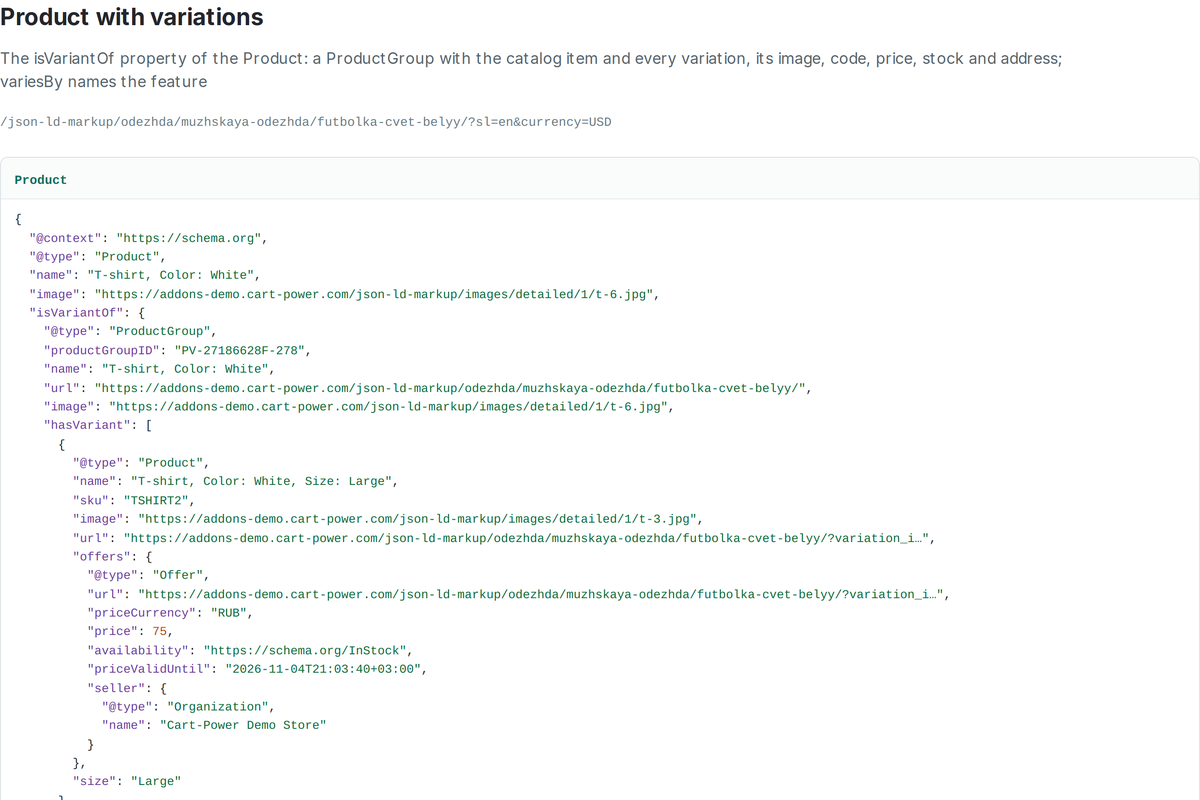
The markup of a product with variations on the demo stand: the isVariantOf property, a ProductGroup with the size variations, each with its own image, SKU, address and an offer with price and stock.

Questions and answers - from blocks, tabs and pages of their own

The question markup is tied to what stands on the page, not to its address: a block of the FAQ add-on in a category, on the home page or on a product page, the FAQ of a category with inheritance, the questions tab of a product. If a block is hidden for a single category or product, its markup is gone there too.

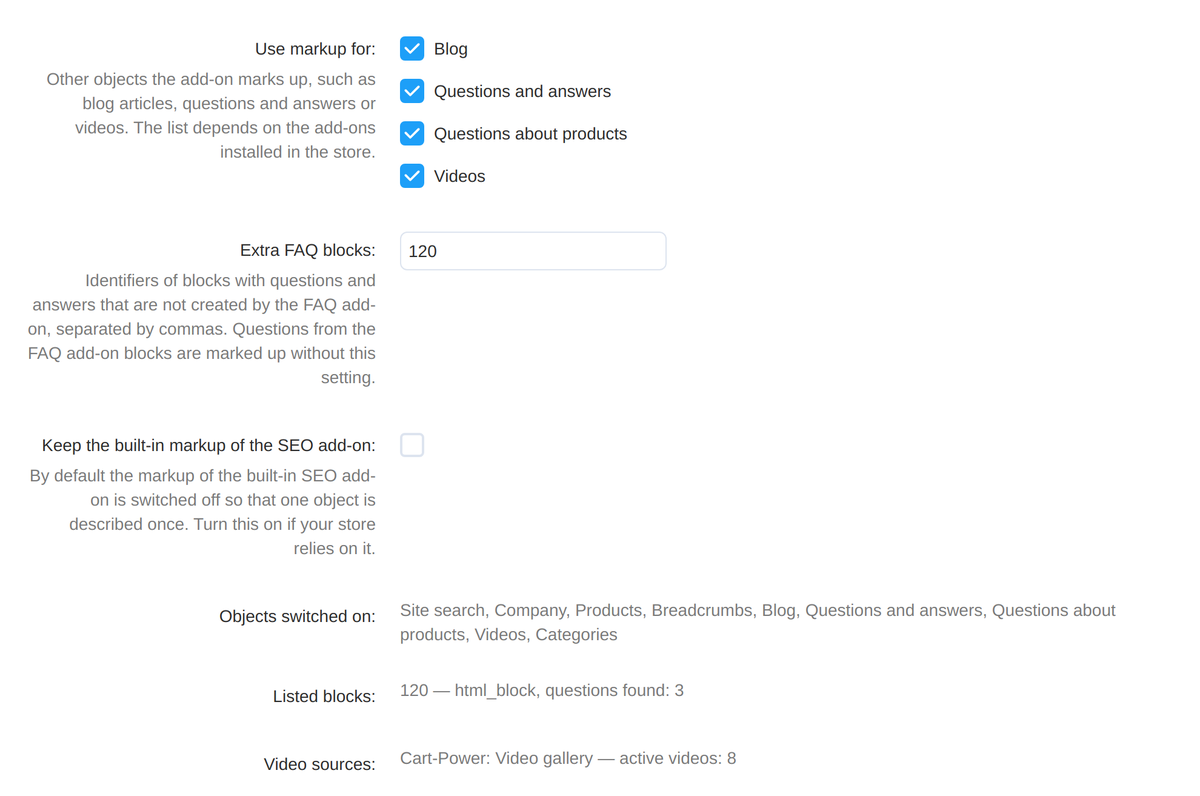
Not every store keeps its questions in the FAQ add-on: often it is a hand-written HTML block. The ids of such blocks go into the "Extra FAQ blocks" setting: a heading in the text becomes the question, the text up to the next heading becomes the answer.

Shoppers' questions from the "Cart-Power: Product Questions" add-on go inside the product object, each with its date, author and the accepted answer of the store.

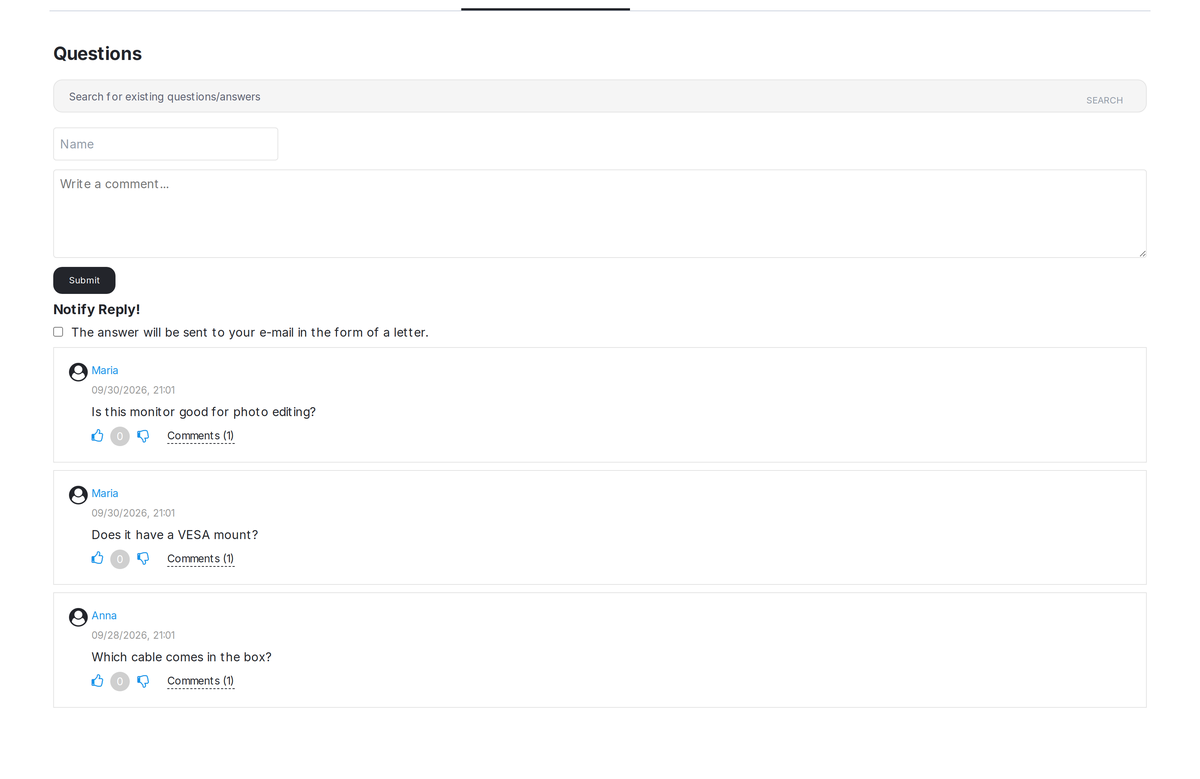
The Product questions tab on the demo stand: shoppers' questions, the source of the Question objects inside the product; the store answer opens under a question and goes into the markup with it.
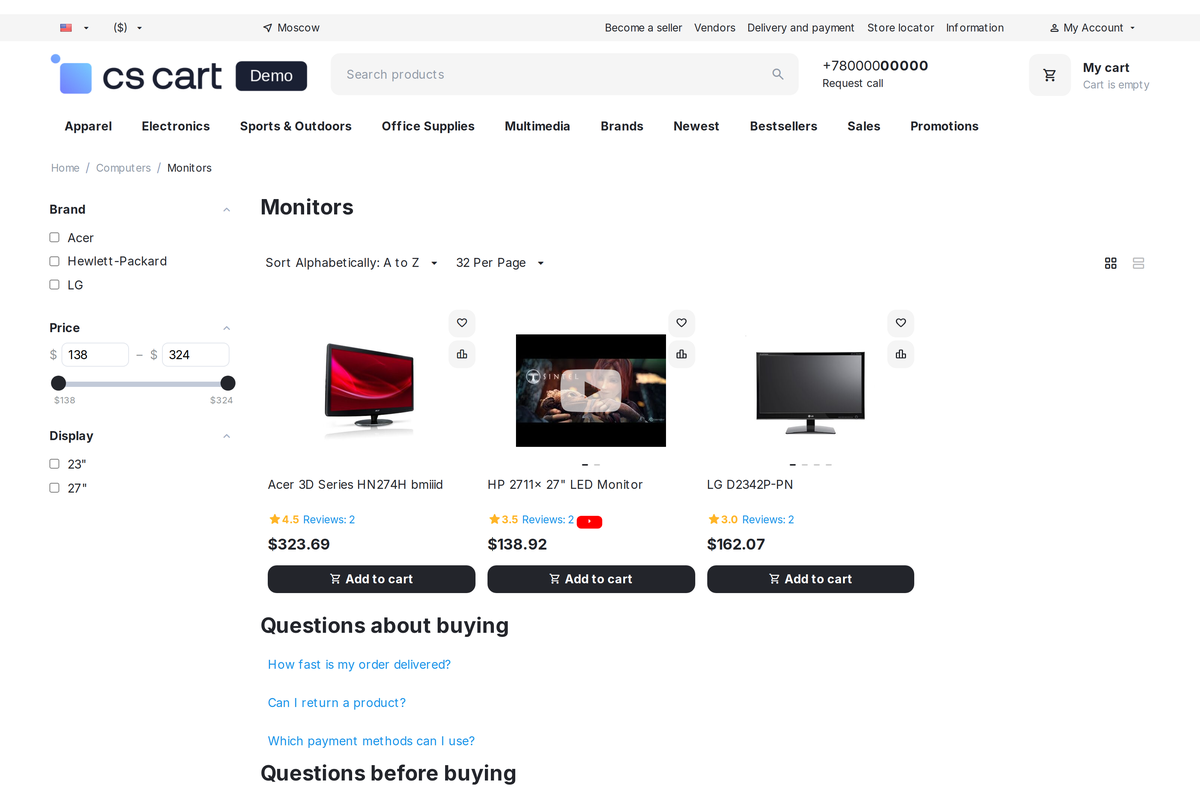
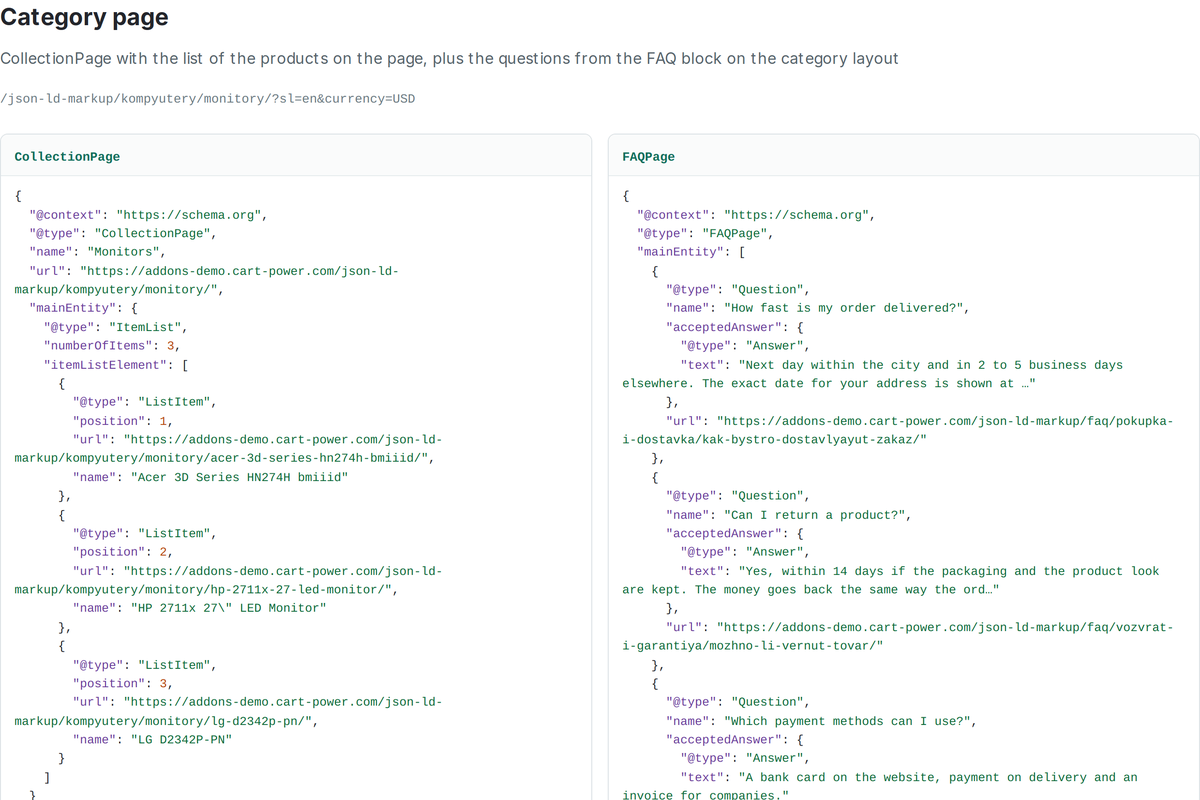
An FAQ add-on questions block on the category layout: it stands under the product list on every category.
The markup of the same category: CollectionPage with the list of the products on the page, FAQPage with the questions from the block and breadcrumbs.
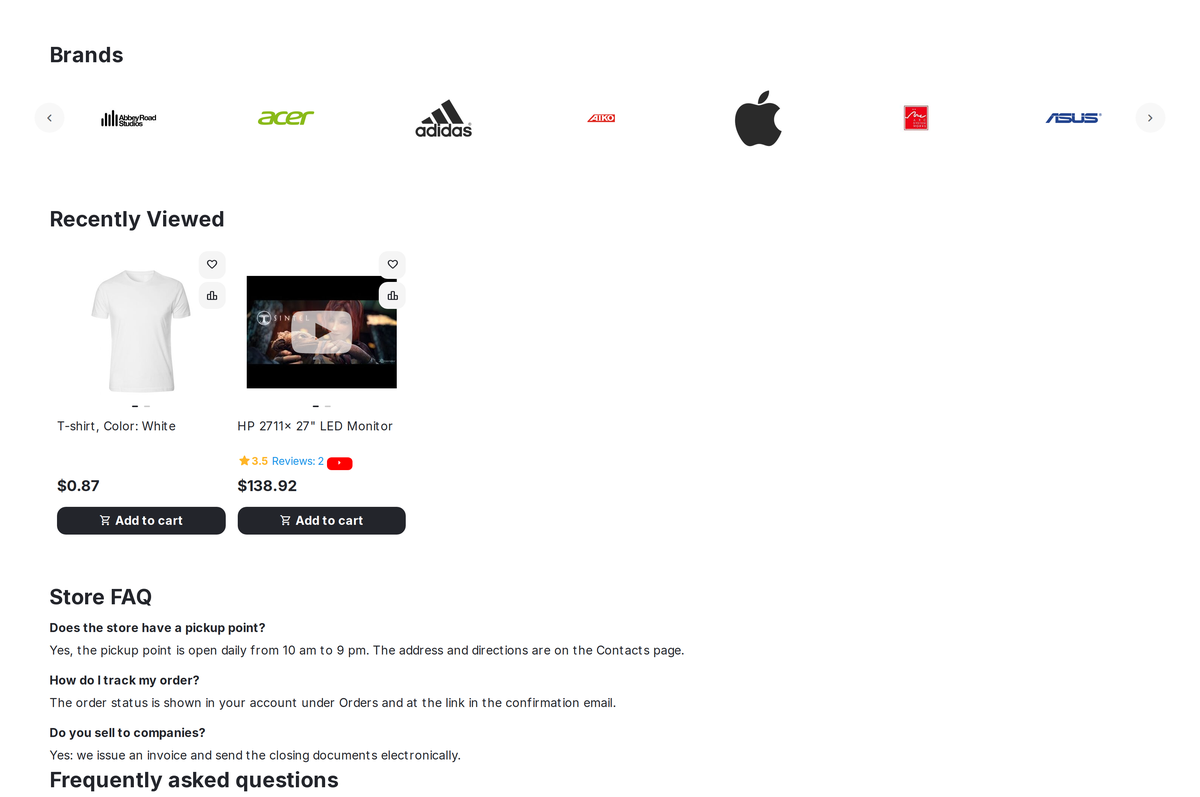
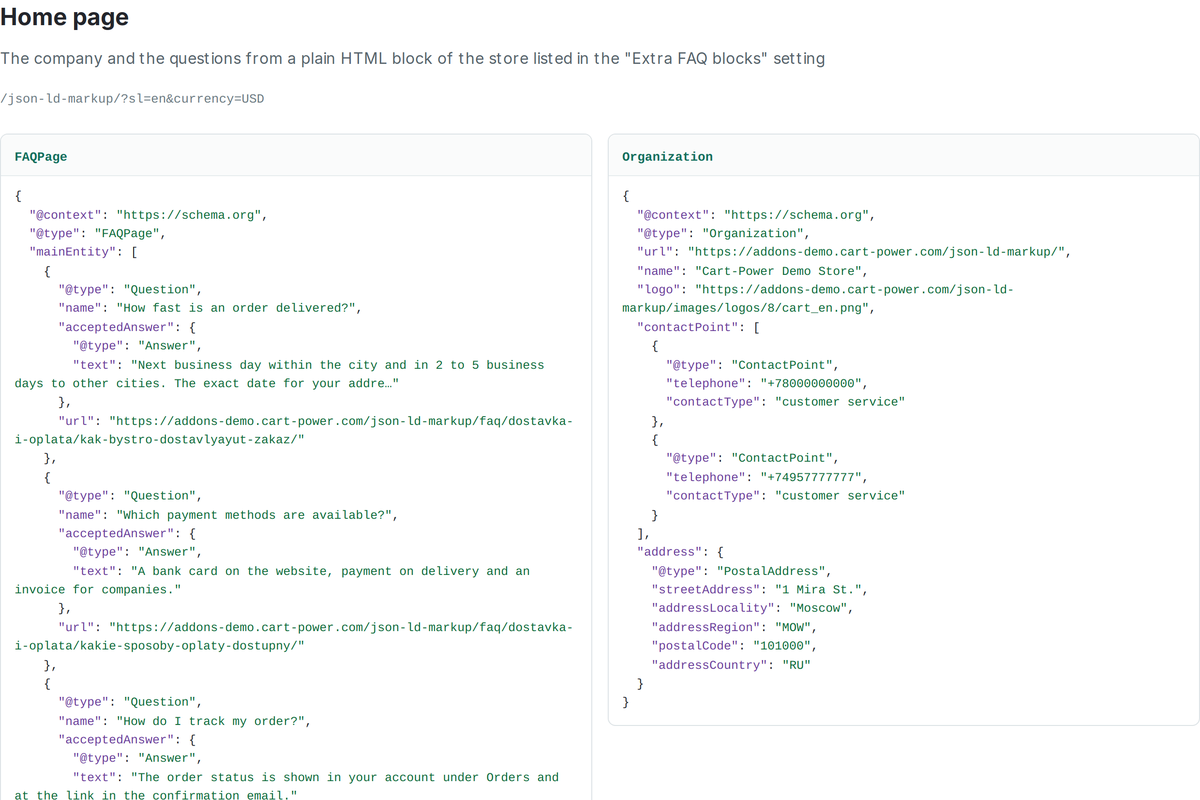
A plain HTML block, Store FAQ, on the home page: the FAQ add-on knows nothing about it.
The markup of the home page: the company and a FAQPage with the questions from that block.

Check the markup right in the settings

Most "the markup does not work" requests used to end with the page source and a validator. The Other section names the markup objects that are switched on and, for every listed block, its type and how many questions the add-on found in it, or "no such block".

The Other section: markup objects, extra FAQ blocks, the built-in SEO markup and the "What the add-on marks up now" block with the questions found.

What you can set up

  • •  Products: the brand features (pick several, one per product group), which features feed color, material, pattern, GTIN and MPN, how condition and availability values map to schema.org, the price validity period, the number of reviews, a price range for products with option modifiers.
  • •  Policies: the country and the days to return, who pays for the return shipping, the country, the rate and the time of delivery. Off by default.
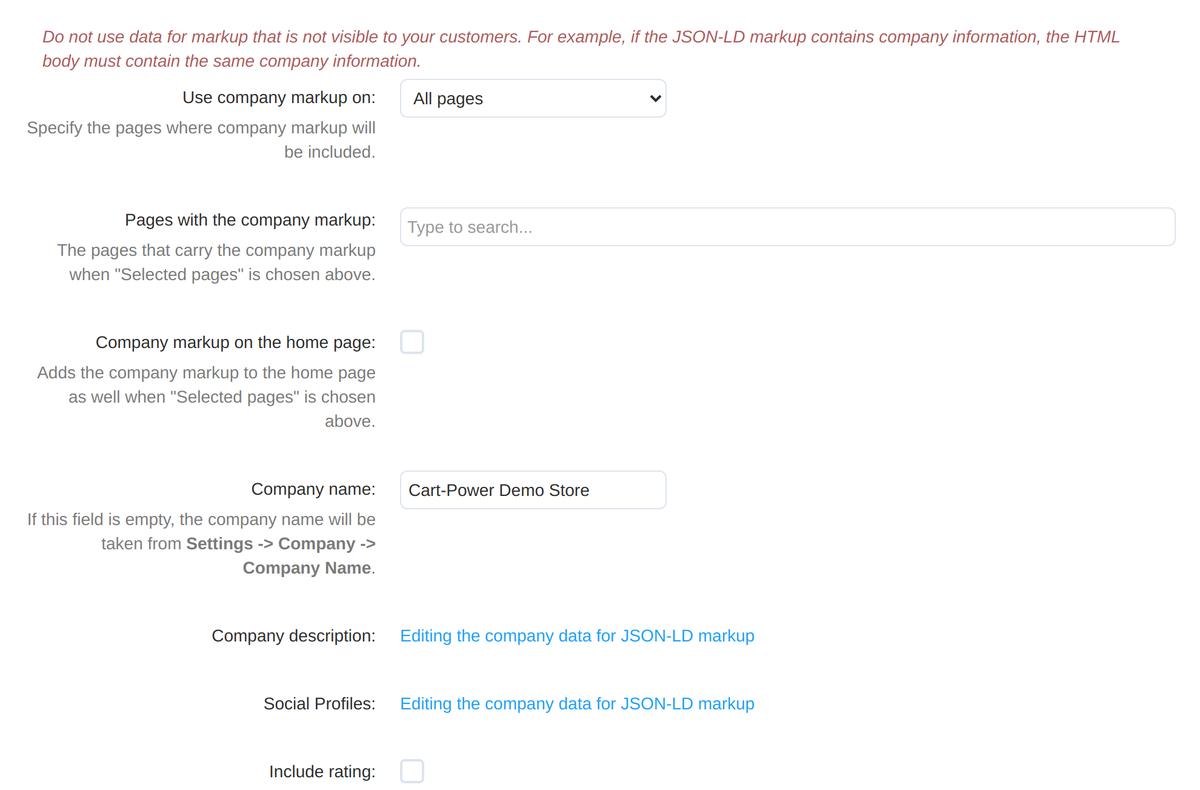
  • •  Company: on every page or on selected pages and the home page; the name, description and social profiles per language, the address and phone numbers from the store settings, the rating, the LocalBusiness type with opening hours.
  • •  Other: categories and the product list, blog articles, FAQ questions, questions about products, videos, extra blocks, breadcrumbs, the site search, video regions and audience, the built-in SEO markup.
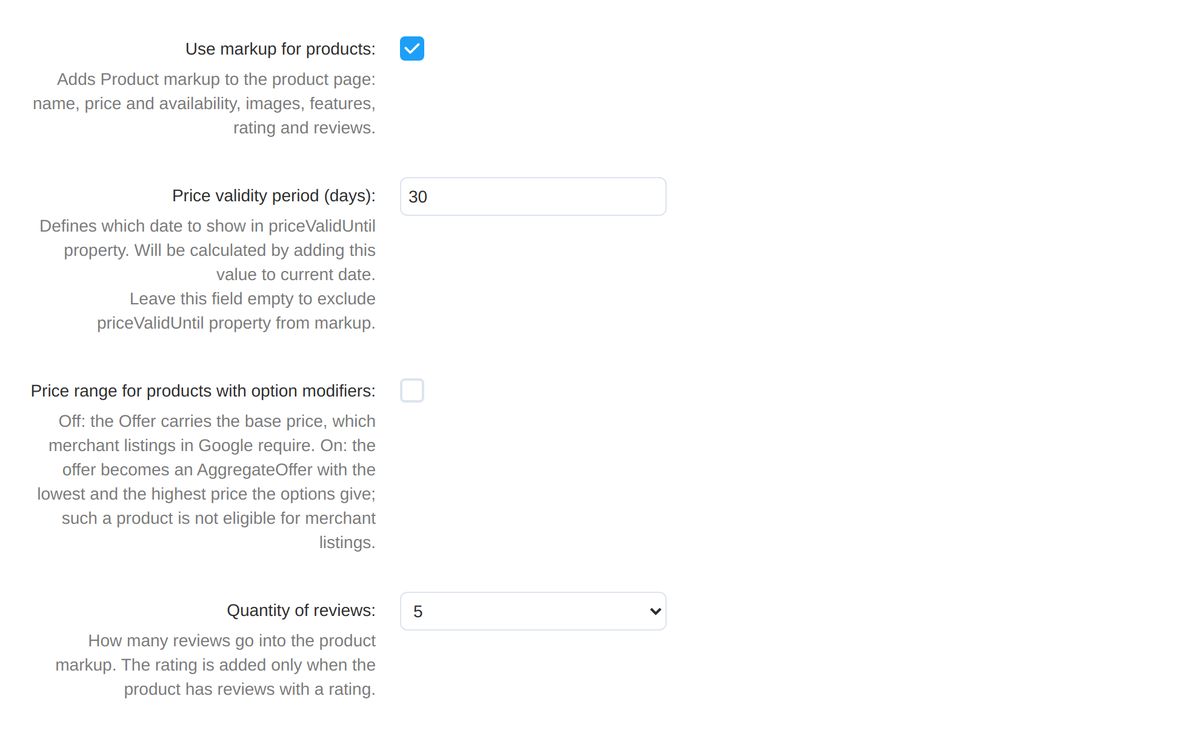
The top of the Products section: the product markup switch, the price validity period, the price range for options and the number of reviews; further down, the features for the markup properties and the barcodes.
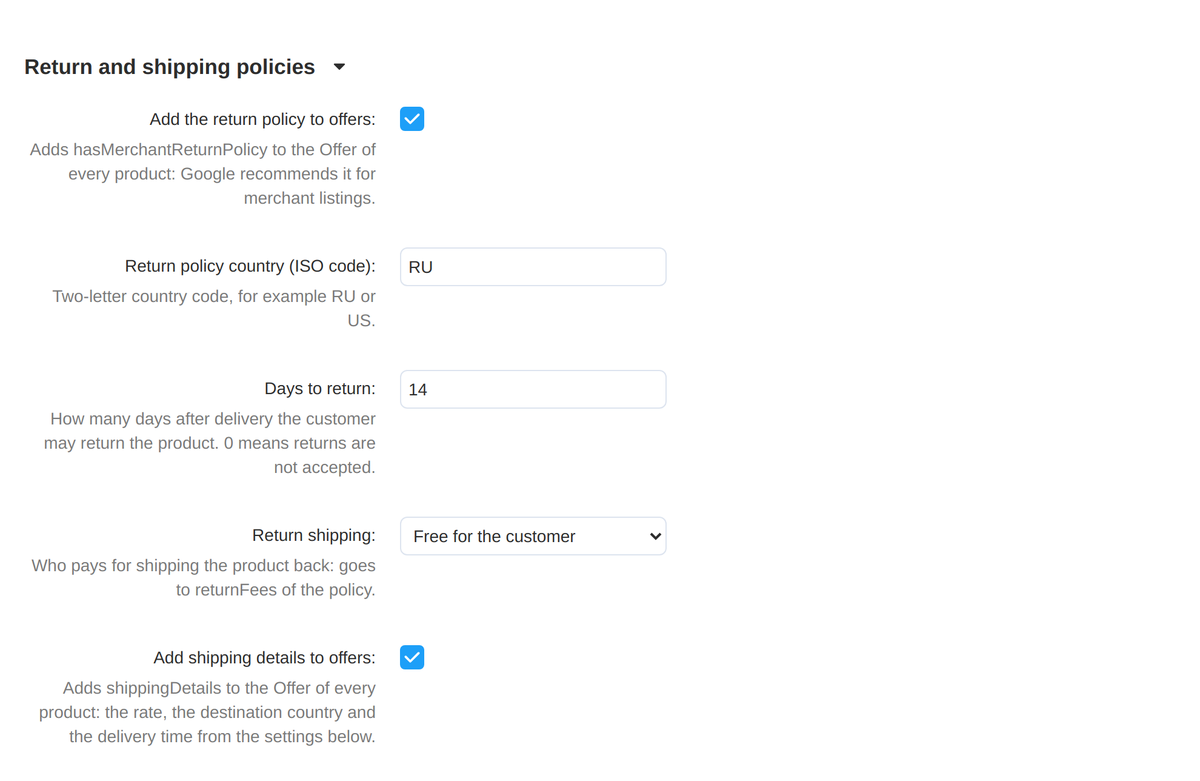
The return and shipping policies in the same section: the return policy switch, the country and the days to return, return shipping and the shipping details switch; further down, the country, rate and time of delivery.
The top of the Company section: where the markup goes, the list of pages, the home page, the company name and description; further down, the address, phone numbers and the LocalBusiness settings.

What the add-on does not promise

  • •  Markup does not push a page up in the results and does not guarantee a rich result or a merchant listing: what to show is up to the search engine.
  • •  Since 2026 Google no longer shows rich results for questions and answers. FAQPage remains a valid schema.org type read by other search engines and AI assistants.
  • •  Questions from FAQ blocks and the FAQ of categories need the "Cart-Power: FAQ addon" add-on, shoppers' questions need the "Cart-Power: Product Questions" add-on; the markup of plain HTML blocks works without them.
  • •  An offer from every vendor needs the Common products add-on of Multi-Vendor switched on.
  • •  A video rich result for a product page is not promised: by the Google documentation video features belong to the page of the video itself, so the address in the video markup leads there.
  • •  Videos are marked up from the "Cart-Power: Video gallery" and "AB: Video gallery of the product" add-ons; without them there are no videos in the markup.

Frequently asked questions

How is the add-on different from the built-in CS-Cart markup?

The built-in markup of the SEO add-on describes the basics of a product in microdata. The add-on delivers the data in JSON-LD by the merchant listing rules and adds brand, GTIN and MPN, condition, seller, return and shipping policies, variations, reviews, the company, categories, breadcrumbs, the site search, articles and questions. It switches the built-in markup off by default so that a product is not described twice.

Do I have to fill anything in on every page?

No. The data comes from products, features, company settings and blocks. Feature mapping, company data and policies are set up once.

What changes after an update from 1.x?

The product offer becomes a single Offer instead of an AggregateOffer, products with variations get a ProductGroup, categories get a CollectionPage. The page chosen for the company markup is kept in the new list of pages. The policies stay off until they are filled in.

Does the markup work when the theme loads the questions block after the page opens?

Yes. The markup is printed by the server together with the page and takes the questions from the database, not from what the theme drew in the browser.

How do I check that the markup is there?

In the Other section of the add-on settings: the "What the add-on marks up now" block. On a page: the page source (Ctrl+U) and a search for application/ld+json, or the schema.org validator.

Which videos get into the markup?

Videos of the "Cart-Power: Video gallery" and "AB: Video gallery of the product" add-ons, where the gallery shows them. Switch on "Videos" in the "Use markup for" setting. A video with no preview, date or address to play it from is skipped, and the "What the add-on marks up now" block shows how many there are.

Product descriptions hold styles and scripts. Will they get into the markup?

No. Since version 2.5 style and script blocks embedded into a description are cut out together with their contents, the HTML goes and the characters are decoded: the description carries only the text of the description, with no HTML, styles or scripts. The same goes for variations, the blog, articles, FAQ questions and videos.

Will stars, prices and questions show up in the results?

That is up to the search engine. The add-on delivers correct data in the format Google describes for merchant listings; rich results for questions are no longer shown by Google.

See the markup on the demo stand. A product with reviews and shoppers' questions, a product with variations, product videos and a video page, a category with the product list and a questions block, the home page with a plain HTML block and the settings with the "What the add-on marks up now" block.
Product
  • Store Builder
  • Store Builder Plus
  • Store Builder Ultimate
  • Multi-Vendor
  • Multi-Vendor Plus
  • Multi-Vendor Ultimate
Compatible versions
  • 4.21.1
  • 4.20.1
  • 4.19.1.SP2
  • 4.19.1.SP1
  • 4.19.1
  • 4.18.4
  • 4.18.3
  • 4.18.2.SP1
  • 4.18.2
  • 4.18.1.SP1
  • 4.18.1
  • 4.17.2.SP3
  • 4.17.2.SP2
  • 4.17.2.SP1
  • 4.17.2
  • 4.17.1
  • 4.16.2
  • 4.16.1
  • 4.15.2
  • 4.15.1.SP4
  • 4.15.1.SP3
  • 4.15.1.SP2
  • 4.15.1.SP1
  • 4.15.1
  • 4.14.3.SP1
  • 4.14.3
  • 4.14.2.SP1
  • 4.14.2
  • 4.14.1.SP1
  • 4.14.1
  • 4.13.3
  • 4.13.2.SP2
  • 4.13.2.SP1
  • 4.13.2
  • 4.13.1
  • 4.12.2
  • 4.12.1
  • 4.11.5
  • 4.11.4
  • 4.11.3
  • 4.11.2
  • 4.11.1
  • 4.10.4.SP1
  • 4.10.4
  • 4.10.3
  • 4.10.2
  • 4.10.1
  • 4.9.3
  • 4.9.2
  • 4.9.1
  • 4.8.2
Localizations
  • English
  • Русский
LTD BEST SOLUSHEN 2022 430806648
Verified purchase
Advantages
Excellent add-on for improving product visibility in Google
Disadvantages
No major disadvantages found so far.
Comment
JSON-LD Markup by Cart-Power is a very useful add-on for any CS-Cart store that wants better search result presentation. It helps generate rich snippets with product details like price, availability, reviews, and images, which makes listings look much more attractive in Google. Installation was straightforward, and the add-on works smoothly. A solid choice for improving SEO and increasing organic traffic.
LTD BEST SOLUSHEN 2022 430806648
Verified purchase
Advantages
High-quality add-on, easy to set up and works exactly as described. Improves SEO and structured data significantly. Professional and responsive support team.
Disadvantages
No disadvantages so far, everything works well.
Comment
We have been using Cart-Power add-ons for our CS-Cart store and we are very satisfied with the quality and functionality. The add-on works stable and as described. The support team is very responsive and professional, they helped us with setup and answered all our questions. Highly recommended developer for CS-Cart add-ons.
Anonymous
Advantages
Модуль формирует микроразметку как надо, спасибо разработчикам.
Disadvantages
Не выявил
Comment
Заказывал с установкой, все прошло легко и быстро.
Anonymous
Advantages
Модуль легко встал, воомирует микиоразметку как надо, спасибо разработчикам!
Disadvantages
Нет
Comment
Заказал с установкой, все прошло легко и быстро.
Jozef
Advantages
it works exactly as it should
Comment
All OK
  CS-Cart development · in-house team · since 2013 We build, upgrade and

Contact information


CS-Cart development · in-house team · since 2013

We build, upgrade and speed up CS-Cart stores and marketplaces

Analysts, developers, designers, QA and support under one roof — no subcontractors. We ship add-ons you can buy on this page today, and we take on the work that no ready-made add-on covers.

2013

Working with
CS-Cart since

4.98

Rating from
184 reviews

200+

Solutions on this
marketplace

500+

E-commerce projects
delivered

Flagship products

Two add-ons that change how a store performs

Everything else we publish improves one screen. These two change the numbers: how customers find products, and how often they come back.


Add-on · Search & merchandising

Smart Search

Elasticsearch-powered search for large catalogues. The customer types two letters, sees products with images and prices, and buys from the dropdown — even after a typo or with the wrong keyboard layout.

Visitors who use the search bar are 24% of traffic and 44% of revenue, and convert about 2.5× better than people who only browse categories. If search returns nothing, up to 80% of them leave.
Constructor, Beyond Relevance Report 2025; Google Cloud × The Harris Poll, 2023

Catalogue size Sub-second results on 300,000+ products, Multi-Vendor included
Understands Typos, wrong keyboard layout, synonyms, word forms, SKUs, brands and attributes
Reporting Query analytics — what customers search for and which searches return nothing
Deployment Our cloud, or Elasticsearch on your own server

from $35/month

Plans by catalogue size · self-hosted from $1,215 one-time

Plans and details →

Try it on a live catalogue: open the demo store and search with a deliberate typo.


Add-on · Mobile commerce

PowerApp — mobile app for your store

A native iOS and Android app running on your CS-Cart data: the same products, prices, stock, promotions, reward points and orders. There is no second catalogue to maintain — everything stays in the admin panel you already use.

A mobile site brings a customer in once; an app brings them back for free. Push notifications replace the retargeting budget you spend to buy the same customer a second time.

Platforms Native iOS and Android, published under your own developer account
Home screen Built in the admin panel from six block types, the same way you build website pages
Time to launch Under a week from purchase to submission for App Store and Google Play review
Compatibility CS-Cart and Multi-Vendor 4.18–4.20 · 11 client apps already live in the stores

from $790

Buy outright, or $79/month on subscription

Open the add-on page →

Screens, block types and pricing tiers: see how the app is built.

Services

When no add-on solves it, we do the work

Fixed scope, written specification, a named project manager and a warranty on what we ship.

Custom CS-Cart development

Functionality the platform does not have: add-ons, marketplace mechanics, integrations with 1C, CRM, ERP, payment and delivery providers. We start from a written specification, not from an estimate on a phone call. Details →

CS-Cart upgrade

Move to the current version without losing data, custom code or add-ons. We audit every modification first, upgrade on a staging copy, adapt what breaks and switch over with little or no downtime. Details →

Speed and performance optimisation

Conversion falls by about 4.4% for every extra second of load time. We profile the server, the database and the front-end, then fix what actually costs the seconds — and show you the before-and-after numbers. Details →

Design for CS-Cart

Mobile-first storefront design built on CS-Cart's own template structure, so the layout survives the next platform upgrade instead of becoming a migration problem. Details →

SEO for CS-Cart

A technical audit of indexing, duplicates, redirects, structured data and Core Web Vitals — delivered as a prioritised fix list your developers can act on, or that we implement ourselves. Details →

How we work

What you get besides the code

Before we start

We discuss the goal, offer options and write the specification. You approve scope and price before development begins.

While we build

A named project manager reports progress on a fixed schedule. You always know what is in work and what is next.
Before release

A separate QA pass on every release — the developer who wrote the code is not the person who signs it off.

After handover

Documentation for everything we ship, plus a warranty on the modifications and the project.

Tell us what the store needs to do

Describe the task in a couple of sentences and we will come back with options, a scope and a price. The consultation is free, and we will say plainly if a ready-made add-on already solves it.
Write to us here

Use the Ask a question button at the top of this page — it reaches the same team.

Or reach us directly

sales@cart-power.com · cart-power.com
We work in English and Russian.

Client cases, our full add-on catalogue and 184 customer reviews are in the tabs above.

Similar products

Integration with Base.com (baselinker)
5.0 (20)
$299.00
Manage catalogue, stock, prices and orders from your store and every marketplace in one place: BaseLinker pulls your products and orders and sends back stock, statuses and tracking numbers. For Store Builder and Multi-Vendor.
Make purchases for 200$ from our entire offer and get 20% discount
Extended Email Marketing
5.0 (14)
$120.00
Six emails the store sends without you: abandoned cart, wishlist and recently viewed products, a review request after delivery, a birthday greeting and a campaign to an audience. Every email carries the customer's products and a personal promo code, and the admin panel shows the queue, the sending log and the statistics. Since version 1.36 — subscription to Power Blog articles and the mailing about new articles.
Vendor Page Pro
5.0 (12)
$69.00
Professional vendor page template and blocks
Promotions - discount on products of vendors
5.0 (11)
$275.00
Vendors create and run their own promotions in their panel, every discount stays inside their own catalogue, and you keep plan limits and optional pre-moderation. For Multi-Vendor, PLUS and Ultimate.
Make purchases for 200$ from our entire offer and get 20% discount.
Power Blog
4.6 (22)
$90.00
A blog inside your CS-Cart store: five article types (text, gallery, video, event and a place on the map), categories, authors, tags, search and archive. Related products in an article and article blocks on product pages lead readers to a purchase; subscription and mailing of new articles work through Extended Email Marketing.
PRO Marketing - all required pixels
5.0 (10)
$74.80
$150.00
Save 50%
Must have solution for all stores! Facebook pixel + Google Adwords Pixel + Criteo pixel + TikTok pixel