
Cart is empty
No reviews found


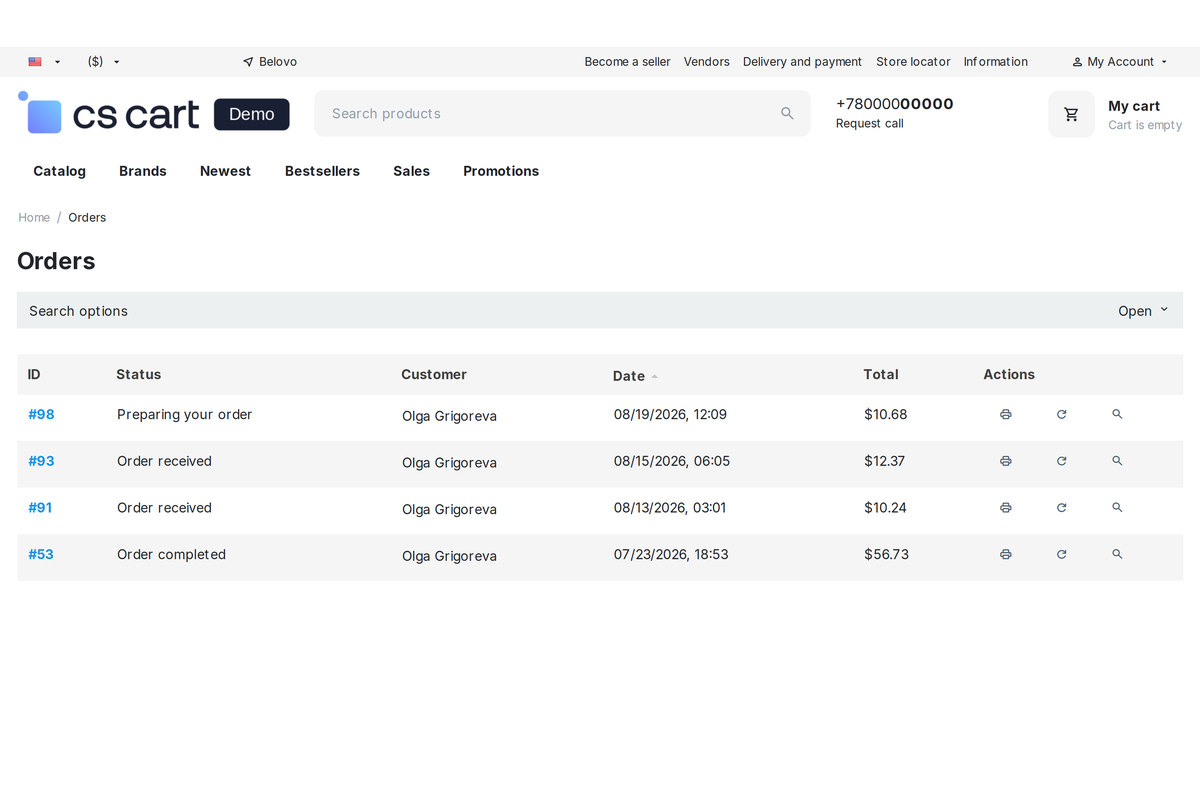
The add-on brings order statuses together in colored groups, defines which statuses managers and vendors may set and watches deadlines: an overdue order gets a mark and the store gets a notification. Customers see clear names on the storefront instead of internal statuses.
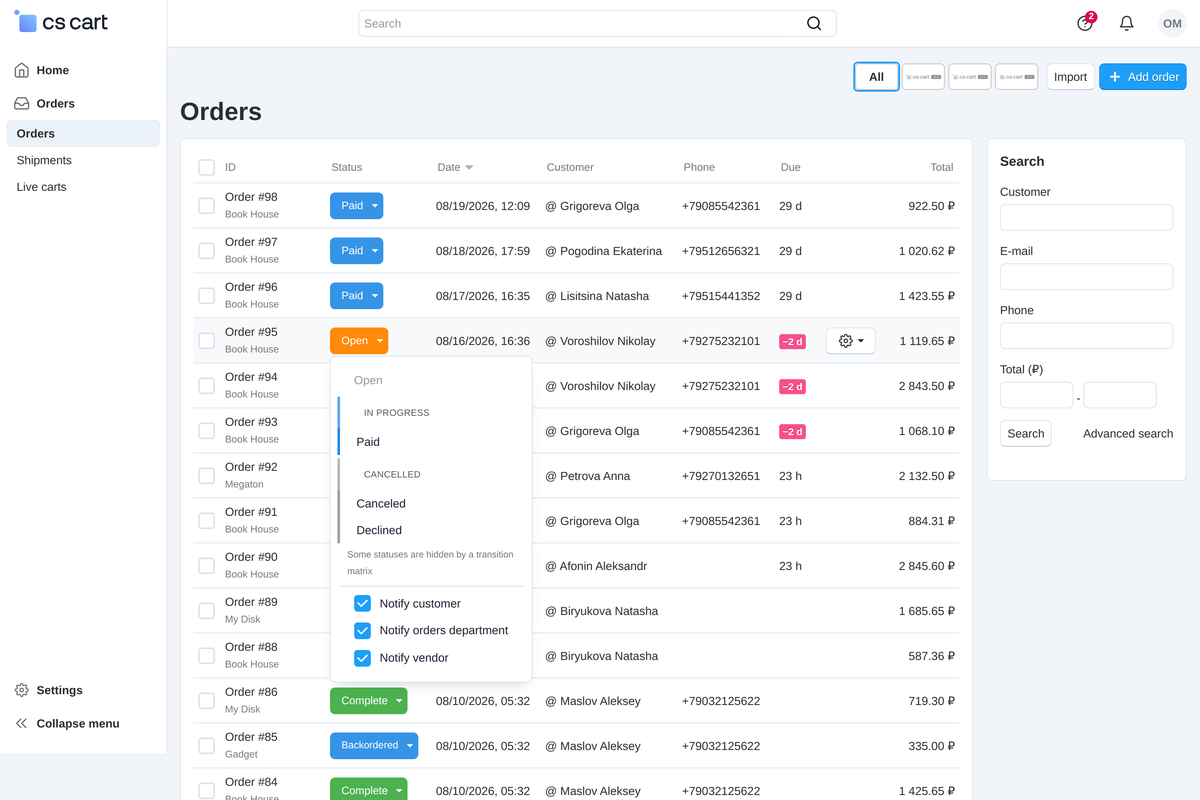
Status groups the status menu follows your workflow, in group colors
|
Transition matrices for administrator groups, vendors and the REST API
|
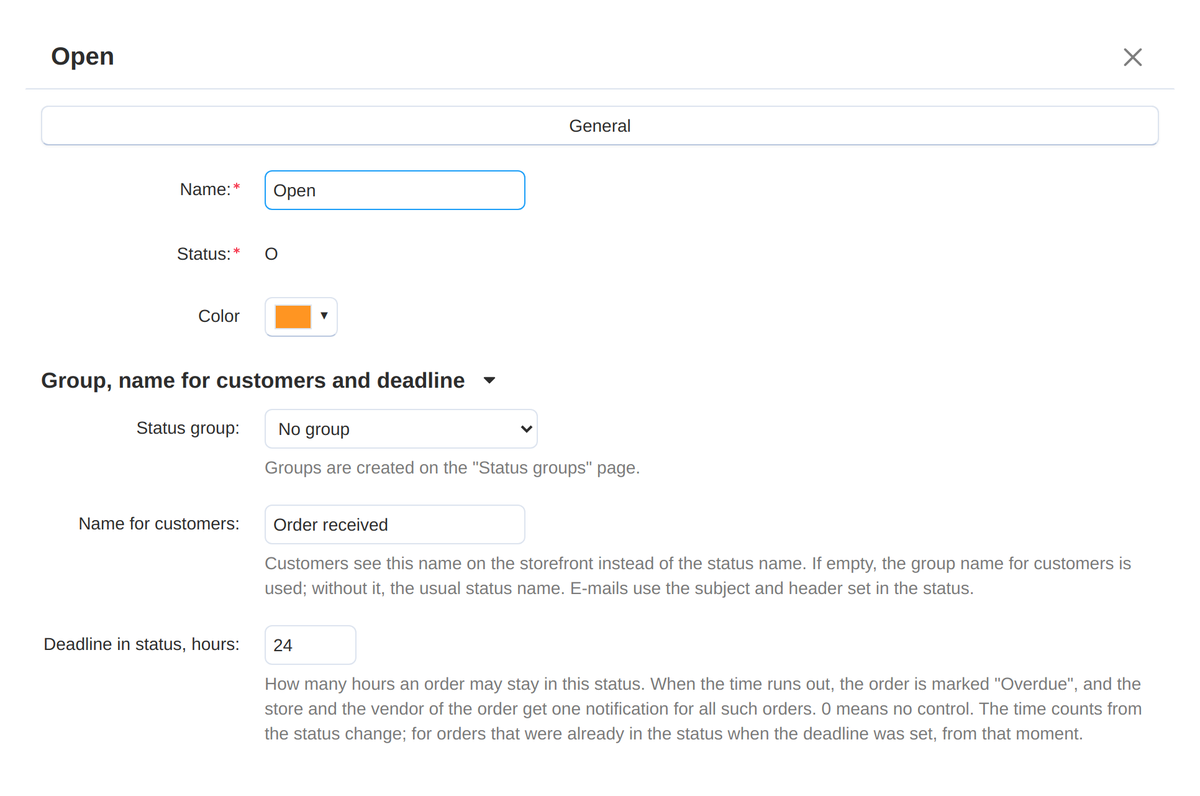
Deadlines in status the Overdue mark, a filter and one notification
|
CS-Cart 4.20.1-4.21.1 and Multi-Vendor; tested on Multi-Vendor 4.21.1 and CS-Cart 4.20.1
|
With a dozen statuses a manager easily sets the wrong one: Complete instead of Processed, or a cancellation nobody agreed on. Customers see internal statuses such as Picking and Packing in their account, and a stuck order is noticed only when the customer writes to support. The add-on solves this with standard CS-Cart tools: statuses, administrator groups, the store log and notifications.
Colored groups
Statuses of one stage stand together in the menu under the group name. |
Status change rules
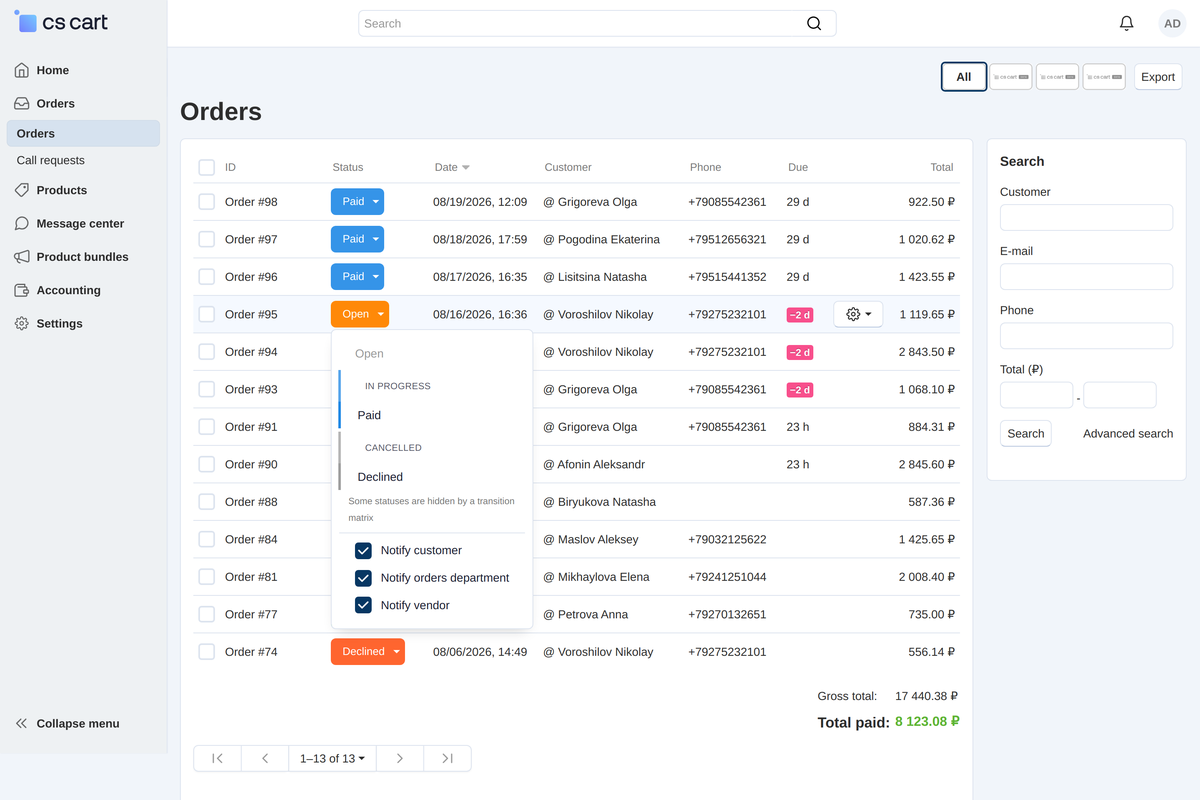
Managers and vendors see only the allowed statuses. |
Deadlines in status
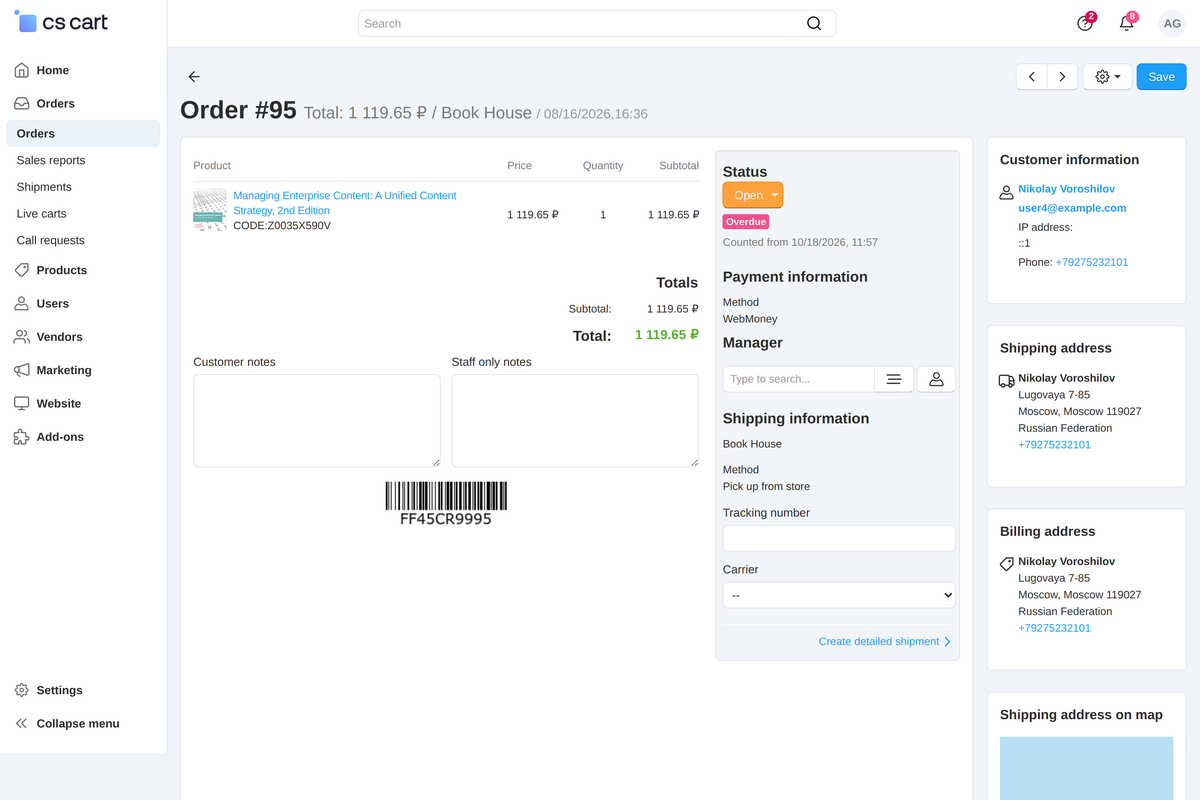
An overdue order is marked in the list and on its page. |
Transition check
Explains why a staff member cannot set a status. |
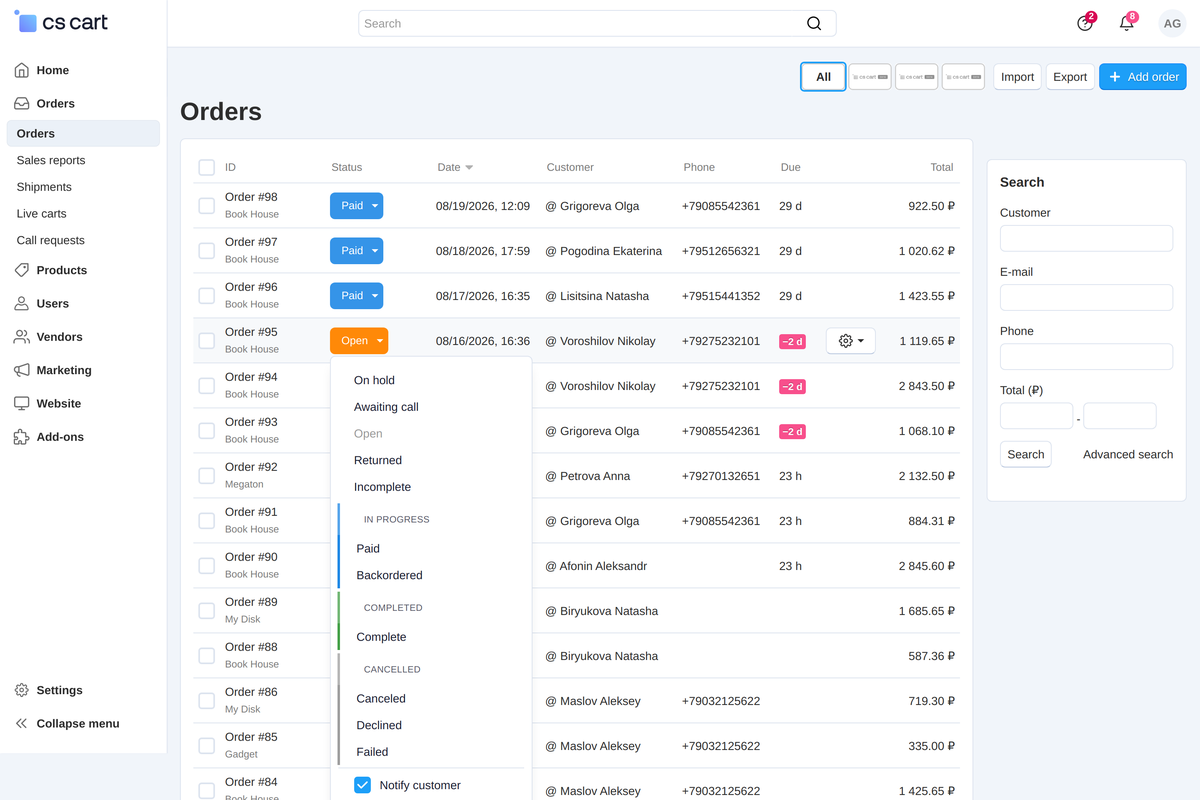
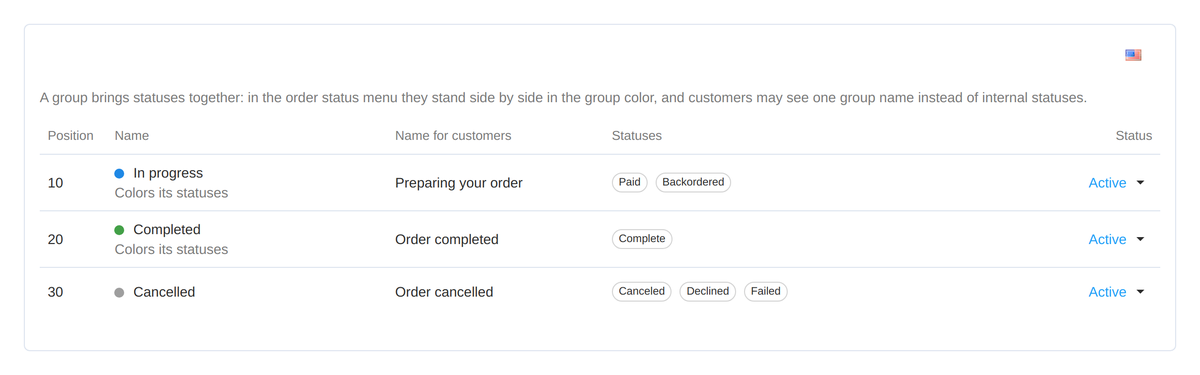
A group brings together the statuses of one stage, gives them a color and one name for customers. A single status may have its own name for customers and a deadline. The name for customers is shown in My orders, on the order page and on the order completion page. The admin panel, e-mails, the 1C exchange and the API keep seeing the real statuses.
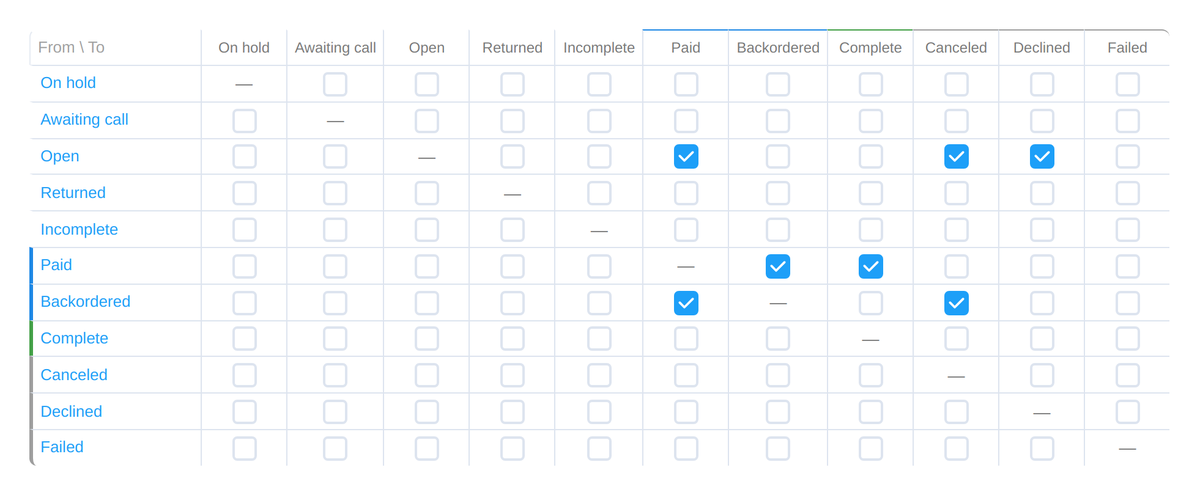
A matrix lists the allowed status changes: from which status to which. It applies to the chosen administrator groups and, in Multi-Vendor, optionally to vendors. Conditions narrow it to the right orders: by customer group, payment method and shipping method. When several matrices match a staff member and an order, everything any of them allows is allowed; when none matches, the status changes as usual.
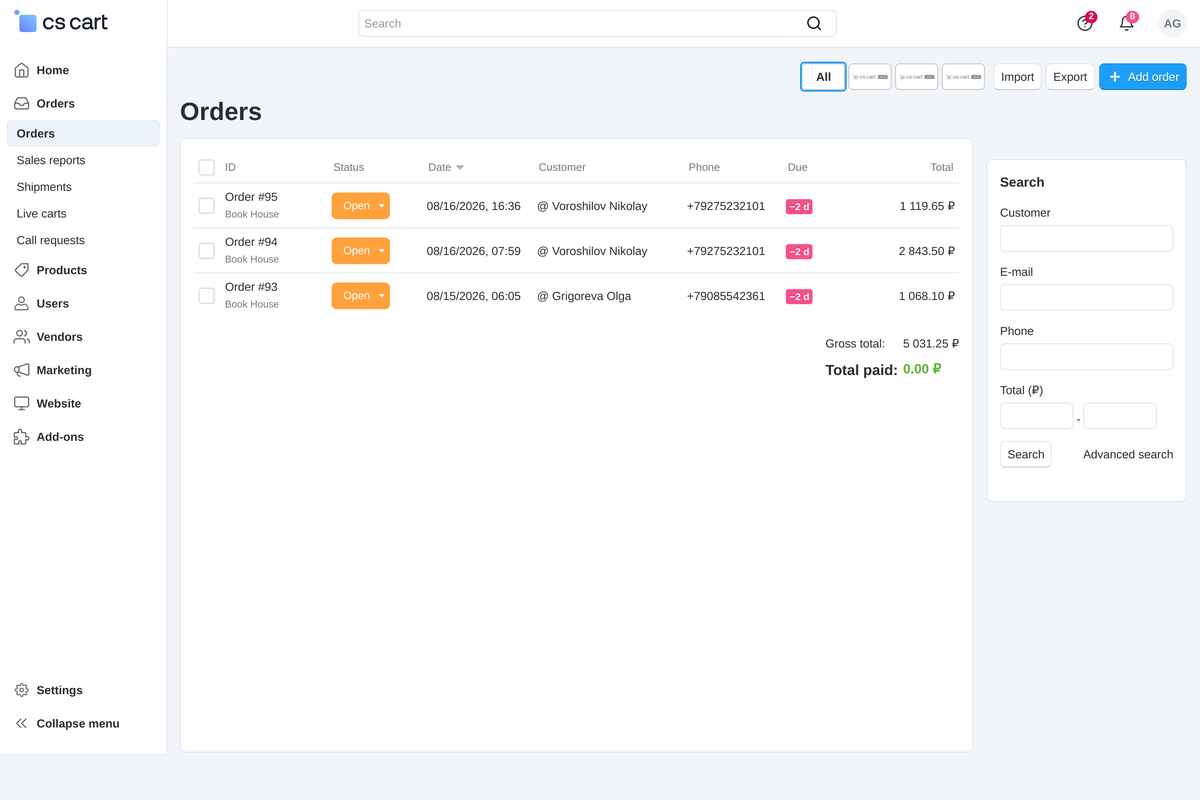
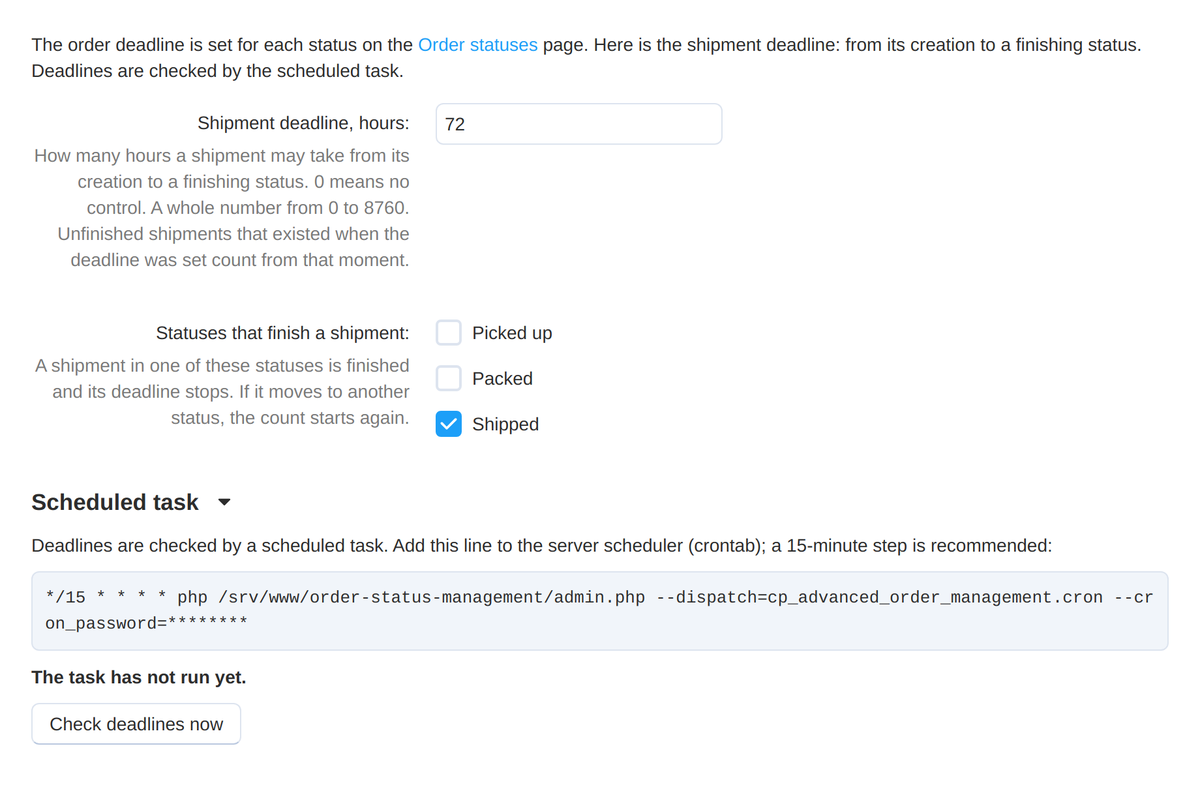
For a status you set how many hours an order may stay in it. The Due column in the order list shows the time left and, in red, how long ago the deadline passed; the order page shows the Overdue mark and the time the deadline counts from. For shipments you set a deadline from creation to a finishing status.
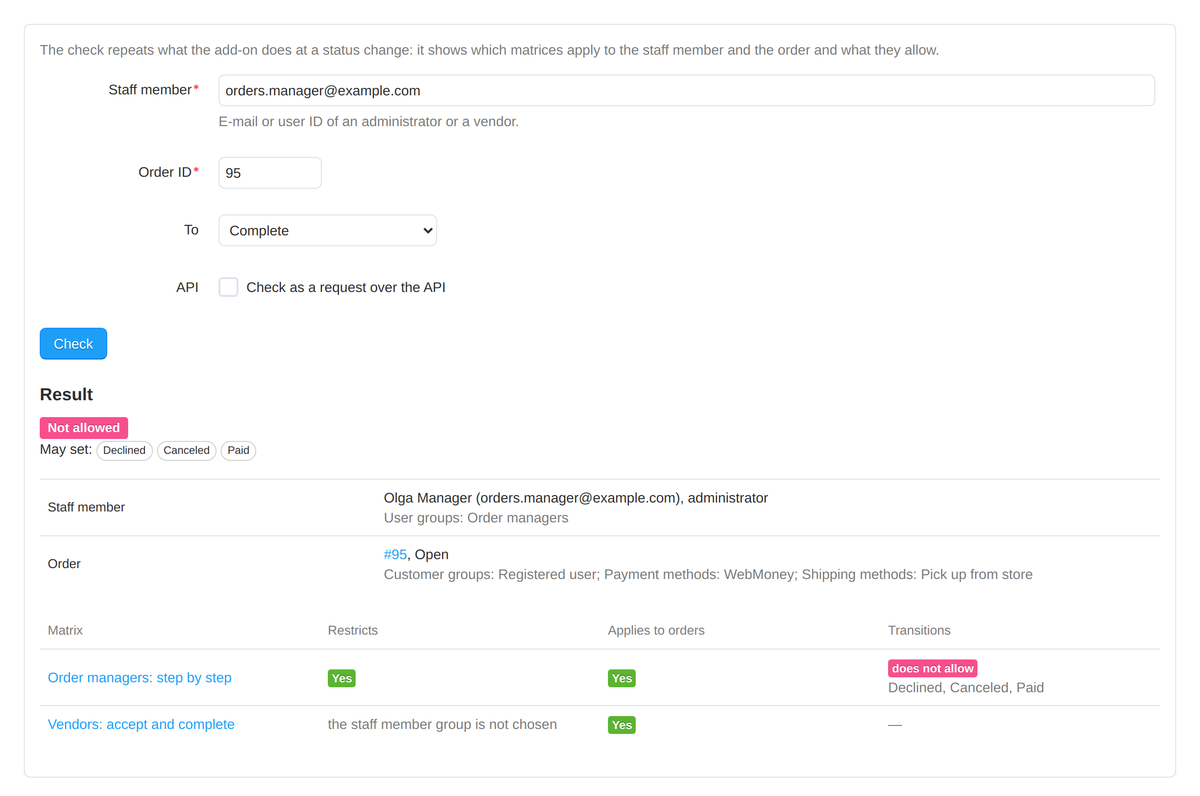
When a manager asks why a status cannot be set, the Transition check page answers: enter the staff member, the order and the status, and it shows which matrices apply and what they allow. Refused status changes, overdue orders, changes of groups, matrices and statuses are written to the standard store log; detailed records are switched on in the logging settings.
Right after installation the add-on restricts nothing: there are no matrices and no deadlines, statuses and orders stay as they were. Rules start working as you create them.
What the add-on does not do
The add-on does not create or rename statuses and does not change status e-mails: their texts are set in the status settings as before. The overdue notification is sent once; if e-mail was not working at that moment, overdue orders remain visible through the filter and in the log.
What changes in the store right after installation?
Nothing staff or customers see: statuses and orders stay as they were and nothing is restricted until you create a matrix. Groups, names for customers and deadlines are also set by you.
Will the add-on interfere with payments, 1C exchange or scheduled tasks?
Checkout and payment by the customer, payment gateway responses, payments and refunds from the panel, scheduled tasks and the 1C exchange are not restricted by matrices. A matrix restricts status changes over the REST API only when its Restrict status changes over the REST API box is ticked.
Does it work in Multi-Vendor and with several storefronts?
Yes. In Multi-Vendor a matrix can restrict vendors and the vendor of an order also gets the overdue notification. In CS-Cart with several storefronts groups, matrices and status properties are shared by the whole store.
Do I need to set up a scheduled task?
For deadlines, yes: the add-on shows the crontab command on its settings page. The Overdue mark and the filter count a passed deadline without the task; notifications are sent by the task.
Which versions was the add-on tested on?
In live runs on Multi-Vendor 4.21.1 and CS-Cart 4.20.1 with several storefronts, plus the demo store on Multi-Vendor 4.21.1. CS-Cart without several storefronts was not run separately; the add-on uses the same code there. On PHP 7.4 the syntax of all files was checked. It is best to try your store on a copy first.
How do I find out why a manager cannot set a status?
Open Transition check and enter the manager, the order and the status: the page shows the matching matrices and what they allow. Every refusal is written to the store log.
No reviews found
|
CS-Cart development · in-house team · since 2013 We build, upgrade and speed up CS-Cart stores and marketplacesAnalysts, developers, designers, QA and support under one roof — no subcontractors. We ship add-ons you can buy on this page today, and we take on the work that no ready-made add-on covers. |
|
2013 Working with |
4.98 Rating from |
200+ Solutions on this |
500+ E-commerce projects |
Flagship products
Everything else we publish improves one screen. These two change the numbers: how customers find products, and how often they come back.
|
Add-on · Search & merchandising Smart SearchElasticsearch-powered search for large catalogues. The customer types two letters, sees products with images and prices, and buys from the dropdown — even after a typo or with the wrong keyboard layout. Visitors who use the search bar are 24% of traffic and 44% of revenue, and convert about 2.5× better than people who only browse categories. If search returns nothing, up to 80% of them leave. | ||||||||
| ||||||||
Try it on a live catalogue: open the demo store and search with a deliberate typo. |
|
Add-on · Mobile commerce PowerApp — mobile app for your storeA native iOS and Android app running on your CS-Cart data: the same products, prices, stock, promotions, reward points and orders. There is no second catalogue to maintain — everything stays in the admin panel you already use. A mobile site brings a customer in once; an app brings them back for free. Push notifications replace the retargeting budget you spend to buy the same customer a second time. | ||||||||
| ||||||||
Screens, block types and pricing tiers: see how the app is built. |
Services
Fixed scope, written specification, a named project manager and a warranty on what we ship.
|
Custom CS-Cart development Functionality the platform does not have: add-ons, marketplace mechanics, integrations with 1C, CRM, ERP, payment and delivery providers. We start from a written specification, not from an estimate on a phone call. Details → |
|
CS-Cart upgrade Move to the current version without losing data, custom code or add-ons. We audit every modification first, upgrade on a staging copy, adapt what breaks and switch over with little or no downtime. Details → |
|
Speed and performance optimisation Conversion falls by about 4.4% for every extra second of load time. We profile the server, the database and the front-end, then fix what actually costs the seconds — and show you the before-and-after numbers. Details → |
|
Design for CS-Cart Mobile-first storefront design built on CS-Cart's own template structure, so the layout survives the next platform upgrade instead of becoming a migration problem. Details → |
|
SEO for CS-Cart A technical audit of indexing, duplicates, redirects, structured data and Core Web Vitals — delivered as a prioritised fix list your developers can act on, or that we implement ourselves. Details → |
How we work
|
Before we start We discuss the goal, offer options and write the specification. You approve scope and price before development begins. |
While we build A named project manager reports progress on a fixed schedule. You always know what is in work and what is next. |
|
Before release A separate QA pass on every release — the developer who wrote the code is not the person who signs it off. |
After handover Documentation for everything we ship, plus a warranty on the modifications and the project. |
Tell us what the store needs to doDescribe the task in a couple of sentences and we will come back with options, a scope and a price. The consultation is free, and we will say plainly if a ready-made add-on already solves it.
|
Client cases, our full add-on catalogue and 184 customer reviews are in the tabs above.


