
Cart is empty
No reviews found


A wrong address means a return; a wrong INN or KPP means redone documents. The add-on connects the DaData suggestion service to store fields: the customer starts typing an address, INN or BIC, picks an option from the list, and the related fields are filled in - from postal code and region to KPP, OGRN and the correspondent account.
5 DaData directories addresses, companies, banks, names and e-mails - in any profile field
|
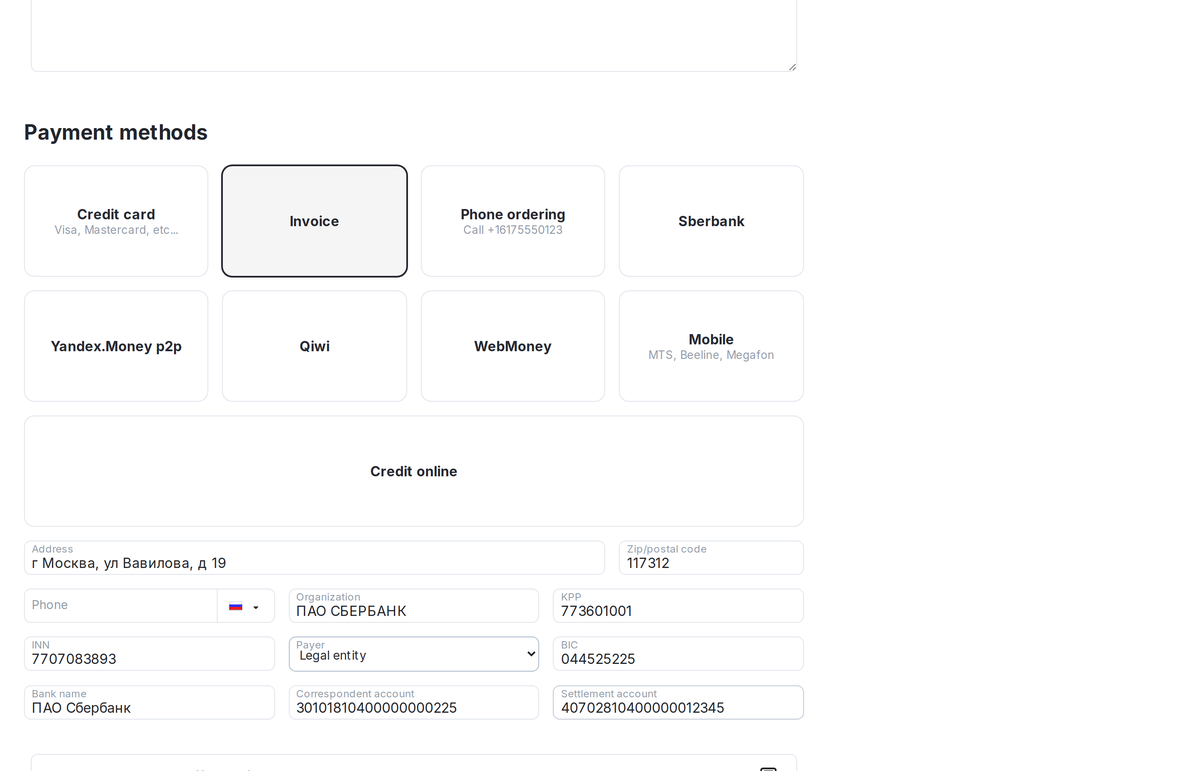
Invoice by INN and BIC name, KPP, address, bank and correspondent account in the "Invoice" form
|
EGRUL check a warning about liquidation, a branch office or unreliable data
|
CS-Cart 4.17.1-4.21.1 every edition, updated with the Add-ons Manager
|
A misspelled address, a postal code from another street, an INN with an extra digit - a manager later hunts each such mistake by hand, and the courier or the accountant pays for it with time. It is easier to fill in correct data right away: DaData keeps addresses, companies and banks in registries, and the add-on shows them to the customer in the field as they type.
Fewer mistakes in orders
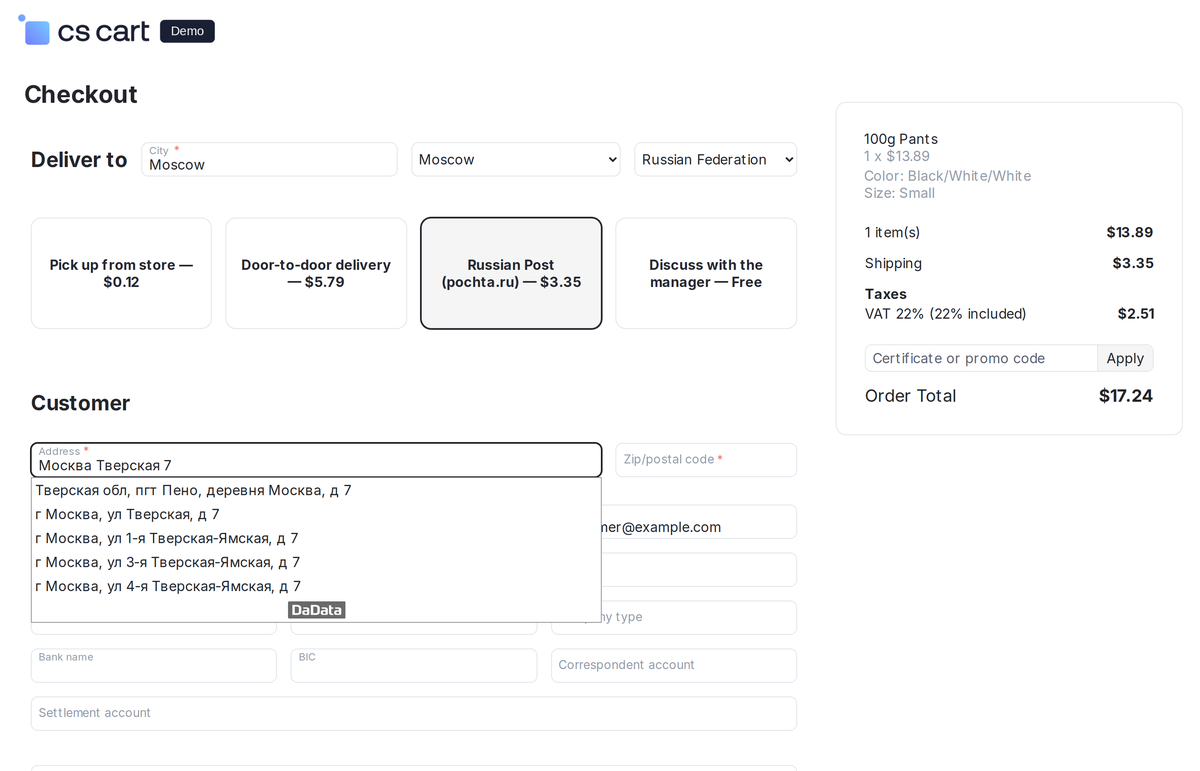
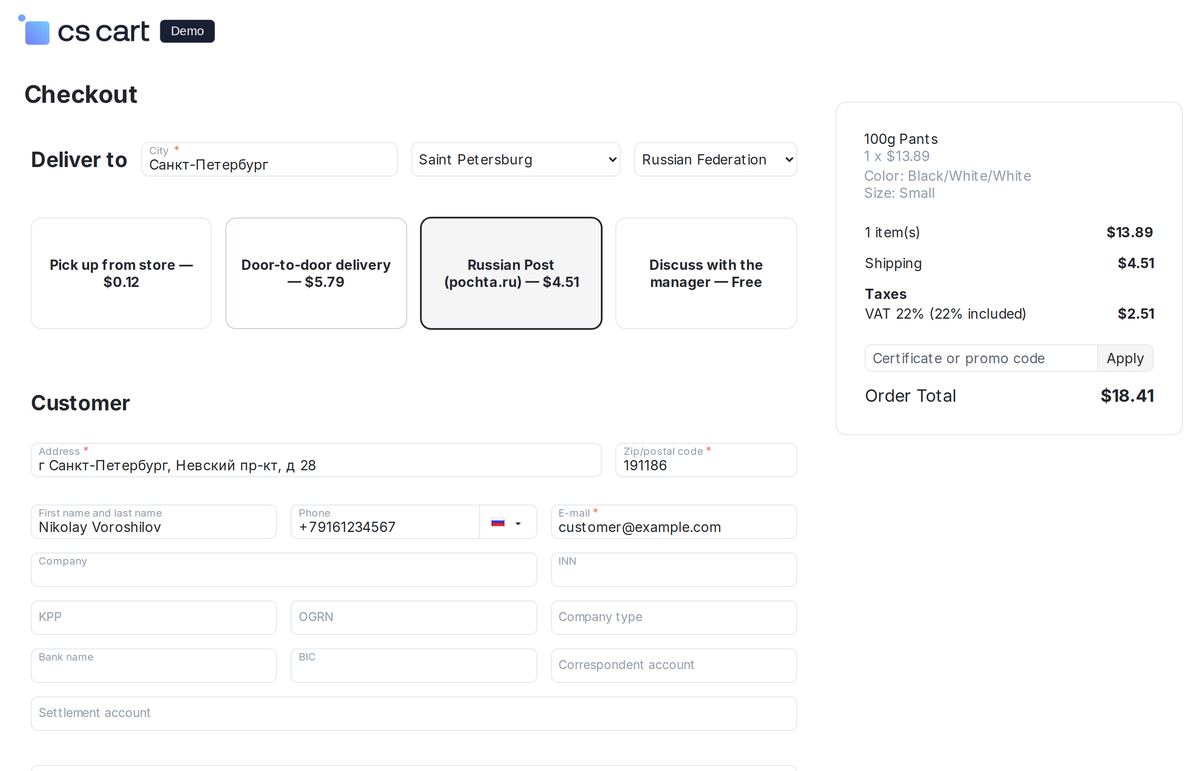
The address is picked from a registry; postal code, city, region and country are filled in - shipping is calculated for the right city. |
Requisites by INN in one click
Company name, KPP, OGRN, legal address and payer type come from one suggestion; bank and correspondent account - by BIC. |
Company status from the registry
A note under the field shows the EGRUL status: the company is liquidated, this is a branch, the data is unreliable. |
Set up without a developer
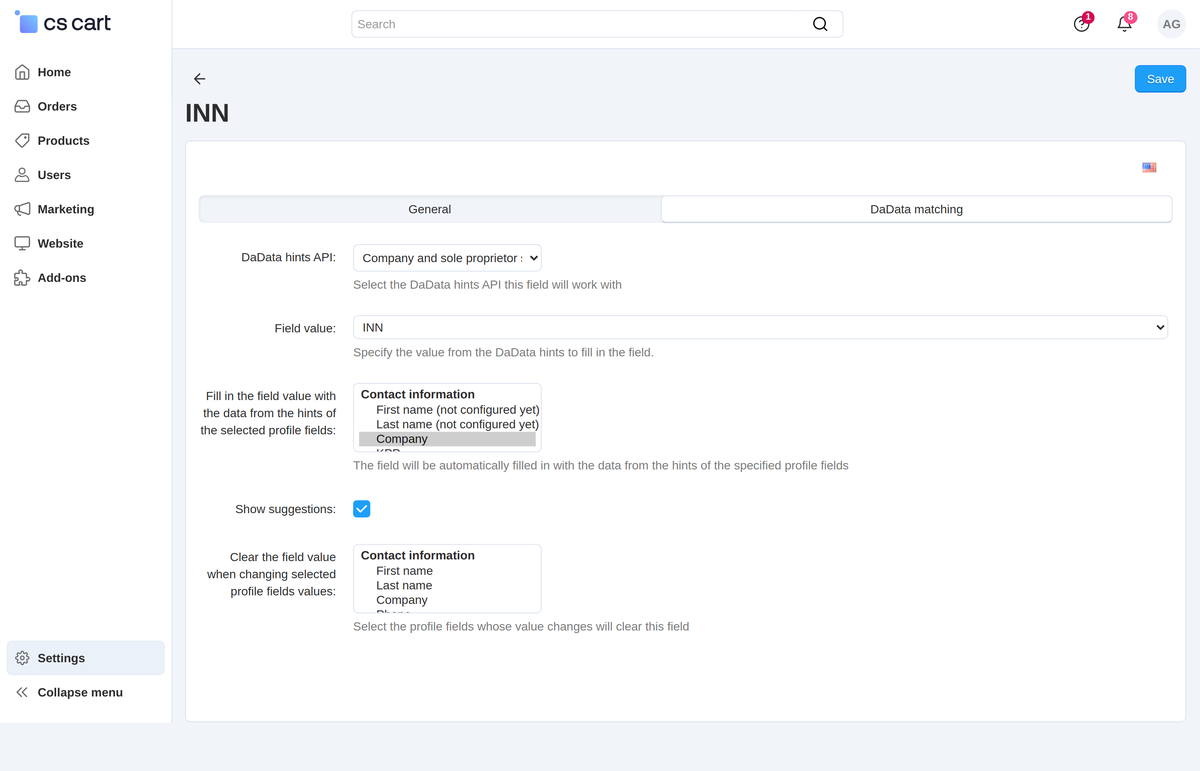
Every profile field gets a "DaData matching" tab: the directory, what to fill in and which fields follow. Any other field is connected by a CSS-selector rule. |
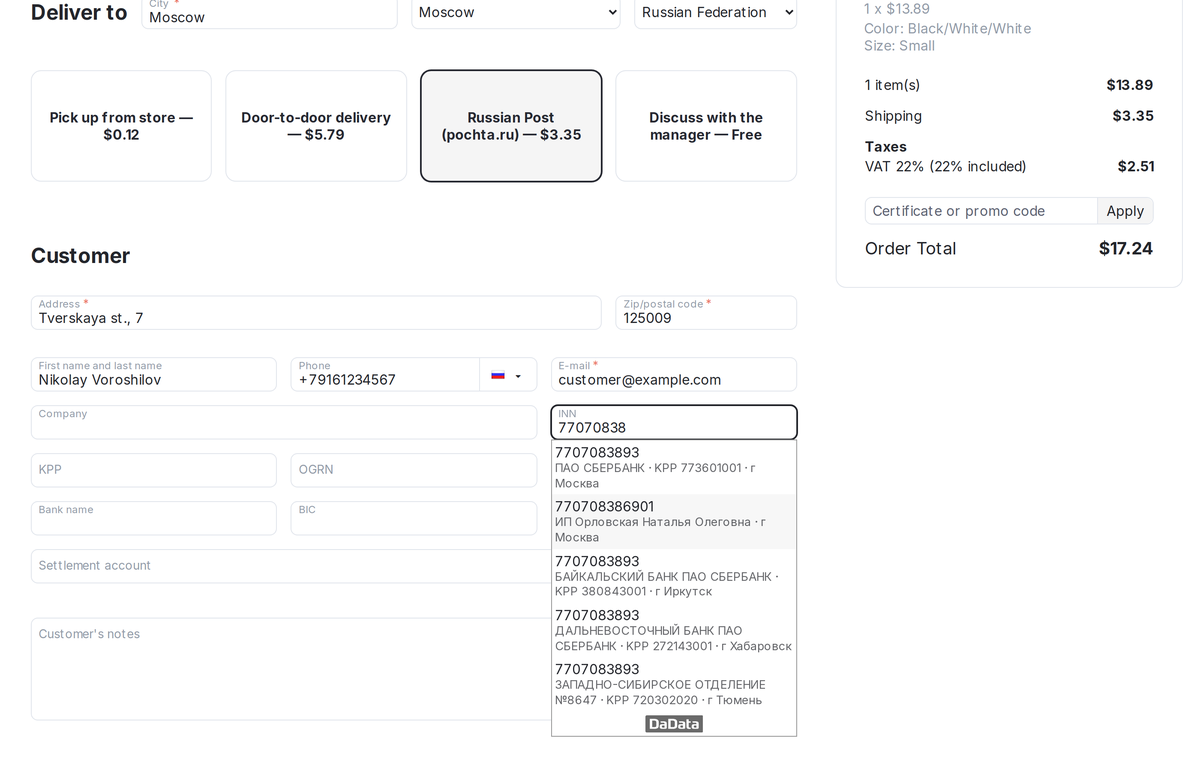
The add-on works with five DaData directories, and any profile field can be linked to any of them:
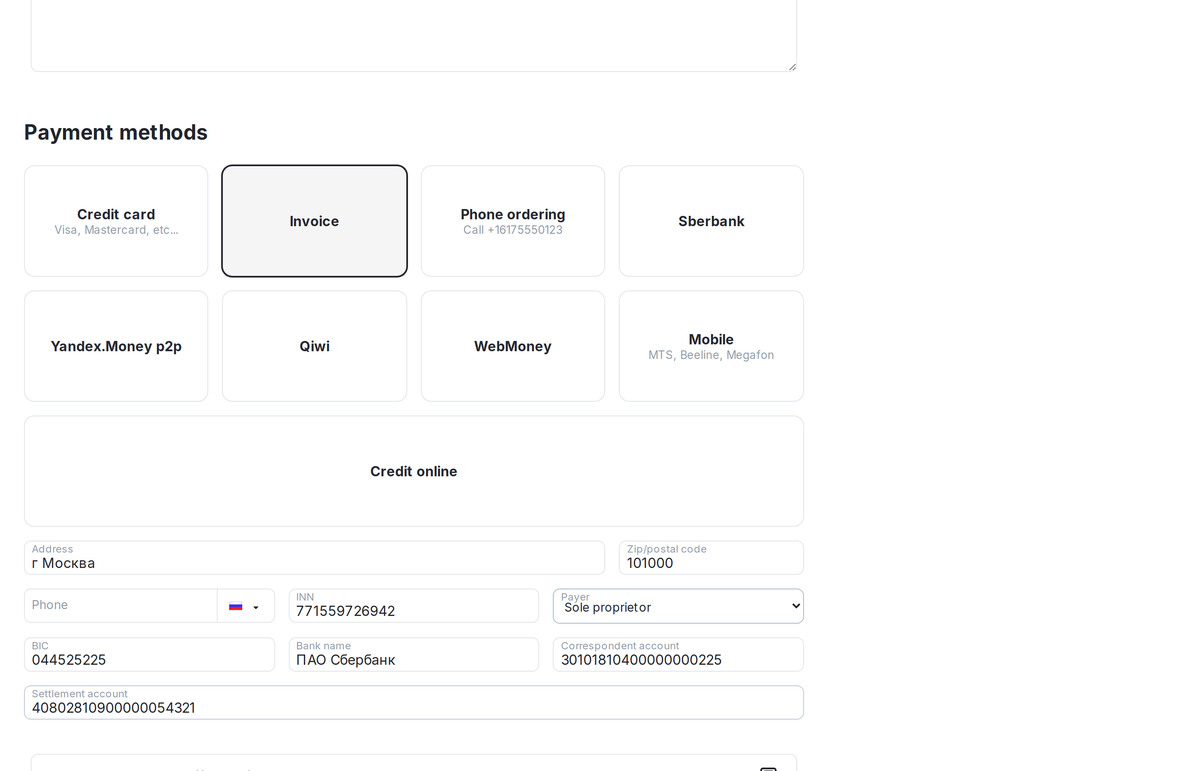
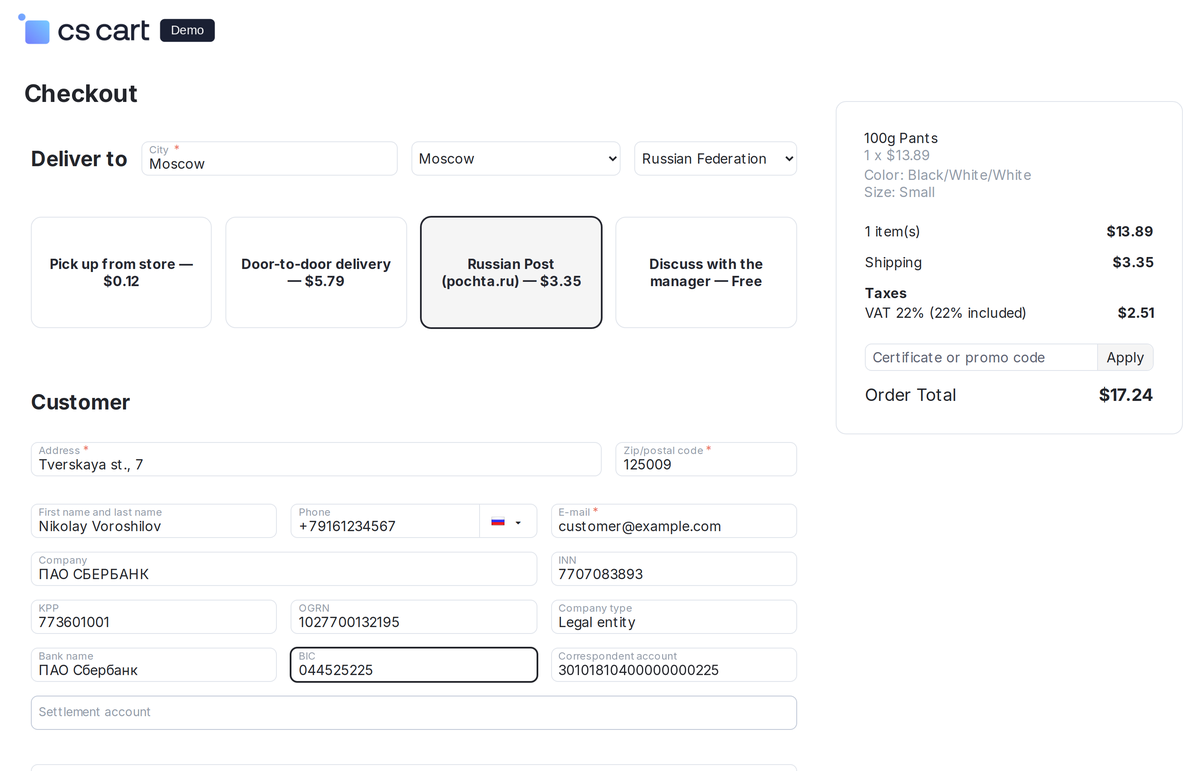
The stock "Invoice" payment form of the "Russian payment methods" add-on knows only the company, INN and one text field of bank details. The add-on extends it with the fields accounting needs and fills them from suggestions:
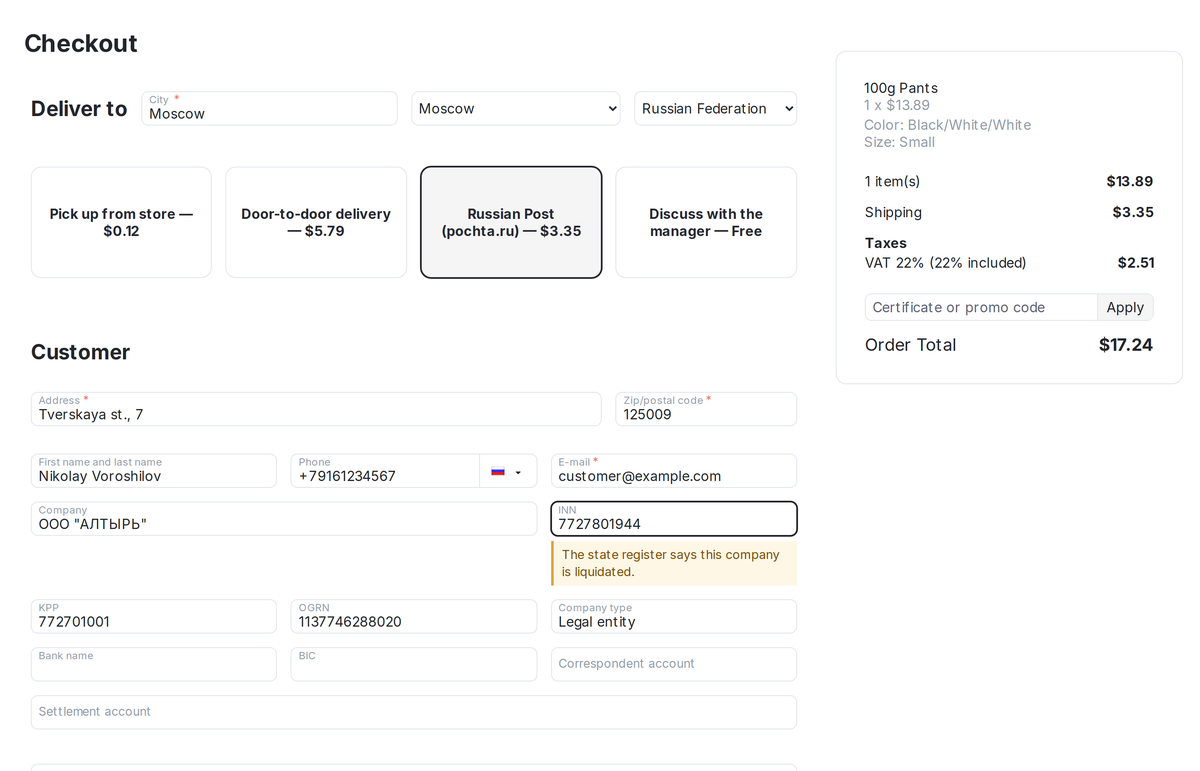
DaData returns the registry status together with the company, and the add-on shows it right under the field - before the order is placed and the invoice is issued:
A note, not a block
The add-on does not stop the checkout: the customer sees the warning and decides, and the manager sees the same requisites in the order. Warnings are switched off by one setting.
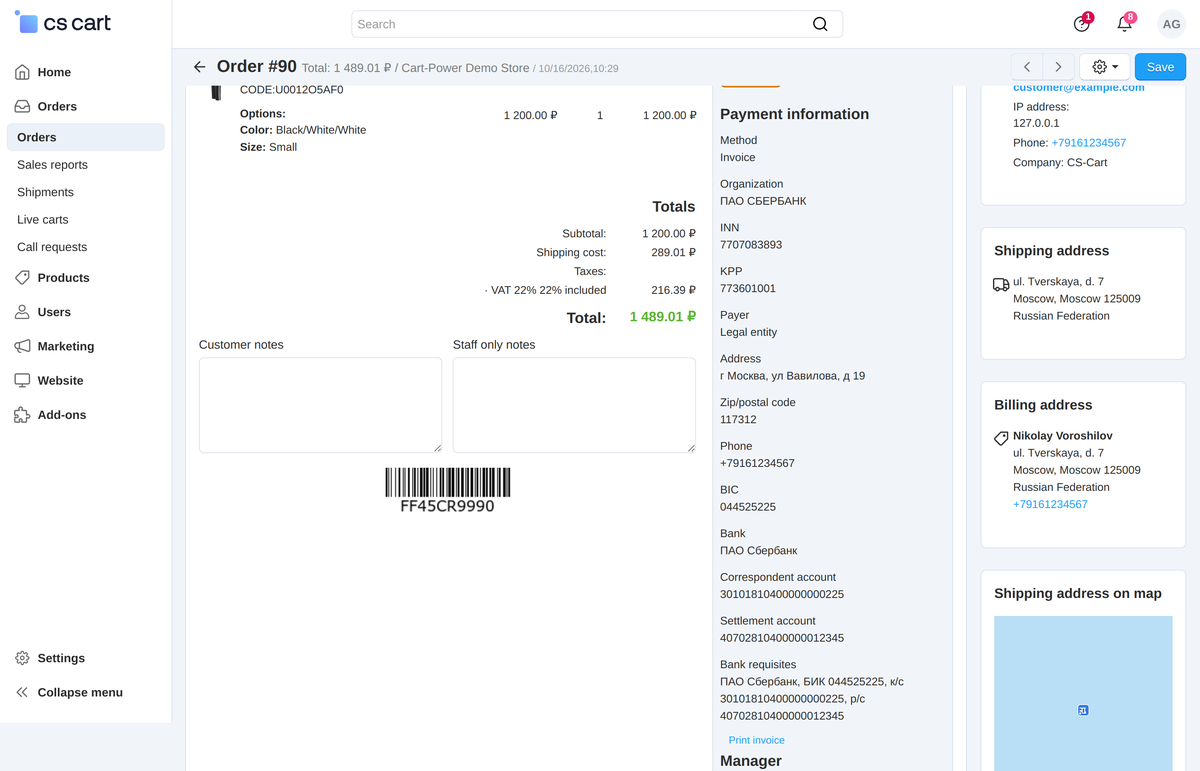
Everything the customer picked reaches the manager: the payer requisites are shown in the order with clear labels - KPP, BIC, bank, correspondent and settlement accounts, payer type. The invoice printed from the panel and from the customer e-mail contains the INN with KPP and the bank details in one line.
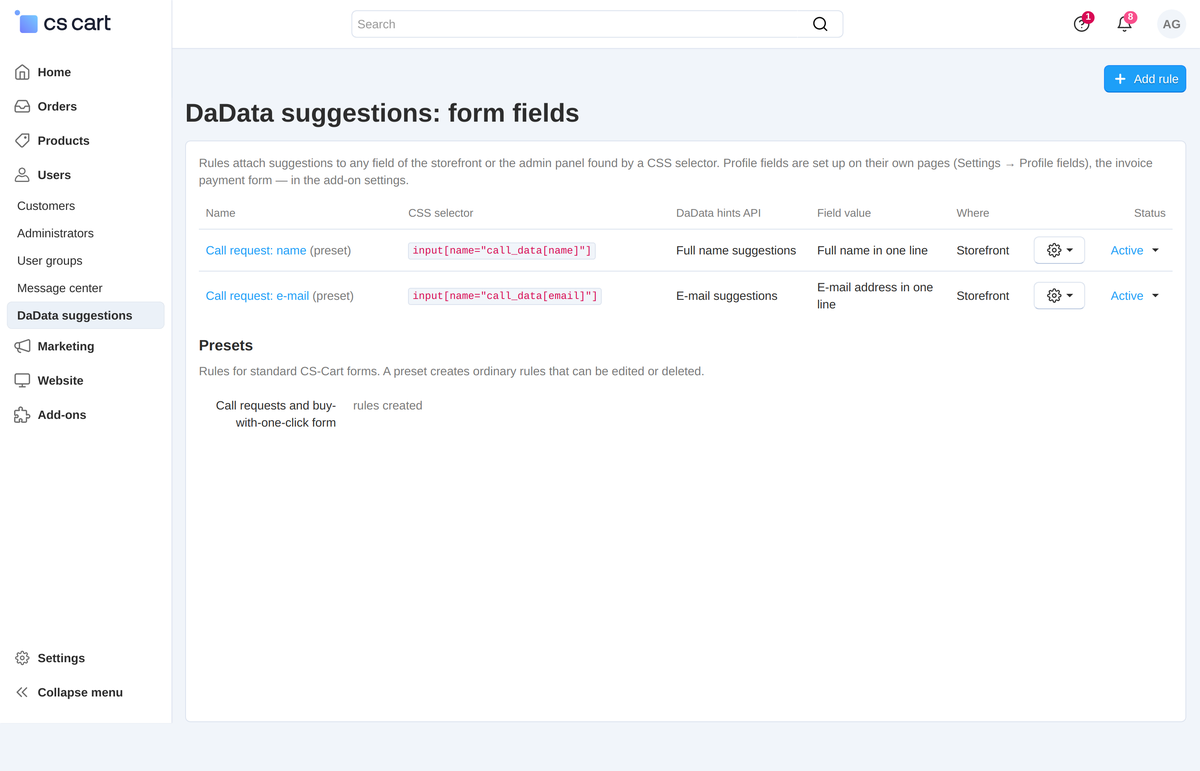
Fields that are not part of the customer profile are connected by rules in "Customers - DaData suggestions". A rule is a CSS selector of the field, a directory and the value to fill in; rules can be linked to each other like profile fields.
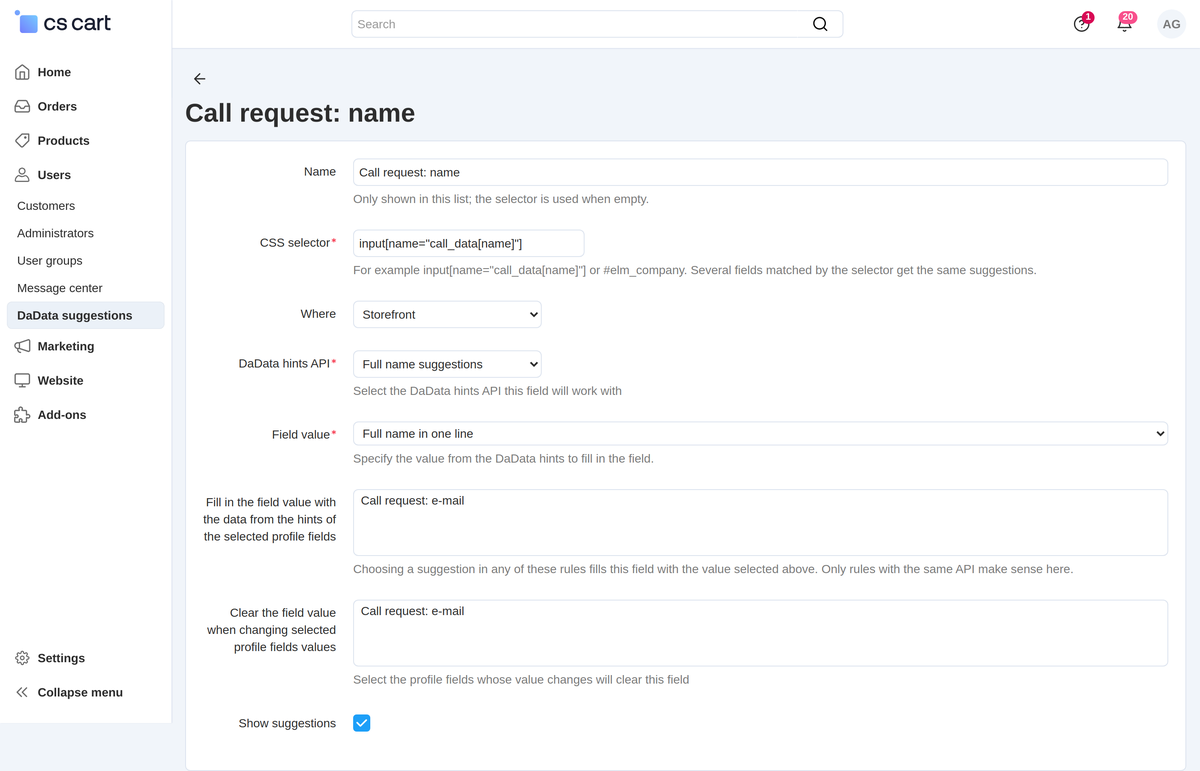
Every profile field in the panel gets a "DaData matching" tab. It sets the directory, the value from the suggestion, the parent fields whose suggestions fill this field, and the fields whose change clears its value.

Release history
1.2 (09/17/2026) - suggestions and requisites in the "Invoice" form, warnings from the EGRUL registry, rules for any field by a CSS selector, shipping city by the IP address, one-step checkout.
1.1 (07/06/2026) - fewer database queries on the storefront.
1.0 (04/06/2026) - the first release.
Is a paid DaData plan required?
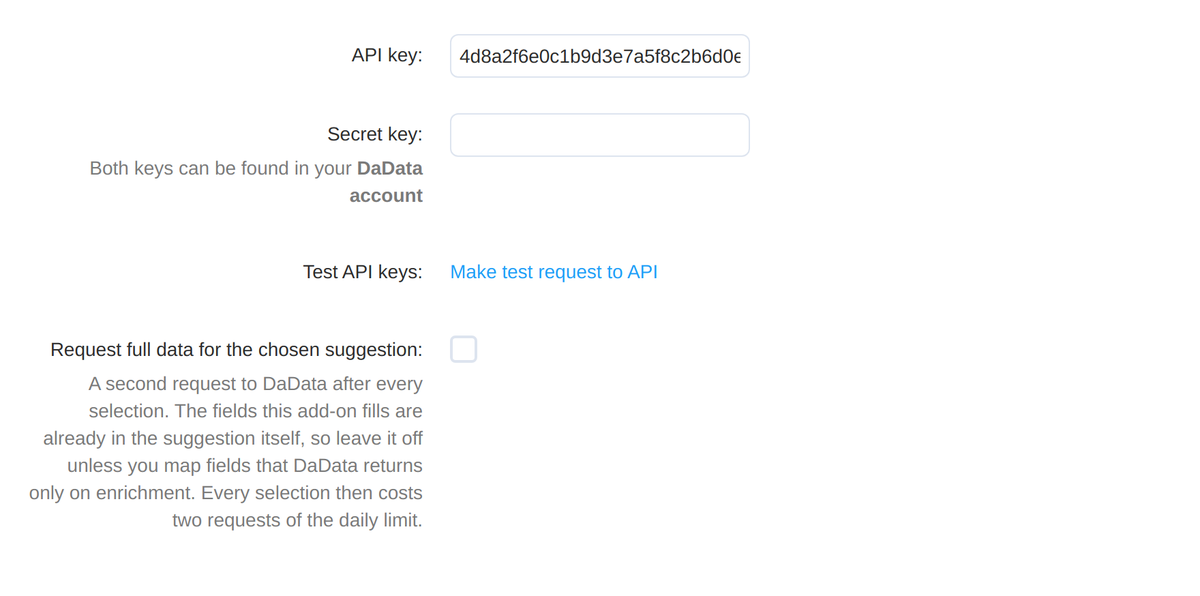
No. The keys are issued by the DaData account, and suggestions are part of the free plan with a daily request limit; the add-on spends one request per input and does not request extra data unless needed. The remaining daily quota is shown in the settings by the key check button.
Will the "Invoice" form work with my theme?
Yes. The extra fields are inserted into the form by a script next to the stock "Company" and "INN" fields, so they do not depend on theme templates. The stock "Russian payment methods" add-on with an active "Invoice" method is required.
What will the manager and the accountant see?
In the order in the panel - every requisite with a label; on the printed invoice - the INN with KPP and the bank details in one line. The data is stored with the order like the stock payment form fields.
Can suggestions be connected to a field of another add-on?
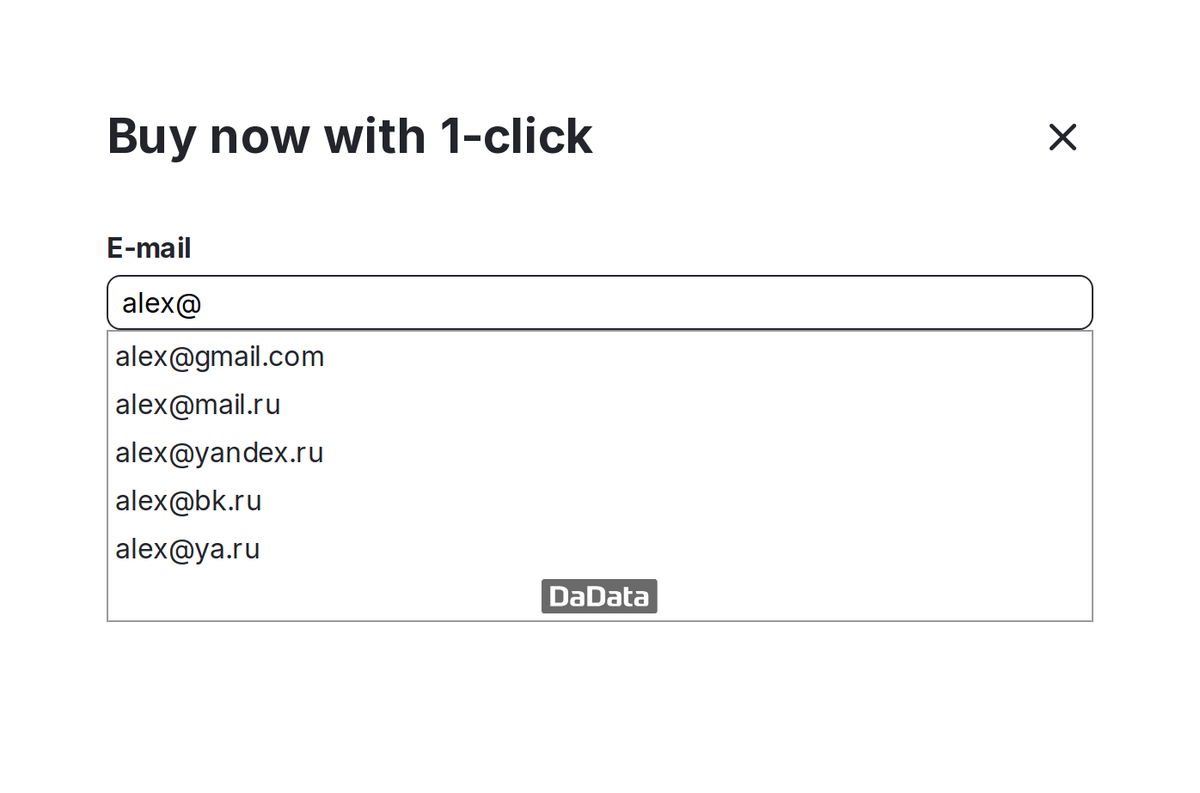
Yes. In "Customers - DaData suggestions" a rule is created: the CSS selector of the field, the directory and the value. A ready-made set exists for the "Call request" and "Buy now with one click" forms.
What happens when updating from version 1.2 or 1.0?
The DaData keys, configured profile fields and rules are kept. The rule and mapping tables, permissions and the new version settings are created by the add-on during the update itself - through the Add-ons Manager and through the Upgrade Center. There is no need to open the panel after the update. Updating from versions 1.0 and 1.2 was tested both ways on CS-Cart Ultimate and Multi-Vendor. When moving from 1.0 or 1.1, the new fields appear in the "Invoice" form at once - a setting turns them off.
Does the add-on work on Multi-Vendor and with several storefronts?
Yes, on every edition of CS-Cart and Multi-Vendor 4.17.1-4.21.1. The DaData keys are shared by the installation; rules work on every storefront.
How much does the add-on cost, and are suggestions paid separately?
The add-on costs $60 per store licence. DaData suggestions are part of the free plan of the service with a daily limit; a paid DaData plan is needed only by a store that exhausts it.
No reviews found
|
CS-Cart development · in-house team · since 2013 We build, upgrade and speed up CS-Cart stores and marketplacesAnalysts, developers, designers, QA and support under one roof — no subcontractors. We ship add-ons you can buy on this page today, and we take on the work that no ready-made add-on covers. |
|
2013 Working with |
4.98 Rating from |
200+ Solutions on this |
500+ E-commerce projects |
Flagship products
Everything else we publish improves one screen. These two change the numbers: how customers find products, and how often they come back.
|
Add-on · Search & merchandising Smart SearchElasticsearch-powered search for large catalogues. The customer types two letters, sees products with images and prices, and buys from the dropdown — even after a typo or with the wrong keyboard layout. Visitors who use the search bar are 24% of traffic and 44% of revenue, and convert about 2.5× better than people who only browse categories. If search returns nothing, up to 80% of them leave. | ||||||||
| ||||||||
Try it on a live catalogue: open the demo store and search with a deliberate typo. |
|
Add-on · Mobile commerce PowerApp — mobile app for your storeA native iOS and Android app running on your CS-Cart data: the same products, prices, stock, promotions, reward points and orders. There is no second catalogue to maintain — everything stays in the admin panel you already use. A mobile site brings a customer in once; an app brings them back for free. Push notifications replace the retargeting budget you spend to buy the same customer a second time. | ||||||||
| ||||||||
Screens, block types and pricing tiers: see how the app is built. |
Services
Fixed scope, written specification, a named project manager and a warranty on what we ship.
|
Custom CS-Cart development Functionality the platform does not have: add-ons, marketplace mechanics, integrations with 1C, CRM, ERP, payment and delivery providers. We start from a written specification, not from an estimate on a phone call. Details → |
|
CS-Cart upgrade Move to the current version without losing data, custom code or add-ons. We audit every modification first, upgrade on a staging copy, adapt what breaks and switch over with little or no downtime. Details → |
|
Speed and performance optimisation Conversion falls by about 4.4% for every extra second of load time. We profile the server, the database and the front-end, then fix what actually costs the seconds — and show you the before-and-after numbers. Details → |
|
Design for CS-Cart Mobile-first storefront design built on CS-Cart's own template structure, so the layout survives the next platform upgrade instead of becoming a migration problem. Details → |
|
SEO for CS-Cart A technical audit of indexing, duplicates, redirects, structured data and Core Web Vitals — delivered as a prioritised fix list your developers can act on, or that we implement ourselves. Details → |
How we work
|
Before we start We discuss the goal, offer options and write the specification. You approve scope and price before development begins. |
While we build A named project manager reports progress on a fixed schedule. You always know what is in work and what is next. |
|
Before release A separate QA pass on every release — the developer who wrote the code is not the person who signs it off. |
After handover Documentation for everything we ship, plus a warranty on the modifications and the project. |
Tell us what the store needs to doDescribe the task in a couple of sentences and we will come back with options, a scope and a price. The consultation is free, and we will say plainly if a ready-made add-on already solves it.
|
Client cases, our full add-on catalogue and 184 customer reviews are in the tabs above.


