No reviews found
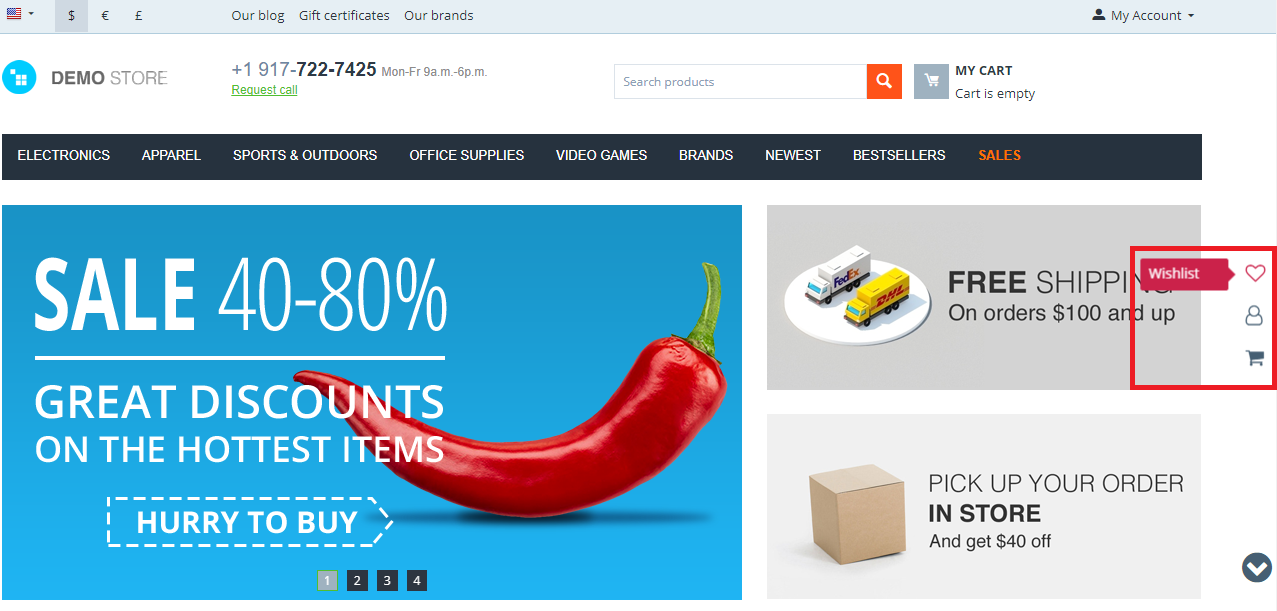
The longer the page, the further the cart and the menu drift from the shopper: getting back means scrolling all the way up. A pinned panel keeps the buttons that matter on screen at all times.
What it does
- A fixed panel of quick access buttons on the storefront.
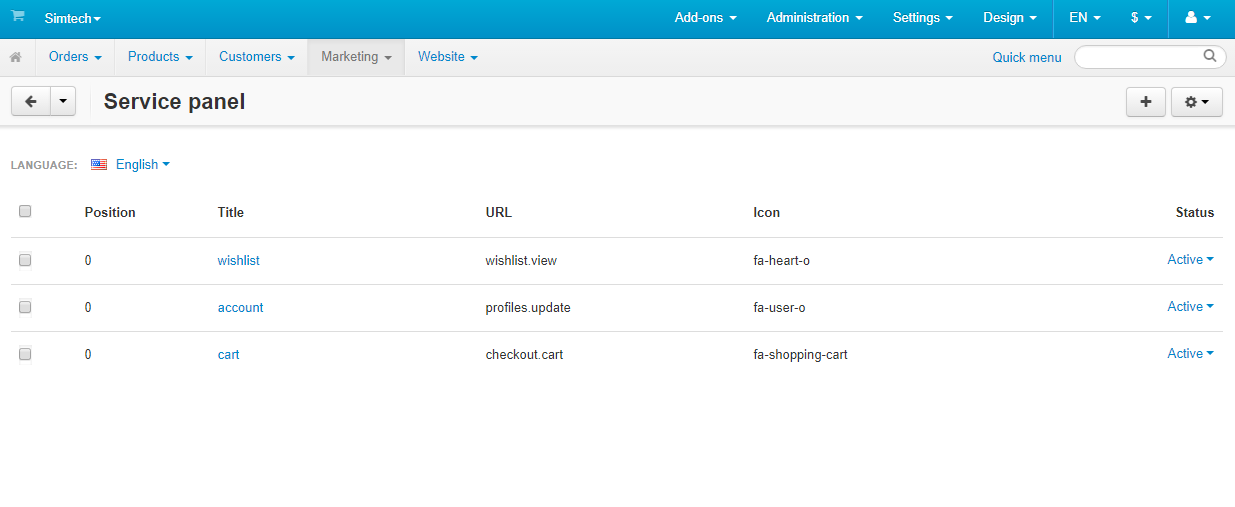
- Your own set of buttons: cart, customer account, wishlist and others.
- A wide choice of icons for the buttons.
- Placement along the left or the right edge of the screen.
- The panel is added as a block, without theme template edits.
- It stays on screen while the page scrolls.
When it helps
Stores with long category pages and detailed product pages, where shoppers scroll a lot. The panel pairs well with the Back to Top Button add-on: both solve the same problem — not making people hunt for the controls.
Support and updates
Creating icons and configuring the block are covered in the documentation. Six months of free updates, questions through HelpDesk.
FAQ
Which buttons can I add?
Any store links: the cart, the customer account, the wishlist, comparison, contacts.
Can the panel be moved to the other side?
Yes, the position is chosen in the settings — left or right of the screen.
- Store Builder
- Store Builder Ultimate
- Multi-Vendor
- Multi-Vendor Plus
- 4.9.3
- 4.9.2
- 4.9.1
- 4.8.2
- 4.7.4
- 4.6.3
- 4.5.2
- 4.4.3
- English
- Български
- Dansk
- Deutsch
- Ελληνικά
- Español
- Français
- Italiano
- Nederlands
- Norsk
- Polska
- Română
- Русский
- Slovenščina
- 中文
|
CS-Cart development · in-house team · since 2013 We build, upgrade and speed up CS-Cart stores and marketplacesAnalysts, developers, designers, QA and support under one roof — no subcontractors. We ship add-ons you can buy on this page today, and we take on the work that no ready-made add-on covers. |
|
2013 Working with |
4.98 Rating from |
200+ Solutions on this |
500+ E-commerce projects |
Flagship products
Two add-ons that change how a store performs
Everything else we publish improves one screen. These two change the numbers: how customers find products, and how often they come back.
|
Add-on · Search & merchandising Smart SearchElasticsearch-powered search for large catalogues. The customer types two letters, sees products with images and prices, and buys from the dropdown — even after a typo or with the wrong keyboard layout. Visitors who use the search bar are 24% of traffic and 44% of revenue, and convert about 2.5× better than people who only browse categories. If search returns nothing, up to 80% of them leave. | ||||||||
| ||||||||
Try it on a live catalogue: open the demo store and search with a deliberate typo. |
|
Add-on · Mobile commerce PowerApp — mobile app for your storeA native iOS and Android app running on your CS-Cart data: the same products, prices, stock, promotions, reward points and orders. There is no second catalogue to maintain — everything stays in the admin panel you already use. A mobile site brings a customer in once; an app brings them back for free. Push notifications replace the retargeting budget you spend to buy the same customer a second time. | ||||||||
| ||||||||
Screens, block types and pricing tiers: see how the app is built. |
Services
When no add-on solves it, we do the work
Fixed scope, written specification, a named project manager and a warranty on what we ship.
|
Custom CS-Cart development Functionality the platform does not have: add-ons, marketplace mechanics, integrations with 1C, CRM, ERP, payment and delivery providers. We start from a written specification, not from an estimate on a phone call. Details → |
|
CS-Cart upgrade Move to the current version without losing data, custom code or add-ons. We audit every modification first, upgrade on a staging copy, adapt what breaks and switch over with little or no downtime. Details → |
|
Speed and performance optimisation Conversion falls by about 4.4% for every extra second of load time. We profile the server, the database and the front-end, then fix what actually costs the seconds — and show you the before-and-after numbers. Details → |
|
Design for CS-Cart Mobile-first storefront design built on CS-Cart's own template structure, so the layout survives the next platform upgrade instead of becoming a migration problem. Details → |
|
SEO for CS-Cart A technical audit of indexing, duplicates, redirects, structured data and Core Web Vitals — delivered as a prioritised fix list your developers can act on, or that we implement ourselves. Details → |
How we work
What you get besides the code
|
Before we start We discuss the goal, offer options and write the specification. You approve scope and price before development begins. |
While we build A named project manager reports progress on a fixed schedule. You always know what is in work and what is next. |
|
Before release A separate QA pass on every release — the developer who wrote the code is not the person who signs it off. |
After handover Documentation for everything we ship, plus a warranty on the modifications and the project. |
Tell us what the store needs to doDescribe the task in a couple of sentences and we will come back with options, a scope and a price. The consultation is free, and we will say plainly if a ready-made add-on already solves it.
|
Client cases, our full add-on catalogue and 184 customer reviews are in the tabs above.