
Prefer a small monthly fee?
The same add-on is also available on a subscription. Start with a small monthly payment instead of paying the full price up front.
Extension for Store Builder and Multi-Vendor that connects your store with the DeepL translation service and translates product descriptions, categories, pages, promotions, features, options, content blocks and menus into every language of your store. You translate the way that suits you: with a single click next to one field, in bulk from a list in the admin panel, or fully automatically right after you save content in the base language.
Running a store in several languages usually means hours of retyping the same descriptions over and over. This add-on takes that work off your hands: you pick one language to create content in, and the translations into the other languages are produced by DeepL, in high quality and with consistent terminology. Translation covers the languages DeepL supports, and you launch new language markets in hours rather than weeks.
Key Features
- Single field translation straight from the product or page editor, in a convenient window with a choice of source and target languages.
- Bulk translation straight from admin lists: products, categories, pages, promotions, features, feature groups, filters, options, content blocks and menus.
- Automatic translation after you save content in the base language, handled by a queue and a CRON job, with no manual involvement.
- A queue panel with status preview, filters and manual record removal, so you stay in full control of what gets translated.
- Translation quality controls: DeepL glossary, formality level and model type, so the content sounds the way your brand does.
- A used character counter, plus per-seller configuration in Multi-Vendor and multi-storefront support in the Ultimate edition.
A Closer Look
It helps to know up front which languages DeepL translates into. The list covers over a hundred target languages, and the formality level (a formal or informal tone) works for a selected subset, marked on the panel. The full coverage depends on the chosen model type, so it is worth starting by checking that your languages are supported

Screenshot 1
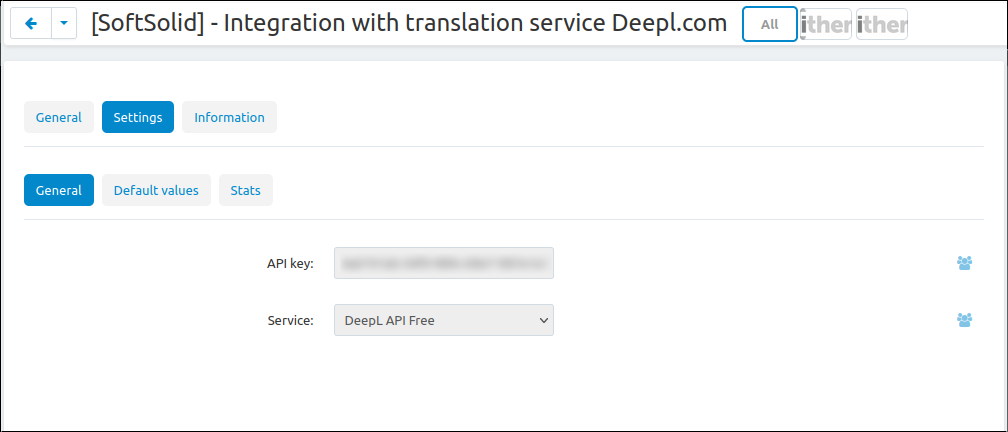
In the general settings you enter the DeepL API key in one place, choose the Free or Pro service type and decide on translation quality: the glossary with your own terminology, the formality level and the model type. This is also where you switch on the automatic mode and set up how the queue works

Screenshot 2
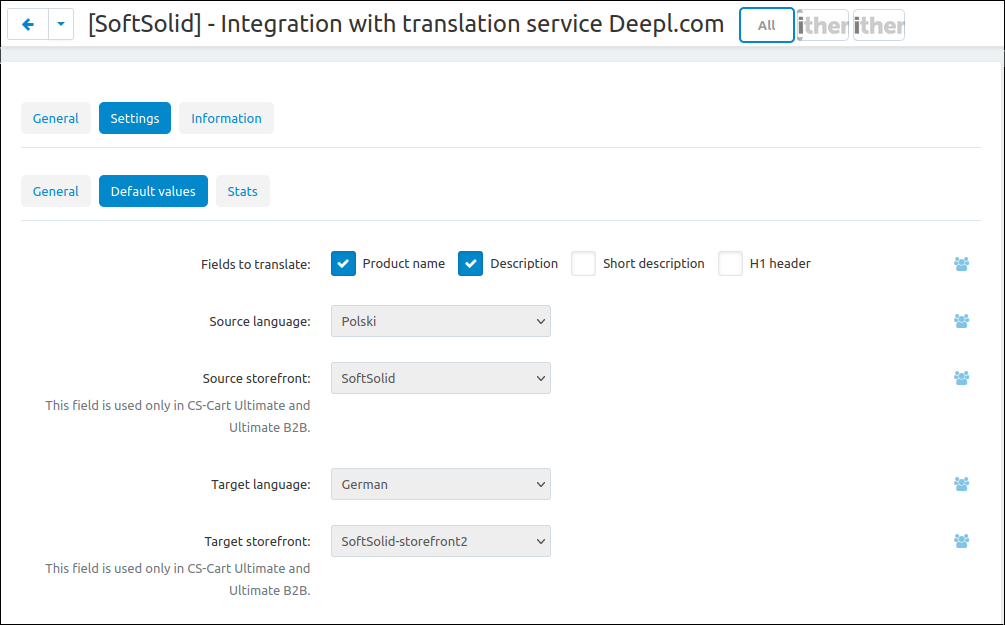
In the default values you decide which fields should be translated for each object type and what the default source and target language are. Translation forms then open with the right set of fields already in place, so repetitive work goes faster

Screenshot 3
Translation starts by choosing one base language, the one you create your original content in. You simply tick a single field next to the chosen language, and every other active language becomes a target

Screenshot 4
Translation covers more than the catalog. Next to every target language you get actions to translate interface variables, common descriptions and static data, so a new language version of the store is consistent from labels to descriptions

Screenshot 5
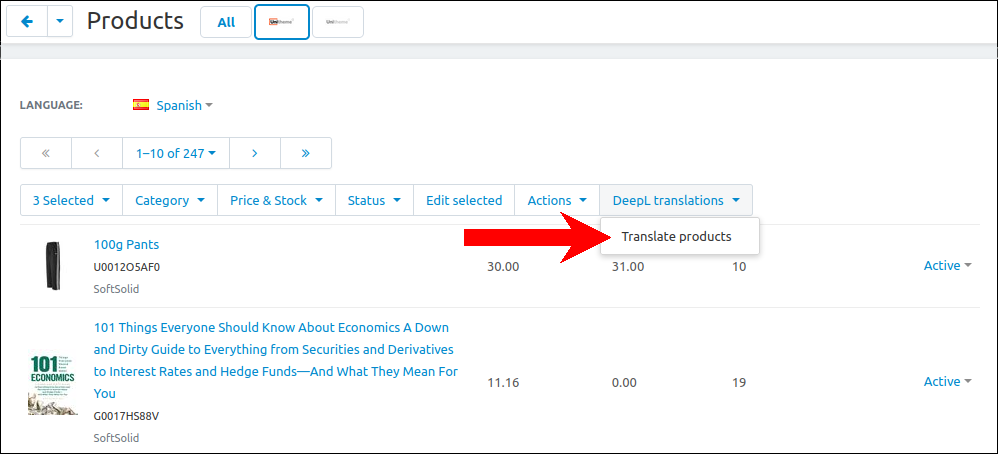
From the product list you launch translation of the selected items with one command from the menu. The same menu works for categories, pages, promotions, features, filters, options, blocks and store menus

Screenshot 6
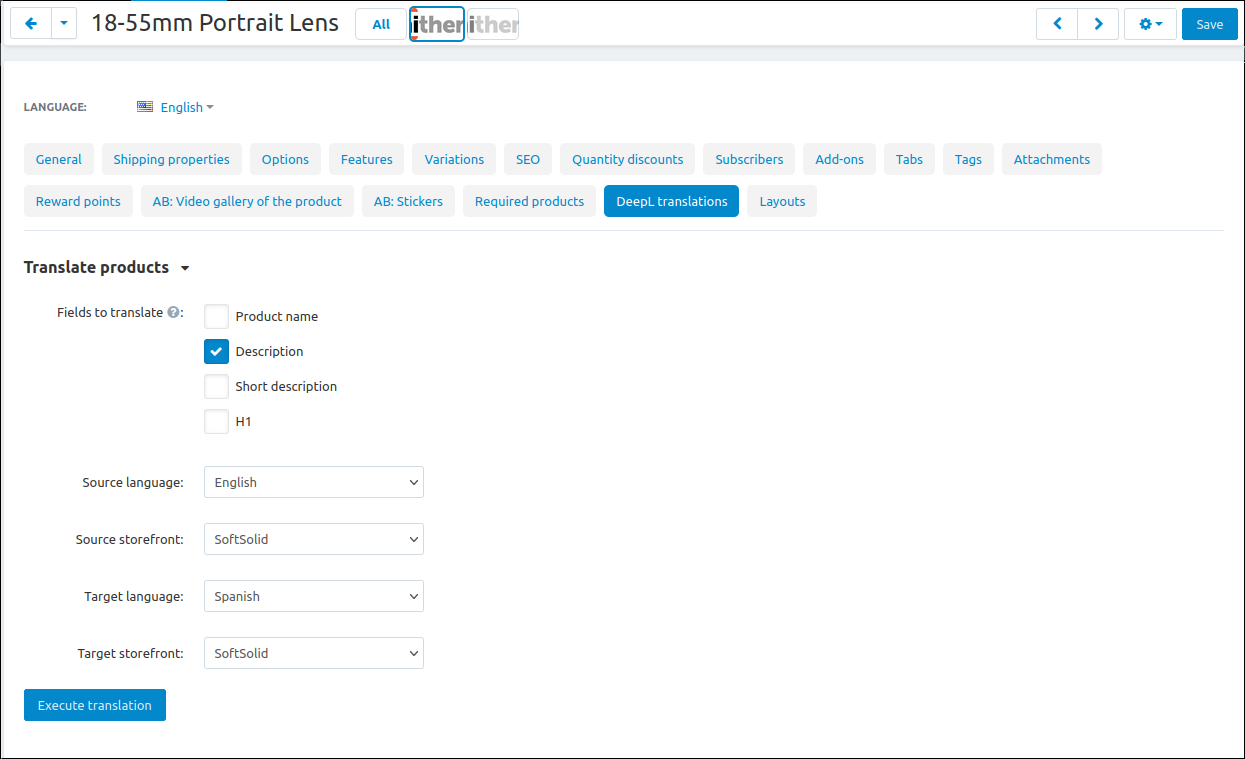
The bulk translation form lets you tick exactly the fields you want to translate and choose the source and target language. You translate only what you need and you do not spend the character limit on unnecessary content

Screenshot 7
When you fill in one missing field, you open the translation window right next to it, without leaving the editor. You choose the source language and one or more target languages, and the content is translated in a few seconds

Screenshot 8
In the automatic mode the changed content lands in a queue, and a CRON job processes it in batches. The queue panel shows what is waiting, what succeeded and what failed along with the reason, with filters by type and status

Screenshot 9
The character counter pulls the number of used characters and the limit from your DeepL account, so you can plan larger operations ahead of time and avoid an unexpected package exhaustion during translation

Screenshot 10
The result shows where it matters most, on the storefront. The product page displays a description translated by DeepL in the customer's language, ready to sell on the next market

Screenshot 11
The DeepL integration takes the most tedious part of multilingual work off your team and keeps content consistent across languages, because it all comes from a single source. In Multi-Vendor each seller can use their own key and their own settings, and in the Ultimate edition translation also covers the split across storefronts.
How to Start
- Install the add-on in Add-ons and open its settings. Installation creates the translation queue table and adds the required permissions.
- Paste your DeepL API key in the General section and save. The add-on recognises the Free or Pro plan from the key itself, and the Characters counter section confirms that the key works and shows your limit.
- Mark one language as the DeepL base language in Settings → Texts and languages → Languages. Every other active language becomes a target.
- In the Default values section tick the fields and languages that translation forms should open with.
- Translate a single field from the editor or a selection from an admin list. For the automatic mode, switch it on, choose the trigger fields and paste one of the ready CRON lines from the settings into the server schedule.
What's New in Version 1.1.4.4
- A counter of the characters DeepL actually bills for, with the cost of the current billing period and, next to it, the usage reported for your whole DeepL account.
- A monthly character limit. Once it is passed, the scheduled job stops sending anything to DeepL and the items wait in the queue instead of failing. On Multi-Vendor the limit is counted per vendor.
- Protection of proper names: brand and model names listed in the settings, or taken from a product feature, are left untranslated, so "Jaguar" stays "Jaguar".
- Products can be added to the translation queue straight from the product list, the selected ones or everything a search filter finds, with a choice of target languages and a character estimate before you confirm.
- The scheduled job sends up to 50 texts to DeepL in one request. On a test catalogue of 100 thousand products this raised throughput about tenfold.
- Fixed newly created products, categories and pages not being translated automatically. They are now queued right after they are saved, including products created through the REST API.
Requirements
- CS-Cart (including Store Builder / Ultimate) or Multi-Vendor 4.x.
- PHP compatible with the requirements of CS-Cart 4.x (a 7.x or newer server environment).
- An active DeepL account with an API key, on either the free or a paid plan. Style rules require a paid DeepL plan.
- At least two active store languages: one base and at least one target.
- Access to the server CRON schedule, if you use automatic translation.
- Optional: the Cart-Power Power Blog add-on, if you want blog articles translated as well.
FAQ
Do I need a paid DeepL account?
No. The add-on works with your own DeepL API key on either the free or a paid plan, and it recognises the plan from the key. Translation uses the character allowance of your DeepL account, and the style rules setting requires a paid plan.
Does it work with Multi-Vendor?
Yes. Each vendor has a DeepL section in the company profile with their own API key, auto-translation mode, fields and languages. A vendor without their own key uses the key from the main configuration, and access depends on the vendor plan, a flag in the company profile and group permissions.
Does it translate automatically?
Yes, in the automatic mode. Products, categories and pages saved in the base language, new ones included, go to a queue that a CRON job processes in batches. Other object types, such as promotions, features, options, blocks and menus, are translated manually or in bulk from their lists.
Which languages can I translate into?
The languages supported by DeepL, over a hundred target languages at the time the documentation was prepared. Coverage depends on the chosen model type, and a store language that is not on the DeepL list is not translated.
How do I keep the DeepL cost under control?
The translation cache serves repeated texts from the database without calling DeepL, a monthly character limit holds the scheduled job back, and bulk screens show the number of characters and the estimated cost before a run starts. The "Keep existing translations" option skips fields that already have their own text, so manual corrections are neither overwritten nor paid for again.
Can I translate a large catalogue for the first time?
Yes, through the queue. On the product list choose "Add all found to translation queue" or "Add selected to translation queue", pick the target languages and confirm. One run adds up to 100 000 products, repeating the action continues from where it stopped, and the CRON job translates them in batches.
Documentation and Support
Questions about the add-on, its configuration or your store? Write to us at office@cs-cart.com.pl or visit cs-cart.pl.
Feel free to contact us and purchase the add-on!
- Store Builder
- Store Builder Plus
- Store Builder Ultimate
- Multi-Vendor
- Multi-Vendor Plus
- Multi-Vendor Ultimate
- 4.21.1
- 4.20.1
- 4.19.1.SP2
- 4.19.1.SP1
- 4.19.1
- 4.18.4
- English
- Български
- Dansk
- Deutsch
- Ελληνικά
- Español
- Français
- Georgian
- Italiano
- Nederlands
- Norsk
- Polska
- Română
- Украинский
- Русский
- Slovenščina
- 中文
Contact information

SoftSolid has been an official CS-Cart developer since February 2010. We build add-ons that a store owner can set up without calling a developer: clear settings, sensible defaults and documentation. Every add-on is kept compatible with new CS-Cart releases.
2010 official CS-Cart developer since | 160+ add-ons in this marketplace |
5.0 average rating from 90+ reviews | 29 add-ons also on a low monthly subscription |
What we do for CS-Cart and Multi-Vendor stores
Beyond ready add-ons, we take on almost any development work for CS-Cart, Store Builder and Multi-Vendor:
Custom add-on development New features for your store built as separate, update-safe add-ons, from a small admin tool to a complete module. | |
Changes to existing functionality Checkout, product pages, promotions, orders, admin panel and vendor panel adjusted to the way your business works. | |
Integrations ERP and accounting systems, marketplaces and order management, couriers and parcel lockers, payment gateways, and any service with an API or data feed. | |
Multi-Vendor marketplaces Vendor plans, commissions, payouts, vendor permissions and tools that make running a marketplace easier. | |
Upgrades and migrations CS-Cart and Multi-Vendor upgrades to new versions, moving data from other platforms, imports and exports. | |
Performance and security Store audits, finding and removing malicious code, speed and server configuration. | |
AI and automation AI chat assistants trained on your store content, automatic translations and automation of repetitive work. | |
Support and maintenance Ongoing care of your store, fixes and keeping custom code compatible with new CS-Cart releases. | |
Turnkey stores A complete CS-Cart or Multi-Vendor store set up on a ready theme: configuration, add-ons, integrations, data import and launch. | |
Mobile applications Mobile apps for your store or marketplace, connected to your CS-Cart data. |
Our flagship add-ons
![]() | Base.com (BaseLinker) integration Exchange orders and products between your store and Base.com, and sell on marketplaces from one place. |
![]() | DeepL translations Translate products, categories, pages and menus into every language of your store: one click, in bulk or automatically. |
![]() | AI Agent / Chat Bot (RAG) An AI assistant that answers your customers using the real content of your store. |
![]() | Promotions for vendors Promotions with vendor conditions on Multi-Vendor, and vendors can create promotions of their own. |
Why merchants choose us
- Direct contact with the developer team, no ticket queue
- Add-ons for integrations, shipping, payments, ERP, AI and Multi-Vendor vendor tools
- One team for ready add-ons and custom work, since 2010
- Buy for $200 or more from our offer and get a 20% discount
Tell us what your store needs to do. We will point you to the add-on that already does it, or build a solution for your case.
Similar products
- Phone number verification.
- Standardization of the entered phone number.
Separate setting for each storefront and vendor.


