Additional Category Links

Shows links above and below the products of a category that take the shopper further: brands with the filter already applied, neighbouring sections, best sellers, store pages and external sites. Buttons, buttons with an image or tiles, display in subcategories, a filter preset made by pasting a page address.
Last update: 12.10.2026 Supports current CS-Cart version
cp-addon-2393
Select the CS-Cart edition on which you will use the add-on.
The update period determines the period of time when you can get access to the new versions of this add-on compatible with the new versions of CS-Cart software released during the chosen period.
To instal the add-on, we will need the FTP access to your server. Please send it along with the order number to sales@cart-power.com once the order is paid.
Take shoppers further from a category: brands with a filter, nearby sections and best sellers
Additional Category Links
$90.00

Links that take the shopper further from a category

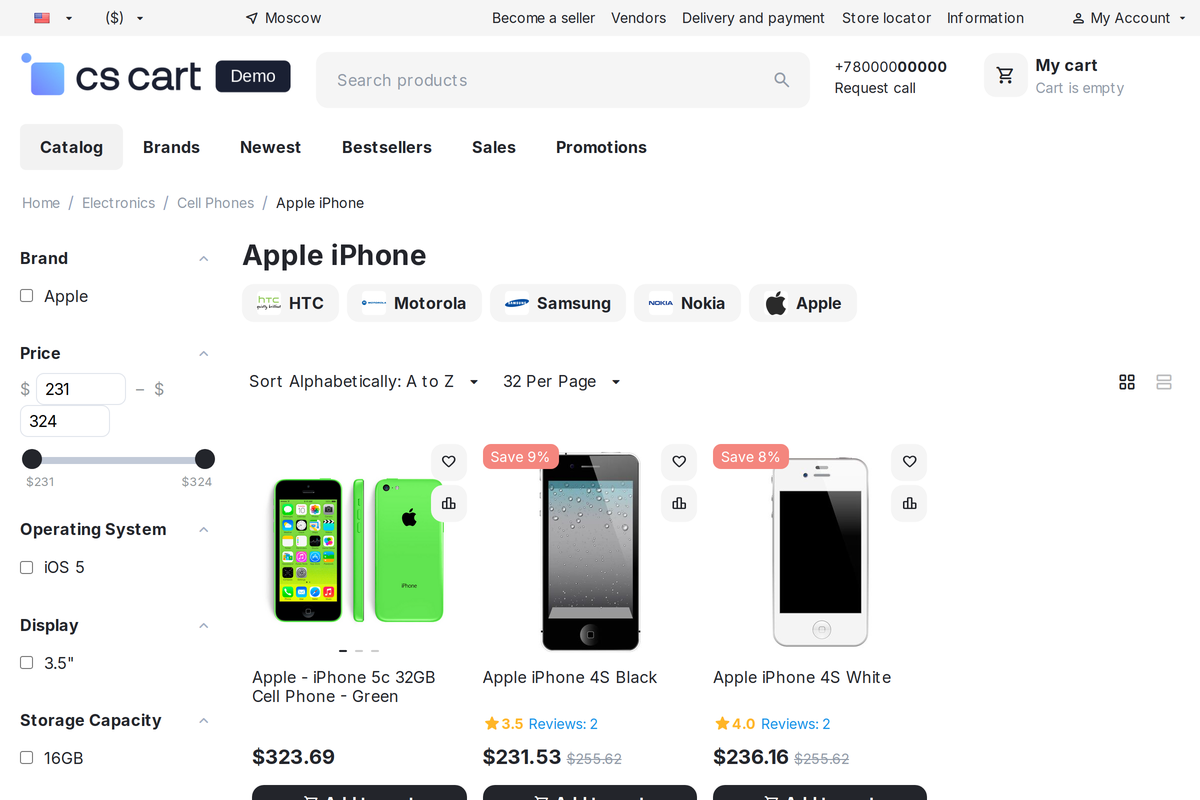
A shopper opens "Cell Phones" and sees hundreds of products in a row. The add-on puts buttons above them - "Samsung", "Apple", "Xiaomi" - that open the category with the brand already selected, and below the products it shows tiles of nearby sections, a best seller and useful store pages. A link is created once and, with a tick, appears in every subcategory.

Five link types
own URL, category, product, page, filter preset
Preset by pasting a URL
the add-on decodes the selected filters itself
Three block views
buttons, buttons with an image, tiles - per storefront
CS-Cart 4.17.1+
all editions; tested on 4.21.1 Ultimate and Multi-Vendor

Why a store needs it

A stock CS-Cart category page is subcategories and a list of products. To pick a brand the shopper hunts for it in the filters; to move to a nearby section they go back to the menu. Every extra step is a reason to leave.

The add-on gives short paths right above and below the products: ready selections by filters, nearby sections, best sellers, delivery and service pages. It is internal linking as well: category pages link to selections and to each other with plain links.

A selection in one click

The "Samsung" button opens the category with the brand selected - no digging in filters.

Once for the whole branch

A link created on "Cell Phones" is shown in all of its subcategories too.

Images without empty frames

No own image - the product photo or brand logo is used, otherwise an icon by link type.

Internal linking

Categories link to selections and nearby sections; external links get nofollow.

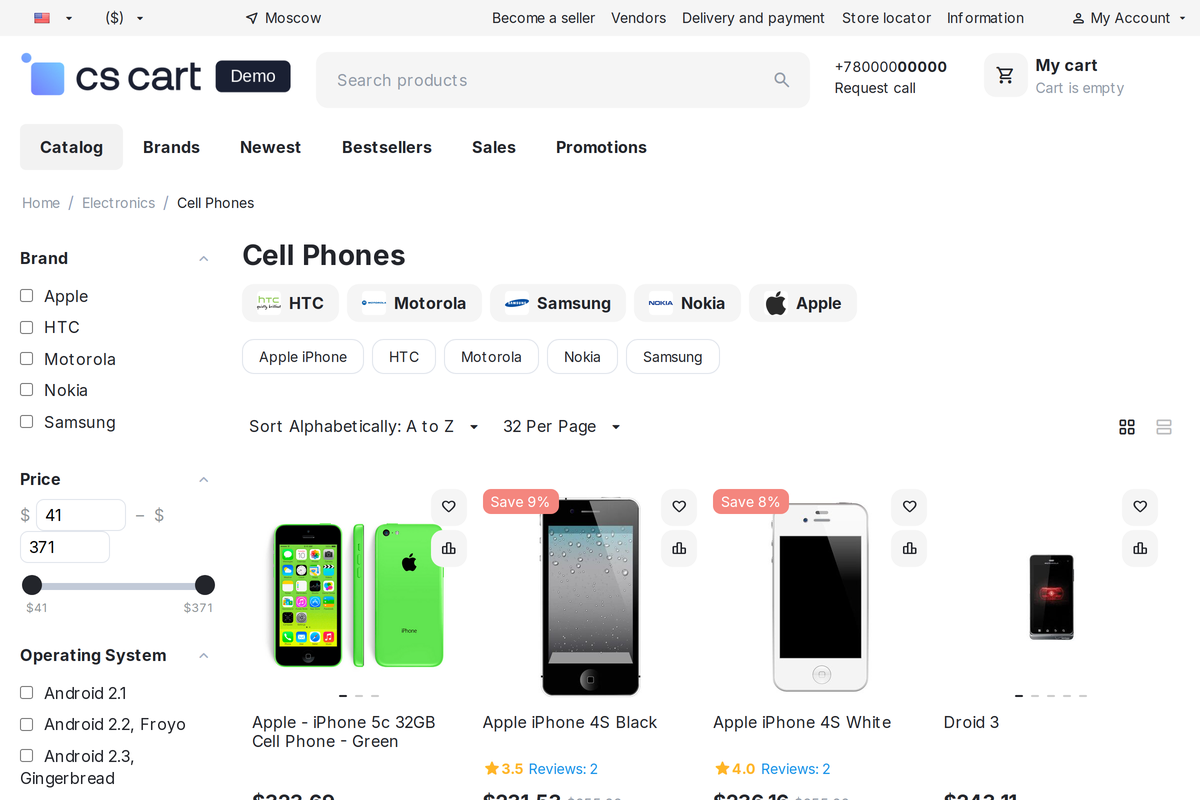
Above the products of a category - buttons with brand logos: each one opens the same category with the brand selected.

Filter presets

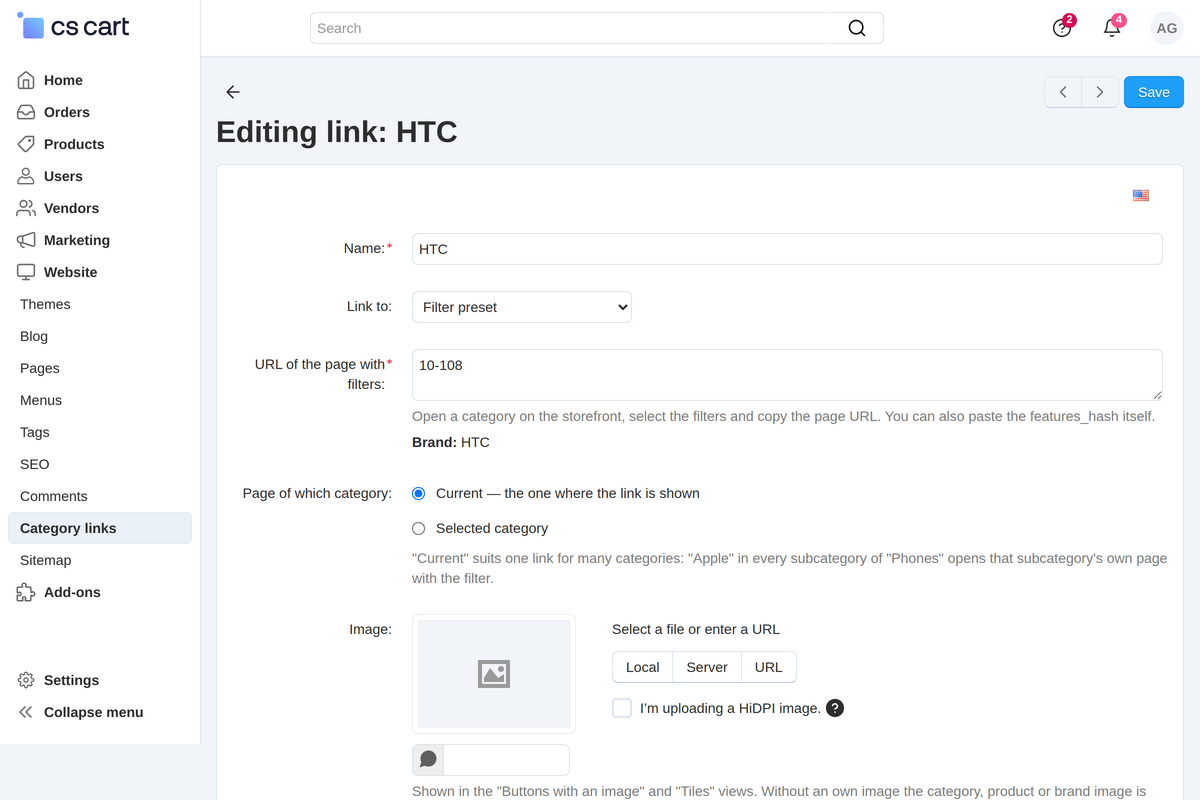
The main new feature of version 4.0. A preset is a link to a category page with filters already selected: "Apple", "under $400", "in stock". The administrator picks the filters on the storefront, copies the page address and pastes it into the form - a decoding such as "Brand: Apple" appears under the field, so it is clear what will be saved.
  • •  Current category. One "Apple" link on "Cell Phones" shown in subcategories opens, in each subcategory, its own page with the filter.
  • •  Chosen category. The link always leads to the same filtered page.
  • •  Brand logo. A preset with a single brand gets the brand logo as its button image.
The preset form: the field holds the filters of a storefront page, decoded below as "Brand: HTC"; the link opens the current category.
A subcategory: the same brand buttons, but each leads to its own filtered page.

Buttons, images and tiles

  • •  Three block views: buttons, buttons with an image, tiles with an image. The top and bottom blocks are set separately, per storefront.
  • •  Link image: its own if uploaded; otherwise the category image or product photo, and for a brand preset - the logo.
  • •  A clear placeholder: no image at all or the file is missing on disk - an icon by link type is shown: folder, box, document, funnel, globe. The icon takes the theme text colour.
  • •  "Show all". The block collapses to the set number of rows, on phones as well.
  • •  Themes: Responsive and themes based on it; UniTheme2 has templates of its own, YOUPI uses the Responsive ones.
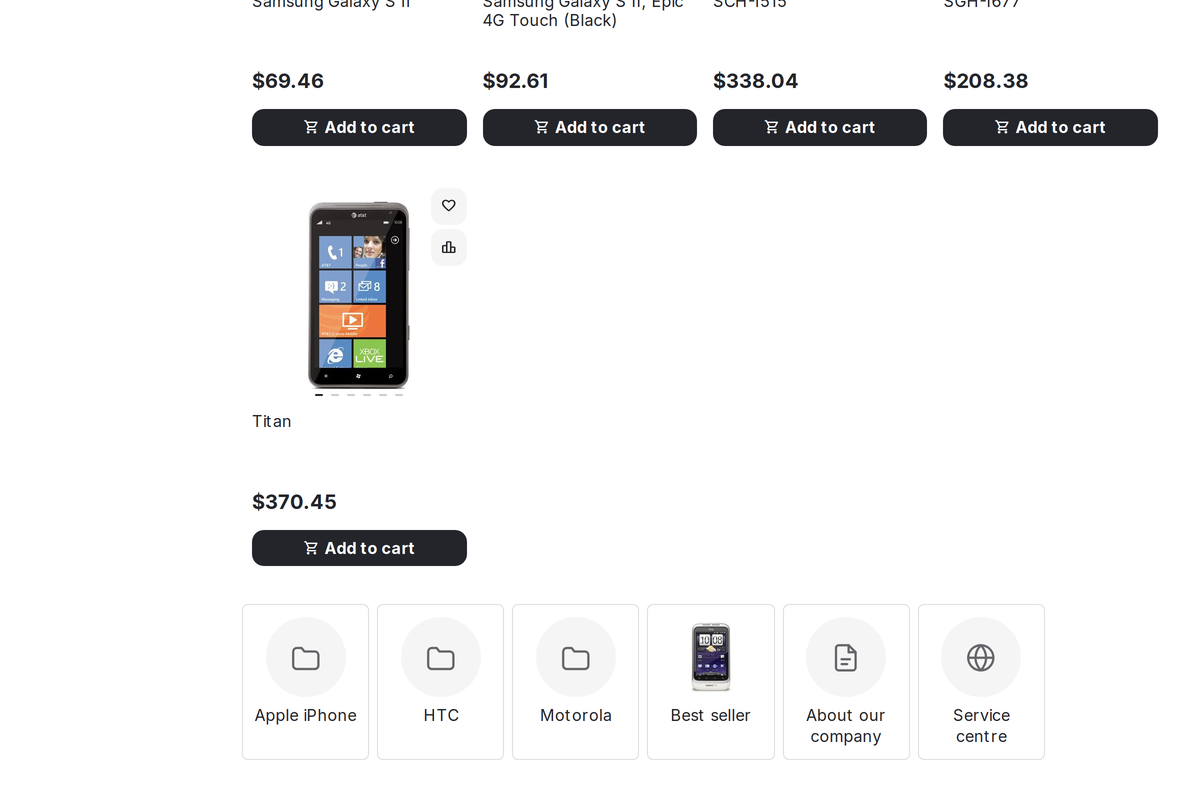
Tiles below the products: a product photo for "Best seller", icons for categories, a page and an external service.

Where links appear

  • •  Categories. A link is attached to any number of categories, and with the "Show in subcategories" tick it appears in all of their subcategories.
  • •  Above and below the products. Each link goes to the top block, the bottom block or both.
  • •  Live objects only. A link to a disabled category, product or page, or one hidden from the customer group, is not shown; a deleted object disables the link.
  • •  The URL is built on the fly for the language and storefront, so a new SEO name does not break the link.
  • •  When filters are selected the blocks can hide so they do not get in the way.
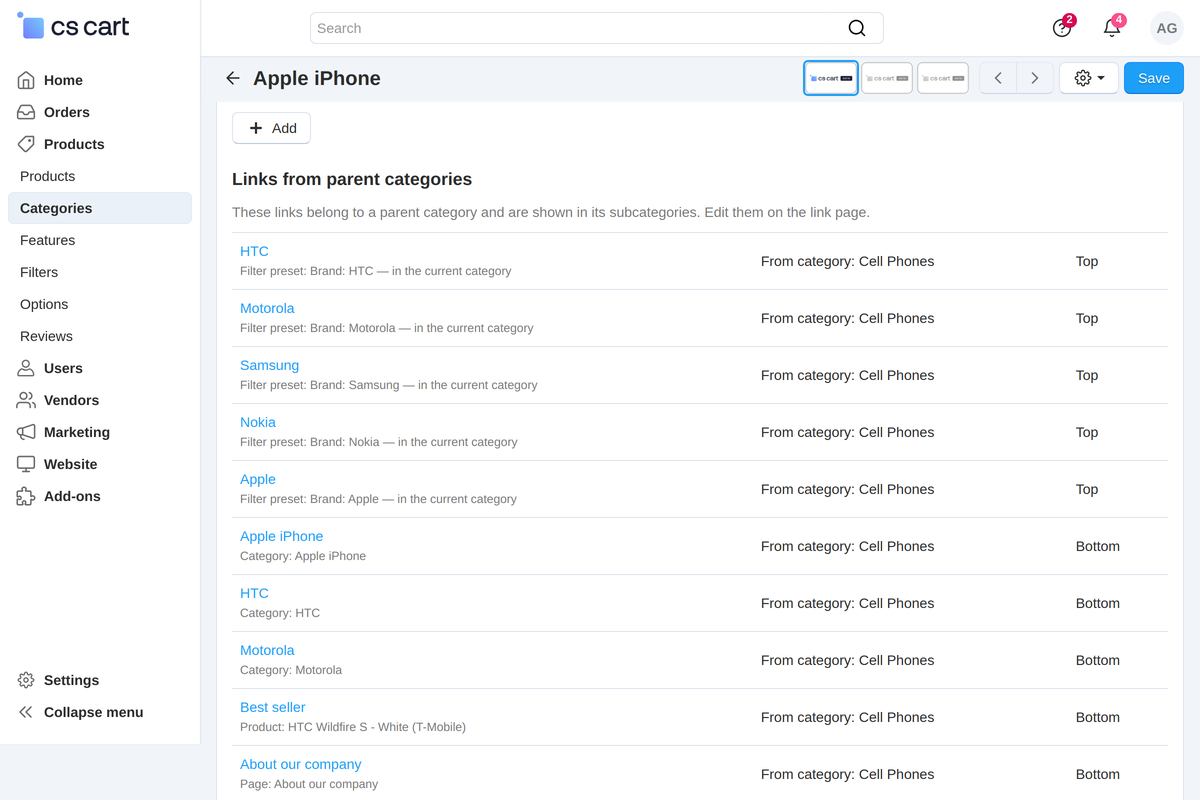
The "Category links" tab of a subcategory: links inherited from "Cell Phones" and the "Add" button for its own ones.

Working in the admin panel

  • •  "Website - Category links" section. Each link shows where it leads, which categories it is in and which block; positions are changed right in the list.
  • •  A tab in the category card. A new link is created in a popup without leaving the page and is attached to the category at once.
  • •  Own URL - an external site, a store path or a dispatch. A path without a leading slash is fixed, and javascript: addresses are not saved.
  • •  nofollow and a new tab - ticks on every link; "Check duplicates" lists links with the same address.
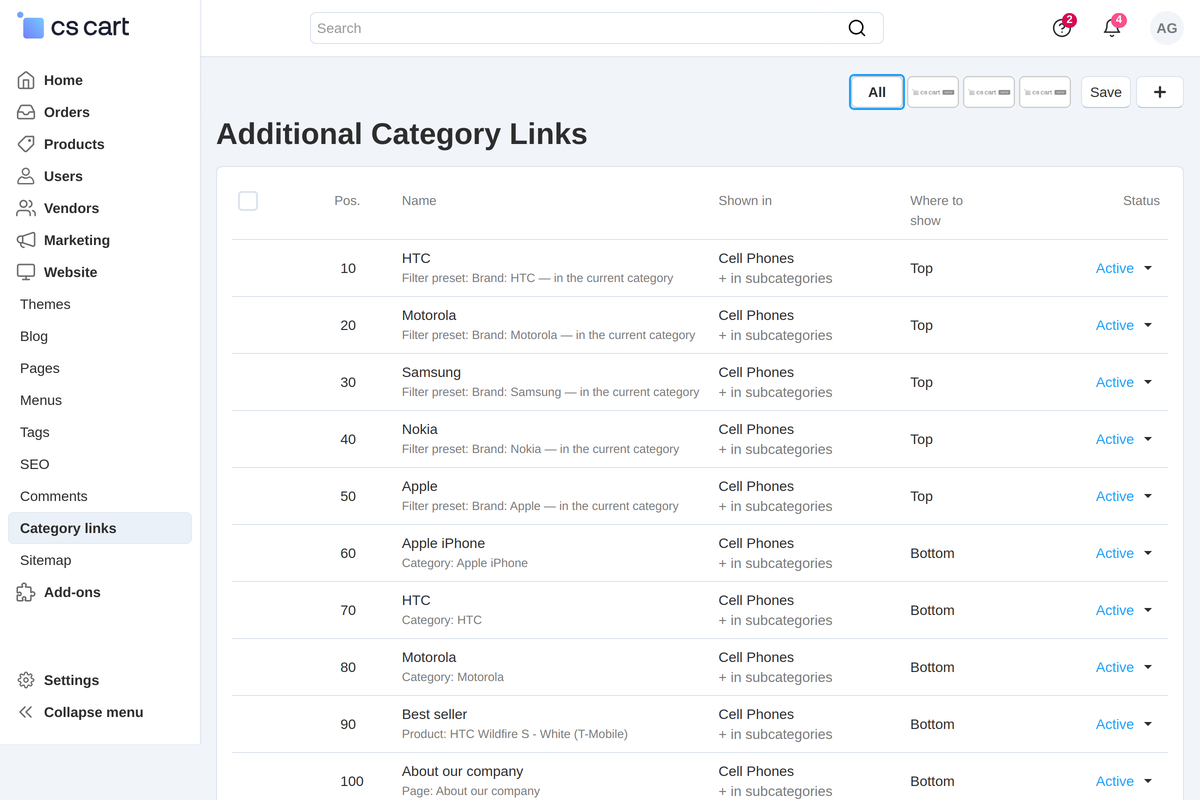
The list of links: under the name - where the link leads, on the right - categories, block and status.
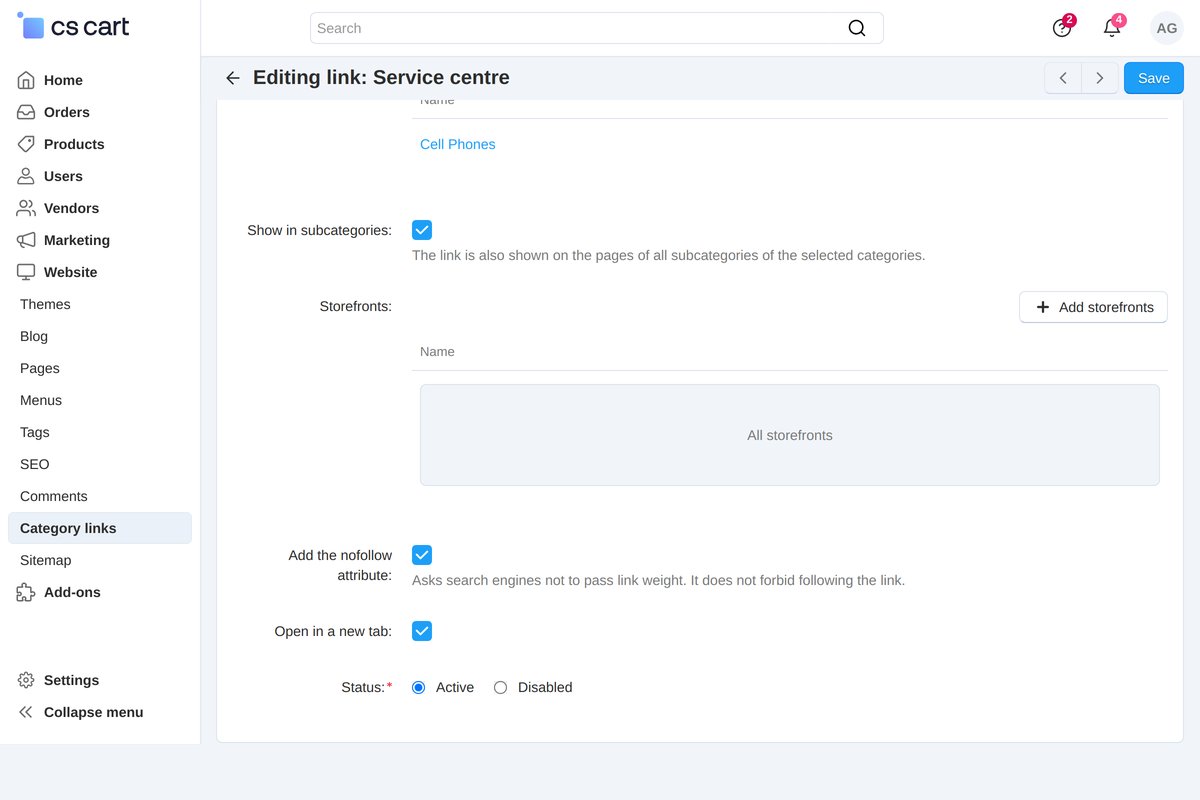
The external link "Service centre": display in subcategories, storefronts, nofollow and a new tab - all set with ticks.

Storefronts, permissions, import and export

  • •  Ultimate. Each storefront has its own links: its admin panel shows only its links, and they attach only to its categories.
  • •  Multi-Vendor. Storefronts are chosen per link; vendors have no access - the links belong to the whole marketplace.
  • •  Administrator permissions. "View" and "Manage category links" privileges.
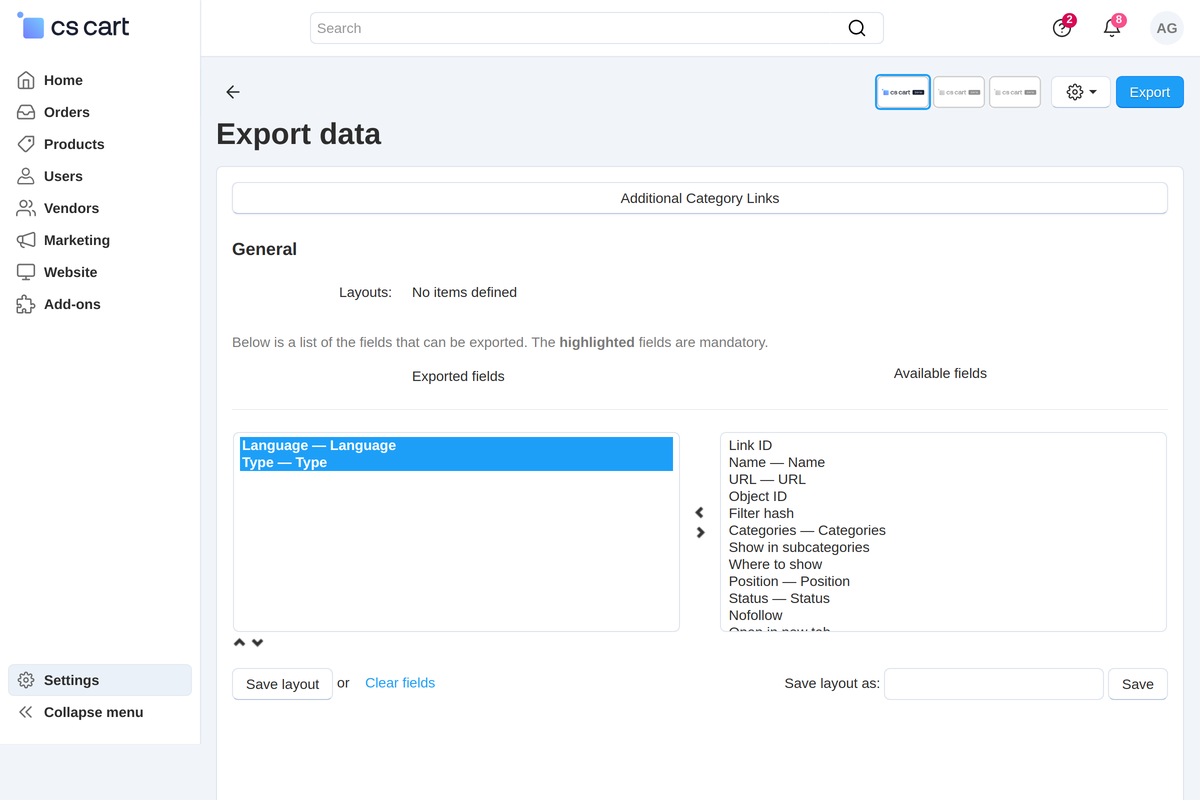
  • •  Import and export. A section of its own: export by language, new links as rows without an ID, rows checked the same way as in the form.
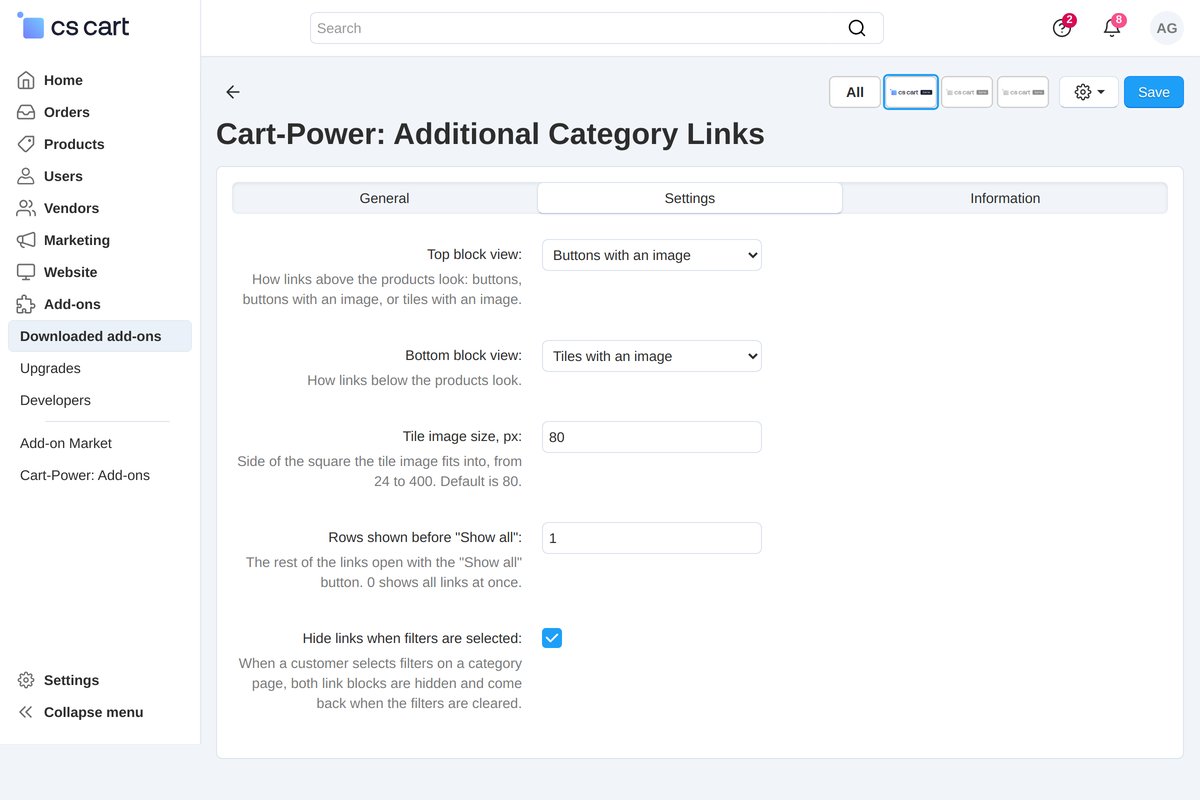
Storefront settings: buttons with an image on top, tiles below, one row before "Show all".
Link export: a section of its own with every link field.

What is new in version 4.0

  • •  Five link types: own URL, category, product, page and filter preset.
  • •  A filter preset made by pasting a storefront page address, with decoding and a choice of category.
  • •  Link images and three block views are back; a placeholder icon by link type.
  • •  Display in subcategories and a links tab in the category card.
  • •  Own links per Ultimate storefront, storefronts per link in Multi-Vendor; vendors have no access.
  • •  Import and export of links, separate administrator permissions.
  • •  Fixed: error 500 on category pages after updating 2.0 to 3.0, "new tab" on every link, links from other categories, broken order when products are sorted.
  • •  Links, names and images of 2.0 and 3.0 carry over on update by themselves.

Frequently asked questions

Are links kept when updating from 2.0 or 3.0?

Yes. Links, names, categories and images carry over, and the database is brought to 4.0 by itself - on update through the "Add-ons Manager" or on the first admin panel visit after replacing files by hand.

How do I make a link to a brand with the filter selected?

Pick the brand in the category filter on the storefront, copy the page address and paste it into a "Filter preset" link. A decoding "Brand: ..." appears under the field.

Do I need a separate link for every subcategory?

No. Attach the link to the parent category and tick "Show in subcategories". A preset with the current category opens its own page in each subcategory.

What does the shopper see if a link has no image?

The product photo, category image or brand logo, and if there is none - an icon by link type. There are no empty frames.

Will the add-on fit my theme?

The blocks are tested on Responsive; themes based on it and YOUPI use the same templates, and UniTheme2 has templates of its own in the add-on. Icons take the theme text colour.

Can a Multi-Vendor vendor change the links?

No. The links belong to the whole marketplace, and the section and tab are closed to vendors.

See the add-on on the demo store. The home page links to the "Cell Phones" branch: brand buttons on top, tiles below, the same presets in a subcategory and the preset form in the admin panel.
Product
  • Store Builder
  • Store Builder Plus
  • Store Builder Ultimate
  • Multi-Vendor
  • Multi-Vendor Plus
  • Multi-Vendor Ultimate
Compatible versions
  • 4.21.1
  • 4.20.1
  • 4.19.1.SP2
  • 4.19.1.SP1
  • 4.19.1
  • 4.18.4
  • 4.18.3
  • 4.18.2.SP1
  • 4.18.2
  • 4.18.1.SP1
  • 4.18.1
  • 4.17.2.SP3
  • 4.17.2.SP2
  • 4.17.2.SP1
  • 4.17.2
  • 4.17.1
Localizations
  • English
  • Русский

No reviews found

  CS-Cart development · in-house team · since 2013 We build, upgrade and

Contact information


CS-Cart development · in-house team · since 2013

We build, upgrade and speed up CS-Cart stores and marketplaces

Analysts, developers, designers, QA and support under one roof — no subcontractors. We ship add-ons you can buy on this page today, and we take on the work that no ready-made add-on covers.

2013

Working with
CS-Cart since

4.98

Rating from
184 reviews

200+

Solutions on this
marketplace

500+

E-commerce projects
delivered

Flagship products

Two add-ons that change how a store performs

Everything else we publish improves one screen. These two change the numbers: how customers find products, and how often they come back.


Add-on · Search & merchandising

Smart Search

Elasticsearch-powered search for large catalogues. The customer types two letters, sees products with images and prices, and buys from the dropdown — even after a typo or with the wrong keyboard layout.

Visitors who use the search bar are 24% of traffic and 44% of revenue, and convert about 2.5× better than people who only browse categories. If search returns nothing, up to 80% of them leave.
Constructor, Beyond Relevance Report 2025; Google Cloud × The Harris Poll, 2023

Catalogue size Sub-second results on 300,000+ products, Multi-Vendor included
Understands Typos, wrong keyboard layout, synonyms, word forms, SKUs, brands and attributes
Reporting Query analytics — what customers search for and which searches return nothing
Deployment Our cloud, or Elasticsearch on your own server

from $35/month

Plans by catalogue size · self-hosted from $1,215 one-time

Plans and details →

Try it on a live catalogue: open the demo store and search with a deliberate typo.


Add-on · Mobile commerce

PowerApp — mobile app for your store

A native iOS and Android app running on your CS-Cart data: the same products, prices, stock, promotions, reward points and orders. There is no second catalogue to maintain — everything stays in the admin panel you already use.

A mobile site brings a customer in once; an app brings them back for free. Push notifications replace the retargeting budget you spend to buy the same customer a second time.

Platforms Native iOS and Android, published under your own developer account
Home screen Built in the admin panel from six block types, the same way you build website pages
Time to launch Under a week from purchase to submission for App Store and Google Play review
Compatibility CS-Cart and Multi-Vendor 4.18–4.20 · 11 client apps already live in the stores

from $790

Buy outright, or $79/month on subscription

Open the add-on page →

Screens, block types and pricing tiers: see how the app is built.

Services

When no add-on solves it, we do the work

Fixed scope, written specification, a named project manager and a warranty on what we ship.

Custom CS-Cart development

Functionality the platform does not have: add-ons, marketplace mechanics, integrations with 1C, CRM, ERP, payment and delivery providers. We start from a written specification, not from an estimate on a phone call. Details →

CS-Cart upgrade

Move to the current version without losing data, custom code or add-ons. We audit every modification first, upgrade on a staging copy, adapt what breaks and switch over with little or no downtime. Details →

Speed and performance optimisation

Conversion falls by about 4.4% for every extra second of load time. We profile the server, the database and the front-end, then fix what actually costs the seconds — and show you the before-and-after numbers. Details →

Design for CS-Cart

Mobile-first storefront design built on CS-Cart's own template structure, so the layout survives the next platform upgrade instead of becoming a migration problem. Details →

SEO for CS-Cart

A technical audit of indexing, duplicates, redirects, structured data and Core Web Vitals — delivered as a prioritised fix list your developers can act on, or that we implement ourselves. Details →

How we work

What you get besides the code

Before we start

We discuss the goal, offer options and write the specification. You approve scope and price before development begins.

While we build

A named project manager reports progress on a fixed schedule. You always know what is in work and what is next.

Before release

A separate QA pass on every release — the developer who wrote the code is not the person who signs it off.

After handover

Documentation for everything we ship, plus a warranty on the modifications and the project.

Tell us what the store needs to do

Describe the task in a couple of sentences and we will come back with options, a scope and a price. The consultation is free, and we will say plainly if a ready-made add-on already solves it.

Write to us here

Use the Ask a question button at the top of this page — it reaches the same team.

Or reach us directly

sales@cart-power.com · cart-power.com
We work in English and Russian.

Client cases, our full add-on catalogue and 184 customer reviews are in the tabs above.

Similar products

Live search and Search history
5.0 (86)
$120.00
Live Search and Search History shows matching products, categories, brands and pages while the shopper types, with a category filter and typo suggestions in the same window. The admin gets four search history reports, synonyms, stop words, featured phrases and speed-up tools for large catalogs.
Live Search
4.9 (48)
$75.00
The customer types and immediately sees products with a photo, a price and an «Add to cart» button, next to categories, brands and store pages. The add-on understands synonyms, word forms and typos, searches by product code and features, puts your chosen products first for the queries that matter and shows what customers did not find. The word index keeps it fast on catalogs of hundreds of thousands of products. No subscription.
Full page CACHE addon for CS-CART + HTML minify
4.9 (42)
$85.00
$120.00
Save 29%
Full page CACHE + HTML minify stores finished storefront pages and serves them to the next visitors, so your server answers quickly at any traffic level. Pages refresh on their own when products, categories or pages change, and the cache can sit in gzipped files or Redis.
Mega Menu
5.0 (20)
$69.00
Adds new functionality in the standard menu. With display similar to Amazon.
One page checkout add-on
5.0 (11)
$80.00
Replace the multi-step CS-Cart checkout with a single page that you arrange yourself: one to four columns, blocks in any order, shipping and payment combined if you like. Control the email field and let returning guests sign in with a one-time code.
Power Blog
4.6 (22)
$90.00
A blog inside your CS-Cart store: five article types (text, gallery, video, event and a place on the map), categories, authors, tags, search and archive. Related products in an article and article blocks on product pages lead readers to a purchase; subscription and mailing of new articles work through Extended Email Marketing.