Product Statistics and Sales Funnel

Shows revenue and orders by period with the change against the period before, the "view → cart → order → payment" funnel for the store and for every product, order sources with UTM tags and the customer path on the order. Every figure can be verified: it opens the order list with exactly the same conditions.
Reviews: 4
Last update: 24.09.2026 Supports current CS-Cart version
cp-addon-609
Select the CS-Cart edition on which you will use the add-on.
The update period determines the period of time when you can get access to the new versions of this add-on compatible with the new versions of CS-Cart software released during the chosen period.
To instal the add-on, we will need the FTP access to your server. Please send it along with the order number to sales@cart-power.com once the order is paid.
Revenue by period, a funnel per product and the source of every order — inside the store
Product Statistics and Sales Funnel
$150.00

Product Statistics and Sales Funnel — your own analytics inside the store

Revenue and orders by period with the change against the period before, the "view → cart → order → payment" funnel for every product, order sources with UTM tags and the customer path right on the order. Everything is counted inside the store and opens in a fraction of a second.

Six periods at once
today, yesterday, 7, 30, 365 days and a custom one — with the change
A funnel per product
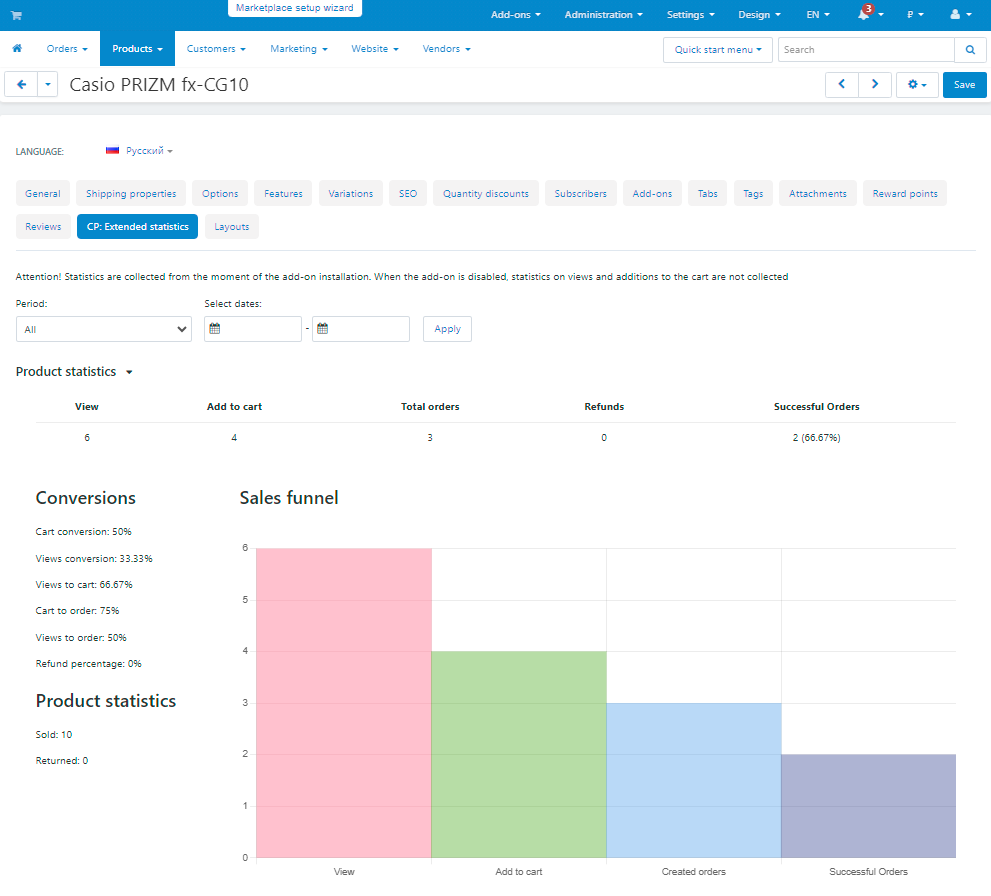
views, cart, order, payment and the conversion of every step
The source of every order
UTM tags, gclid and yclid, referrals, direct visits
CS-Cart 4.14.1+
and Multi-Vendor with vendor isolation

Why a store needs it

The built-in CS-Cart reports answer the question "how much did we sell". They do not answer "why did we not sell more": how many people viewed the product, how many added it to the cart and at which step they left. Web analytics knows that but does not tie it to the products and the orders of the store, and it has to be set up separately.

The sales are visible at once

Six figures and a chart on one screen, with the change against the same period before. It opens in a fraction of a second on any history.

You see where the customers drop off

A four-step funnel for the store and for every product, with the conversion of every step and the formula in a tooltip.

You see where an order came from

UTM tags, advertising identifiers, referrals and direct visits — with a breakdown by campaign.

You see what the customer did

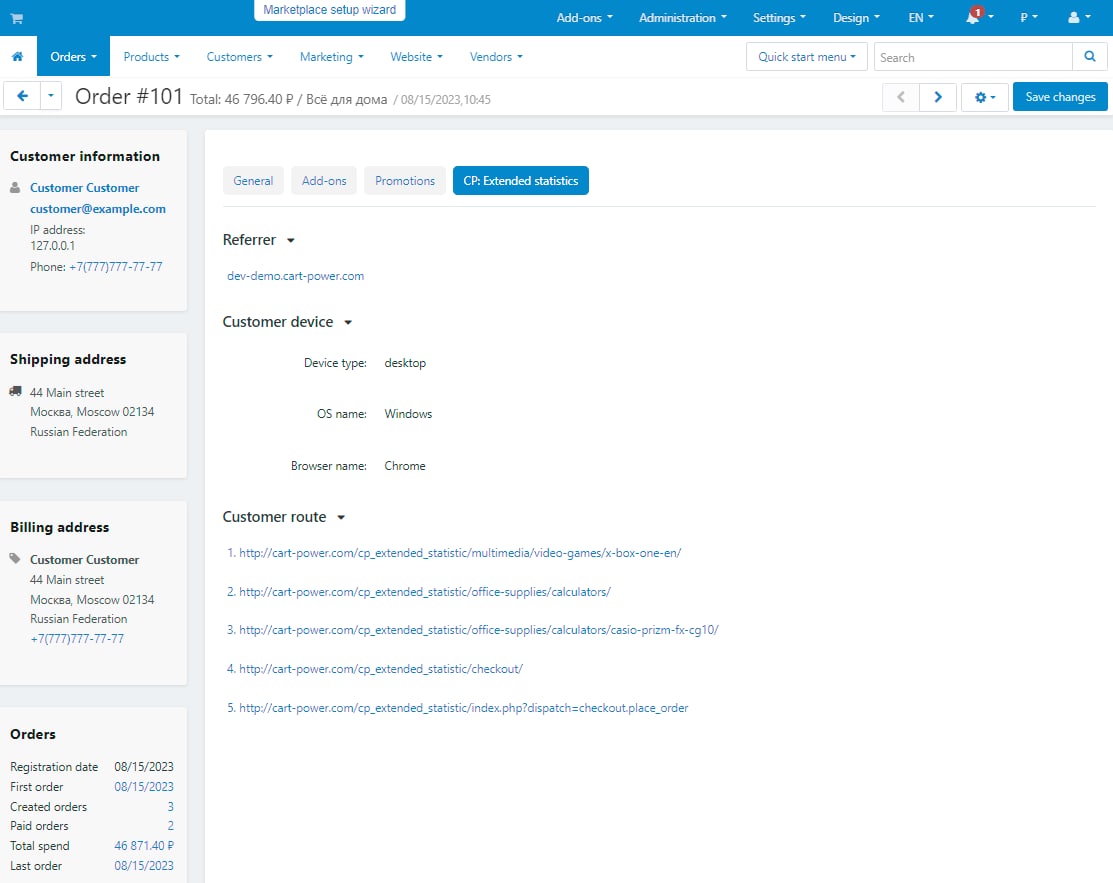
The pages before the order, the device and the purchase history — on the order itself.

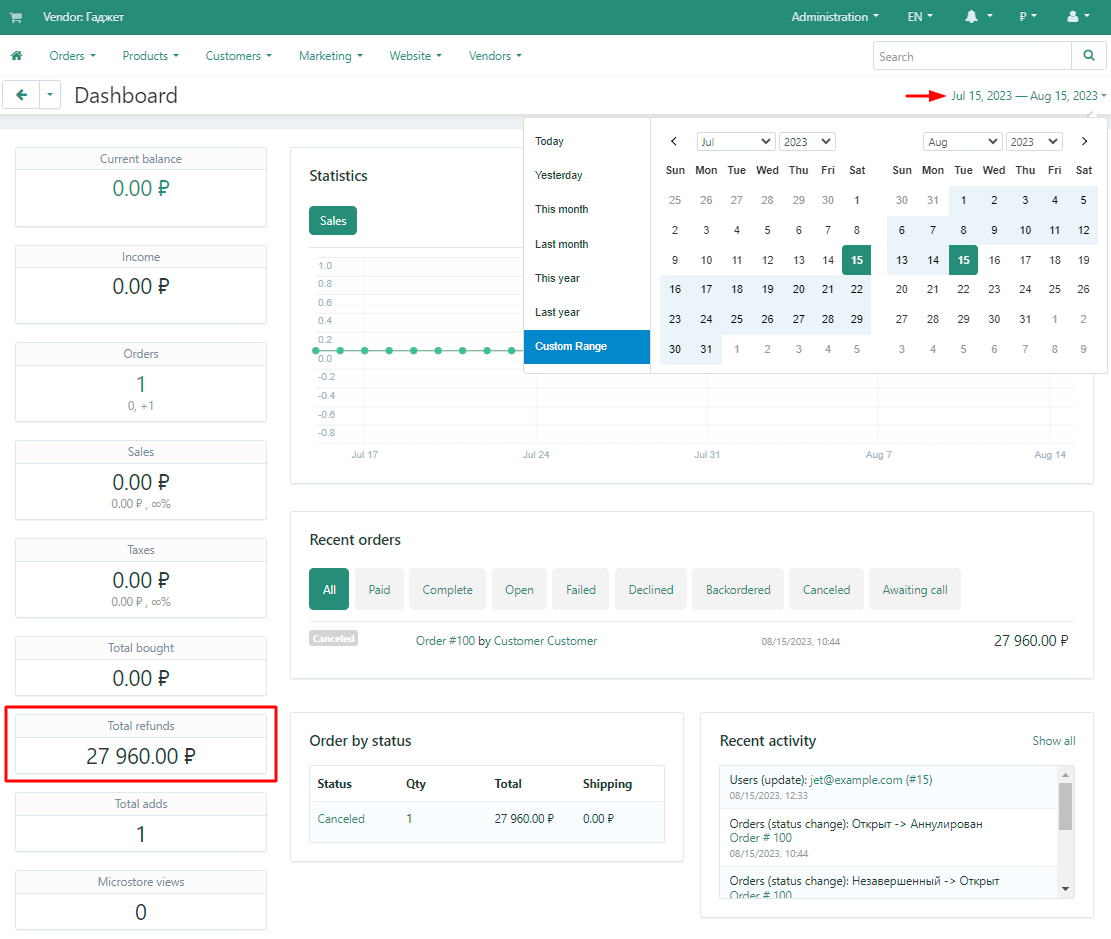
The Sales screen: six periods, a chart of orders and revenue, quick filters by vendor, payment method and storefront.

Every figure can be verified

A report you cannot trust is useless. That is why every figure has a way down to the raw data: the arrow on a card opens the order list with exactly the same conditions — the same period, the same statuses, the same vendor and the same storefront.

  • •  You choose what the total is — the full order value, products only or the value without shipping.
  • •  The statuses are set explicitly, and the line under the report always shows which of them are counted now.
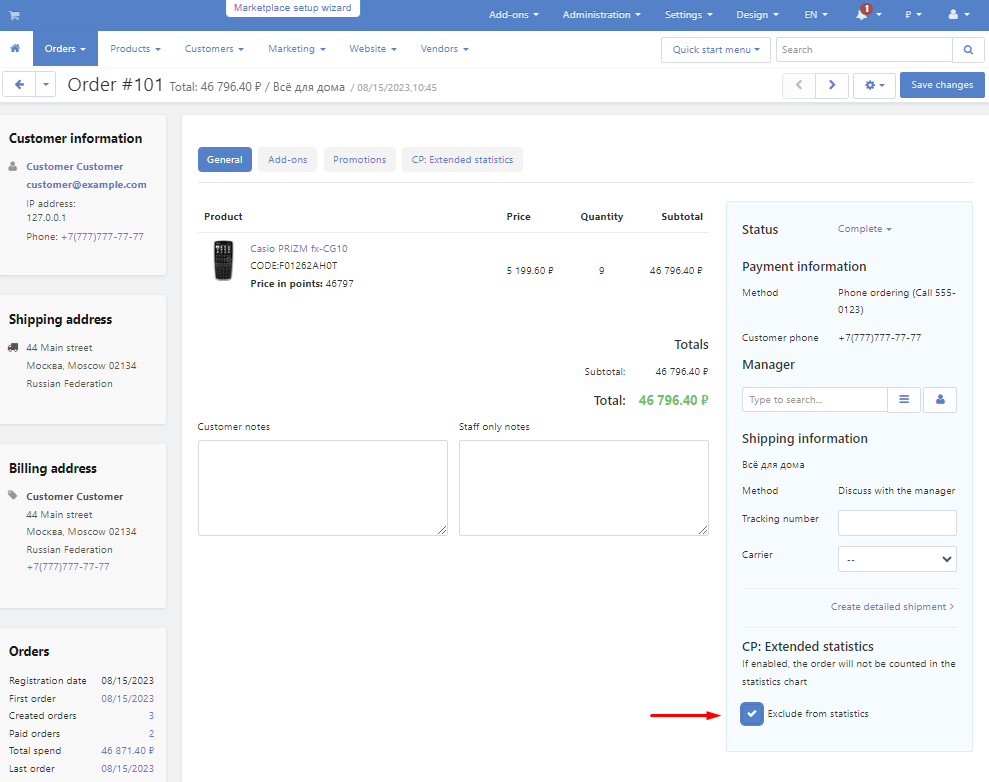
  • •  Internal orders are excluded — by a mark on the order, by payment method, by user group or by a minimum order total.
  • •  Bots do not enter the conversion: fifty masks and a counter of what was filtered out on the maintenance screen.

The funnel and the products

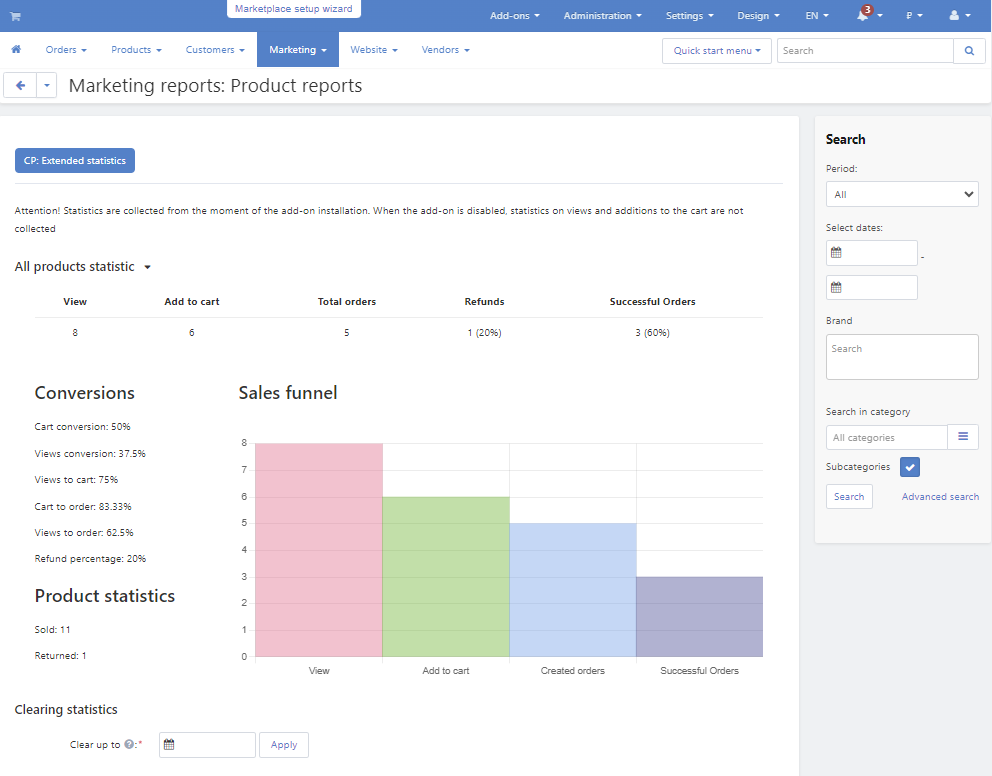
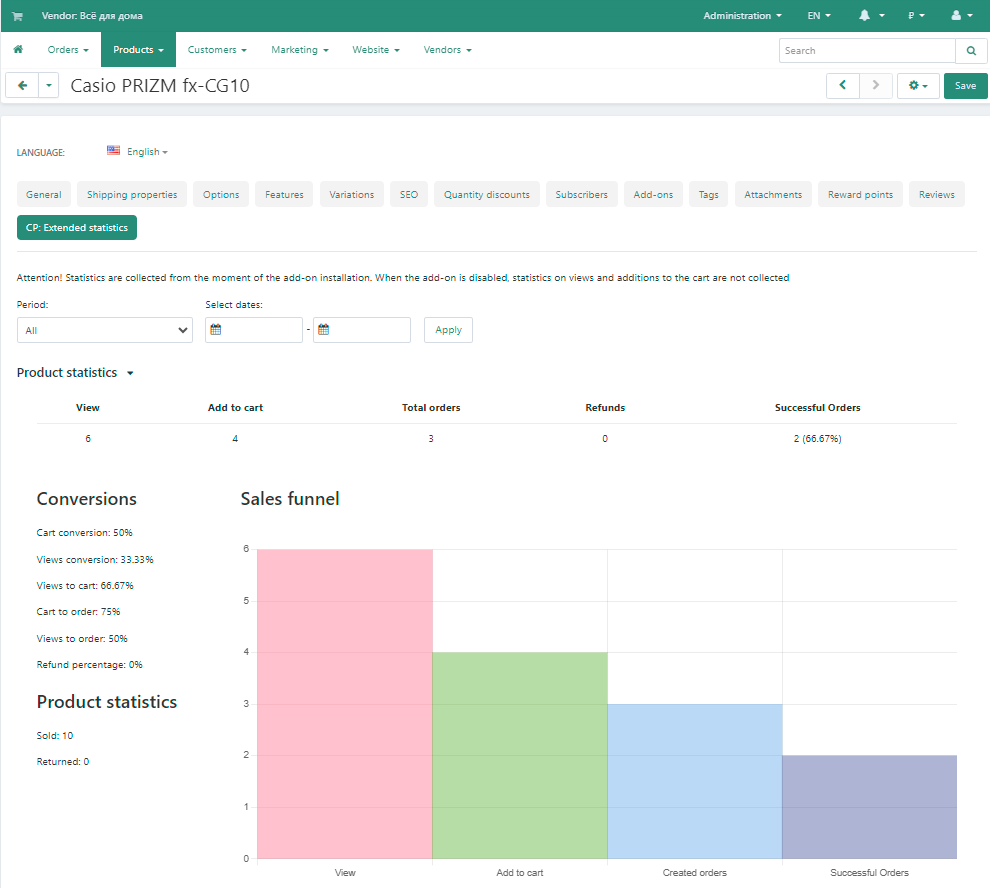
The Products screen answers what people buy and where they drop off. Four steps of the path with the conversion of every transition, in plain words. Below are the abandoned carts and the product table with sorting and filters by category, brand and storefront.

A showcase product is marked

A product that is viewed a lot and bought almost never often works as an entrance to the catalogue. The add-on marks such items so that their zero conversion is not taken for a problem.

The funnel: views, cart additions, orders and payments with the conversion of every step.
The product table: views, cart, ordered, paid, conversion and revenue for every item.

Order sources and the customer path

  • •  UTM tags with a breakdown by channel and campaign.
  • •  gclid, yclid and fbclid — the paid traffic is visible even when the tags are not set.
  • •  Referrals, direct visits, orders from the admin panel and the API — each in its own row instead of one "unknown" pile.
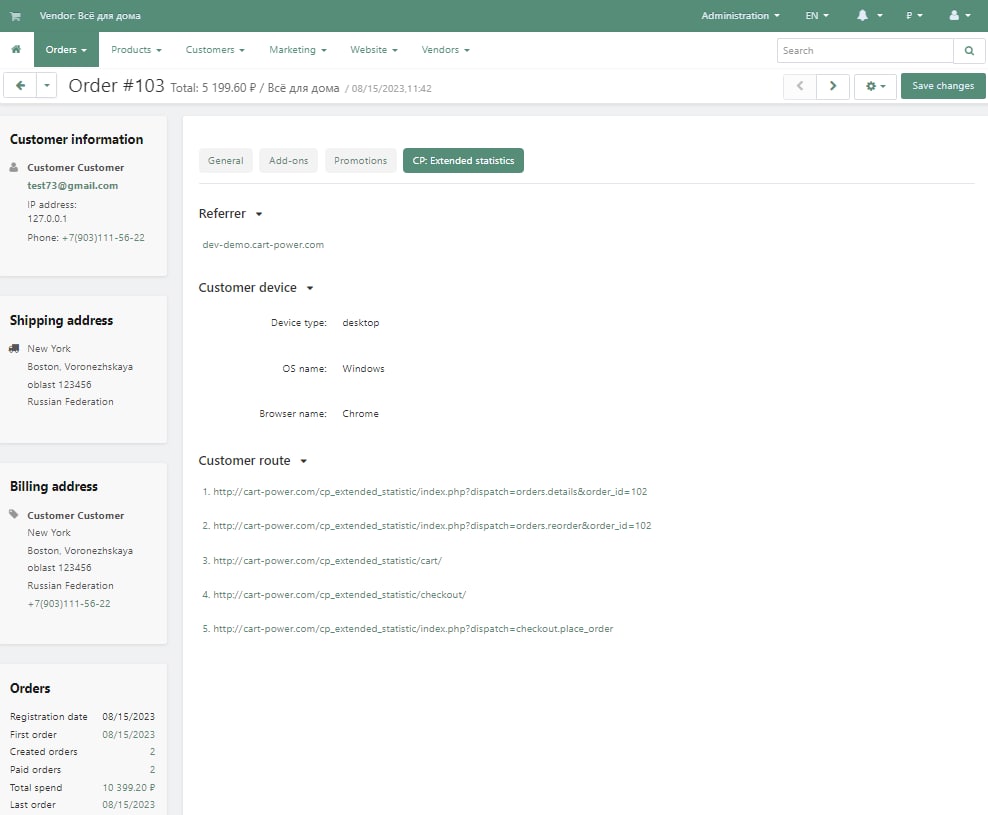
  • •  The customer path on the order: the pages before the order with the time of every step, the device and the browser.
Order sources: orders, revenue, average order value and share — with a breakdown by campaign.
The customer path on the order: the source, the device and the pages before the checkout.

Reports, comparison and the widget

A report is a saved set of conditions: which statuses to count, which vendors and which payment methods. Five ready reports come with the add-on, and your own takes two fields to create.

  • •  Up to four reports on one chart — every line with its own colour and dash.
  • •  Personal, vendor and shared reports — the visibility is chosen when the report is created.
  • •  A dashboard widget: the sales of the last 30 days as the first thing after signing in, enabled by a setting.
Comparing reports: all sales, paid and cancelled on one chart.
The dashboard widget: revenue, orders and a 30-day chart.

Multi-Vendor and permissions

  • •  A vendor sees only their own sales and their own products. Substituting a foreign identifier in the address changes nothing.
  • •  The order level is a setting: count the vendor orders or the parent orders of the marketplace.
  • •  Four permissions, and the destructive one — statistics maintenance — is disabled by default.
  • •  Storefronts as a dimension: on Ultimate and Multi-Vendor Plus the figures split by storefront on every screen of the add-on.

How to start

STEP 1
Install the add-on

Through "Cart-Power: Add-on manager" — the updates arrive the same way.

STEP 2
Build the summary

Once, on the Maintenance screen, with empty dates: the add-on counts the whole past order history.

STEP 3
Set up the schedule

The add-on prints three ready crontab lines right in the settings — copy them to the server.

STEP 4
Decide what a sale is

Statuses, payment methods, user groups and the minimum order total.

What to keep in mind

There is nowhere to take past views from: the collection of events starts at the installation. The sales figures still cover the whole history, because they are counted from the orders themselves.

Maintenance: the state of the collection, the index on the orders table, a rebuild for a period and the cleanup of old events.
Settings: the order total basis, the Multi-Vendor order level, the sections and the dashboard widget.

What is new in version 3.2

  • •  The Maintenance section needs a permission of its own, "Statistics maintenance".
  • •  The permissions of the add-on have readable names in user groups, in Russian and English.
  • •  Multi-Vendor vendors with the Vendor Privileges add-on see the statistics right away: their user groups get "View the statistics" and "Manage the statistics" on installation and on update. Groups where the permissions are already set up are left as they are.
  • •  The update from 3.0 through the Upgrade Center finishes the migration of settings and reports.

Frequently asked questions

How is this different from web analytics?

The data is collected inside the store and tied to particular products, orders and vendors: the funnel of an item is visible in the admin panel, without counters, goals and e-commerce setup. The add-on does not replace web analytics — it answers different questions.

Why do the figures differ from the Orders section?

Because the conditions differ: the add-on counts the statuses of the selected report, excludes the payment methods and the user groups from the settings and the orders marked "exclude from the statistics", and takes the total in the composition you chose. The arrow on a card opens the order list with exactly these conditions, so a discrepancy is visible at once.

Will it slow the storefront down?

No. It draws nothing on the storefront and only writes an event — a fraction of a millisecond per request. The reports are counted from a daily summary rather than from the raw events.

What happens to the statistics of the past years?

The sales figures are counted over the whole order history — they are taken from the orders. The views and the carts start piling up at the installation: there is nowhere to take them from retroactively.

Do the vendors of a marketplace see each other’s data?

No. A vendor has access only to their own orders and their own products, there is no "Vendor" filter for them, and substituting a foreign company identifier in the address changes nothing.

Is cron required?

It is recommended. Without cron the add-on fills in the missing days when a screen is opened — it works, but on the days with a backlog the screens open slower.

Try the add-on on the demo stand. The sales, the funnel, the sources and the customer path are filled with data: you see both the figures and the way they are counted.
Payment type
One-time payment
Product
  • Store Builder
  • Store Builder Plus
  • Store Builder Ultimate
  • Multi-Vendor
  • Multi-Vendor Plus
  • Multi-Vendor Ultimate
Compatible versions
  • 4.21.1
  • 4.20.1
  • 4.19.1.SP2
  • 4.19.1.SP1
  • 4.19.1
  • 4.18.4
  • 4.18.3
  • 4.18.2.SP1
  • 4.18.2
  • 4.18.1.SP1
  • 4.18.1
  • 4.17.2.SP3
  • 4.17.2.SP2
  • 4.17.2.SP1
  • 4.17.2
  • 4.17.1
  • 4.16.2
  • 4.16.1
  • 4.15.2
  • 4.15.1.SP4
  • 4.15.1.SP3
  • 4.15.1.SP2
  • 4.15.1.SP1
  • 4.15.1
  • 4.14.3.SP1
  • 4.14.3
  • 4.14.2.SP1
  • 4.14.2
  • 4.14.1.SP1
  • 4.14.1
Localizations
  • English
  • Български
  • Dansk
  • Deutsch
  • Ελληνικά
  • Español
  • Français
  • Italiano
  • Nederlands
  • Norsk
  • Polska
  • Română
  • Русский
  • Slovenščina
  • 中文
Chris
Comment
Save your money. Extremely buggy and inaccurate. Had to uninstall it because of all the errors.
Catalin
Comment
Working great. Fast and spoton support. All the statistics that you need in a single add-on
Shane Boswell
Comment
This power statistics ad-don is super buggy. We have had nothing but issues with it since it was first installed, requiring cart-power to have to fix, re-fix, fix again issues that shouldn't even be here. Disappointing for such a usually GREAT company.
Takis
Comment
Great addon. Is something that really missing from preinstalled add-ons of cs-cart.
  CS-Cart development · in-house team · since 2013 We build, upgrade and speed up

Contact information


CS-Cart development · in-house team · since 2013

We build, upgrade and speed up CS-Cart stores and marketplaces

Analysts, developers, designers, QA and support under one roof — no subcontractors. We ship add-ons you can buy on this page today, and we take on the work that no ready-made add-on covers.

2013

Working with
CS-Cart since

4.98

Rating from
184 reviews

200+

Solutions on this
marketplace

500+

E-commerce projects
delivered

Flagship products

Two add-ons that change how a store performs

Everything else we publish improves one screen. These two change the numbers: how customers find products, and how often they come back.


Add-on · Search & merchandising

Smart Search

Elasticsearch-powered search for large catalogues. The customer types two letters, sees products with images and prices, and buys from the dropdown — even after a typo or with the wrong keyboard layout.

Visitors who use the search bar are 24% of traffic and 44% of revenue, and convert about 2.5× better than people who only browse categories. If search returns nothing, up to 80% of them leave.
Constructor, Beyond Relevance Report 2025; Google Cloud × The Harris Poll, 2023

Catalogue size Sub-second results on 300,000+ products, Multi-Vendor included
Understands Typos, wrong keyboard layout, synonyms, word forms, SKUs, brands and attributes
Reporting Query analytics — what customers search for and which searches return nothing
Deployment Our cloud, or Elasticsearch on your own server

from $35/month

Plans by catalogue size · self-hosted from $1,215 one-time

Plans and details →

Try it on a live catalogue: open the demo store and search with a deliberate typo.


Add-on · Mobile commerce

PowerApp — mobile app for your store

A native iOS and Android app running on your CS-Cart data: the same products, prices, stock, promotions, reward points and orders. There is no second catalogue to maintain — everything stays in the admin panel you already use.

A mobile site brings a customer in once; an app brings them back for free. Push notifications replace the retargeting budget you spend to buy the same customer a second time.

Platforms Native iOS and Android, published under your own developer account
Home screen Built in the admin panel from six block types, the same way you build website pages
Time to launch Under a week from purchase to submission for App Store and Google Play review
Compatibility CS-Cart and Multi-Vendor 4.18–4.20 · 11 client apps already live in the stores

from $790

Buy outright, or $79/month on subscription

Open the add-on page →

Screens, block types and pricing tiers: see how the app is built.

Services

When no add-on solves it, we do the work

Fixed scope, written specification, a named project manager and a warranty on what we ship.

Custom CS-Cart development

Functionality the platform does not have: add-ons, marketplace mechanics, integrations with 1C, CRM, ERP, payment and delivery providers. We start from a written specification, not from an estimate on a phone call. Details →

CS-Cart upgrade

Move to the current version without losing data, custom code or add-ons. We audit every modification first, upgrade on a staging copy, adapt what breaks and switch over with little or no downtime. Details →

Speed and performance optimisation

Conversion falls by about 4.4% for every extra second of load time. We profile the server, the database and the front-end, then fix what actually costs the seconds — and show you the before-and-after numbers. Details →

Design for CS-Cart

Mobile-first storefront design built on CS-Cart's own template structure, so the layout survives the next platform upgrade instead of becoming a migration problem. Details →

SEO for CS-Cart

A technical audit of indexing, duplicates, redirects, structured data and Core Web Vitals — delivered as a prioritised fix list your developers can act on, or that we implement ourselves. Details →

How we work

What you get besides the code

Before we start

We discuss the goal, offer options and write the specification. You approve scope and price before development begins.

While we build

A named project manager reports progress on a fixed schedule. You always know what is in work and what is next.

Before release

A separate QA pass on every release — the developer who wrote the code is not the person who signs it off.

After handover

Documentation for everything we ship, plus a warranty on the modifications and the project.

Tell us what the store needs to do

Describe the task in a couple of sentences and we will come back with options, a scope and a price. The consultation is free, and we will say plainly if a ready-made add-on already solves it.

Write to us here

Use the Ask a question button at the top of this page — it reaches the same team.

Or reach us directly

sales@cart-power.com · cart-power.com
We work in English and Russian.

Client cases, our full add-on catalogue and 184 customer reviews are in the tabs above.

Similar products

Live search and Search history
5.0 (86)
$120.00
Fast and convenient smart search. Search history. Flexible search settings.
Live Search
4.9 (47)
$75.00
The customer types and immediately sees products with a photo, a price and an «Add to cart» button. The add-on understands synonyms, word forms and typos, searches by product code and features, shows what customers did not find and lets you add a synonym right from the report. The word index keeps it fast on catalogs of hundreds of thousands of products. No subscription.
One Step Checkout - Simple Layout
5.0 (20)
$119.00
The ultimate checkout experience
Integration with Base.com (baselinker)
5.0 (20)
$299.00
Manage catalogue, stock, prices and orders from your store and every marketplace in one place: BaseLinker pulls your products and orders and sends back stock, statuses and tracking numbers. For Store Builder and Multi-Vendor.
Make purchases for 200$ from our entire offer and get 20% discount
Wherefrom client + marketing report
5.0 (18)
$59.00
$89.00
Save 34%
This module can tell you order channel - paid channel, referall, search engine, social networks.
Mega Menu
5.0 (20)
$69.00
Adds new functionality in the standard menu. With display similar to Amazon.