
SEO Templates

Fills in the page title, meta description, keywords, H1, breadcrumb title and SEO name of products, categories, pages, brands and vendor stores from templates with placeholders. Selection conditions, preview, incremental scheduled generation and a run log.
Reviews: 2
Last update: 24.09.2026 Supports current CS-Cart version
cp-addon-2423
Select the CS-Cart edition on which you will use the add-on.
The update period determines the period of time when you can get access to the new versions of this add-on compatible with the new versions of CS-Cart software released during the chosen period.
To instal the add-on, we will need the FTP access to your server. Please send it along with the order number to sales@cart-power.com once the order is paid.
One template, and every catalog page gets a title, a description and an H1 of its own
SEO Templates
$60.00

SEO Templates - a title, a description and an H1 for the whole catalog without manual work

A catalog has thousands of pages, and on most of them the title repeats the name and there is no description at all. The add-on fills in the SEO fields of products, categories, pages, brands and vendor stores from templates: the text is written once, the data of every object is inserted automatically, and new products get their meta data on schedule.

7 object types
products, categories, pages, brands, blog posts, vendor stores and vendor categories
6 fields
page title, meta description, keywords, H1, breadcrumb title and SEO name
Only what changed
a repeated run rewrites changed objects and changed templates only
CS-Cart 4.12.1-4.21.1
Ultimate and Multi-Vendor, every edition, updated with the Add-ons Manager

Why a store needs meta data templates

A search engine shows a page by its title and description. When they are empty or identical across the catalog, pages compete with each other and lose to the ones with written titles. Nobody has time to fill in thousands of product cards by hand, and every import adds more.

A title of its own on every page

The template "Buy {{ product }} in {{ category }} - price {{ price }}" gives every product a unique title with its name, category and price.

New products fill themselves in

A daily CRON job fills in the fields of everything added or changed since the previous run. Nothing else is touched.

See it before it is written

The preview shows what the first objects will get and highlights titles longer than the search results can show.

Manual work stays

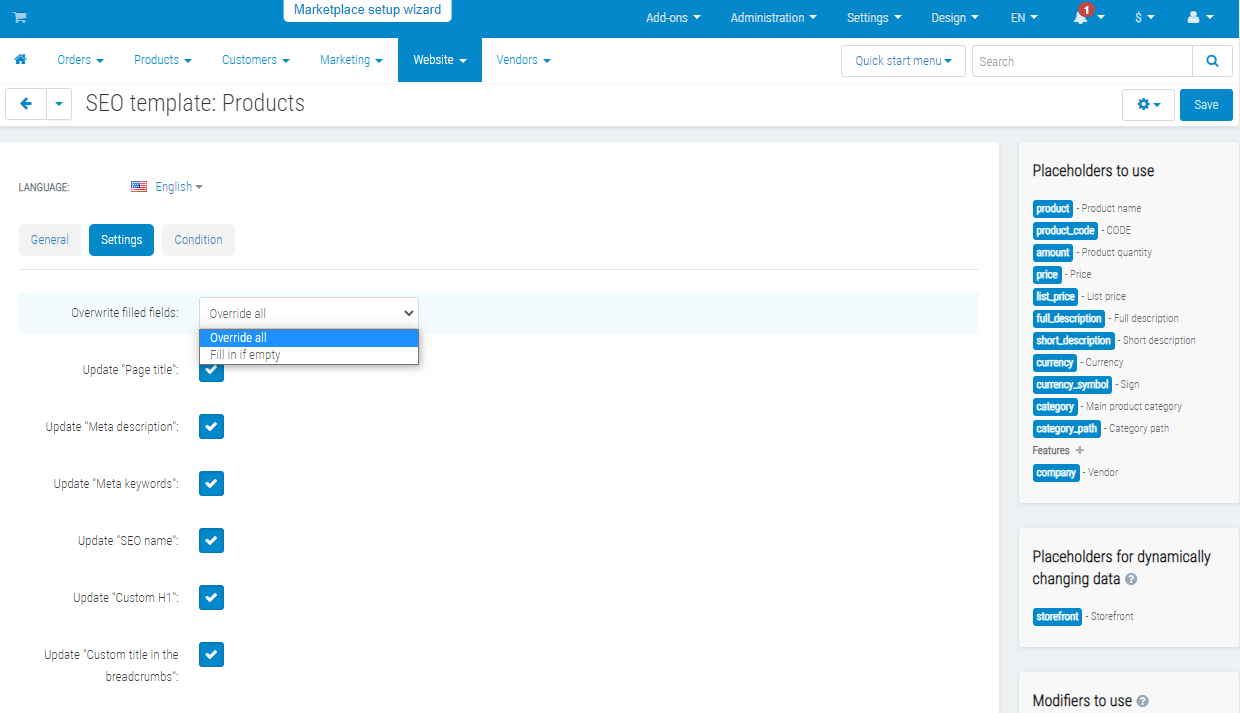
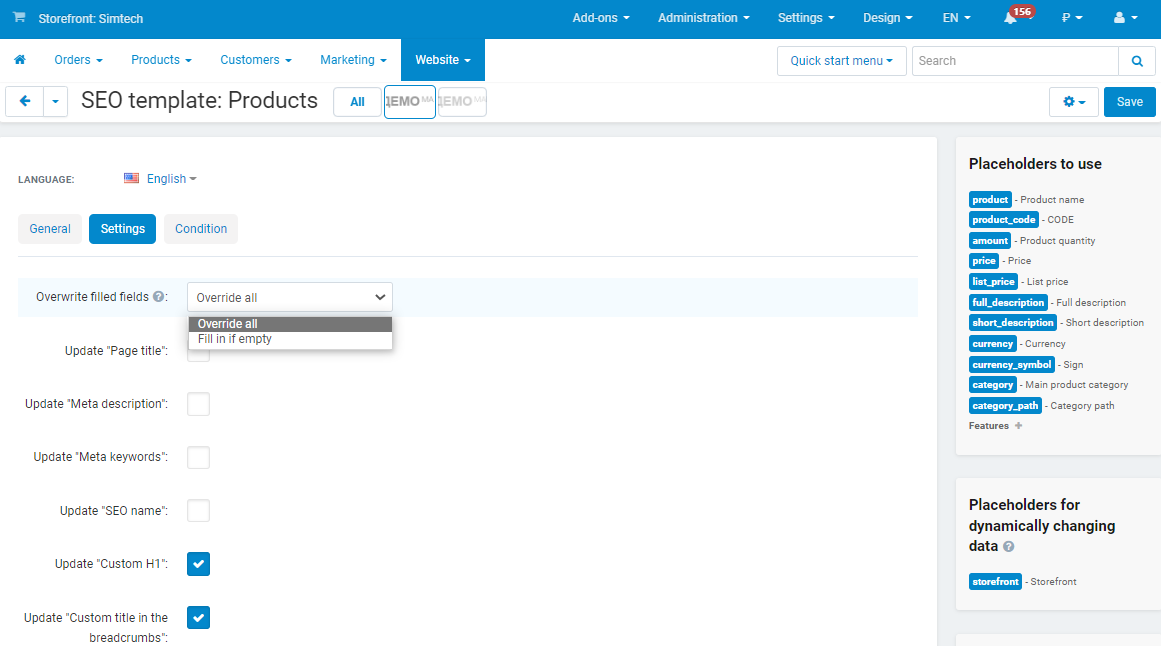
The "Fill in if empty" mode fills in what is missing and keeps what was written by hand. Fields not selected in the template are never rewritten.

A category page: the H1 "Buy Camcorders at Cart-Power Demo Store" is built by the template from the category name and the storefront name.

The template is written once

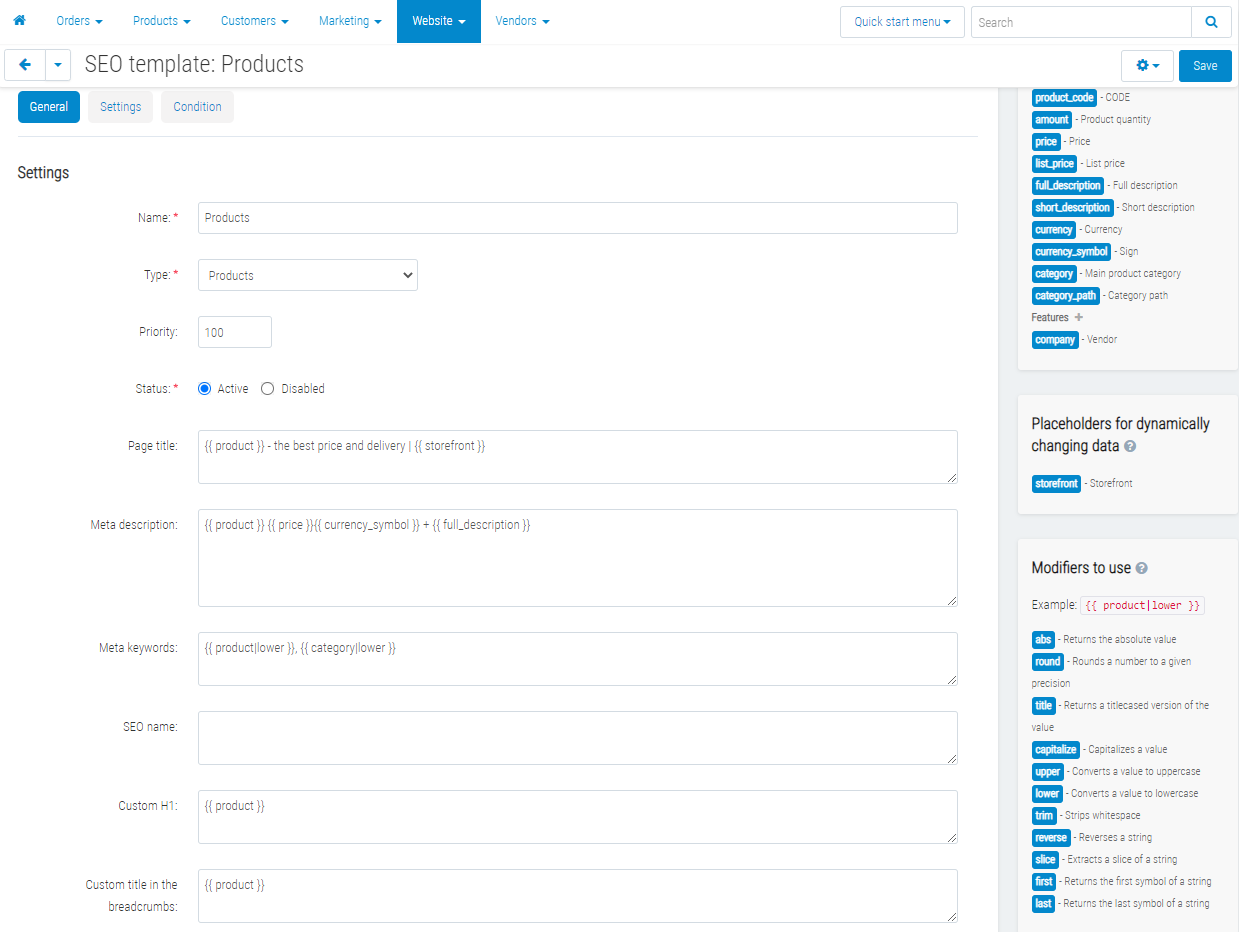
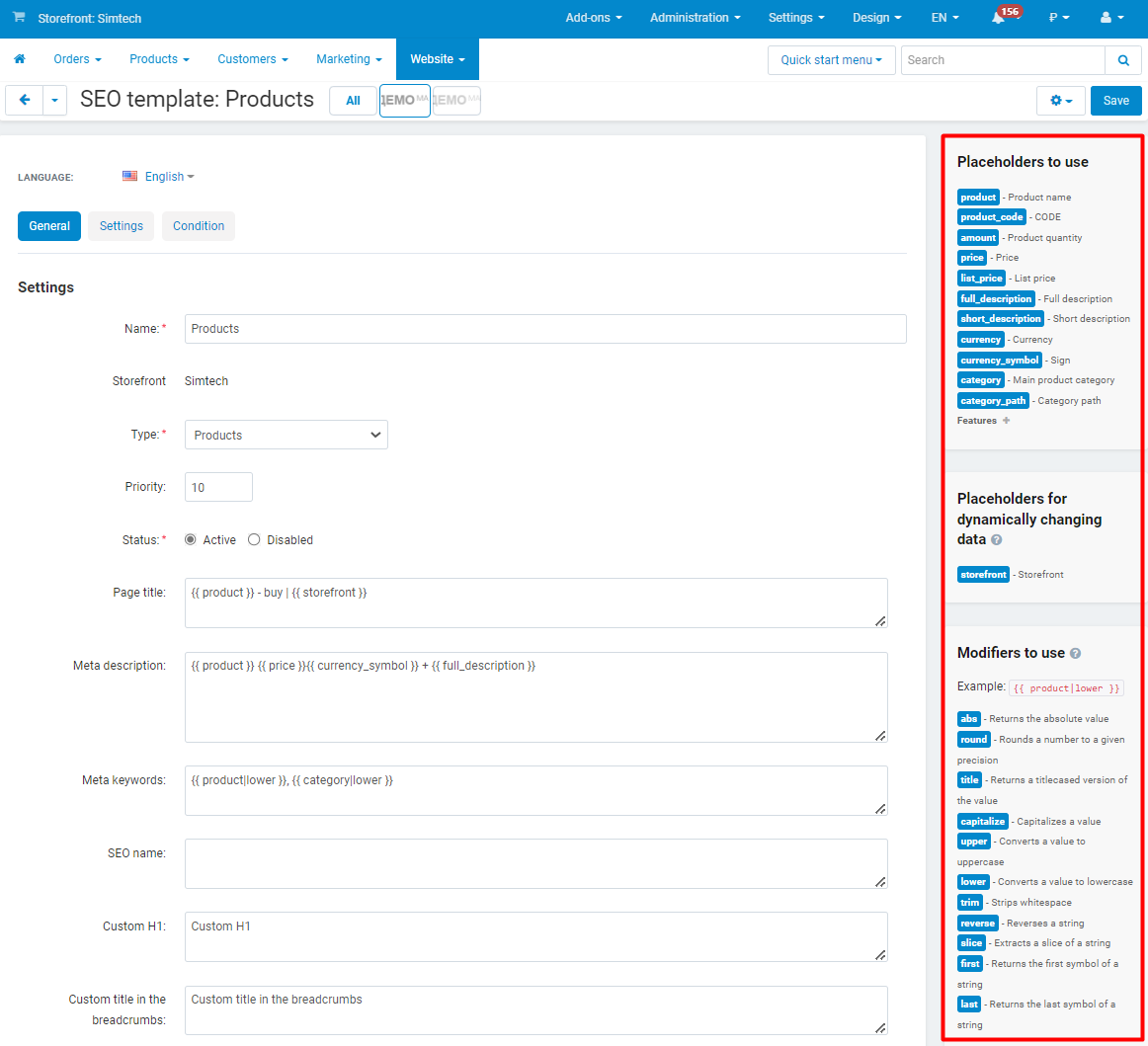
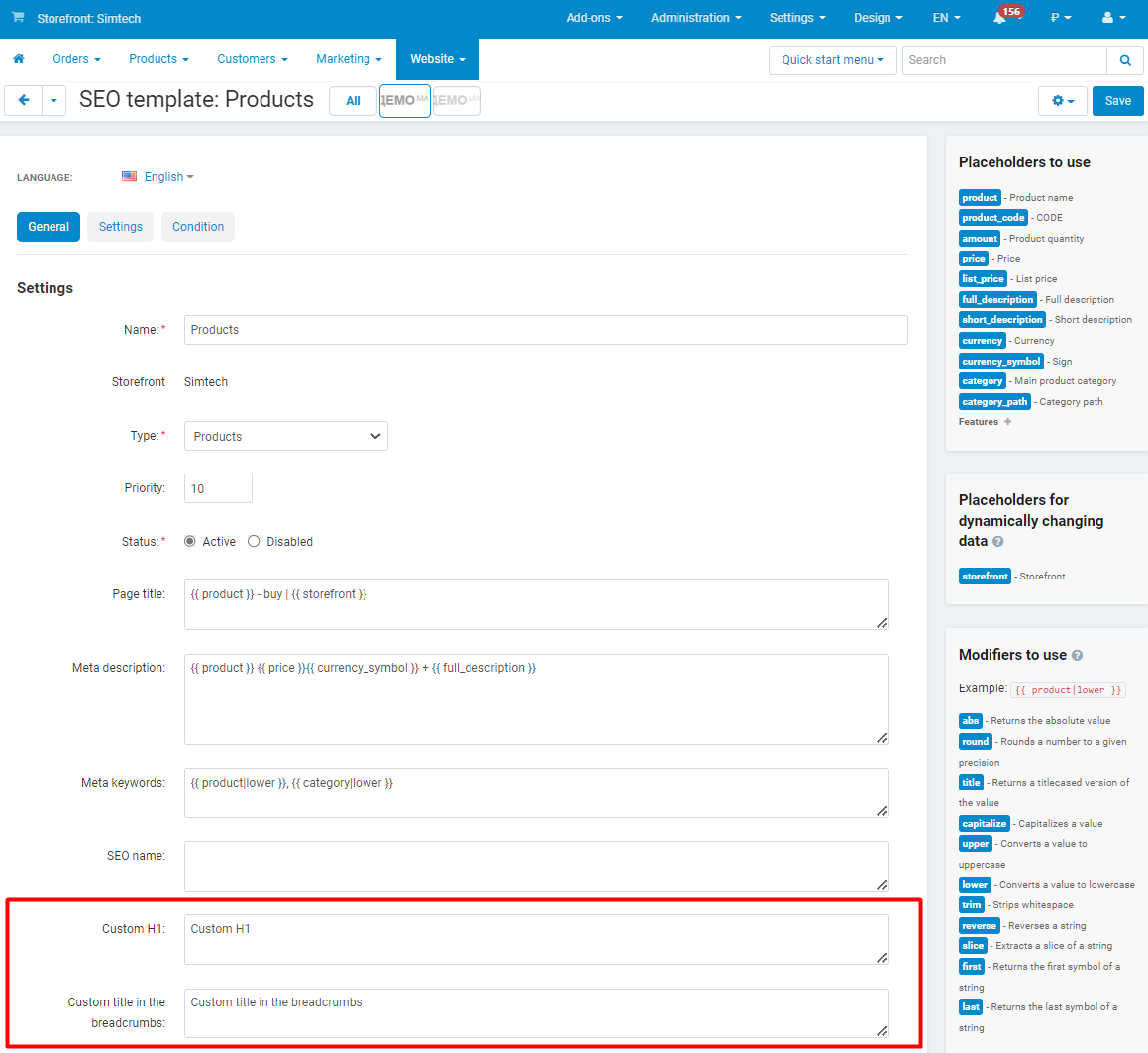
A template belongs to an object type and fills in the selected fields. The text holds placeholders such as {{ product }}, {{ category_path }}, {{ price }}, {{ brand }}, {{ feature_12 }}; the full list for the object type is shown next to the form, and a click inserts a placeholder into the field.

  • •  Products: name, code, price, price in the secondary currency, stock, brand, category and category path, descriptions, promo text, tags, dates, any feature; in Multi-Vendor - the vendor, its city and country.
  • •  Categories: name, parent category, path, level, description, number of products, minimum and maximum price.
  • •  Pages and blog posts: name, parent page, description, date. Brands: the value and the feature, number of products, prices.
  • •  The dynamic placeholders {{ storefront }} and {{ pagination }} are inserted on the storefront - the page number and the storefront name land in the title without another run.
  • •  Filters: {{ product|upper }}, {{ description|strip|truncate(160) }}, {{ full_description|words(20) }} and the standard Twig filters - case, slicing, rounding, replacing.
  • •  Template texts are set per store language, and generation runs for every language.
The product template page: fields with placeholders and the placeholder list next to the form; a click inserts the placeholder into the field.

Selection conditions and preview

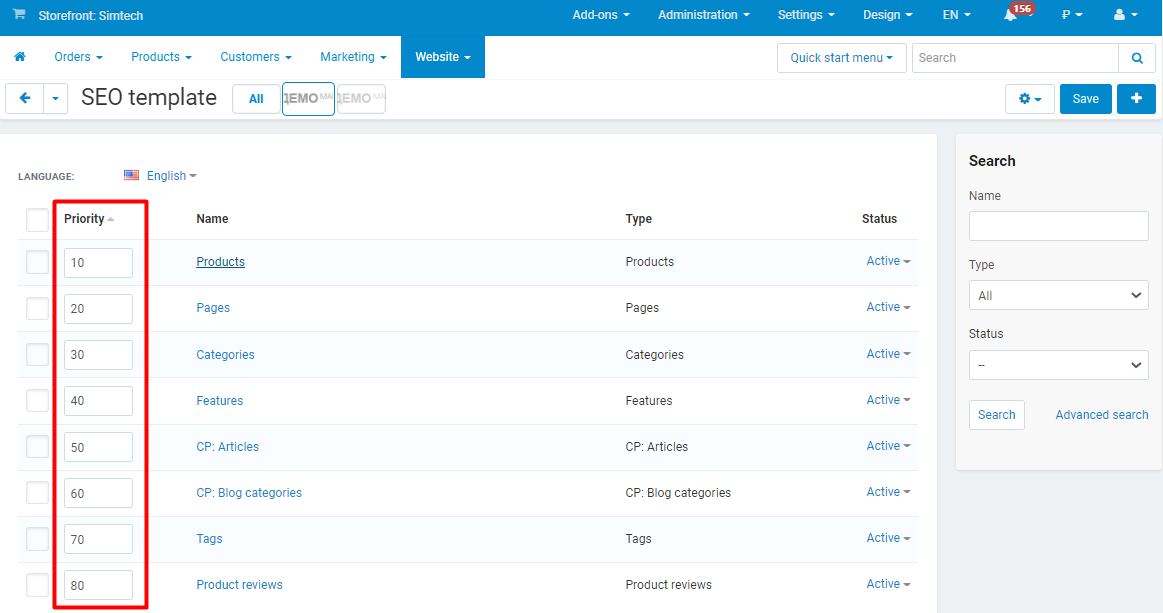
One template for the whole catalog rarely fits: branded products need one text, a sale needs another, and empty product cards just need something. Conditions limit a template to the right objects, and the priority decides which of the matching templates is applied last.

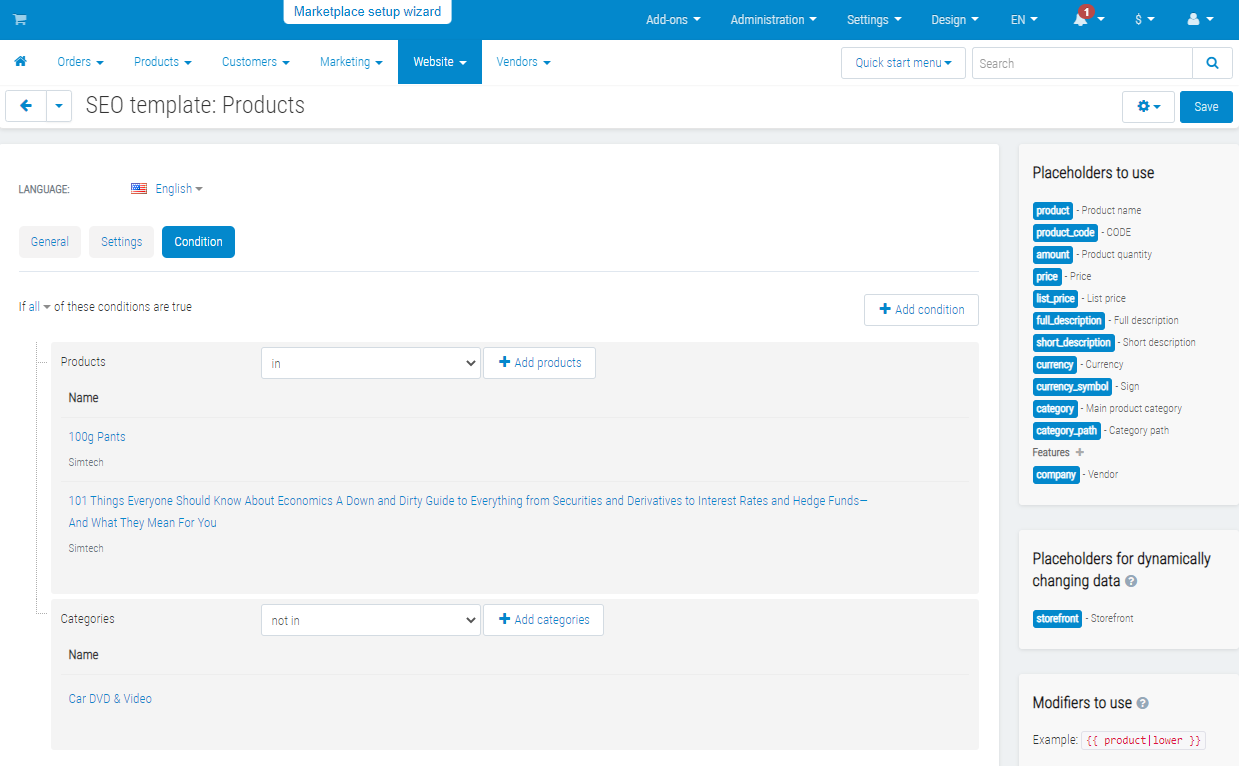
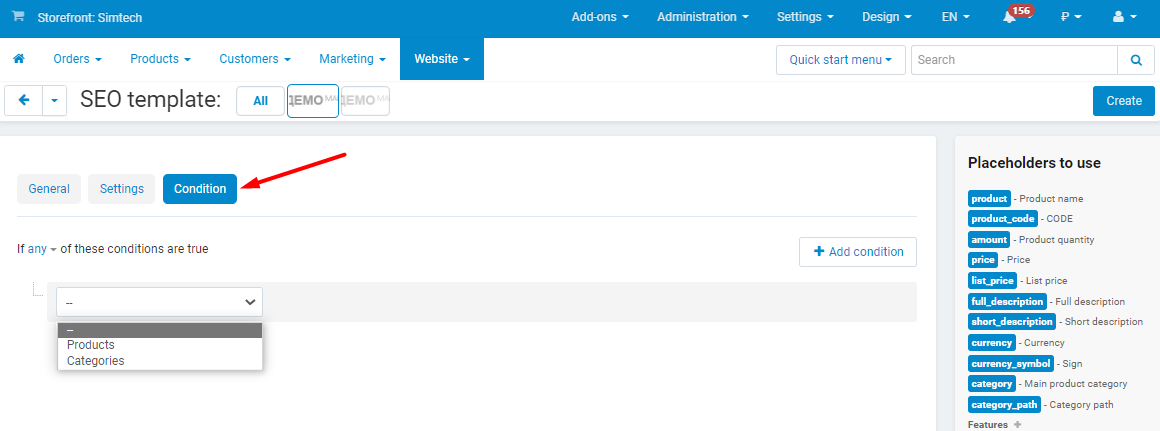
  • •  Products: selected products, categories (with or without subcategories), brand, price range, status, in stock, "name contains", "field is empty", vendor.
  • •  Categories: selected categories with or without subcategories, nesting level.
  • •  Several conditions at once - all of them or any of them.
  • •  Preview on the template page: the current value, the value by the template and its length for the first five matching objects. It uses the unsaved text and writes nothing.
  • •  A mistake in a placeholder shows up when the template is saved and in the preview, not after a run.
The "Condition" tab: in stock, price from 10 and the "Active" status - the template applies to such products only.
Preview: the current value, the value by the template and the length of every field for the first objects.

Generation: incremental, on schedule, with a log

The add-on remembers which revision of the template processed each object. The next run takes only the objects saved, imported or changed through the API since then, and every object of a template whose text or conditions changed. On a catalog of hundreds of thousands of products the daily run takes minutes, not hours.

  • •  A run from the admin panel with a progress bar and a summary: processed, updated, skipped, errors.
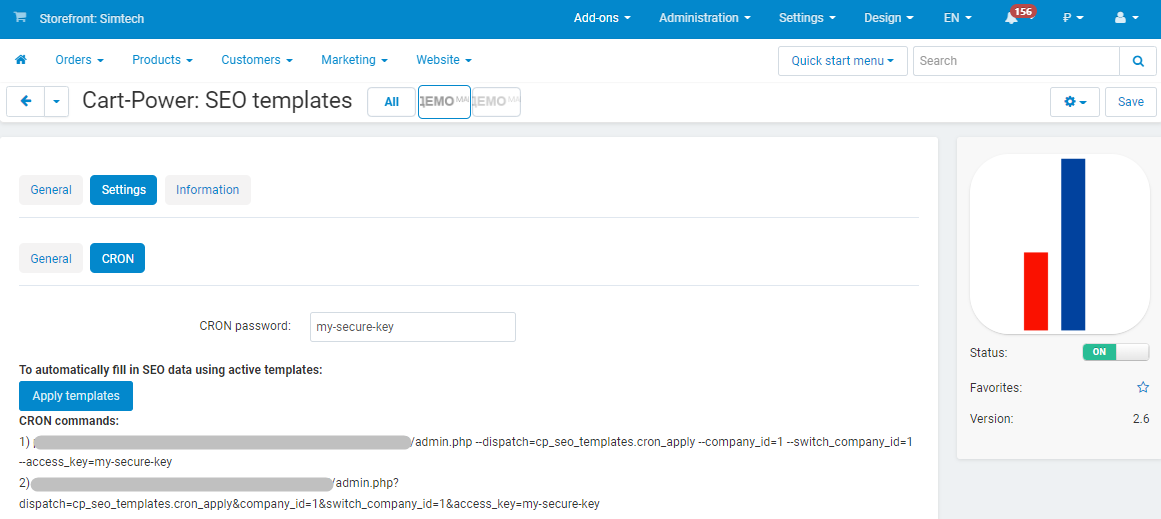
  • •  A CRON job with an access key: the command is ready on the "CRON" tab of the settings. The --limit, --time_limit and --template_id parameters; a run stopped by a limit continues with the remaining objects on the next start.
  • •  The run log: time, duration, template, where it was started from, status, counters and the first errors with the object number and the field.
  • •  A second run does not start while the first one is working. When a run is short of memory it stops, writes that to the log and continues on the next start.
  • •  "Apply to all objects again" - for data changed indirectly, for example a renamed parent category.
The run log: a run of all templates with a row per template, a run stopped by a limit and the counters of each.
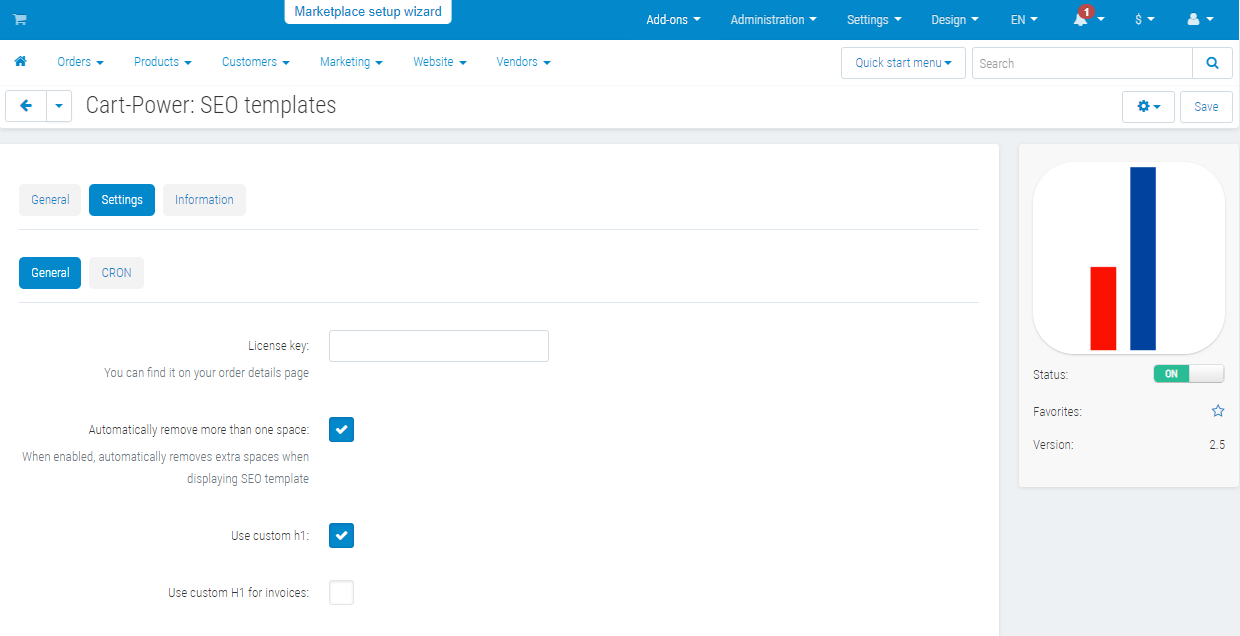
The CRON tab of the settings: the ready command with the key and the limit parameters.
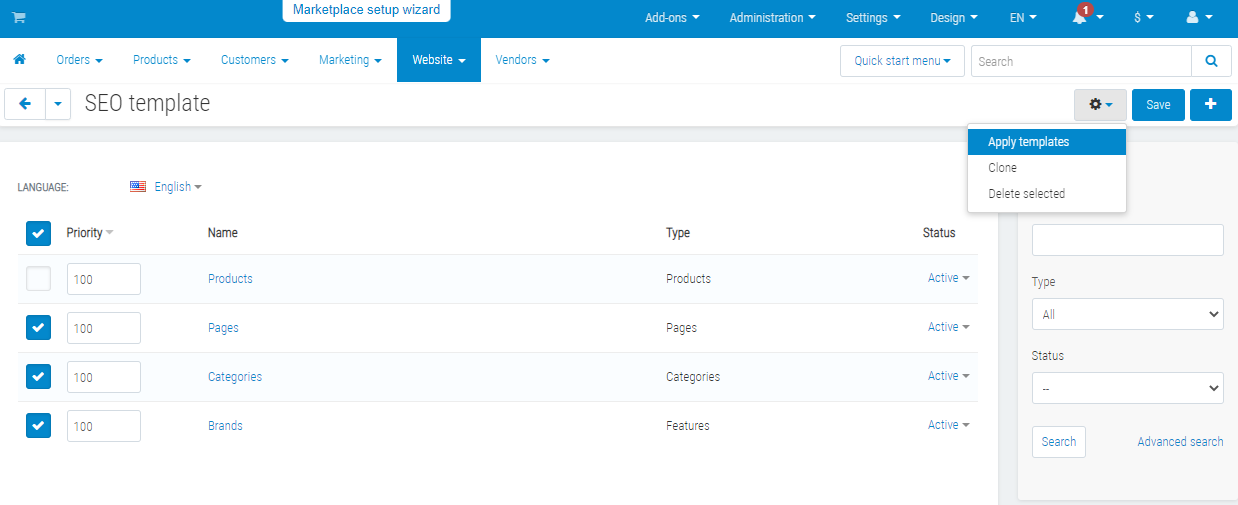
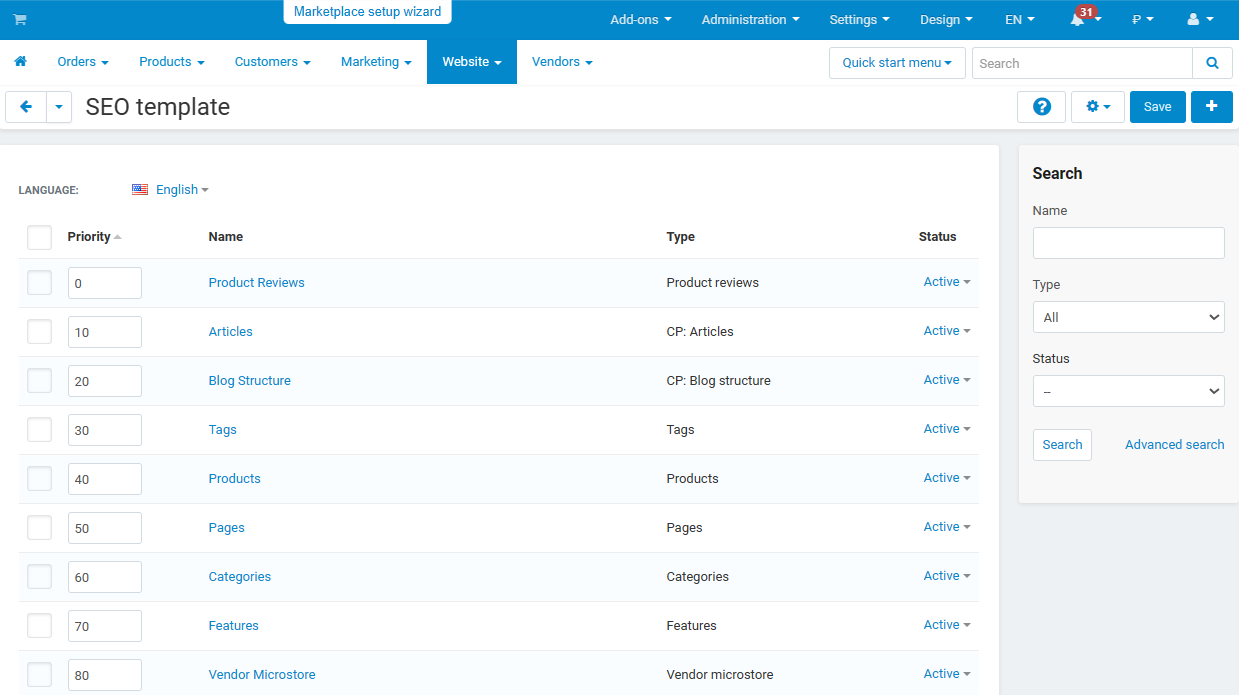
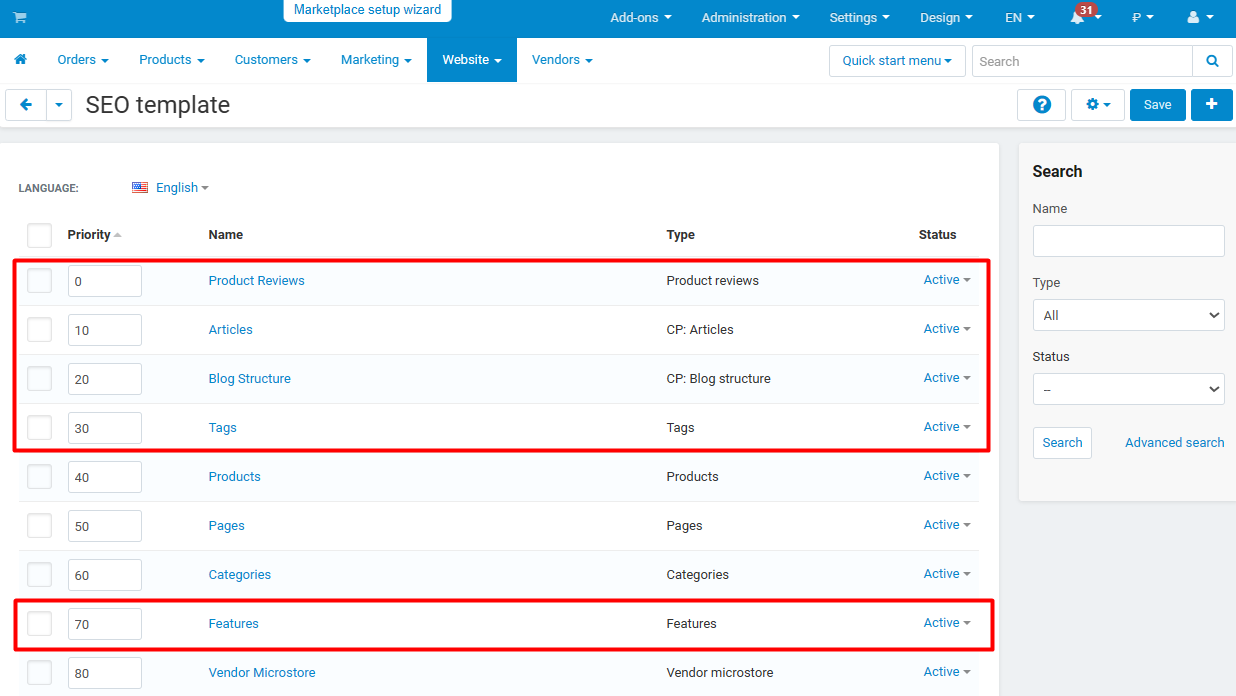
The template list: object type, priority, status and the last run of every template.

H1 and the breadcrumb title

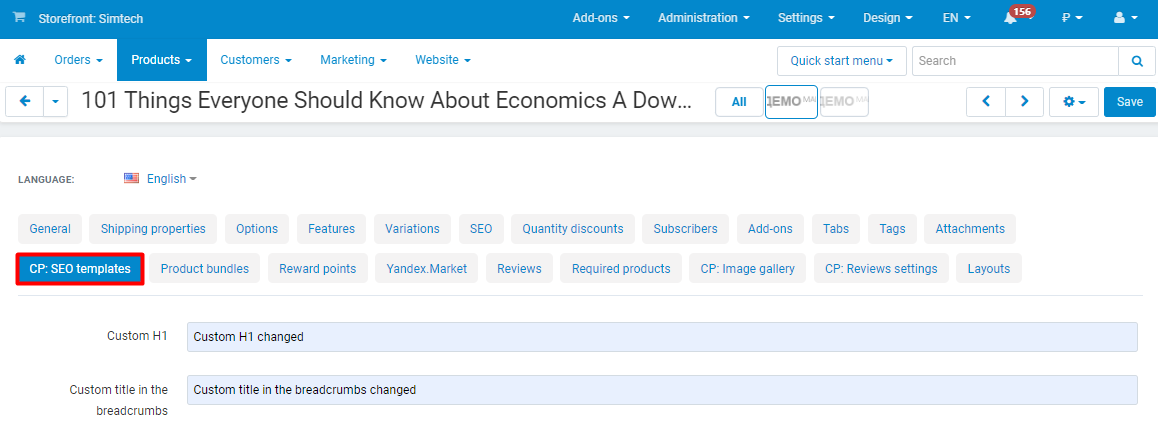
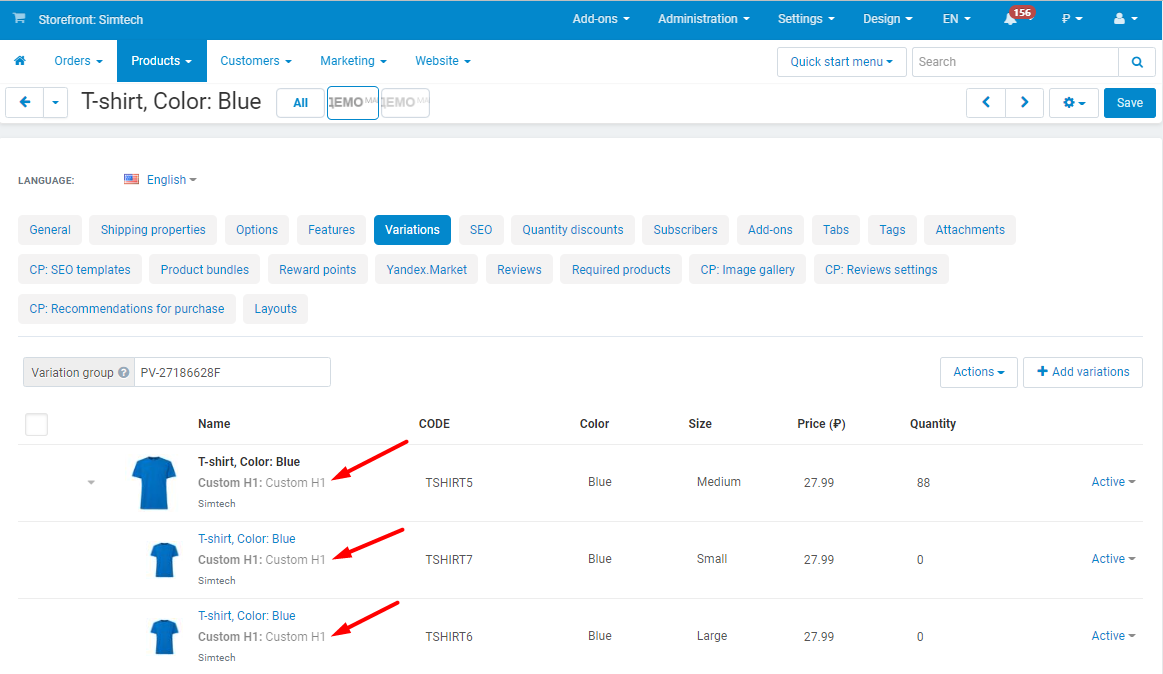
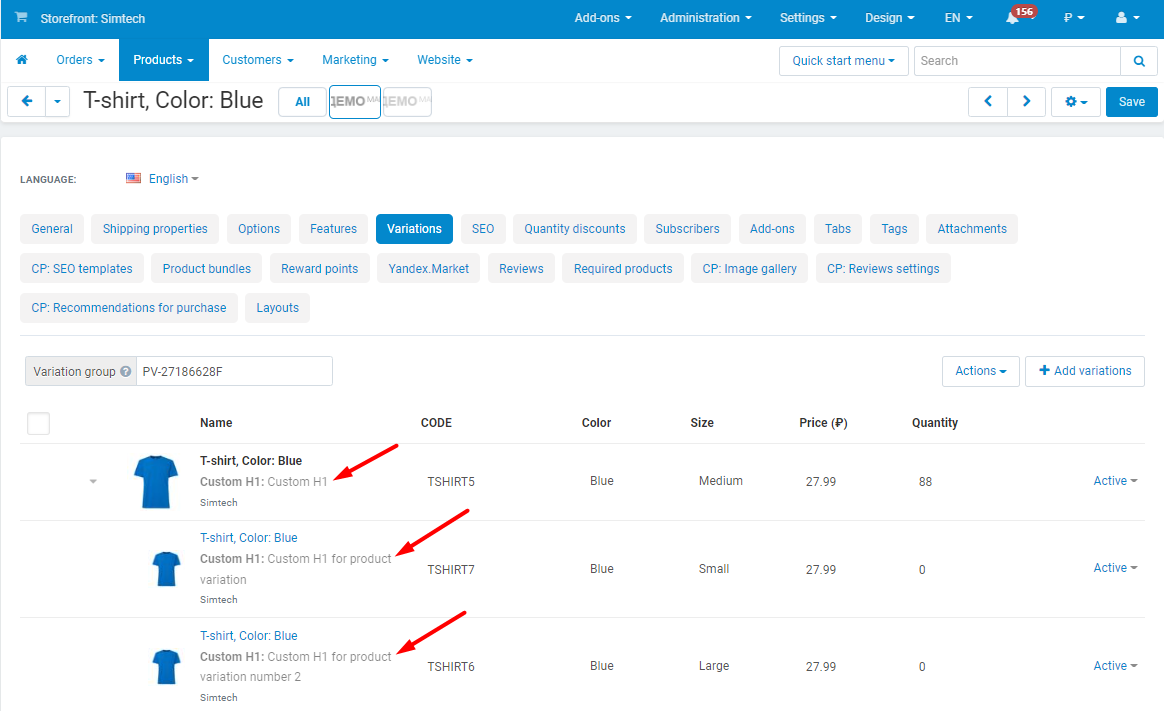
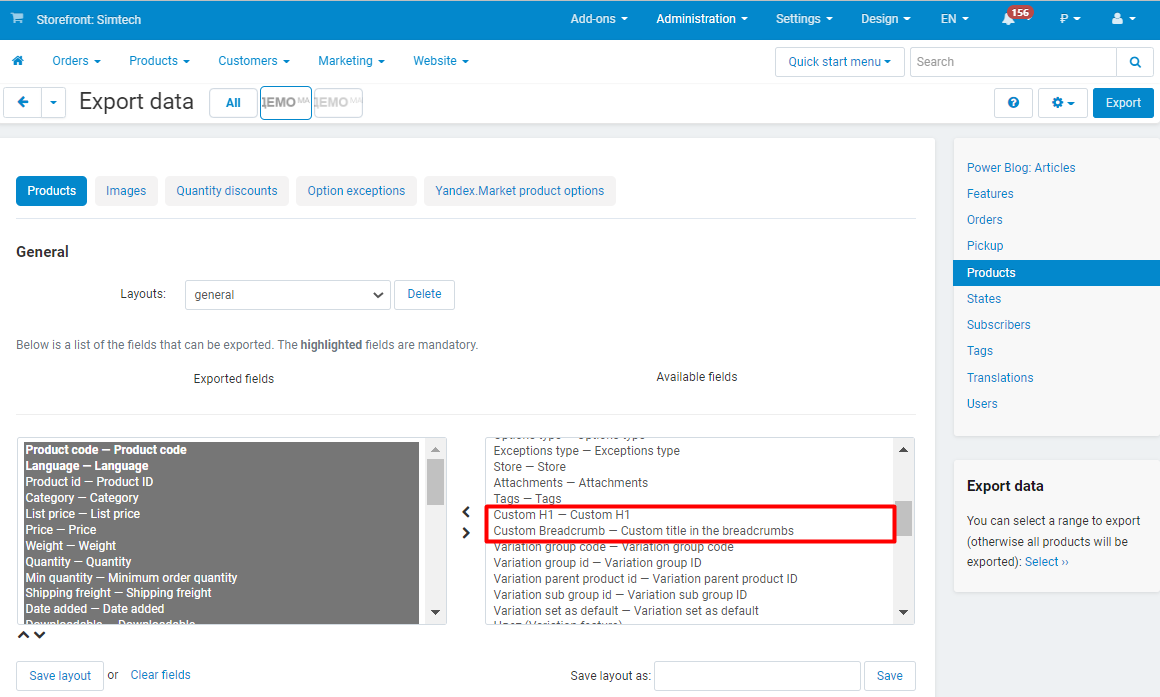
  • •  Products, categories, pages, brands and vendors get two extra fields: "Custom H1" and "Custom breadcrumb title". They are filled in by a template or by hand.
  • •  On the storefront the H1 replaces the page heading and the breadcrumb title replaces the last breadcrumb. The product name stays as it was - in the cart, orders and feeds.
  • •  Optionally the H1 is shown instead of the name in product lists and in invoices.
  • •  The fields are available in the product and vendor export and import.
  • •  Multi-Vendor: vendors can be forbidden to edit the H1 and the titles.
A product page: the "name - category" H1 from the template and a shortened breadcrumb title; the product name does not change.

Multi-Vendor: vendor stores and vendor categories

A category page inside a vendor store is a separate page with an address of its own, and since 2.15 it has SEO fields of its own. The text is set once per category, and the vendor name is inserted by the {{ vendor }} placeholder: "GPS navigators at {{ vendor }}" shows the name of each vendor on their page.

  • •  The "Vendor store" template type: the page title, description, keywords, H1 and breadcrumb of the vendor page from its name, description, city, country and number of products.
  • •  The "Categories in vendor stores" template type and the "Category in the vendor store" section on the category page - five fields, available to the marketplace administrator.
  • •  SEO-friendly addresses of vendor categories like /vendor/category-path/ with pagination; the previous addresses answer with a permanent redirect.
  • •  Vendor categories go to the standard sitemap and to the Cart-Power Extended XML Sitemap.
  • •  Templates are created and applied by the marketplace administrator, including for the common products of vendors.
A category in a vendor store on the storefront: the "Camcorders (Gadget)" breadcrumb and the "Camcorders - Gadget" H1 with the vendor name.
The "Category in the vendor store" section on the category page: title, description, keywords, H1 and breadcrumb with {{ vendor }}.

Settings, storefronts and integrations

  • •  A length limit for every field: the excess is cut at a word boundary with an ellipsis.
  • •  The brand feature for the {{ brand }} placeholder; all feature values separated by commas; removal of extra spaces.
  • •  Keep dynamic placeholders out of the product export.
  • •  CS-Cart Ultimate: a set of templates for every storefront, the CRON command for a storefront is ready in the settings.
  • •  Integrations: Extended Tags (tag pages), Power Blog (categories and posts), Power Reviews, the CS-Cart blog, Extended XML Sitemap.
Add-on settings: a length limit for every field.

What is new in 2.15-2.17

  • •  Multi-Vendor: SEO fields of categories in vendor stores, the "Categories in vendor stores" template type, the {{ vendor }} placeholder, addresses like /vendor/category/ and a sitemap for these pages.
  • •  Generation is incremental for every object type and any number of templates; simultaneous runs are excluded.
  • •  The run log and the preview on the template page.
  • •  New selection conditions: categories with subcategories, brand, price, status, in stock, "name contains", "field is empty", vendor, category level.
  • •  New placeholders: brand, code, tags, promo text, dates, price in the secondary currency, category path, level, number of products, vendor city and country and more.
  • •  The truncate, strip and words filters; the "Length limits" settings for every field.
  • •  CRON: the --limit and --time_limit parameters, continuation with the remaining objects, a start by URL with the key from the settings only.
  • •  Template validation on save: syntax, unknown placeholders, field selection.
  • •  The "Apply to all objects again" button.
  • •  2.16: the template list and the template page open when the Blog add-on is installed but disabled.
  • •  2.16: the "Pages" template no longer counts blog posts and polls, which it does not process, as pending and no longer logs them as skipped.
  • •  2.17: the currency symbol is inserted as text, not as the markup of old Russian builds; the upgrade replaces that markup in titles, descriptions and keywords already written.
  • •  2.17: the default templates no longer write a zero price or a dangling "+" without a description.
  • •  2.17: VIVAshop theme - the category H1 from the template is shown in the theme title block, a custom product H1 uses the theme markup; without a custom H1 the theme title is left as it is.

Frequently asked questions

What happens to the meta data already written by hand?

It depends on the template mode. "Fill in if empty" fills in empty fields and leaves manual text alone; "Override all" replaces the values of every matching object. Fields not selected in the template are never changed in either mode.

Do we have to run the generation every time products are added?

No. Set up a CRON job on the server - the command is shown in the add-on settings. Every run processes new and changed objects only and writes the summary to the log.

Does the product name change when an H1 is set?

No. The H1 is a separate field and replaces the page heading only; the cart, orders, invoices and feeds keep the product name. Showing the H1 in lists and in invoices is switched on in the settings.

Can different templates apply to different products?

Yes. A template has conditions - categories, brand, price, stock, status, text in the name, an empty field, vendor - and a priority. Of several matching templates the one with the higher priority is applied last, and its result stays.

How do we check a template without rewriting the catalog?

On the "Preview" tab of the template page: it shows the current and the new values of the fields for the first five matching objects and their length, saving nothing.

What changes when we upgrade to 2.15-2.17?

Templates, settings and generated data are kept. After an upgrade from 2.14 or earlier the first run goes through every object to set the applied marks anew; after that the runs process only what changed. Versions 2.16 and 2.17 fix errors. Templates with the old default text are updated by 2.17 itself; to rewrite fields that are already filled, click "Apply to all objects again".

See the add-on at work. On the demo store open the product template, its "Preview" tab and the run log, then compare the headings of a category and a product page on the storefront with the template text.
Product
  • Store Builder
  • Store Builder Plus
  • Store Builder Ultimate
  • Multi-Vendor
  • Multi-Vendor Plus
  • Multi-Vendor Ultimate
Compatible versions
  • 4.21.1
  • 4.20.1
  • 4.19.1.SP2
  • 4.19.1.SP1
  • 4.19.1
  • 4.18.4
  • 4.18.3
  • 4.18.2.SP1
  • 4.18.2
  • 4.18.1.SP1
  • 4.18.1
  • 4.17.2.SP3
  • 4.17.2.SP2
  • 4.17.2.SP1
  • 4.17.2
  • 4.17.1
  • 4.16.2
  • 4.16.1
  • 4.15.2
  • 4.15.1.SP4
  • 4.15.1.SP3
  • 4.15.1.SP2
  • 4.15.1.SP1
  • 4.15.1
  • 4.14.3.SP1
  • 4.14.3
  • 4.14.2.SP1
  • 4.14.2
  • 4.14.1.SP1
  • 4.14.1
  • 4.13.3
  • 4.13.2.SP2
  • 4.13.2.SP1
  • 4.13.2
  • 4.13.1
  • 4.12.2
  • 4.12.1
Localizations
  • English
  • Русский
Владислав
Verified purchase

Advantages
Отличный модуль для оптимизации SEO составляющей! Очень прост в использовании - 1 раз настроил и забыл! Поднимает качество поисковой выдачи и увеличивает органический трафик с поисковых систем!
Модуль отрабатывавет на 200%.
Disadvantages
Недостатки отсутствуют!
Comment
К преобритению рекомендуем! 10 из 10
Чирков Владислав
Advantages
Отличный модуль для SEO Оптимизации! Интуитивно понятный и простой интерфейс. Трафик поднялся в разы, а также позволил поднять качество в поисковой выдаче!
Выражаем благодарность тех. поддержке, которая всегда оперативно реагирует на все вопросы и заявки!


Disadvantages
Нет таких.
Comment
К покупке рекомендуем!
  CS-Cart development · in-house team · since 2013 We build, upgrade and speed up

Contact information


CS-Cart development · in-house team · since 2013

We build, upgrade and speed up CS-Cart stores and marketplaces

Analysts, developers, designers, QA and support under one roof — no subcontractors. We ship add-ons you can buy on this page today, and we take on the work that no ready-made add-on covers.

2013

Working with
CS-Cart since

4.98

Rating from
184 reviews

200+

Solutions on this
marketplace

500+

E-commerce projects
delivered

Flagship products

Two add-ons that change how a store performs

Everything else we publish improves one screen. These two change the numbers: how customers find products, and how often they come back.


Add-on · Search & merchandising

Smart Search

Elasticsearch-powered search for large catalogues. The customer types two letters, sees products with images and prices, and buys from the dropdown — even after a typo or with the wrong keyboard layout.

Visitors who use the search bar are 24% of traffic and 44% of revenue, and convert about 2.5× better than people who only browse categories. If search returns nothing, up to 80% of them leave.
Constructor, Beyond Relevance Report 2025; Google Cloud × The Harris Poll, 2023

Catalogue size Sub-second results on 300,000+ products, Multi-Vendor included
Understands Typos, wrong keyboard layout, synonyms, word forms, SKUs, brands and attributes
Reporting Query analytics — what customers search for and which searches return nothing
Deployment Our cloud, or Elasticsearch on your own server

from $35/month

Plans by catalogue size · self-hosted from $1,215 one-time

Plans and details →

Try it on a live catalogue: open the demo store and search with a deliberate typo.


Add-on · Mobile commerce

PowerApp — mobile app for your store

A native iOS and Android app running on your CS-Cart data: the same products, prices, stock, promotions, reward points and orders. There is no second catalogue to maintain — everything stays in the admin panel you already use.

A mobile site brings a customer in once; an app brings them back for free. Push notifications replace the retargeting budget you spend to buy the same customer a second time.

Platforms Native iOS and Android, published under your own developer account
Home screen Built in the admin panel from six block types, the same way you build website pages
Time to launch Under a week from purchase to submission for App Store and Google Play review
Compatibility CS-Cart and Multi-Vendor 4.18–4.20 · 11 client apps already live in the stores

from $790

Buy outright, or $79/month on subscription

Open the add-on page →

Screens, block types and pricing tiers: see how the app is built.

Services

When no add-on solves it, we do the work

Fixed scope, written specification, a named project manager and a warranty on what we ship.

Custom CS-Cart development

Functionality the platform does not have: add-ons, marketplace mechanics, integrations with 1C, CRM, ERP, payment and delivery providers. We start from a written specification, not from an estimate on a phone call. Details →

CS-Cart upgrade

Move to the current version without losing data, custom code or add-ons. We audit every modification first, upgrade on a staging copy, adapt what breaks and switch over with little or no downtime. Details →

Speed and performance optimisation

Conversion falls by about 4.4% for every extra second of load time. We profile the server, the database and the front-end, then fix what actually costs the seconds — and show you the before-and-after numbers. Details →

Design for CS-Cart

Mobile-first storefront design built on CS-Cart's own template structure, so the layout survives the next platform upgrade instead of becoming a migration problem. Details →

SEO for CS-Cart

A technical audit of indexing, duplicates, redirects, structured data and Core Web Vitals — delivered as a prioritised fix list your developers can act on, or that we implement ourselves. Details →

How we work

What you get besides the code

Before we start

We discuss the goal, offer options and write the specification. You approve scope and price before development begins.

While we build

A named project manager reports progress on a fixed schedule. You always know what is in work and what is next.

Before release

A separate QA pass on every release — the developer who wrote the code is not the person who signs it off.

After handover

Documentation for everything we ship, plus a warranty on the modifications and the project.

Tell us what the store needs to do

Describe the task in a couple of sentences and we will come back with options, a scope and a price. The consultation is free, and we will say plainly if a ready-made add-on already solves it.

Write to us here

Use the Ask a question button at the top of this page — it reaches the same team.

Or reach us directly

sales@cart-power.com · cart-power.com
We work in English and Russian.

Client cases, our full add-on catalogue and 184 customer reviews are in the tabs above.

Similar products

Live Search
4.9 (47)
$75.00
The customer types and immediately sees products with a photo, a price and an «Add to cart» button. The add-on understands synonyms, word forms and typos, searches by product code and features, shows what customers did not find and lets you add a synonym right from the report. The word index keeps it fast on catalogs of hundreds of thousands of products. No subscription.
Full page CACHE addon for CS-CART + HTML minify
4.9 (42)
$85.00
$120.00
Save 29%
  • Makes your store faster.
  • Improves the SEO ranking of the site.
  • Increases conversion.
Vendor Page Pro
5.0 (12)
$69.00
Professional vendor page template and blocks
SEO pages for filters
5.0 (12)
$100.00
Get search traffic to any filter pages
Power Blog
4.6 (22)
$90.00
A blog inside your CS-Cart store: five article types (text, gallery, video, event and a place on the map), categories, authors, tags, search and archive. Related products in an article and article blocks on product pages lead readers to a purchase; subscription and mailing of new articles work through Extended Email Marketing.
SEO Ultimate: Canonical URL + Google Rich Snippets + SEO Name History + More
5.0 (9)
$199.00
Loved by more than 500 CS-Cart live stores