Staff Knowledge Base

Procedures, instructions and links right on CS-Cart admin pages: the Knowledge bases button opens hints for orders, the catalog and other sections. Search, group access, bases for Multi-Vendor vendors.
Last update: 12.10.2026 Supports current CS-Cart version
cp-addon-4062
Select the CS-Cart edition on which you will use the add-on.
The update period determines the period of time when you can get access to the new versions of this add-on compatible with the new versions of CS-Cart software released during the chosen period.
To instal the add-on, we will need the FTP access to your server. Please send it along with the order number to sales@cart-power.com once the order is paid.
Keep your procedures where the staff works: on the admin pages
Staff Knowledge Base
$60.00

Procedures and instructions on the admin page where your staff works

The Knowledge bases button in the header of the order list, the catalog and other admin sections opens the hints for that very page: the order processing steps, the product page requirements, links to the documentation and to store pages. A new employee does not search a shared folder or distract colleagues, and marketplace vendors see the rules right in their panel.

Any admin page
orders, products, shipments, messages and any section from the menu
Search through all bases of a page
with the matches highlighted and counted
Access by groups and staff
separately for administrators and for vendors
CS-Cart 4.14.1 to 4.21.1
all editions; version 1.3 tested on 4.20.1 and 4.21.1

What it solves

Every store has its own rules: how to confirm an order, what to do when part of it is out of stock, which photos a product page needs, who approves a discount. They usually live in the head of an experienced employee, in chats or in a document nobody opens. A newcomer asks colleagues and makes mistakes where mistakes cost money, in orders and prices.

The add-on puts these rules into the admin panel itself, on the page where the work is done. One button, and the procedure for this screen is in front of the employee.

A hint where the work is

A base is bound to admin pages: the order processing steps on the order list, the product page requirements in the catalog.

A quick start for newcomers

Procedures, documentation links and store pages are grouped into sections, with no searching through folders.

An answer by search

One field searches all bases of the page, highlights the matches and shows how many are found.

To each their own

A base is shown to the chosen groups and staff; with nothing chosen everyone sees it, and the list of bases says so.

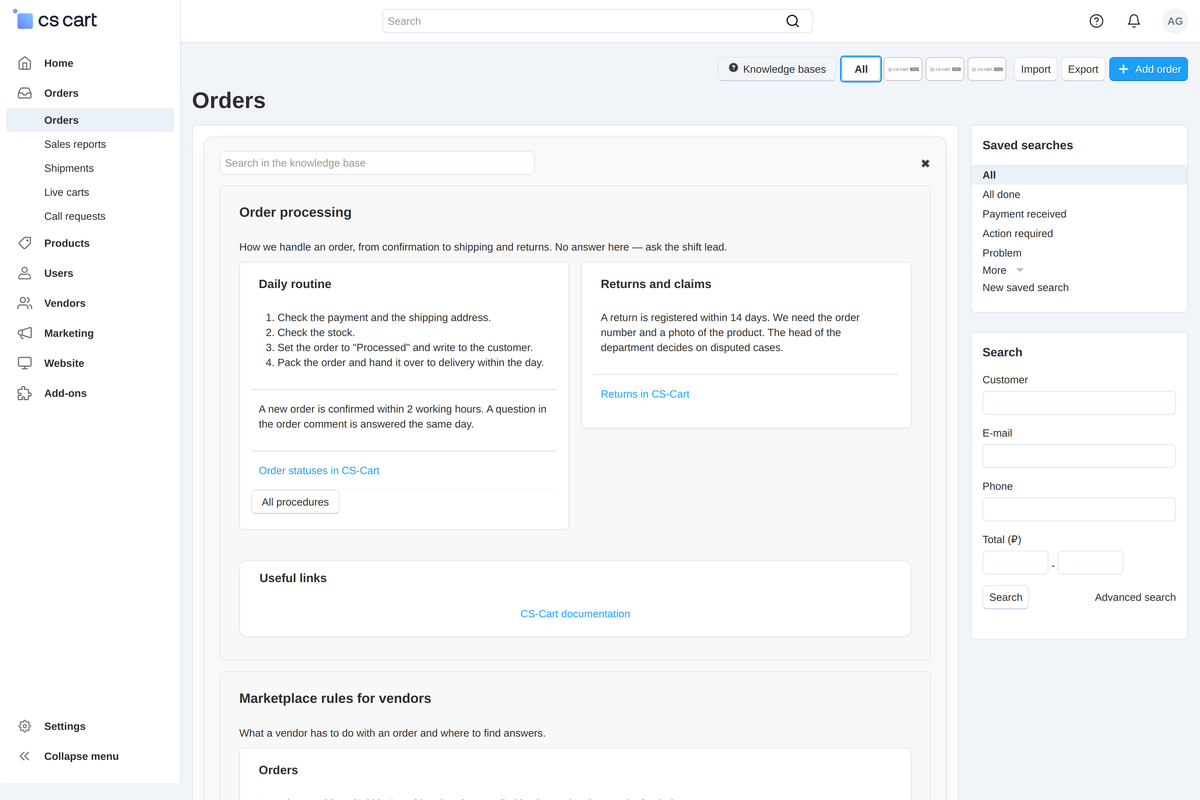
The order list with the panel open: the Order processing base with its description, the Daily routine and Returns and claims sections, the All procedures button and the bottom links. Below, the second base of this page.

How an employee uses a base

  • •  The Knowledge bases button appears only on the admin pages that have at least one base: in the page header next to the other buttons or floating in a corner of the screen.
  • •  The panel opens above the page and shows all bases of this page: the description, sections with objects and the bottom links.
  • •  Section objects: formatted text right in the panel, a link, a store page, a blog post or a Power Blog post when that blog add-on is on. Links and pages open in a new tab or in a popup.
  • •  All items: a long section shows its first objects, the rest are expanded in place by a button or opened by a link.
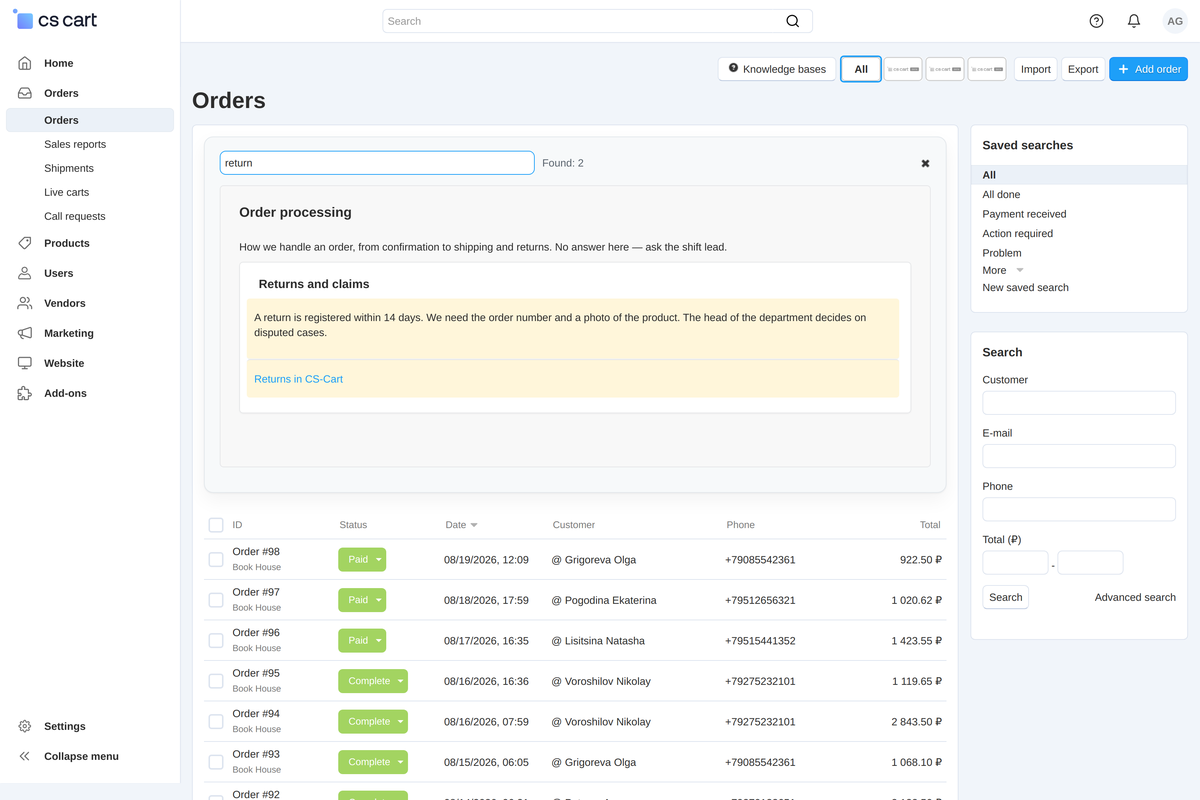
  • •  Search covers all bases of the page, the bottom links and the objects above the section limit included. Esc clears the search without closing the panel.
Searching for "return": the panel kept two matches from the Returns and claims section, highlighted them and shows Found: 2.
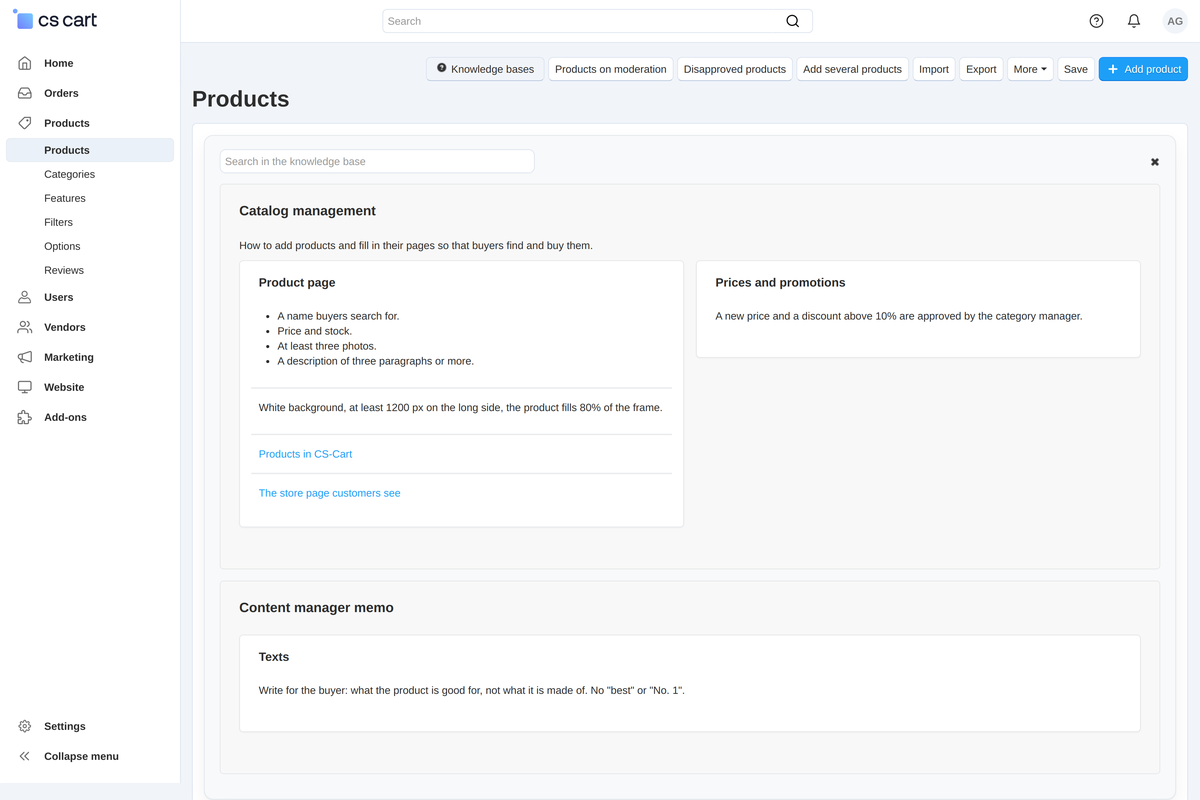
The same button on the product list: the Catalog management base with the product page requirements and the content manager memo. The root administrator sees all bases of a page.
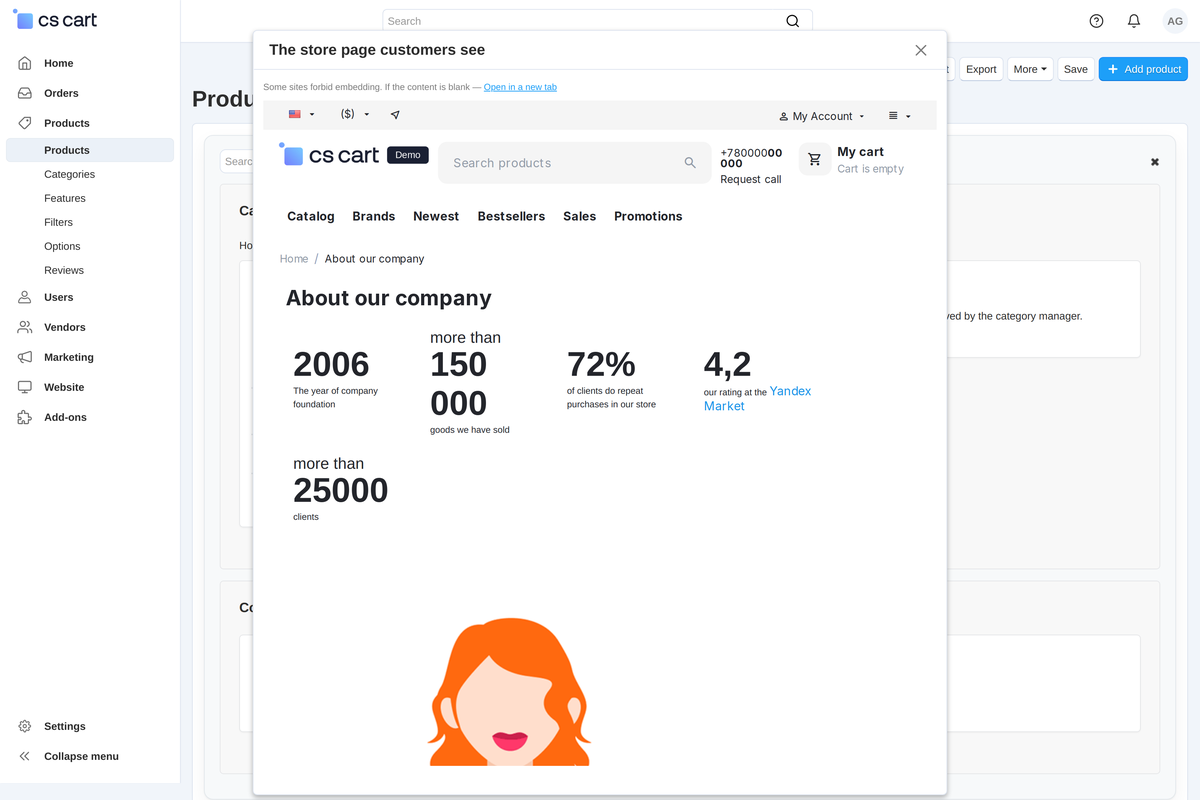
The About our company store page in a popup right from the panel. Above it, a link to open the page in a new tab when a site forbids embedding.

How a base is built

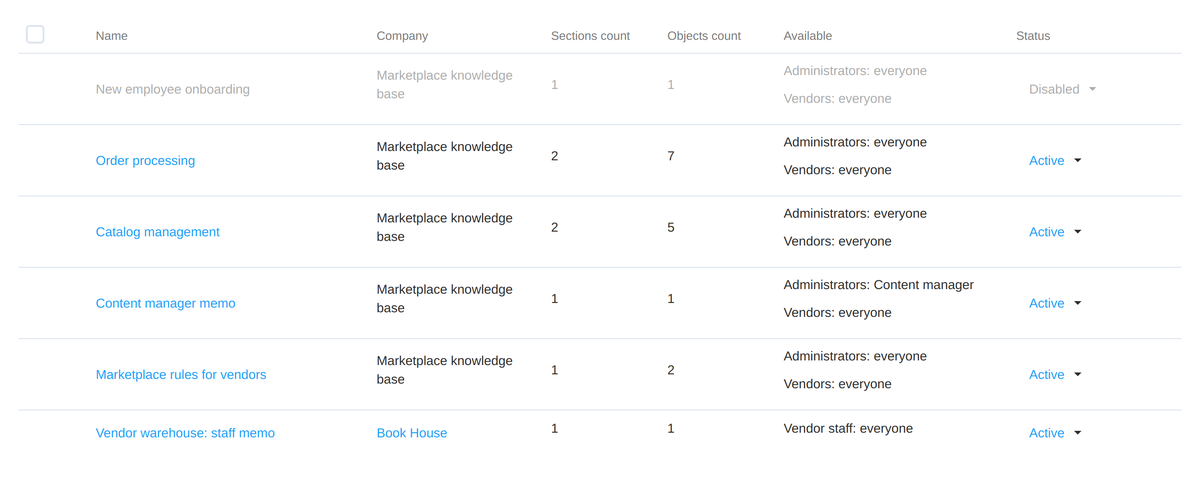
Bases are managed under Website → Knowledge bases. The list shows how many sections and objects a base has, who sees it and whether it is active. The row menu edits, duplicates or deletes a base. A copy carries the sections, objects, access, display settings and translations and is created disabled.

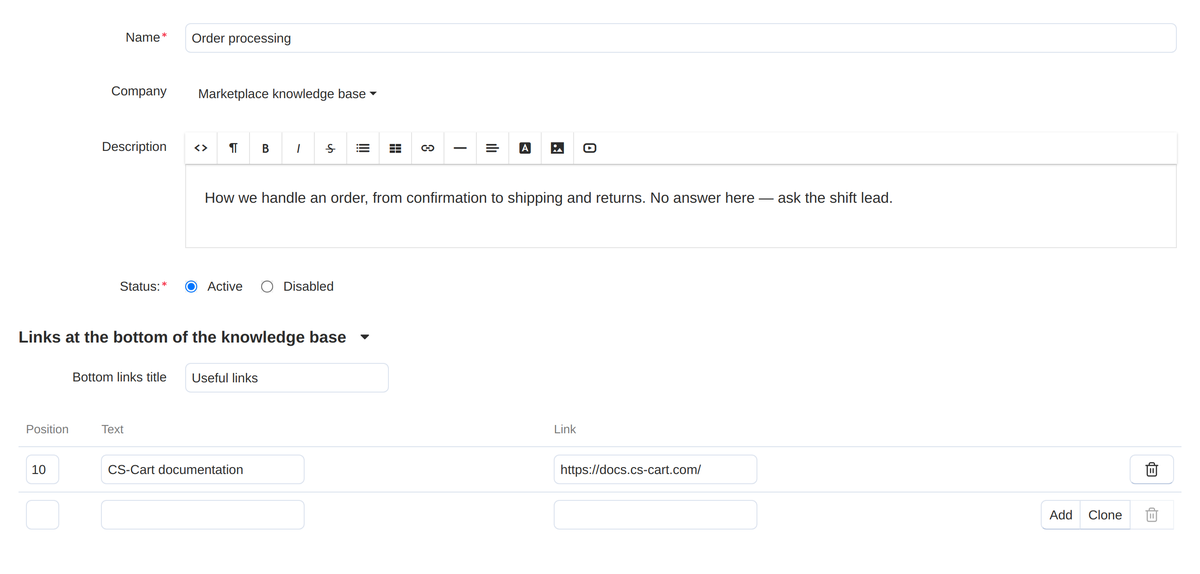
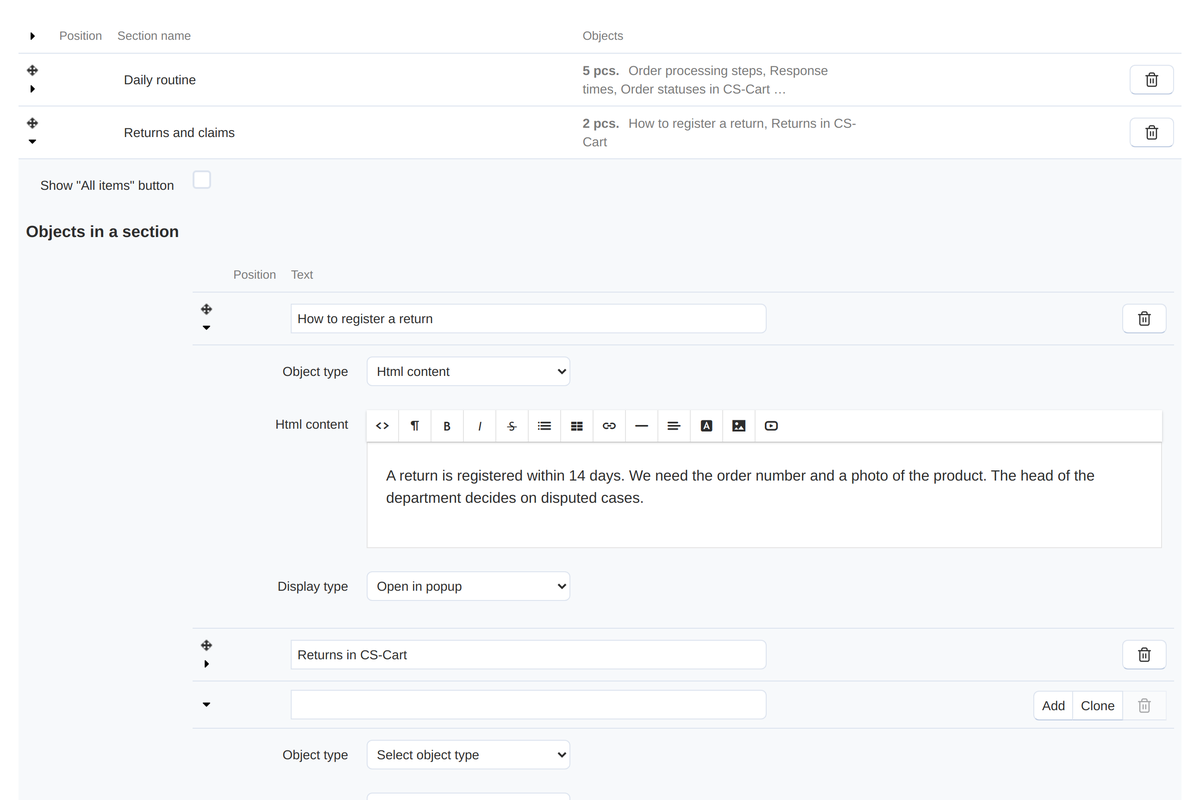
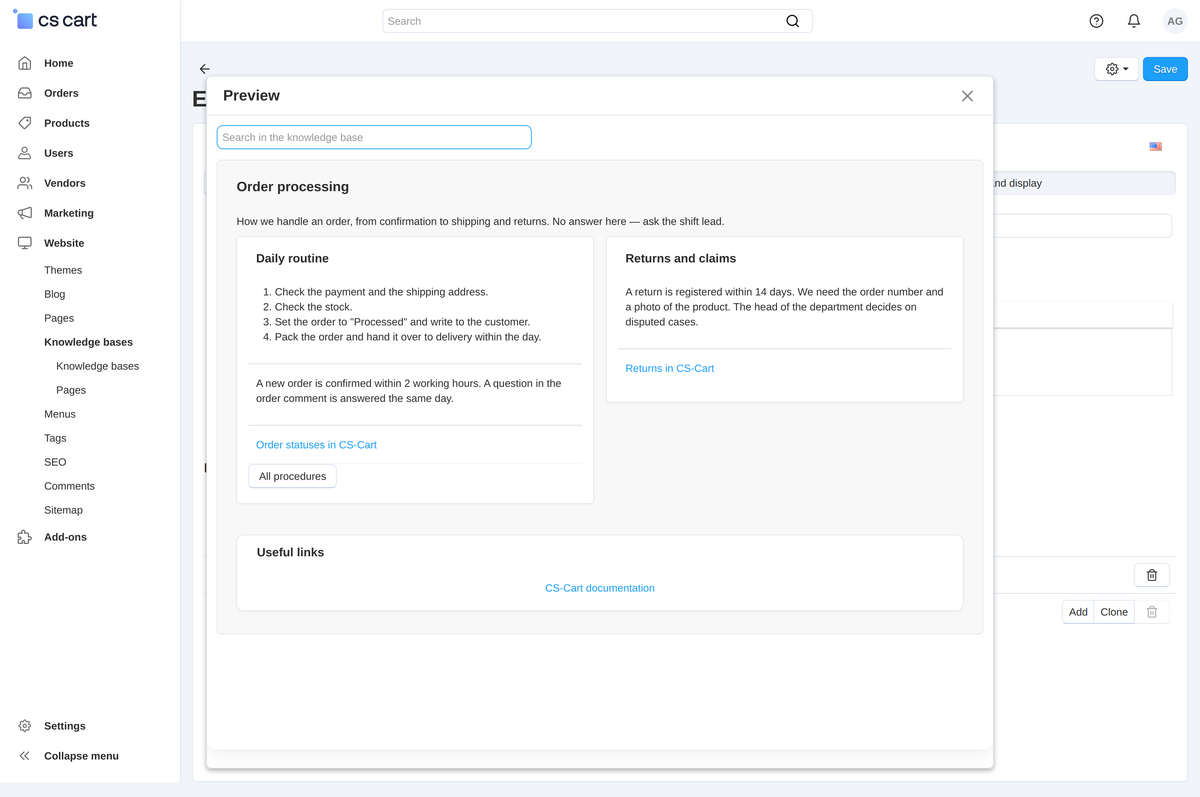
The editor has three tabs: General for the name, the description and the bottom links; Sections for the sections and objects; Access and display for who sees the base, its display settings and the pages it is shown on. Sections and objects are reordered by drag and drop, and Preview shows the base the way an employee will see it.

The list of bases: the company, the number of sections and objects, who sees each base (Administrators: everyone, Administrators: Content manager, Vendor staff: everyone) and the status. The New employee onboarding starter base is disabled.
The General tab: the name and description of the base, the status and the bottom links titled Useful links.
The Sections tab: sections with a drag handle and their objects; in the expanded section, an object of the Html content type with the text editor and the display type.
Preview of a saved base from the editor: the same layout and the same search as in the panel of a page.

Who sees a base

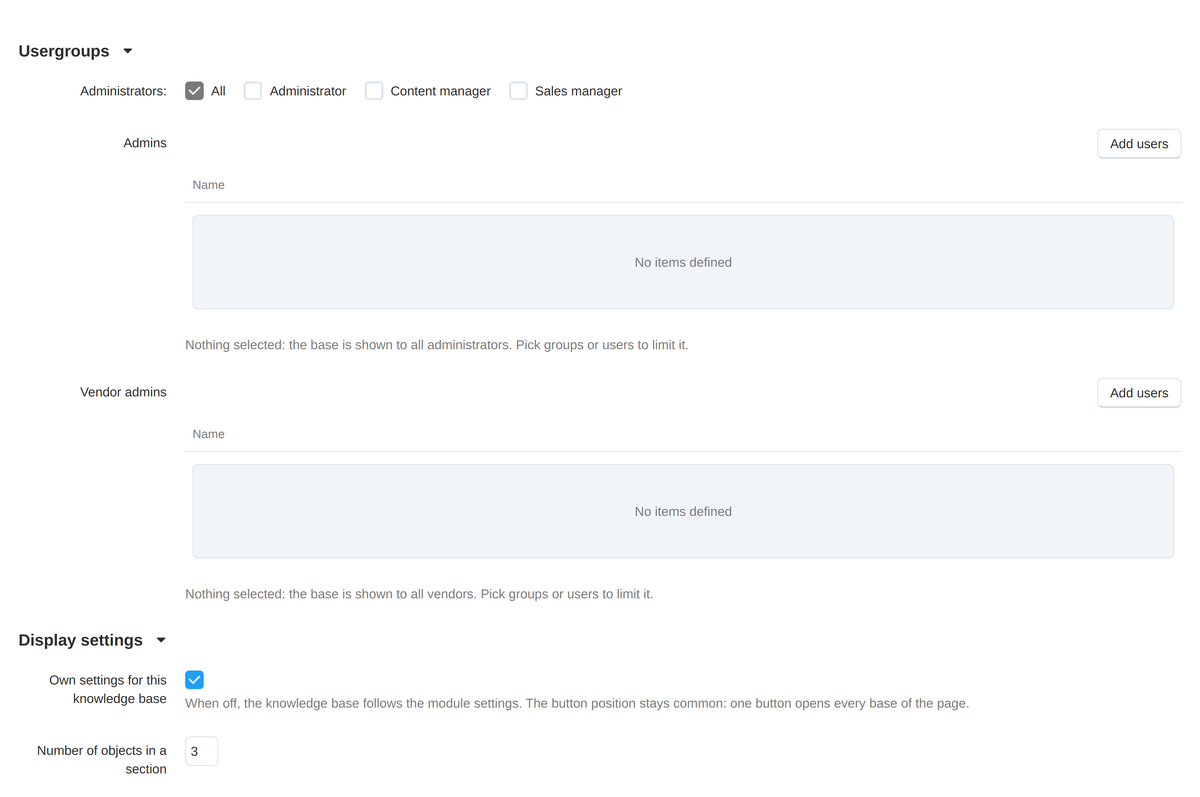
Access is set separately for administrators and for vendors, by user groups and by individual staff members. With nothing selected everyone sees the base: the hint under the group pickers says it plainly, and each row of the list of bases says which administrators and which vendors it is shown to.

In Ultimate a base is shown on all storefronts or on selected ones. A storefront administrator sees the bases of their storefront and the shared ones; a base shown on other storefronts as well opens for them read-only, with a note on the storefronts it is shown on and who can edit it.

The Access and display tab: administrator groups (All selected), staff members, the "Nothing selected: the base is shown to all..." hints and the own display settings of the base, 3 objects per section.

Multi-Vendor: bases for vendors

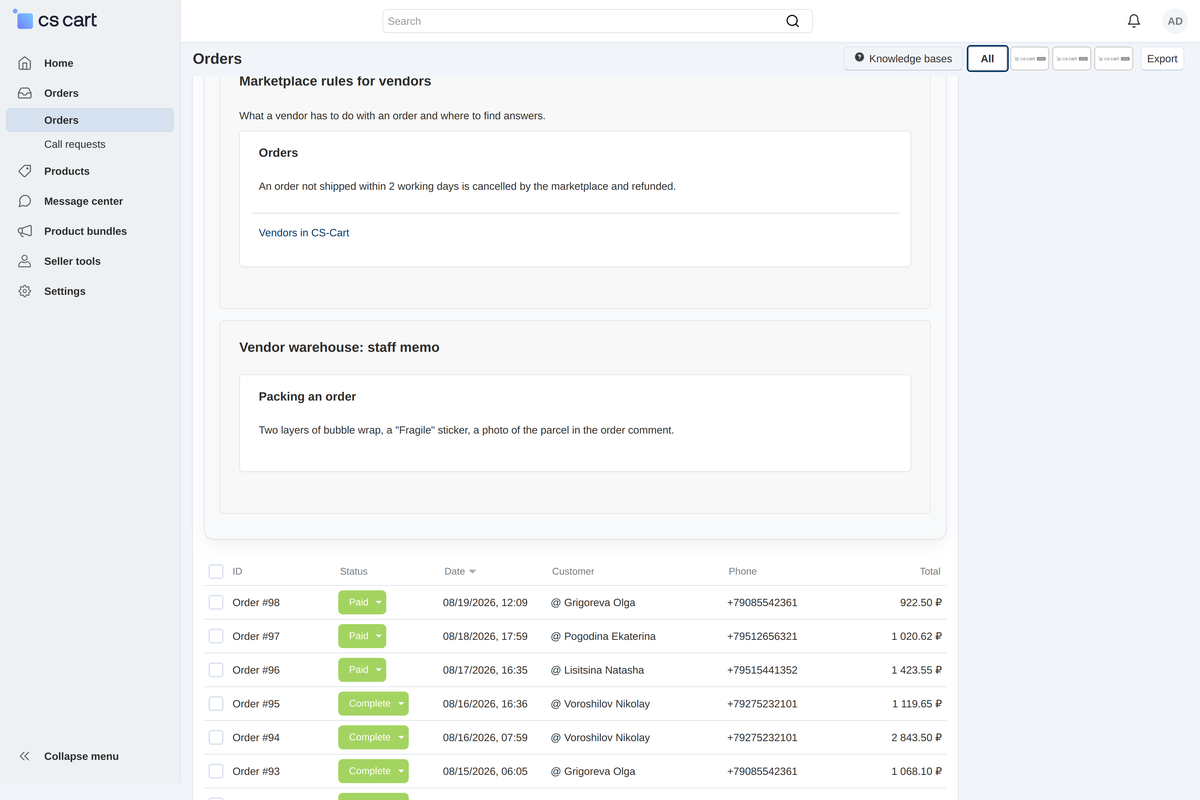
A base of the marketplace administrator can be shown in the vendor panel: shipping rules, product page requirements, links to instructions. A vendor also keeps bases of their own for their staff, under Seller tools, and those are shown only in their panel.

On installation the add-on grants the knowledge base privileges to vendor groups as well, so vendors keep their bases with the Vendor privileges add-on on.

The vendor panel, the order list scrolled to the vendor's bases: the Marketplace rules for vendors base of the marketplace and the vendor's own Vendor warehouse: staff memo base.

Admin pages and settings

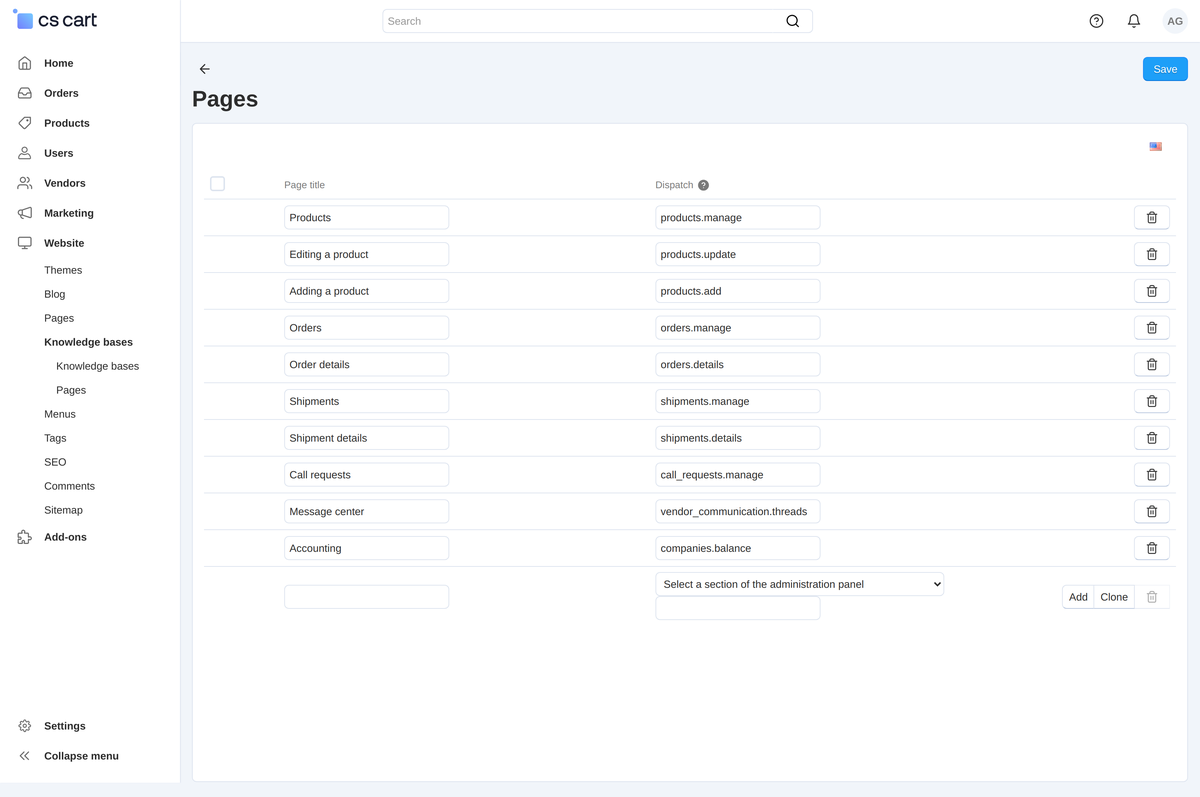
After installation the list of pages already has ten entries: the product list and product page, adding a product, the order list and order details, shipments, call requests, the message center and vendor accounting. A new page is picked from the list of admin menu sections, and the dispatch and the name are filled in automatically.

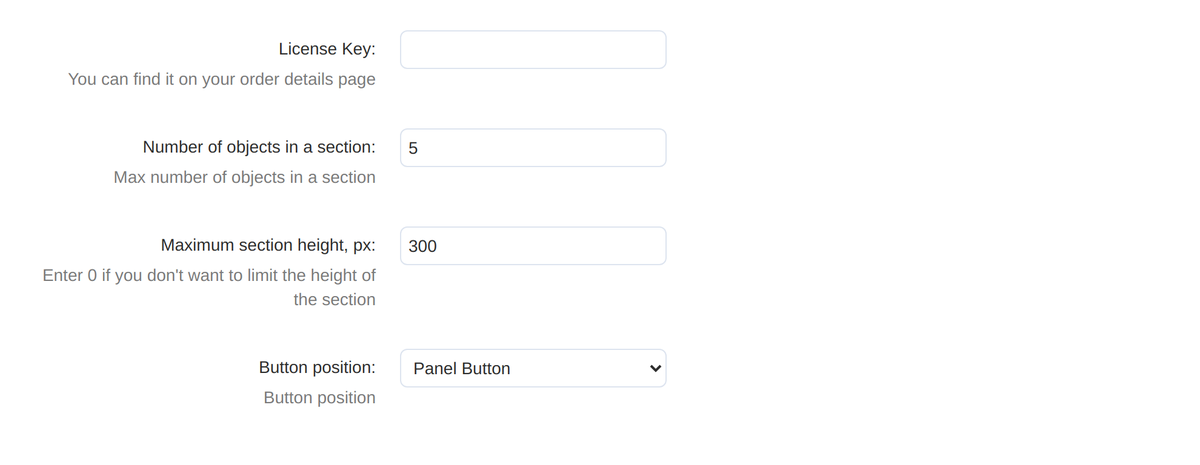
The add-on settings define the button position, the number of objects in a section and the maximum section height. A base can keep its own number of objects and height, for example a short hint on the order page and a large base in the catalog.

The Website → Knowledge bases → Pages list: ten admin pages with their dispatches and a new row with the "Select a section of the administration panel" list.
The add-on settings: the number of objects in a section, the maximum section height and the button position, Panel Button in the screenshot.

New in version 1.3

  • •  Ultimate: a knowledge base can be shown on selected storefronts or on all of them. A base of several storefronts opens read-only for an administrator of one storefront, with a note.
  • •  Display settings of a base: the number of objects in a section and the section height.
  • •  Search in the panel through all bases of the page, the bottom links and the objects above the section limit included: highlighting, the number of matches, Esc clears the search.
  • •  Sections and objects are reordered by drag and drop.
  • •  A base is copied together with its sections, objects, access, settings and translations; the copy is created disabled.
  • •  Preview of a base from the editor, the same way as in the panel of a page.
  • •  An admin page is picked from a list: the dispatch and the name are filled in automatically.
  • •  Three starter bases after installation: Catalog management, Order processing and New employee onboarding, disabled, with examples in English and Russian.
  • •  An "Open in a new tab" link in the popup when a site forbids embedding.
  • •  The access to a base is plain to see: the list says which administrators and which vendors see it, the group pickers say that with nothing selected the base is shown to everyone.
  • •  Multi-Vendor: the installation grants the module privileges to vendor groups as well; an update does not change the vendor privileges.
  • •  Fixes: the module privileges are granted to administrator groups, a base for all storefronts is listed in Ultimate, deleting a base removes its sections and objects, All items expands without loading, the order of objects is kept, admin page names follow the store language.
  • •  Link addresses of objects and sections are checked on saving and on the module update; the administrator is warned about an unsuitable address.
  • •  Multi-Vendor: improved vendor privileges for knowledge bases and the processing of vendor base content. Improved how administrator and vendor groups are taken into account when a base is shown.
  • •  The minimum CS-Cart version is 4.14.1, the tables of the module are converted to InnoDB.

What the add-on does not do

  • •  It shows nothing on the storefront: a base is visible only in the administrator and vendor panels.
  • •  It binds a base to an admin page as a whole, not to a particular order or product.
  • •  It keeps no edit history or comments on articles: these are hints, not a document management system.
  • •  Formatted text (an HTML object) is always shown right in the panel, without a popup.
  • •  It does not bypass the embedding ban of third-party sites: such a page opens by a link in a new tab.

Frequently asked questions

Can customers see the knowledge base?

No. The add-on works only in the administrator and vendor panels; the storefront does not change.

Which pages can show a base?

Any admin page in the Pages list. Ten pages are added on installation (orders, products, shipments, messages and others), and a new one is picked from the list of menu sections.

Can a base be shown to some of the staff only?

Yes. The editor picks administrator and vendor groups or individual staff members. With nothing picked everyone sees the base, and the list of bases says so for every row.

How does it work in Multi-Vendor?

The marketplace administrator shows their bases to vendors, and a vendor keeps bases of their own for their staff under Seller tools; those are shown only in the vendor's panel.

What happens on an upgrade from version 1.0?

The upgrade runs through the Upgrade Center or the add-ons manager. Bases, sections and objects are kept, the tables are converted to InnoDB, the module privileges are granted to administrator groups, leftovers of bases deleted earlier are removed. Vendor privileges do not change on an upgrade.

Does it work with several Ultimate storefronts?

Yes. A base is shown on all storefronts or on selected ones; a storefront administrator edits the bases of their storefront and opens the shared ones read-only.

See the add-on on the demo stand. Log in to the admin panel (the login and password are filled in), open Orders and click Knowledge bases at the top of the page; the bases are under Website → Knowledge bases. Vendor panel: vendor@cart-power.com / demo.
Payment type
One-time payment
Product
  • Store Builder
  • Store Builder Plus
  • Store Builder Ultimate
  • Multi-Vendor
  • Multi-Vendor Plus
  • Multi-Vendor Ultimate
Compatible versions
  • 4.21.1
  • 4.20.1
  • 4.19.1.SP2
  • 4.19.1.SP1
  • 4.19.1
  • 4.18.4
  • 4.18.3
  • 4.18.2.SP1
  • 4.18.2
  • 4.18.1.SP1
  • 4.18.1
  • 4.17.2.SP3
  • 4.17.2.SP2
  • 4.17.2.SP1
  • 4.17.2
  • 4.17.1
  • 4.16.2
  • 4.16.1
  • 4.15.2
  • 4.15.1.SP4
  • 4.15.1.SP3
  • 4.15.1.SP2
  • 4.15.1.SP1
  • 4.15.1
  • 4.14.3.SP1
  • 4.14.3
  • 4.14.2.SP1
  • 4.14.2
  • 4.14.1.SP1
  • 4.14.1
Localizations
  • English
  • Русский

No reviews found

  CS-Cart development · in-house team · since 2013 We build, upgrade and

Contact information


CS-Cart development · in-house team · since 2013

We build, upgrade and speed up CS-Cart stores and marketplaces

Analysts, developers, designers, QA and support under one roof — no subcontractors. We ship add-ons you can buy on this page today, and we take on the work that no ready-made add-on covers.

2013

Working with
CS-Cart since

4.98

Rating from
184 reviews

200+

Solutions on this
marketplace

500+

E-commerce projects
delivered

Flagship products

Two add-ons that change how a store performs

Everything else we publish improves one screen. These two change the numbers: how customers find products, and how often they come back.


Add-on · Search & merchandising

Smart Search

Elasticsearch-powered search for large catalogues. The customer types two letters, sees products with images and prices, and buys from the dropdown — even after a typo or with the wrong keyboard layout.

Visitors who use the search bar are 24% of traffic and 44% of revenue, and convert about 2.5× better than people who only browse categories. If search returns nothing, up to 80% of them leave.
Constructor, Beyond Relevance Report 2025; Google Cloud × The Harris Poll, 2023

Catalogue size Sub-second results on 300,000+ products, Multi-Vendor included
Understands Typos, wrong keyboard layout, synonyms, word forms, SKUs, brands and attributes
Reporting Query analytics — what customers search for and which searches return nothing
Deployment Our cloud, or Elasticsearch on your own server

from $35/month

Plans by catalogue size · self-hosted from $1,215 one-time

Plans and details →

Try it on a live catalogue: open the demo store and search with a deliberate typo.


Add-on · Mobile commerce

PowerApp — mobile app for your store

A native iOS and Android app running on your CS-Cart data: the same products, prices, stock, promotions, reward points and orders. There is no second catalogue to maintain — everything stays in the admin panel you already use.

A mobile site brings a customer in once; an app brings them back for free. Push notifications replace the retargeting budget you spend to buy the same customer a second time.

Platforms Native iOS and Android, published under your own developer account
Home screen Built in the admin panel from six block types, the same way you build website pages
Time to launch Under a week from purchase to submission for App Store and Google Play review
Compatibility CS-Cart and Multi-Vendor 4.18–4.20 · 11 client apps already live in the stores

from $790

Buy outright, or $79/month on subscription

Open the add-on page →

Screens, block types and pricing tiers: see how the app is built.

Services

When no add-on solves it, we do the work

Fixed scope, written specification, a named project manager and a warranty on what we ship.

Custom CS-Cart development

Functionality the platform does not have: add-ons, marketplace mechanics, integrations with 1C, CRM, ERP, payment and delivery providers. We start from a written specification, not from an estimate on a phone call. Details →

CS-Cart upgrade

Move to the current version without losing data, custom code or add-ons. We audit every modification first, upgrade on a staging copy, adapt what breaks and switch over with little or no downtime. Details →

Speed and performance optimisation

Conversion falls by about 4.4% for every extra second of load time. We profile the server, the database and the front-end, then fix what actually costs the seconds — and show you the before-and-after numbers. Details →

Design for CS-Cart

Mobile-first storefront design built on CS-Cart's own template structure, so the layout survives the next platform upgrade instead of becoming a migration problem. Details →

SEO for CS-Cart

A technical audit of indexing, duplicates, redirects, structured data and Core Web Vitals — delivered as a prioritised fix list your developers can act on, or that we implement ourselves. Details →

How we work

What you get besides the code

Before we start

We discuss the goal, offer options and write the specification. You approve scope and price before development begins.

While we build

A named project manager reports progress on a fixed schedule. You always know what is in work and what is next.

Before release

A separate QA pass on every release — the developer who wrote the code is not the person who signs it off.

After handover

Documentation for everything we ship, plus a warranty on the modifications and the project.

Tell us what the store needs to do

Describe the task in a couple of sentences and we will come back with options, a scope and a price. The consultation is free, and we will say plainly if a ready-made add-on already solves it.

Write to us here

Use the Ask a question button at the top of this page — it reaches the same team.

Or reach us directly

sales@cart-power.com · cart-power.com
We work in English and Russian.

Client cases, our full add-on catalogue and 184 customer reviews are in the tabs above.

Similar products

Live search and Search history
5.0 (86)
$120.00
Live Search and Search History shows matching products, categories, brands and pages while the shopper types, with a category filter and typo suggestions in the same window. The admin gets four search history reports, synonyms, stop words, featured phrases and speed-up tools for large catalogs.
Live Search
4.9 (48)
$75.00
The customer types and immediately sees products with a photo, a price and an «Add to cart» button, next to categories, brands and store pages. The add-on understands synonyms, word forms and typos, searches by product code and features, puts your chosen products first for the queries that matter and shows what customers did not find. The word index keeps it fast on catalogs of hundreds of thousands of products. No subscription.
Simple import from Excel, XML, CSV files with Multivendor support
5.0 (29)
$219.00
$249.00
Save 12%
Import and update products and features. Addon can help you control stocks & prices via Excel, XML price lists.
Integration with Base.com (baselinker)
5.0 (20)
$299.00
Manage catalogue, stock, prices and orders from your store and every marketplace in one place: BaseLinker pulls your products and orders and sends back stock, statuses and tracking numbers. For Store Builder and Multi-Vendor.
Make purchases for 200$ from our entire offer and get 20% discount
Incomplete products
5.0 (19)
$19.99
$27.50
Save 27%
Give a full description of your products! Find products for which you have not contributed content.
Extended Email Marketing
5.0 (14)
$120.00
Six emails the store sends without you: abandoned cart, wishlist and recently viewed products, a review request after delivery, a birthday greeting and a campaign to an audience. Every email carries the customer's products and a personal promo code, and the admin panel shows the queue, the sending log and the statistics. Since version 1.36 — subscription to Power Blog articles and the mailing about new articles.