What it does
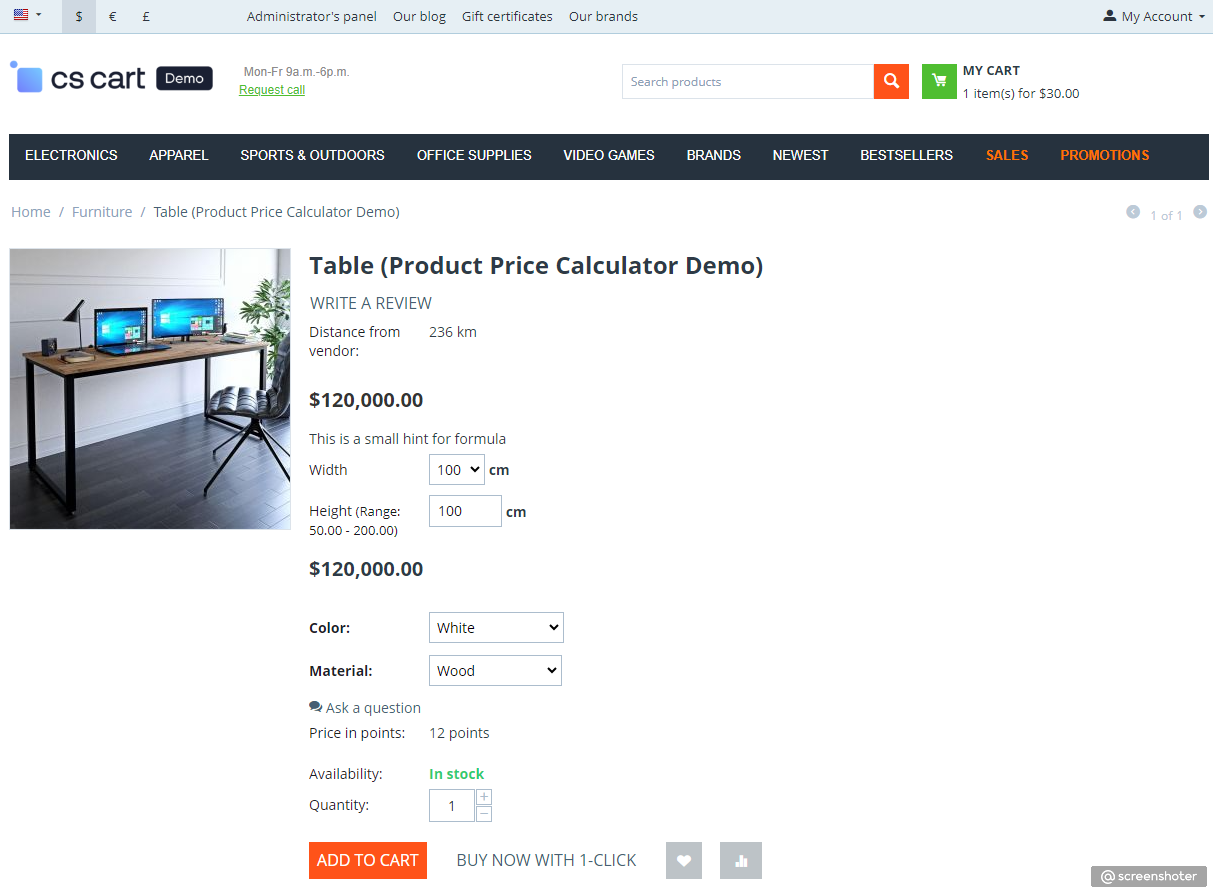
The add-on calculates the final product price from custom numeric inputs entered by the customer, such as size, area, or other measurable parameters. A formula configured in the product settings is applied instantly, so the customer sees an accurate price before adding the item to cart. The result is preserved in cart and checkout to keep pricing consistent.
Key features
- Calculate price by formula — applies arithmetic expressions to customer-provided values and product option modifiers.
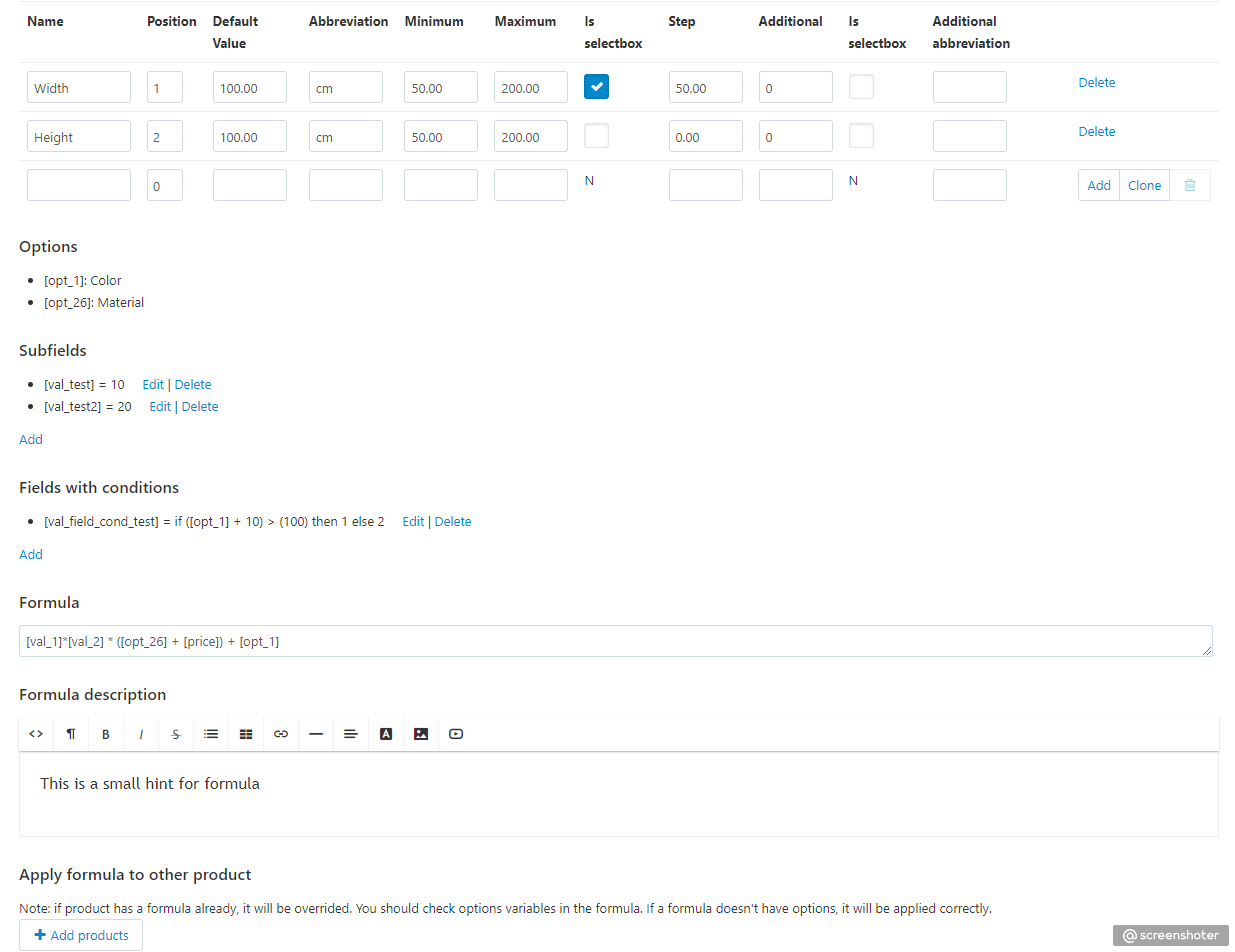
- Name custom measurement fields — configure labels such as width, height, length, thickness, and other product-specific parameters.
- Use different measurement units — set up fields for meters, centimeters, kilograms, and other numeric units.
- Set value ranges and steps — controls minimum, maximum, and increment limits for each pricing field.
- Use subfields and conditions — builds advanced pricing scenarios with intermediate expressions and conditional rules.
- Show formula description on storefront — display calculation notes under product title to explain price logic to customers.
- Apply formula to multiple products — reuse configured formula logic across several products to speed up setup.
- Protect margin with minimum price — enforces a minimum calculated product price to avoid underpricing.
- Keep storefront and cart synchronized — recalculates and stores custom price data through cart, checkout, and order view.
How it works
- Configure product formula — enable calculator mode for a product, add fields, and define the pricing formula.
- Customer enters parameters — the customer fills required values on the product page and selects options.
- System calculates final price — the add-on computes the price, applies limits, and passes it to cart and checkout totals.
Formula examples (simple to advanced)
- Basic multiplication:
[val_1] * [price]
Use case: multiply base price by entered quantity/size value. - Area-based pricing:
[val_1] * [val_2] * [price]
Use case: width × height × base price per unit. - Area + fixed surcharge:
([val_1] * [val_2] * [price]) + 15
Use case: add setup/cutting fee to area-based calculation. - With product option modifier:
([val_1] * [val_2] * [price]) + [opt_3]
Use case: add color/material option impact to calculated price. - With additional field value:
([val_1] * [price]) + ([addval_1] * 2)
Use case: add extra processing cost from an additional input. - Advanced formula with intermediate values:
([val_subtotal] + [val_packaging]) * 1.1
Use case: combine subfields and apply markup/tax coefficient in the final formula.
Formula variables cheat sheet
[price]— base product price used as a starting value in calculations.[val_1],[val_2], ... — values entered by the customer in calculator fields by position.[addval_1],[addval_2], ... — additional values linked to the corresponding main field.[opt_3],[opt_15], ... — selected product option modifier values (by option ID).[val_subtotal]— result of a configured subfield expression.[val_packaging]— result of another subfield or condition field used in the final formula.
Best use cases
- Print products — calculate price by sheet size, print area, and finishing options.
- Roll materials — price films, fabrics, wallpapers, and similar goods by length and width.
- Custom furniture — build pricing by dimensions, material options, and extra processing.
- Glass and mirrors — calculate by area, edge treatment, and drilling/cutout services.
- Metal and construction parts — apply formulas for size-based manufacturing and handling fees.
- Packaging and labels — combine quantity, dimensions, and setup costs in one formula.
Calculation behavior and limits
- Empty values — missing formula variables are treated as
0, so the calculation remains stable. - Division by zero protection — if a divisor is empty or zero, the add-on uses
1to avoid calculation errors. - Minimum price enforcement — final calculated value cannot be lower than the configured minimum product price.
- Option impact — option modifiers are included only when referenced in the formula through
[opt_ID]. - Numeric precision — calculation fields support decimal values and configured step/range limits.
- Consistent totals — calculated price is reused in product, cart, checkout, order data, and invoice documents.
Quick start
- Open calculator tab in product editor — go to the product edit page in admin panel and open the "Product Price Calculator" tab.
- Create input fields — add dimension/quantity fields with min, max, and step values.
- Set formula — build price logic using variables, options, and optional subfields.
- Set minimum price — define the minimum calculated amount to protect margin.
- Test storefront flow — enter sample values on product page and verify cart/checkout totals.
Requirements
- CS-Cart / Multi-Vendor 4.8.1+
- No external API keys or third-party services required
Edition support
Supports CS-Cart and Multi-Vendor. In Multi-Vendor, vendor products can use calculator fields while global add-on settings are managed by the administrator.
Common questions
Q: Does it work with Multi-Vendor?
A: Yes. The add-on is compatible with Multi-Vendor and supports calculator logic for vendor products.
Q: Can different products use different formulas?
A: Yes. Each product can have its own fields, formula, conditional logic, and minimum calculated price.
- Store Builder
- Store Builder Ultimate
- Multi-Vendor
- Multi-Vendor Plus
- Multi-Vendor Ultimate
- 4.20.1
- 4.19.1.SP2
- 4.19.1.SP1
- 4.19.1
- 4.18.4
- 4.18.3
- 4.18.2.SP1
- 4.18.2
- 4.18.1.SP1
- 4.18.1
- 4.17.2.SP3
- 4.17.2.SP2
- 4.17.2.SP1
- 4.17.2
- 4.17.1
- 4.16.2
- 4.16.1
- 4.15.2
- 4.15.1.SP4
- 4.15.1.SP3
- 4.15.1.SP2
- 4.15.1.SP1
- 4.15.1
- 4.14.3.SP1
- 4.14.3
- 4.14.2.SP1
- 4.14.2
- 4.14.1.SP1
- 4.14.1
- 4.13.3
- 4.13.2.SP2
- 4.13.2.SP1
- 4.13.2
- 4.13.1
- 4.12.2
- 4.12.1
- 4.11.5
- 4.11.4
- 4.11.3
- 4.11.2
- 4.11.1
- 4.10.4.SP1
- 4.10.4
- 4.10.3
- 4.10.2
- 4.10.1
- 4.9.3
- 4.9.2
- 4.9.1
- 4.8.1
- 4.8.2
- 4.7.3
- 4.7.2
- 4.7.1
- 4.7.4
- 4.6.2
- 4.6.1
- 4.6.3
- 4.5.1
- 4.5.2
- 4.4.2
- 4.4.1
- 4.4.3
- English
- Русский
Alt-team is one of the most experienced team of CS-Cart developers. Starting to provide the online store development service in 2010, we released more than 100 add-ons for CS-Cart and MultiVendor editions. We fulfilled over 3500 projects on CS-Cart solution.

.png?1600274735443)
Alt-team is a team of talented PHP developers with 10+ years of experience with CS-Cart.
If you have any questions to us, please get in touch at manager@alt-team.com. We appreciate all our clients and are always glad to help!
Similar products
- Makes your store faster.
- Improves the SEO ranking of the site.
- Increases conversion.
Optimize and convert to WebP all the images on the site