Profile types - a profile of its own for an individual, a company and a dealer
CS-Cart has one customer form for everyone: an individual stumbles over a tax ID and company fields, and a company never leaves its details. The add-on splits customers and vendors into types, and every type has its own fields, its own user group, its own storefronts and its own rules.
3 places to choose the type is chosen at registration, in the account and at checkout - by a guest too
|
One list of fields a field is created once; the "show / require" checkboxes are set per type
|
The type decides the user group and prices, the storefronts where the type is available, account activation
|
CS-Cart 4.16.2-4.21.1 and Multi-Vendor, every edition, updated with the Add-ons Manager
|
Why a store needs profile types
An individual, a company, a sole trader, a dealer - they buy differently, and the store needs different things from them. One form for everyone either scares people off with extra fields or leaves the manager without the details they then have to ask for by phone.
Fields by type
A company sees "Company", "Tax ID" and the legal address, an individual sees a name, a phone and a date of birth. Nobody gets fields they do not need. |
Group and prices - automatically
The type assigns the user group: a wholesale customer gets wholesale prices and terms right after registration, without a manager. |
Company details in the order the first time
The fields of the type are asked at checkout and go to the order, emails and printed documents - the invoice is issued to the company without a single email exchange. |
Own storefronts and activation
Dealers can be let in on the dealer storefront only, and individuals can be activated at once even while companies are checked by an administrator. |

Where the customer chooses the type
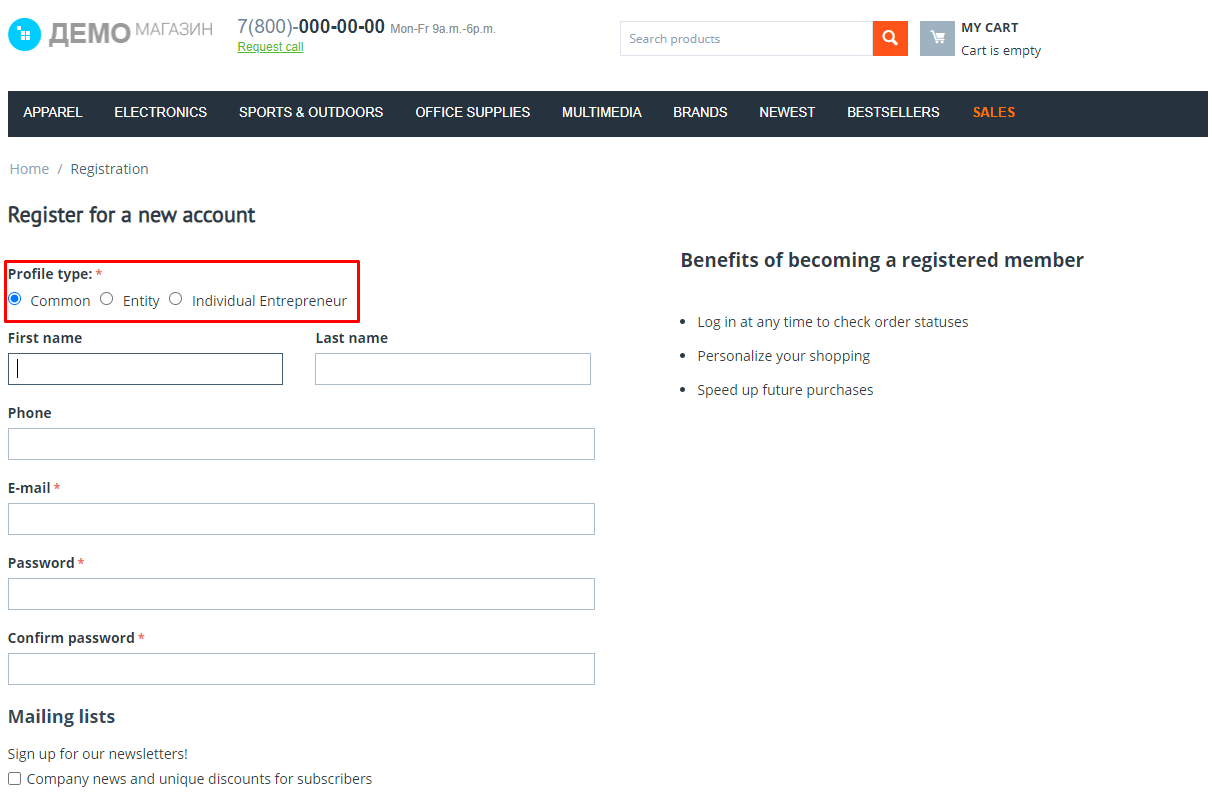
- • At registration. Radio buttons or a drop-down list, as set; the form is rebuilt at once and keeps what has been typed.
- • In the account. The customer sees the fields of their type. Changing the type can be allowed always, once or never; on a change the user groups change too.
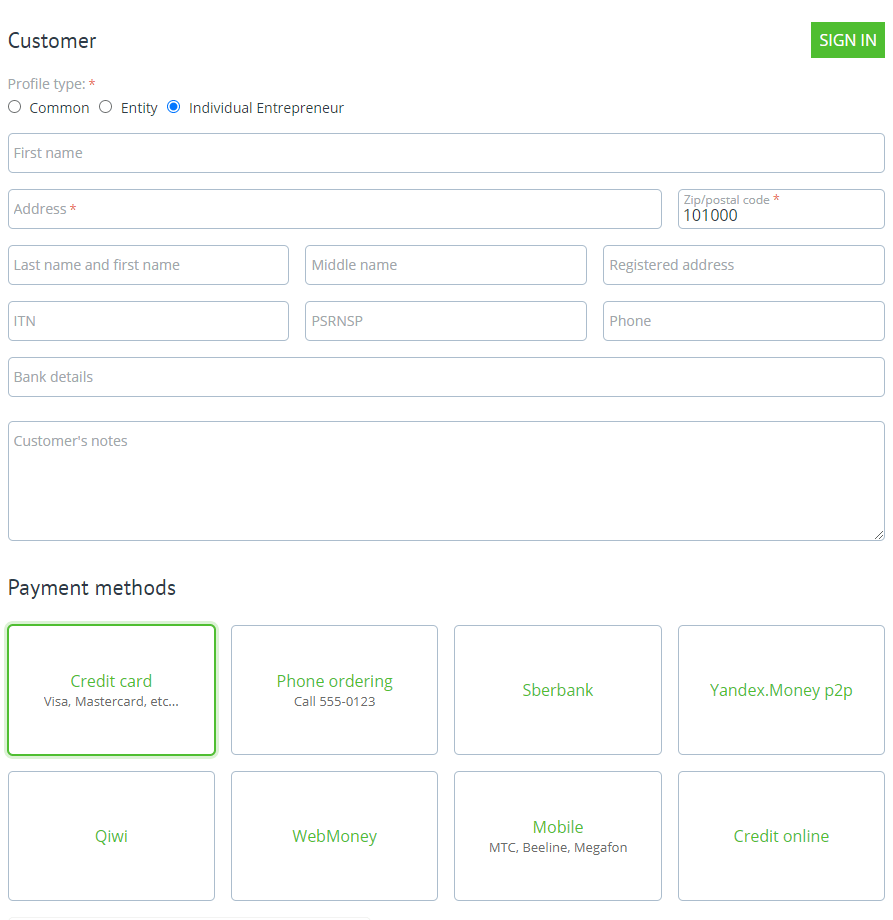
- • At checkout. The choice is shown to everyone, to guests only or to nobody. The type of the order does not change the type of the customer profile.
-
• By a link with a fixed type. A registration address like
?cp_profile_type=CODEopens the form of that type,cp_profile_type_locked=1forbids changing it - for a dealer mailing or a "For companies" page. - • Values are kept. Fields hidden for the chosen type keep what was typed: the customer switches back - and the company details are still there.


One list of fields, checkboxes per type
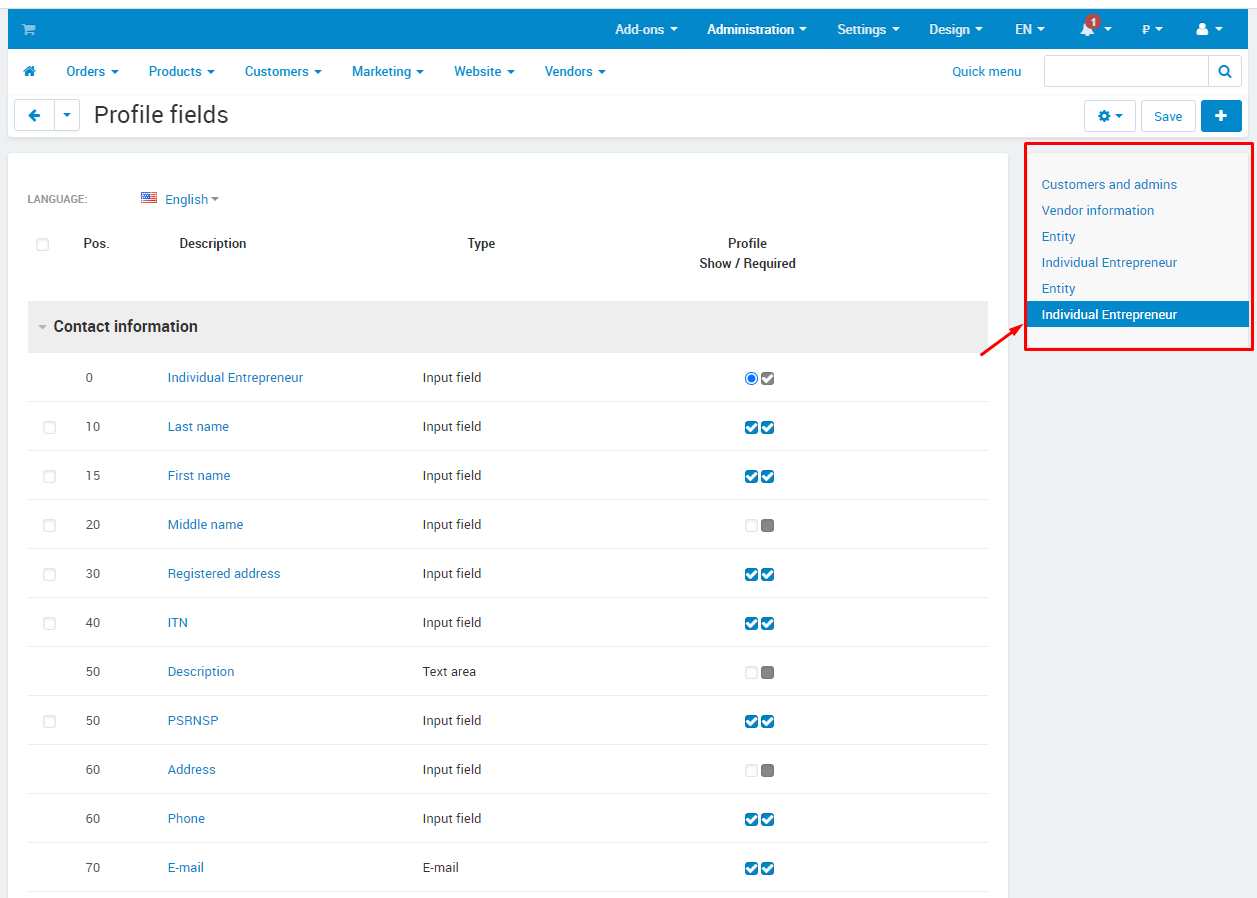
The add-on does not clone fields for every type. A field is created once in the standard "Profile fields" list, and it gets a row per type with checkboxes: show in the profile, at registration, at checkout, require in the profile and require at checkout.
- • The "At registration" checkbox is separate: a field can live in the account without making the registration form longer.
- • "Required" is set separately for the profile and for checkout - required in the order, optional in the account.
- • Vendor fields get one more checkbox, "Show on the storefront": the value is visible on the vendor page.
- • Reports, exports and other add-ons keep seeing the same field, whichever type filled it in.

The type decides: groups, storefronts, activation
- • User groups. A customer of the type joins its groups - with the "Active" or "Pending" status. Change the groups of a type, and the change applies to existing users as well.
- • Storefronts. A type is available on selected storefronts or on all of them. The "Let customers sign in only on the storefronts of their profile type" setting keeps a dealer off the retail storefront.
- • Activation at once. A type has a flag: its customers sign in right after registration, even when new accounts in the store are activated by an administrator.
- • The default type. The first active type in the list: those who did not choose register with it, and a guest checks out with it. Standard types can be hidden from the choice.
- • Names are translated into the store languages, the order is a position, a disabled type disappears from the storefront while its users keep working as before.


In the order, documents and the admin panel
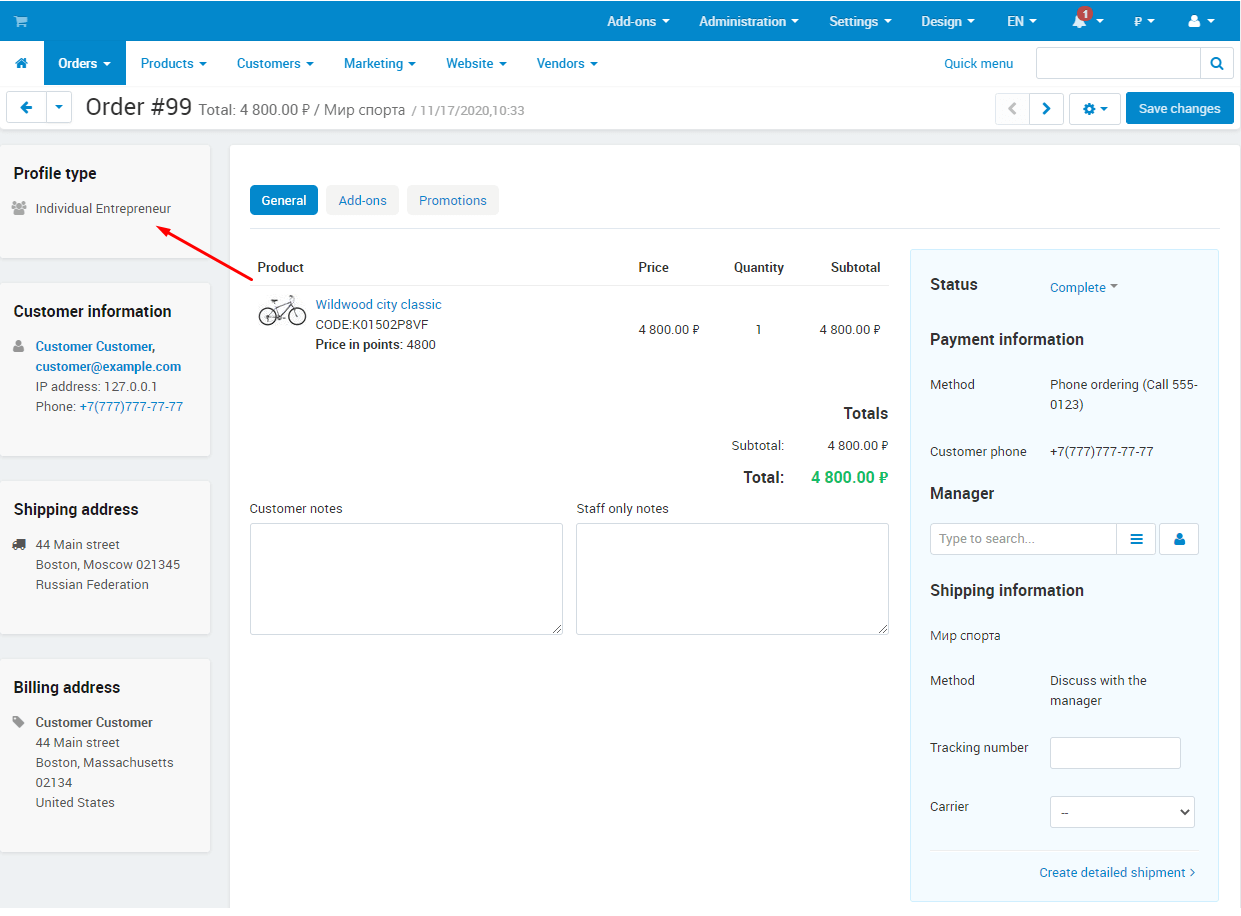
- • The profile type and its fields - in the order, in the "Customer information" dialog of order editing and in the order details of the customer account.
- • The values of the type fields are passed to emails and printed documents: added to the invoice template once, printed in every invoice.
- • In the customer card the administrator changes the type and fills in the fields of the type; an order created from the panel gets the fields of the chosen type.
- • The customer list is searched by type; the type is in the export of customers and vendors, and the type code is checked at import.


Vendors in Multi-Vendor
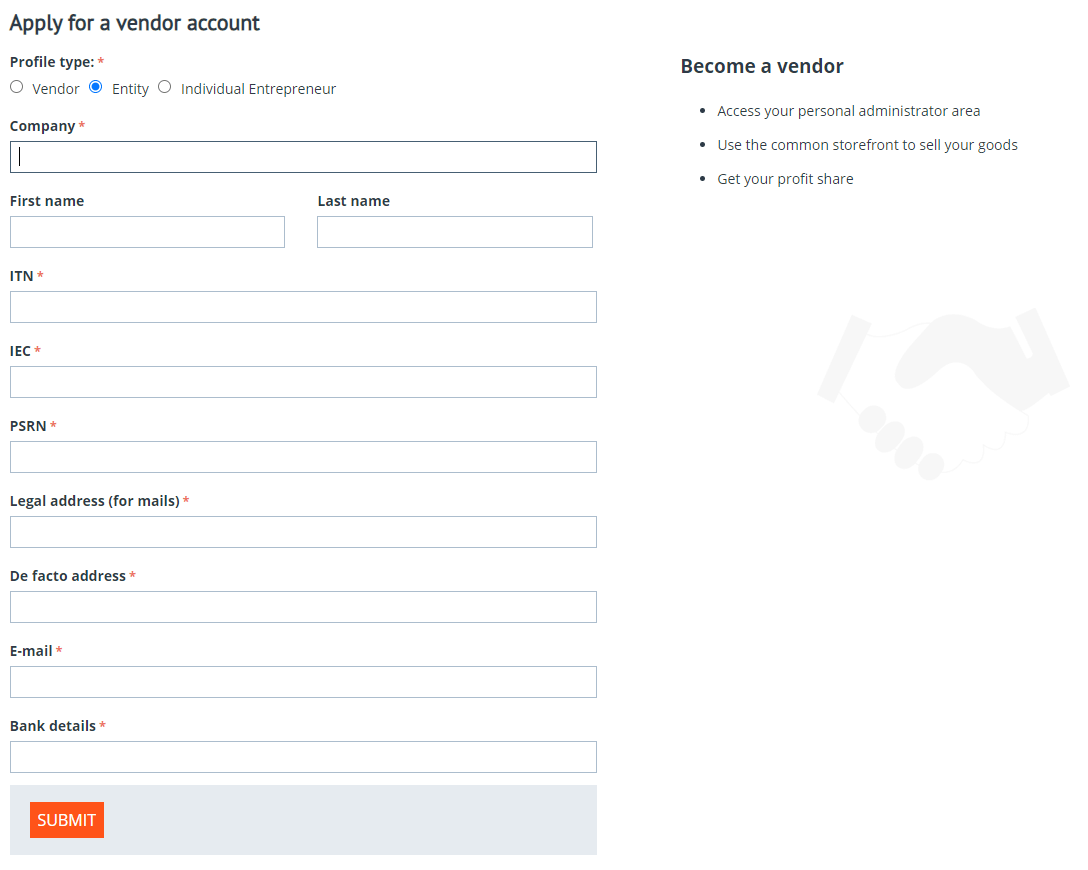
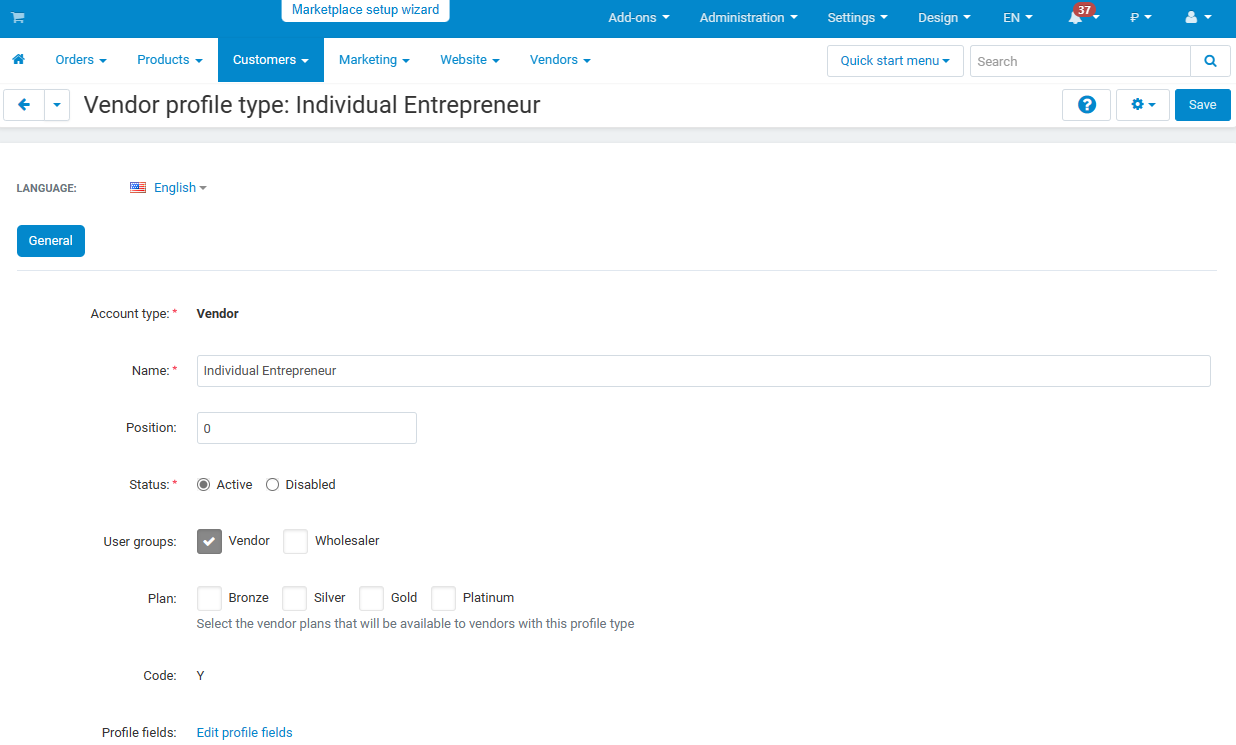
Vendors have types of their own - "Company" and "Individual seller", for example. Every type has its own fields in the application and in the vendor card and its own vendor plans: a company picks from one set, a private seller from another.
- • A vendor application link with a fixed type works the same way as for customers.
- • With a setting on, the vendor type name is shown on the product page instead of the "Vendor" label.
- • A vendor field with "Show on the storefront" is visible to customers on the vendor page.
- • The vendor type is in the import and export of vendors.
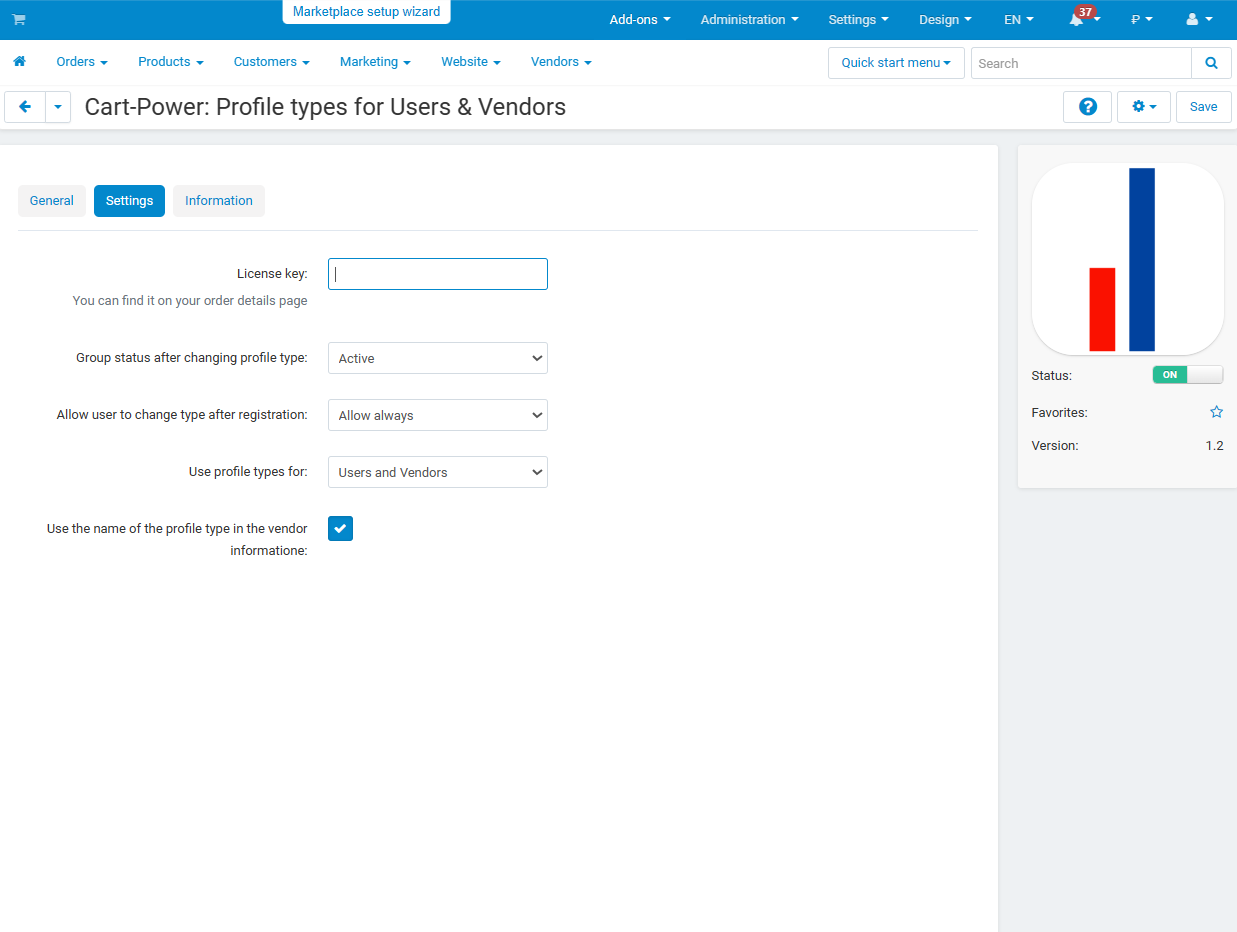
- • The "Use profile types for" setting turns types on for customers, for vendors or for both.


Settings
Ten settings with tooltips. All of them except "Let customers sign in only on the storefronts of their profile type" are set per storefront - in Multi-Vendor and in CS-Cart Ultimate.
- • Who the types are for: customers, vendors or both.
- • Type change by the customer: always, once or never; the group status after a change.
- • Hide standard types from the choice on the storefront.
- • The type choice at checkout: everyone, guests only or nobody.
- • The choice view: radio buttons or a drop-down list.
- • Reload the page when the type is changed - for stores with third-party captchas and scripts.
- • The vendor type name on the product page; sign-in only on the storefronts of the type; invoice details from the profile.
- • The "Manage profile types" privilege - a separate permission for administrator groups.

What is new in version 2.3
- • On a storefront with a single profile type, a customer registration and a vendor application save that type.
- • A vendor application from the storefront gets a vendor plan of its own type.
- • A vendor type change moves the vendor administrators from the privilege usergroups of the previous type to those of the new one.
Frequently asked questions
Do we have to create the fields again for every type?
No. The list of fields stays standard and shared; every field gets checkboxes per type. Fields that already existed in the store keep working with their previous settings.
Can the customer change the type themselves?
As the store decides: always, once or never. The administrator changes the type in the customer card in any case, and the user groups change together with the type.
Will the fields of the type appear at checkout?
Yes. The "Customer information" and address blocks of the lite checkout are switched once to the "By profile type" content the add-on adds to the layout, and the form shows the fields of the chosen type. A guest can choose the type too.
How do we put the tax ID and company details into the invoice and emails?
The add-on passes the values of the type fields to document and email templates: a variable like user.field_code is inserted into the template once in "Design - Documents".
How many types can we create?
About twenty for customers and vendors together: a type has a one-letter code, and some letters are taken by CS-Cart itself. When the free codes run out, the add-on says so on saving.
What happens to types and data when we upgrade from 1.x or 2.x?
Everything is migrated: types, field settings and customer values. The upgrade is installed with the Add-ons Manager or the Upgrade Center as usual.
- Store Builder
- Store Builder Plus
- Store Builder Ultimate
- Multi-Vendor
- Multi-Vendor Plus
- Multi-Vendor Ultimate
- 4.21.1
- 4.20.1
- 4.19.1.SP2
- 4.19.1.SP1
- 4.19.1
- 4.18.4
- 4.18.3
- 4.18.2.SP1
- 4.18.2
- 4.18.1.SP1
- 4.18.1
- 4.17.2.SP3
- 4.17.2.SP2
- 4.17.2.SP1
- 4.17.2
- 4.17.1
- 4.16.2
- English
- Русский
|
CS-Cart development · in-house team · since 2013 We build, upgrade and speed up CS-Cart stores and marketplacesAnalysts, developers, designers, QA and support under one roof — no subcontractors. We ship add-ons you can buy on this page today, and we take on the work that no ready-made add-on covers. |
|
2013 Working with |
4.98 Rating from |
200+ Solutions on this |
500+ E-commerce projects |
Flagship products
Two add-ons that change how a store performs
Everything else we publish improves one screen. These two change the numbers: how customers find products, and how often they come back.
|
Add-on · Search & merchandising Smart SearchElasticsearch-powered search for large catalogues. The customer types two letters, sees products with images and prices, and buys from the dropdown — even after a typo or with the wrong keyboard layout. Visitors who use the search bar are 24% of traffic and 44% of revenue, and convert about 2.5× better than people who only browse categories. If search returns nothing, up to 80% of them leave. | ||||||||
| ||||||||
Try it on a live catalogue: open the demo store and search with a deliberate typo. |
|
Add-on · Mobile commerce PowerApp — mobile app for your storeA native iOS and Android app running on your CS-Cart data: the same products, prices, stock, promotions, reward points and orders. There is no second catalogue to maintain — everything stays in the admin panel you already use. A mobile site brings a customer in once; an app brings them back for free. Push notifications replace the retargeting budget you spend to buy the same customer a second time. | ||||||||
| ||||||||
Screens, block types and pricing tiers: see how the app is built. |
Services
When no add-on solves it, we do the work
Fixed scope, written specification, a named project manager and a warranty on what we ship.
|
Custom CS-Cart development Functionality the platform does not have: add-ons, marketplace mechanics, integrations with 1C, CRM, ERP, payment and delivery providers. We start from a written specification, not from an estimate on a phone call. Details → |
|
CS-Cart upgrade Move to the current version without losing data, custom code or add-ons. We audit every modification first, upgrade on a staging copy, adapt what breaks and switch over with little or no downtime. Details → |
|
Speed and performance optimisation Conversion falls by about 4.4% for every extra second of load time. We profile the server, the database and the front-end, then fix what actually costs the seconds — and show you the before-and-after numbers. Details → |
|
Design for CS-Cart Mobile-first storefront design built on CS-Cart's own template structure, so the layout survives the next platform upgrade instead of becoming a migration problem. Details → |
|
SEO for CS-Cart A technical audit of indexing, duplicates, redirects, structured data and Core Web Vitals — delivered as a prioritised fix list your developers can act on, or that we implement ourselves. Details → |
How we work
What you get besides the code
|
Before we start We discuss the goal, offer options and write the specification. You approve scope and price before development begins. |
While we build A named project manager reports progress on a fixed schedule. You always know what is in work and what is next. |
|
Before release A separate QA pass on every release — the developer who wrote the code is not the person who signs it off. |
After handover Documentation for everything we ship, plus a warranty on the modifications and the project. |
Tell us what the store needs to doDescribe the task in a couple of sentences and we will come back with options, a scope and a price. The consultation is free, and we will say plainly if a ready-made add-on already solves it.
|
Client cases, our full add-on catalogue and 184 customer reviews are in the tabs above.
Similar products
- Makes your store faster.
- Improves the SEO ranking of the site.
- Increases conversion.