Cart is empty
No reviews found

Try it before you buy
Launch your own demo store with this add-on already installed. The store is ready within a few minutes and runs for 7 days.
Subscription plan: small monthly fee, all updates included.
Pay a small monthly fee instead of the full price up front, and get all add-on updates for as long as the subscription is active. Prefer to pay once, or want to read the reviews?
See the one-time purchase version → See all our subscription add-ons →
Save 50% in the Bundle for Multi-Vendor
This add-on is one of six SoftSolid add-ons in the Bundle for Multi-Vendor. Bought separately they cost $1,194, in the bundle you pay $597.
An extension for Multi-Vendor that opens the promotion module to vendors in their own panel and makes sure every discount they create stays inside their own catalogue. Out of the box promotions belong to the marketplace administrator, so each vendor sale begins with a request and ends in the operator's task queue. Our add-on moves that work to the vendor and leaves the marketplace with what matters most: control over how far someone else's freedom reaches.
Setup starts on a single screen and takes a moment. Two switches are enough to scope every promotion a vendor saves to their own company and to keep the condition logic beyond reach of an alternative branch. A third option decides how a fixed discount is spread across cart items, and a fourth appends the vendor name to the promotion name, which brings welcome order to the campaign list in the marketplace panel
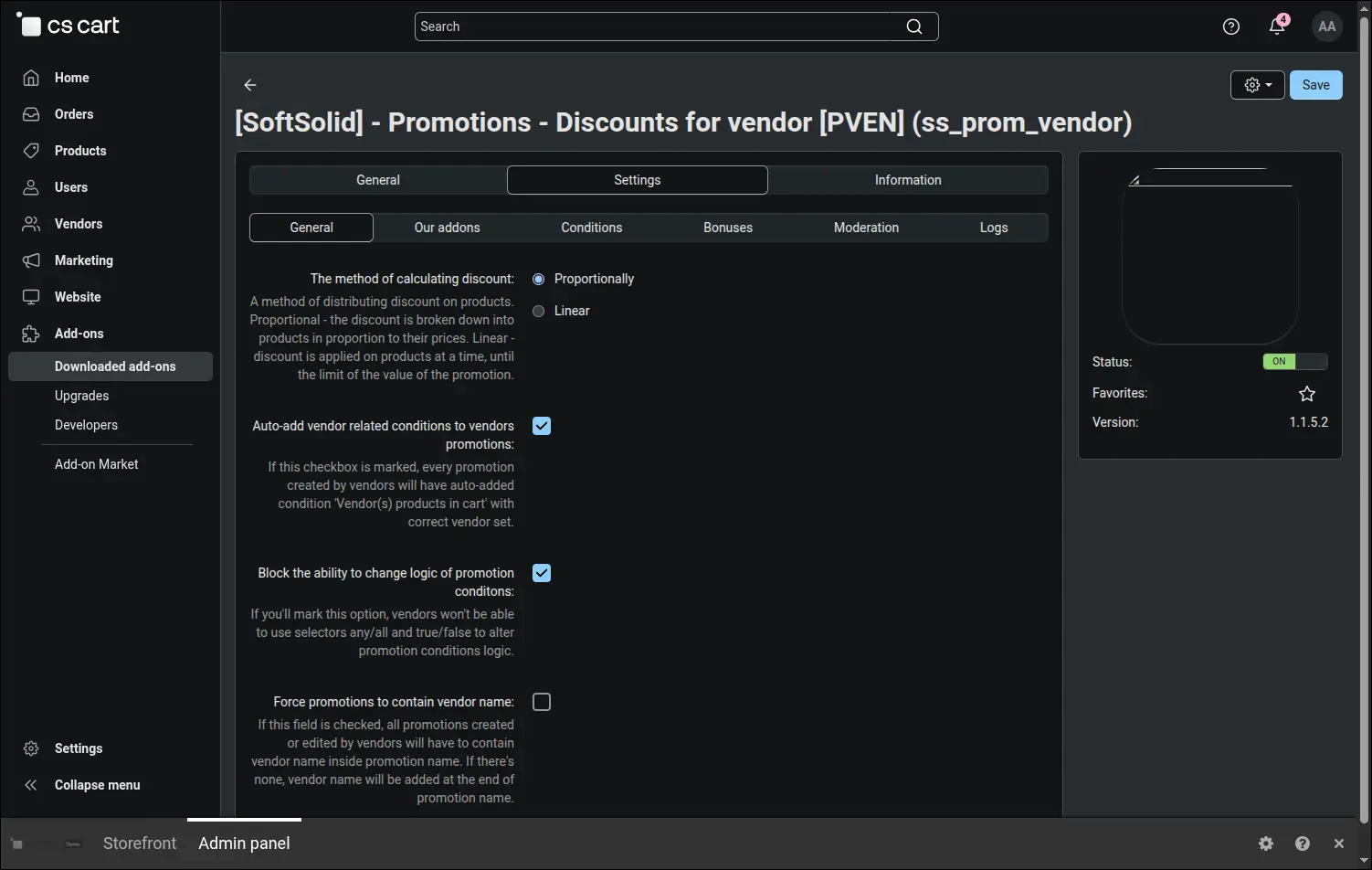
Screenshot 1 - general settings: automatic scoping of a vendor promotion to that vendor's own offer
Not every promotion condition is meant to be handed over. The list of blocked conditions is built from the real schema of your installation, separately for catalogue and cart promotions, so it covers the native CS-Cart mechanisms as well as those brought in by other extensions. Ticking an entry takes it away from vendors and leaves it untouched for the administrator
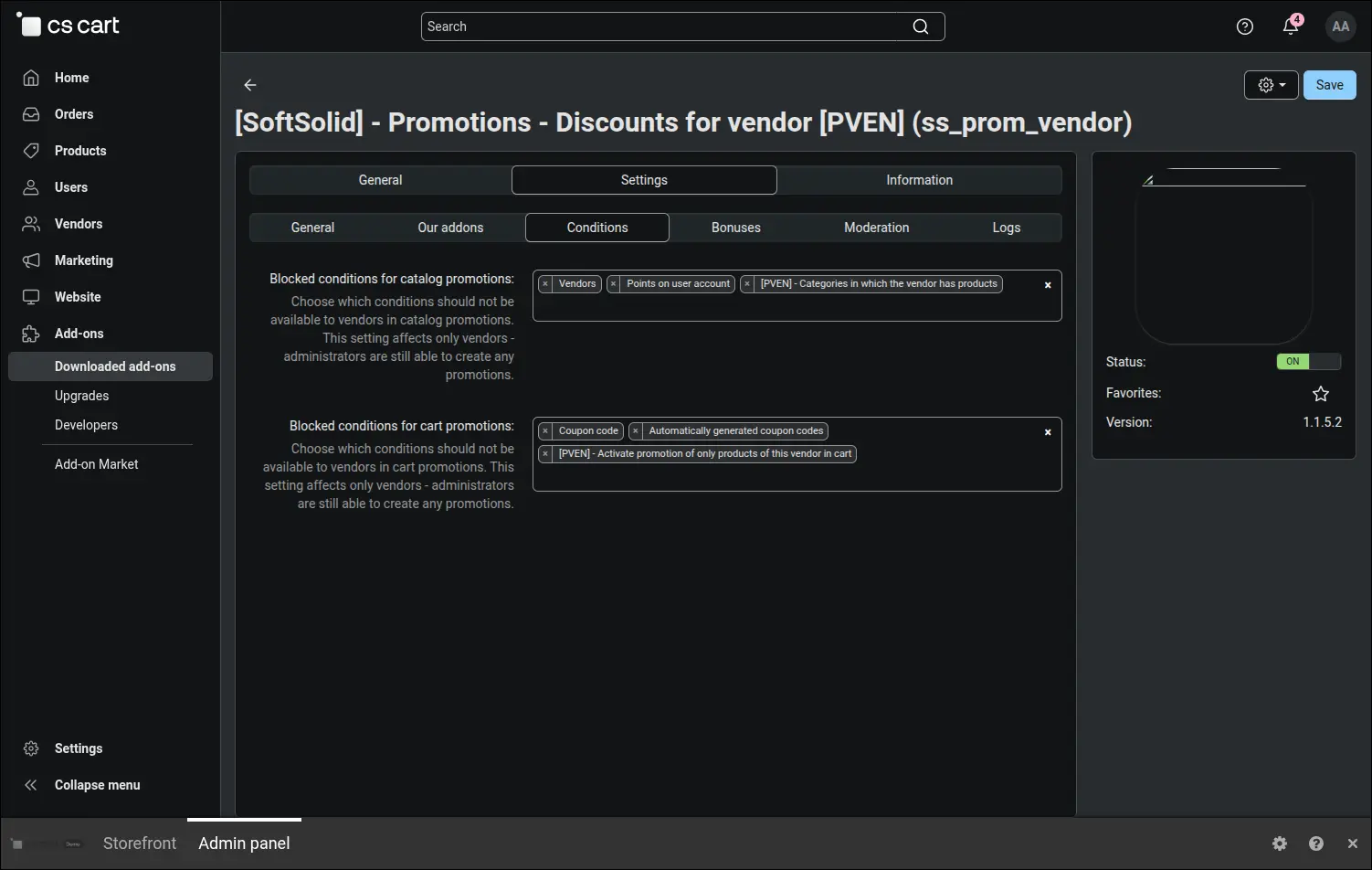
Screenshot 2 - the administrator removes the conditions that vendors should not have
Bonuses follow the same rule, except the default arrangement is already thought through. After installation the native bonuses are blocked, among them product and category discounts, granting a user group, issuing coupons and free shipping counted for the whole cart. Vendors keep the bonuses marked with the PVEN prefix, the ones that understand the notion of a company and never reach for someone else's parcel
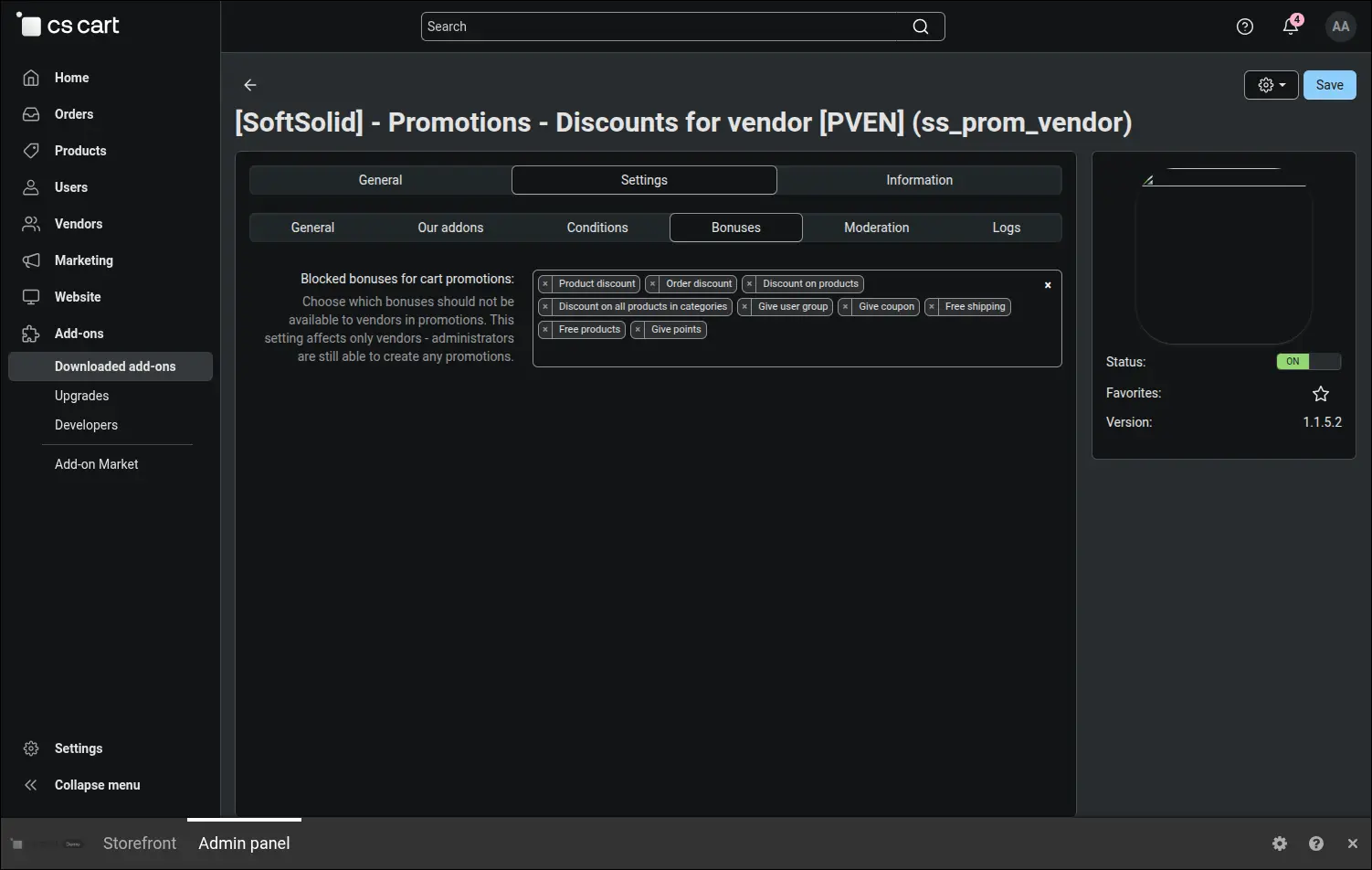
Screenshot 3 - core bonuses are blocked by default, vendors get the company-aware ones
A marketplace that wants to see every price cut before it goes live turns on pre-moderation with a single switch. From that moment a promotion saved by a vendor waits, disabled, for the administrator's decision, and the appointed moderators receive a message with a link that leads straight to the queue
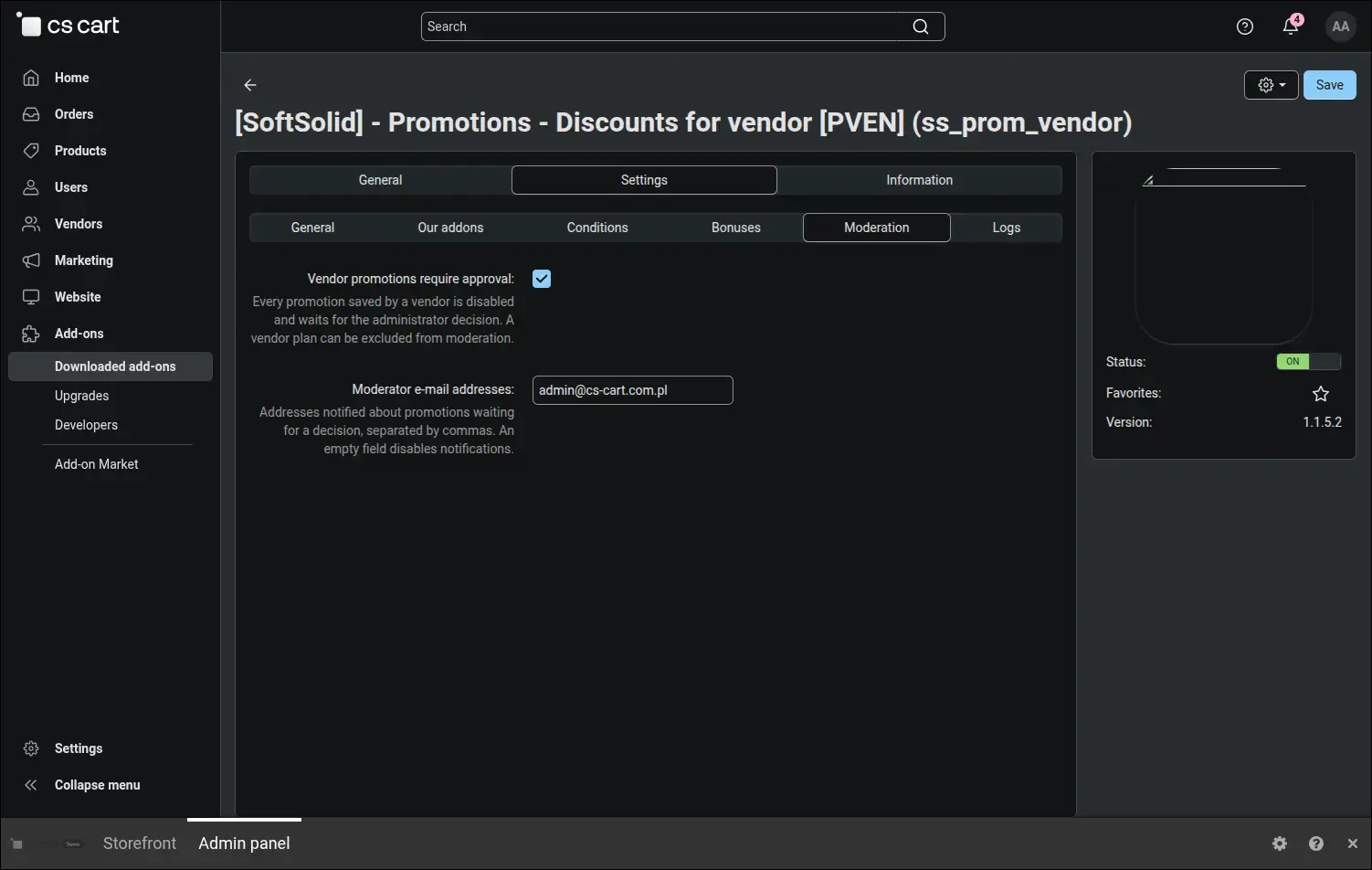
Screenshot 4 - promotion moderation is switched on in one click, with a notification to moderators
The most interesting part happens in the vendor plan, the very place where a marketplace already differentiates commissions and catalogue limits. The plan grants the right to run promotions, sets their priority against marketplace campaigns and enforces four boundaries: maximum discount in percent, maximum discount amount, maximum number of simultaneously active promotions and maximum duration of a single campaign. An empty field means no limit, so installing the add-on on a running marketplace changes nothing until you fill the values in yourself. A separate switch exempts a chosen plan from moderation, which comes in handy with long-standing vendors
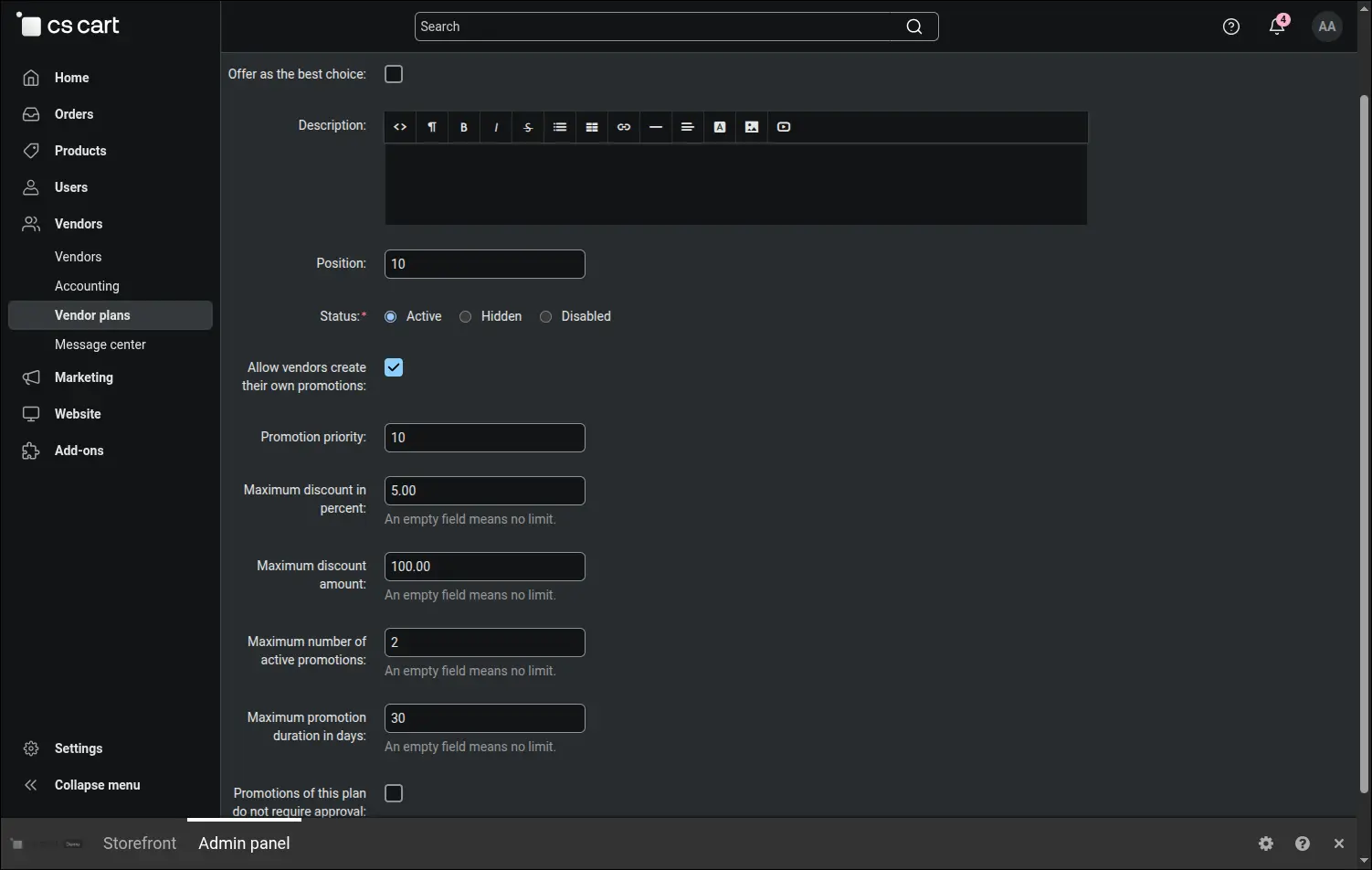
Screenshot 5 - the vendor plan decides on the right to run promotions and on the discount limits
From the vendor's side it looks simple: the Marketing section shows a promotion list that holds their campaigns only, with statuses and a button for adding another one. Other companies' promotions stay out of sight, both on the list and after typing an address by hand, because the company filter sits in the controller. On a marketplace that hosts rival companies this is the condition that makes anyone willing to run a pricing policy there at all
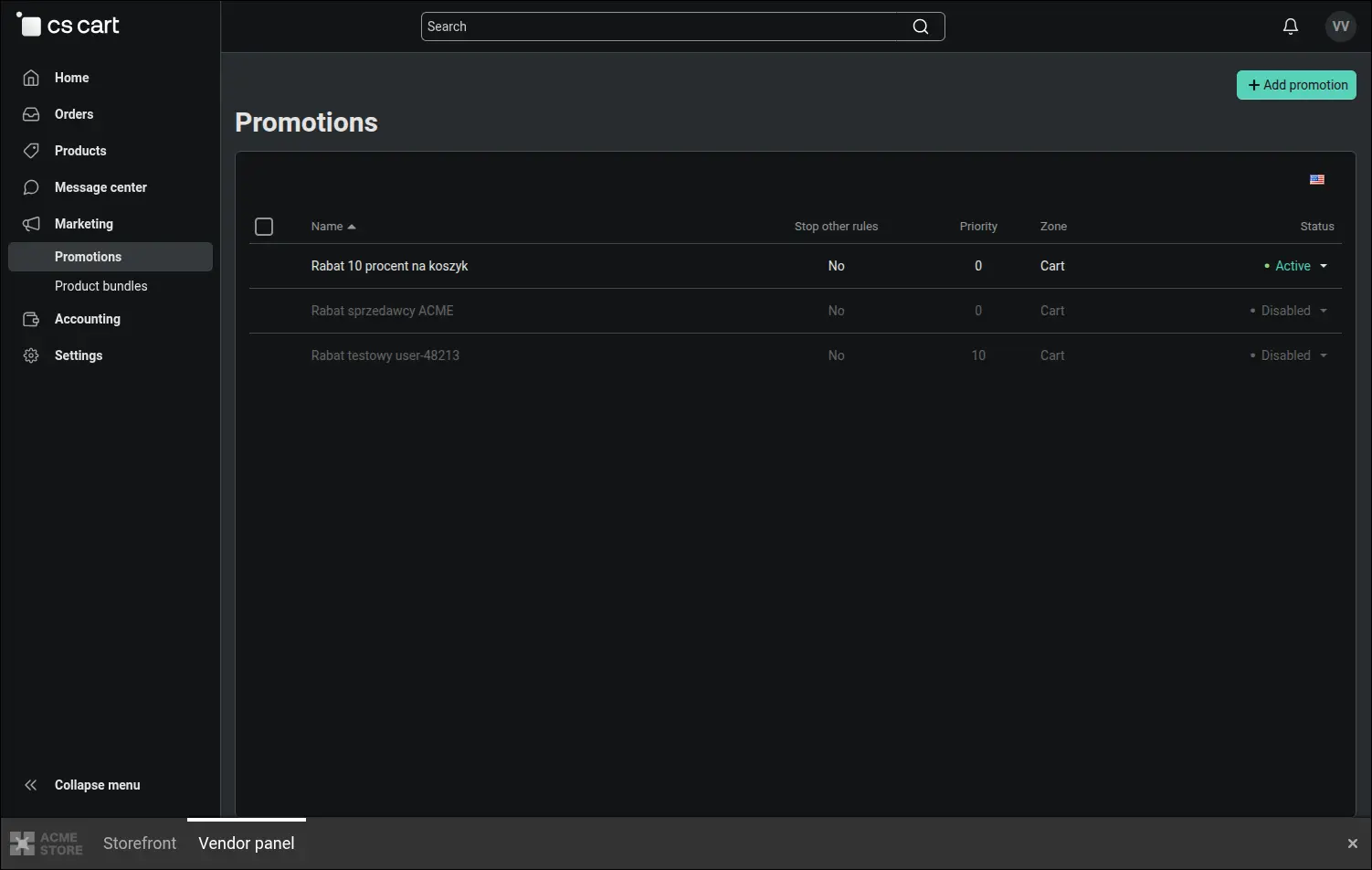
Screenshot 6 - the vendor runs an own promotion list, with no access to other companies' campaigns
Inside the promotion form the vendor reaches for the conditions marked with the PVEN prefix, and those make all the difference. The subtotal counts that vendor's products alone, the item count works the same way, and a separate condition fires the campaign only when the cart holds nothing from other companies. A threshold such as "spend 200 and save" finally means what the banner promises: 200 with that vendor, not the sum of purchases across every company. The screenshot also shows that a condition blocked by the administrator simply does not appear in the selector
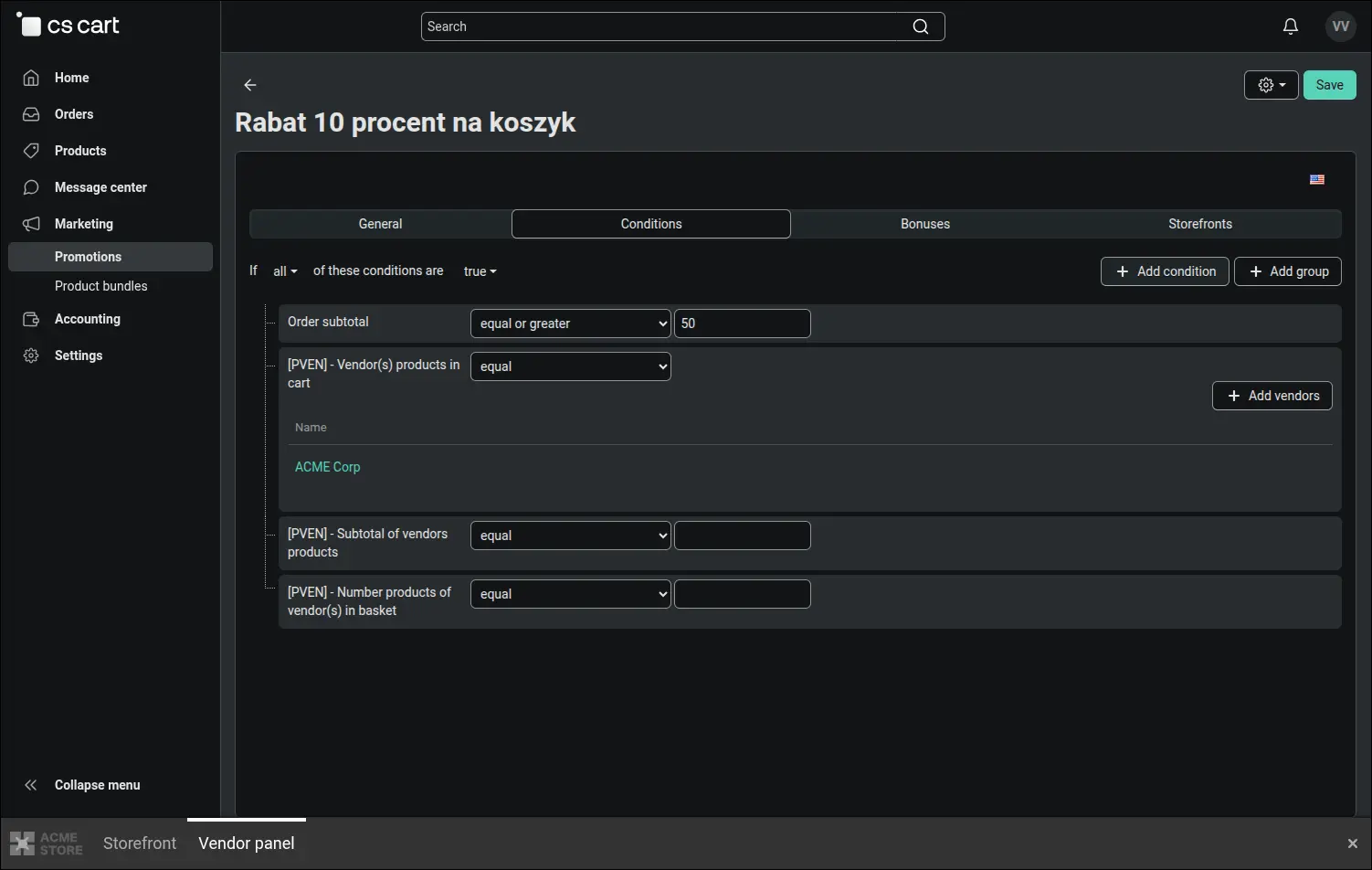
Screenshot 7 - conditions calculated from that vendor's part of the cart, not from the whole order
The bonuses available to a vendor keep to the same principle. The discount covers their items only, a fixed order-level reduction is spread across their company's products, free shipping zeroes the cost of their parcel alone, and a gift product comes from their own stock. The discount therefore comes out of the margin of whoever announced it, which keeps commission settlements readable and spares the remaining vendors from subsidising someone else's campaign
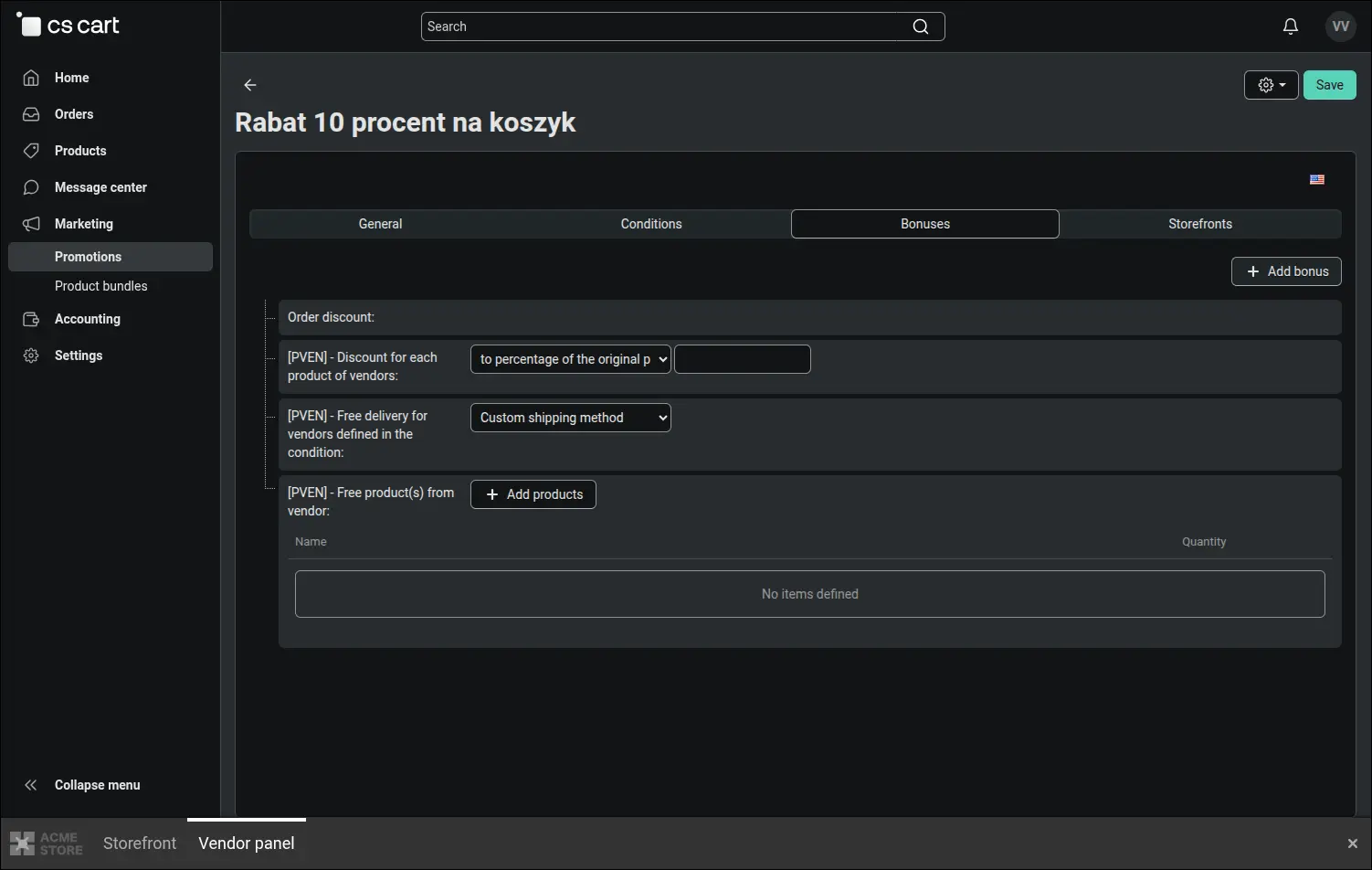
Screenshot 8 - bonuses that cover only the offer of the vendor running the promotion
Plan limits are not a clause in the terms of service but a real barrier at save time. A vendor who tries to enter a discount higher than the plan allows receives a message with the exact threshold, and the promotion never reaches the database. The boundary on the number of simultaneously active campaigns and the one on their duration work the same way, so a ninety percent typo never reaches a customer
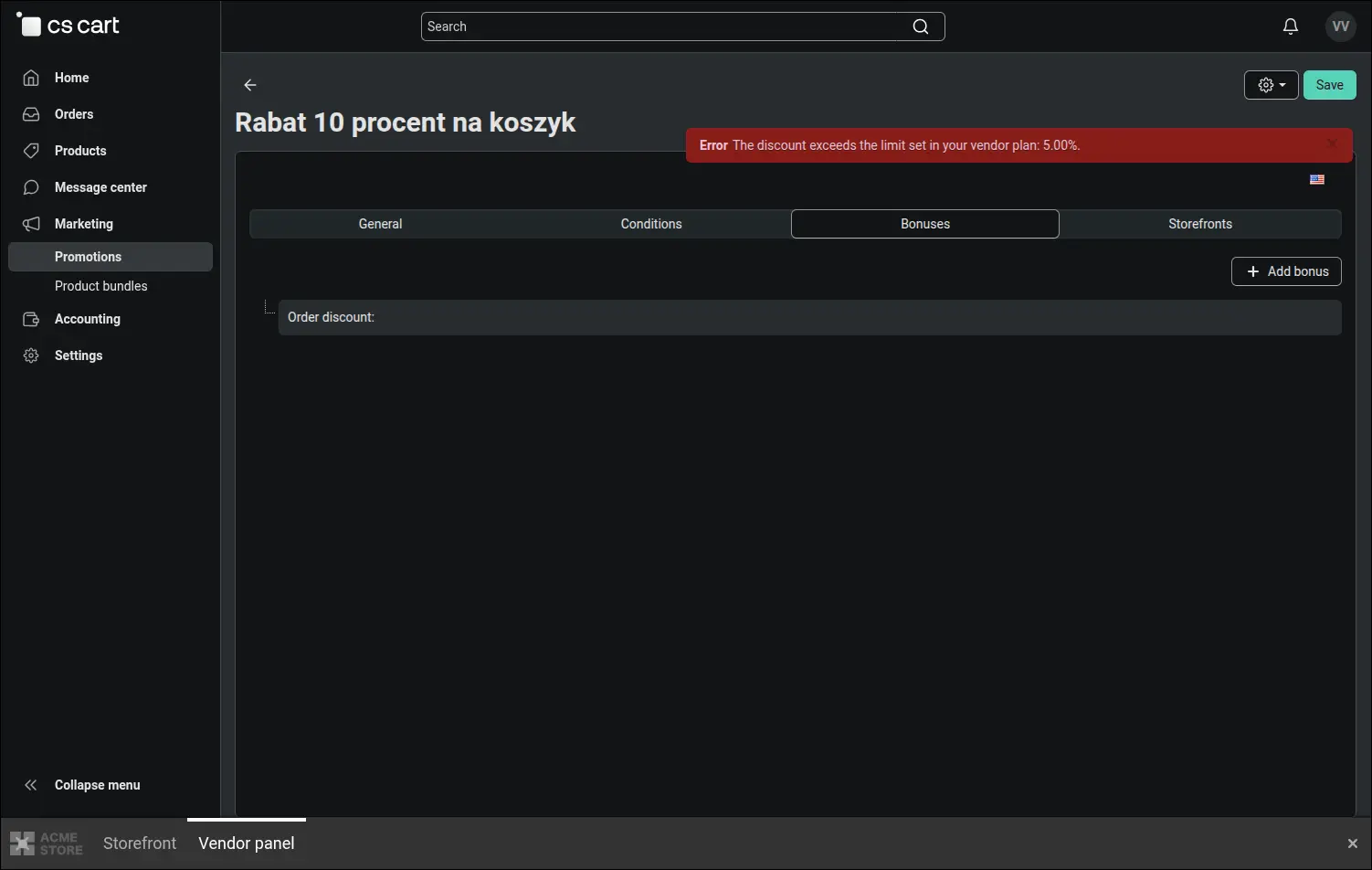
Screenshot 9 - a discount above the plan limit is not saved and the vendor gets a message
With moderation enabled the vendor is never left guessing. Above the promotion form they see its state, and in case of a refusal also the reason written by the administrator. Correcting the campaign and saving it again sends it for approval once more, with no e-mails to support and no guesswork about what went wrong
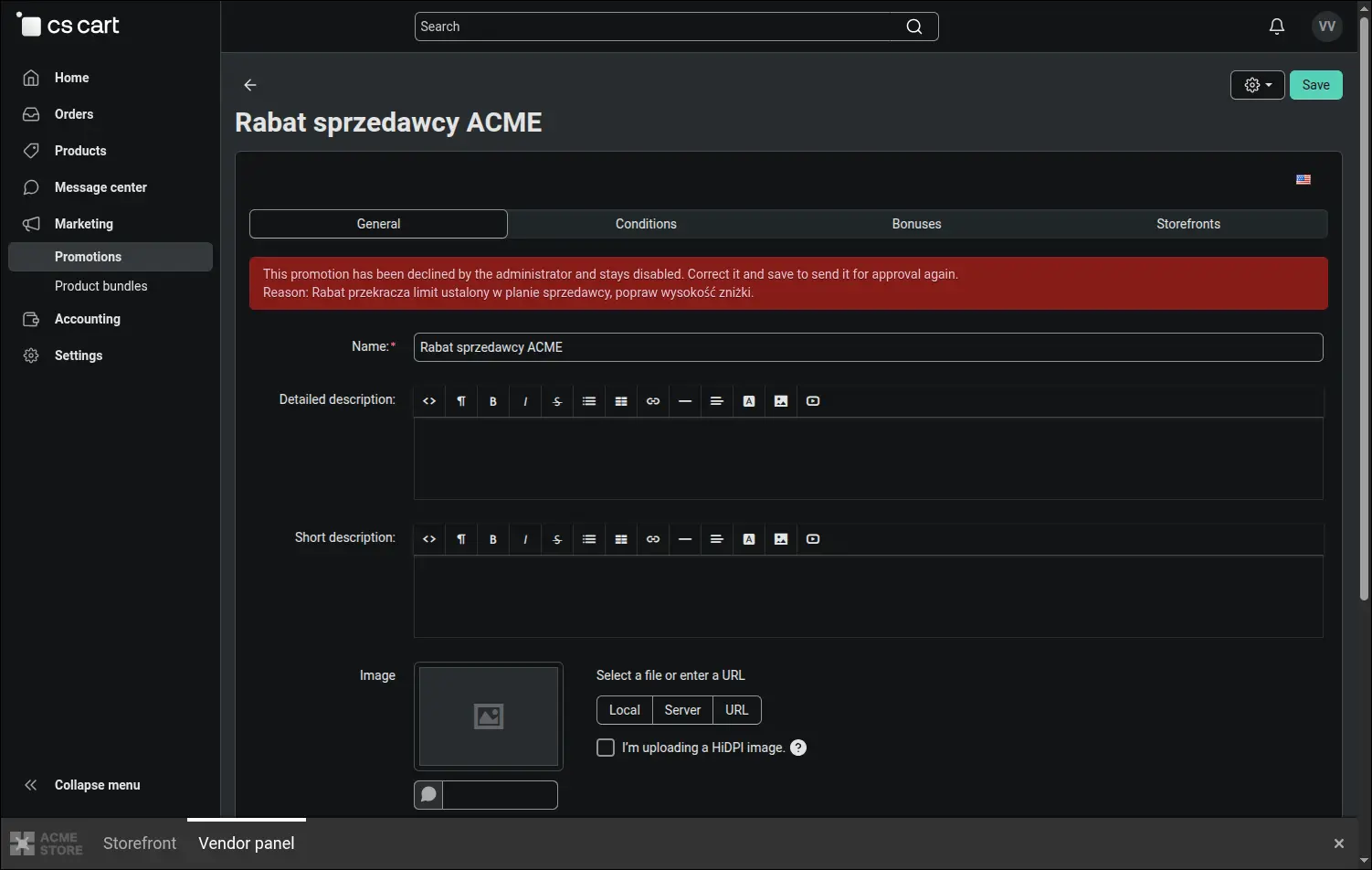
Screenshot 10 - the vendor sees the promotion status and the decline reason without contacting the administrator
On the marketplace side the whole moderation fits on one screen in the Marketing section. The queue separates submissions into waiting, approved and declined, and every entry shows the promotion, the vendor, the zone and the submission time. Approval gives the campaign the status the vendor asked for, a decline requires a reason and leaves the campaign disabled. With a few dozen vendors this is exactly what decides whether pre-moderation is workable or merely theoretical
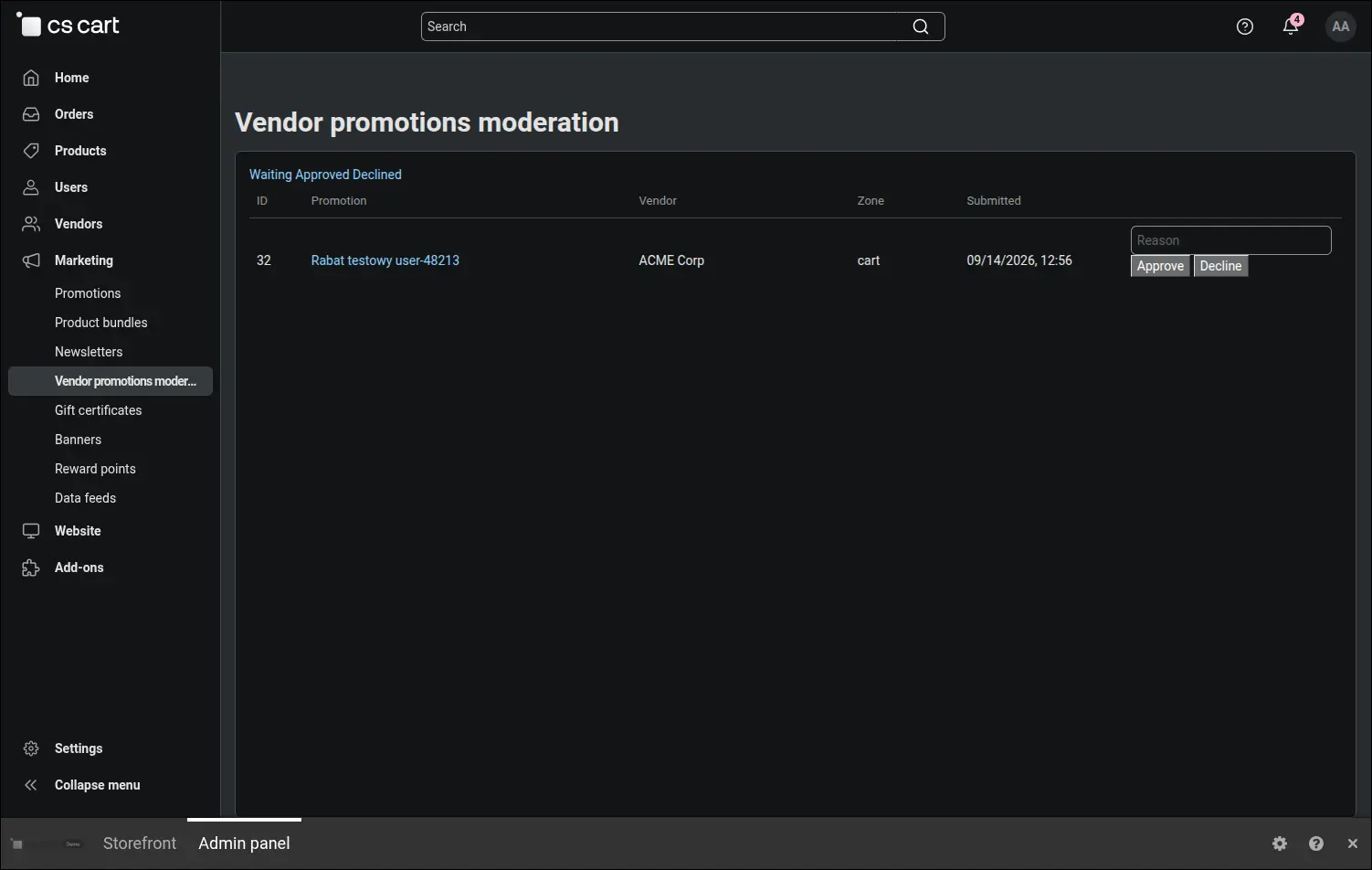
Screenshot 11 - the moderation queue: approve or decline a promotion from a single screen
The best proof shows up where the money is. In a cart holding products from two vendors the reduction covers the item of the company that announced the promotion, while the other vendor's goods keep their full price. Free shipping behaves in exactly the same way: Multi-Vendor calculates delivery separately for each company, and our add-on zeroes the rate in that one product group, leaving the remaining parcels untouched
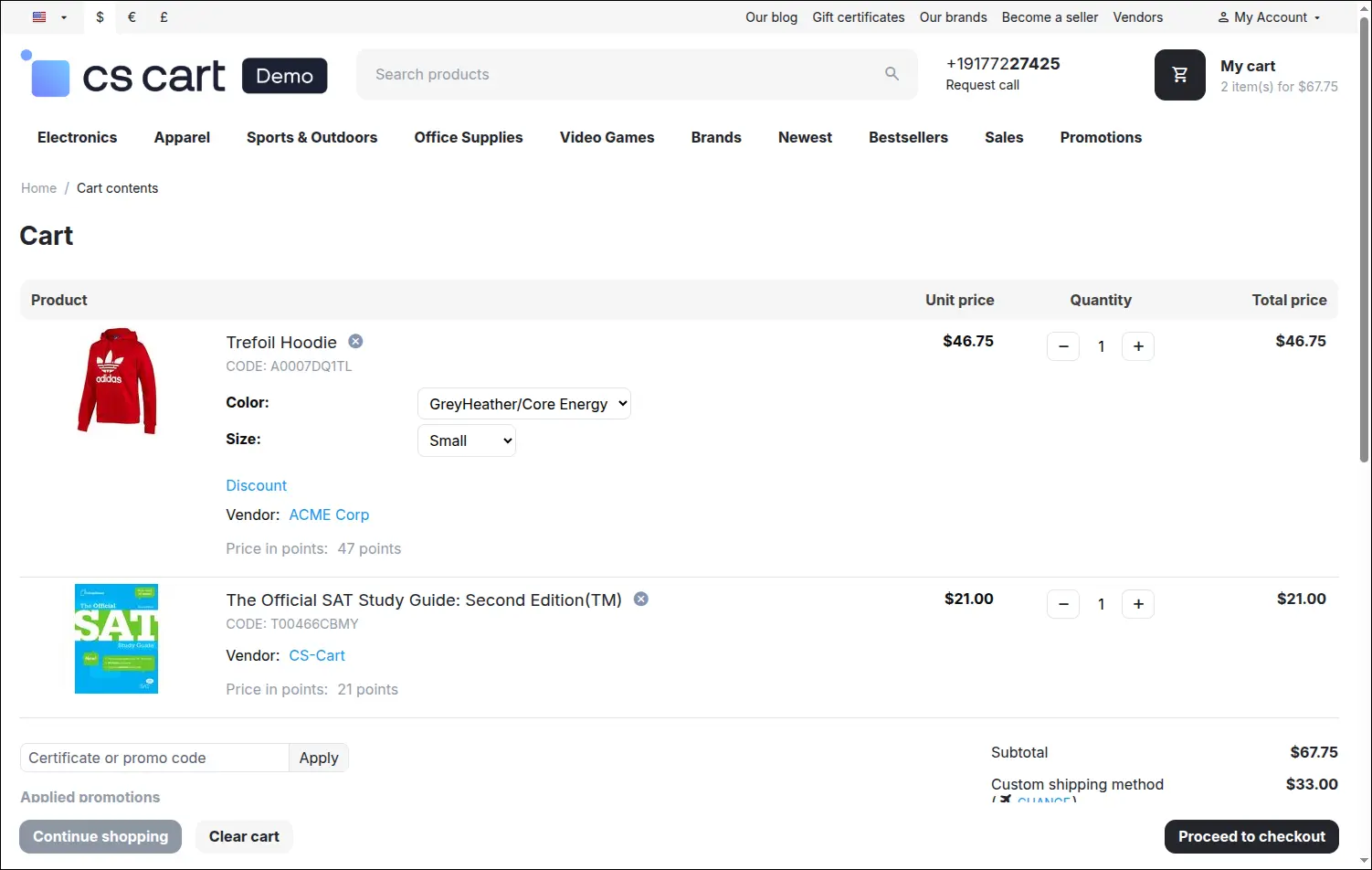
Screenshot 12 - the discount covers only the shipment and products of the vendor running the promotion
The Promotions and discounts for vendors add-on therefore solves two problems at once. It takes other people's sales off the administrator's desk and at the same time guarantees that the freedom given to vendors has firm boundaries: a reach defined by construction, limits written into the plan and pre-moderation wherever the marketplace wants the last word. Vendors receive the tool they have been waiting for, the support team gets its hours back, and the pricing policy of the platform stays under control.
No. The whole logic rests on vendor companies, vendor plans and a cart split into per-vendor shipments, which exist only in Multi-Vendor. On a plain CS-Cart installation the add-on will not install.
No. On every save the add-on adds a condition limiting the promotion to the vendor's company, every bonus of the add-on checks which company a cart item belongs to, and products picked in the product bonuses must belong to the vendor. The vendor also sees and edits only their own promotions.
Multi-Vendor calculates delivery separately for every company in the cart. The free shipping bonus zeroes the rates in the product group of the promoted vendor and leaves the rates of the other companies unchanged.
Not until you decide so. An empty limit field in the vendor plan means no limit, and vendors on a plan without the right to run promotions do not see the promotion module at all.
The vendor's promotions are recalculated: the priority is overwritten with the value from the new plan, and if the new plan does not include promotions, the existing campaigns are disabled.
Yes. With moderation enabled every save by a vendor, including an edit of a running promotion, disables the campaign until it is approved again. Selected vendor plans can be exempted from moderation.
Questions about the add-on, its configuration or your store? Write to us at office@cs-cart.com.pl or visit cs-cart.pl.
Feel free to contact us and purchase the add-on!
No reviews found
SoftSolid has been an official CS-Cart developer since February 2010. We build add-ons that a store owner can set up without calling a developer: clear settings, sensible defaults and documentation. Every add-on is kept compatible with new CS-Cart releases.
2010 official CS-Cart developer since | 160+ add-ons in this marketplace |
5.0 average rating from 90+ reviews | 29 add-ons also on a low monthly subscription |
What we do for CS-Cart and Multi-Vendor stores
Beyond ready add-ons, we take on almost any development work for CS-Cart, Store Builder and Multi-Vendor:
 | Custom add-on development New features for your store built as separate, update-safe add-ons, from a small admin tool to a complete module. |
 | Changes to existing functionality Checkout, product pages, promotions, orders, admin panel and vendor panel adjusted to the way your business works. |
 | Integrations ERP and accounting systems, marketplaces and order management, couriers and parcel lockers, payment gateways, and any service with an API or data feed. |
 | Multi-Vendor marketplaces Vendor plans, commissions, payouts, vendor permissions and tools that make running a marketplace easier. |
 | Upgrades and migrations CS-Cart and Multi-Vendor upgrades to new versions, moving data from other platforms, imports and exports. |
 | Performance and security Store audits, finding and removing malicious code, speed and server configuration. |
 | AI and automation AI chat assistants trained on your store content, automatic translations and automation of repetitive work. |
 | Support and maintenance Ongoing care of your store, fixes and keeping custom code compatible with new CS-Cart releases. |
 | Turnkey stores A complete CS-Cart or Multi-Vendor store set up on a ready theme: configuration, add-ons, integrations, data import and launch. |
 | Mobile applications Mobile apps for your store or marketplace, connected to your CS-Cart data. |
Our flagship add-ons
 | Base.com (BaseLinker) integration Exchange orders and products between your store and Base.com, and sell on marketplaces from one place. |
 | DeepL translations Translate products, categories, pages and menus into every language of your store: one click, in bulk or automatically. |
 | AI Agent / Chat Bot (RAG) An AI assistant that answers your customers using the real content of your store. |
 | Promotions for vendors Promotions with vendor conditions on Multi-Vendor, and vendors can create promotions of their own. |
Why merchants choose us
Tell us what your store needs to do. We will point you to the add-on that already does it, or build a solution for your case.