WebP and AVIF Images

Converts store images to WebP and AVIF and serves them only to browsers that display them. Three delivery modes — address substitution, the picture tag or the web server — conversion of the whole catalog from an admin page, and a file that came out no lighter than the source does not reach the storefront.
Reviews: 9
Last update: 12.11.2026
cp-addon-2724
Select the CS-Cart edition on which you will use the add-on.
The update period determines the period of time when you can get access to the new versions of this add-on compatible with the new versions of CS-Cart software released during the chosen period.
To instal the add-on, we will need the FTP access to your server. Please send it along with the order number to sales@cart-power.com once the order is paid.
WebP and AVIF for the whole catalog — only a file lighter than the source is served
WebP Images
WebP and AVIF Images
$60.00

WebP and AVIF Images — lighter copies of catalog photos for browsers that display them

The add-on converts the store's JPEG and PNG images to WebP and, when the server can encode it, to AVIF. Only a file that came out lighter than the source is served; browsers without format support, e-mails and printed invoices get the source. You choose how images are delivered: address substitution, the picture tag or the web server by the Accept header.

Three delivery modes
address substitution, the picture tag or the web server
Only lighter than the source
AVIF is kept when it is lighter than WebP
The whole catalog
a conversion page with pause and scheduled finishing
CS-Cart 4.13.2+
and Multi-Vendor; GD, Imagick or ShortPixel

The problem

Catalog photos make up a noticeable share of page weight, and WebP or AVIF reduces it. Plain conversion brings problems of its own: at high quality WebP comes out heavier than the source JPEG, a browser without format support shows no picture, and a substituted image address ends up in e-mails, feeds and the full page cache. The add-on deals with each of them separately.

Only a file lighter than the source

If WebP or AVIF comes out no lighter than the source even at a lower quality, the file is removed and the image goes to the exclusions with a reason.

The format only where it displays

WebP and AVIF go to browsers that accept them. Other browsers and social network preview robots get the source.

The whole catalog, not just visited pages

The conversion page walks the whole images directory, and new product and category photos are queued when saved.

Sources where WebP does not belong

E-mails, printed invoices, the YML feed and product structured data keep JPEG and PNG.

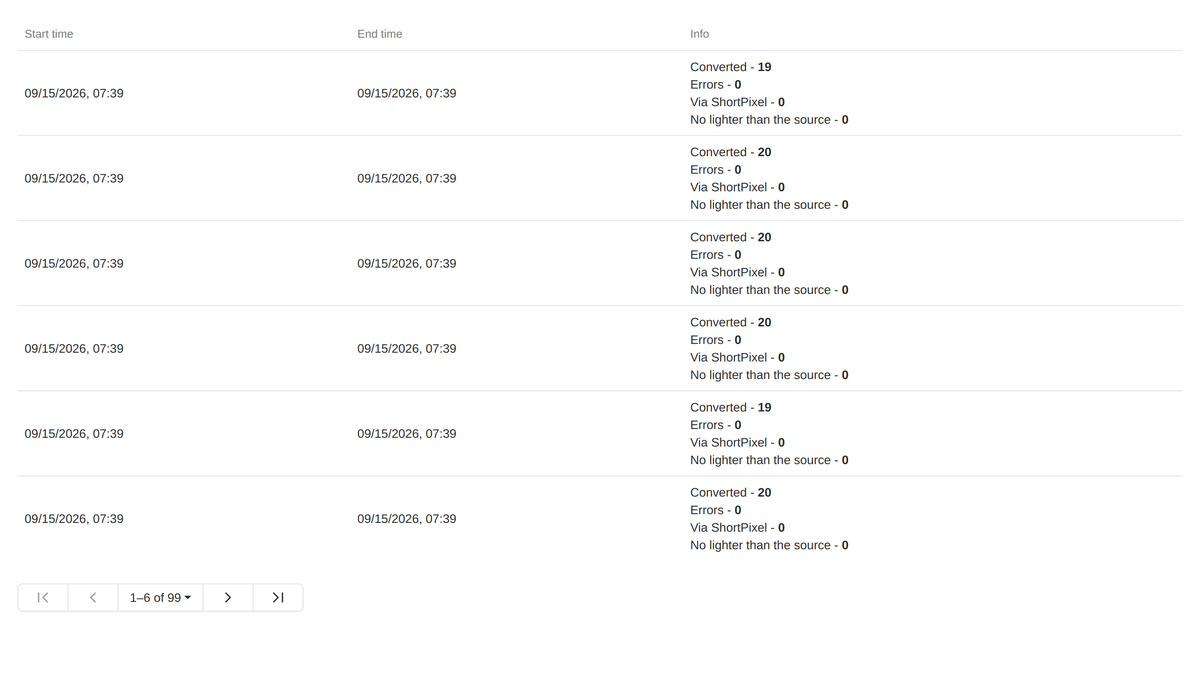
The log of scheduled runs: how many images were converted, how many came out no lighter than the source and how many errors each run had.

What you get after installing

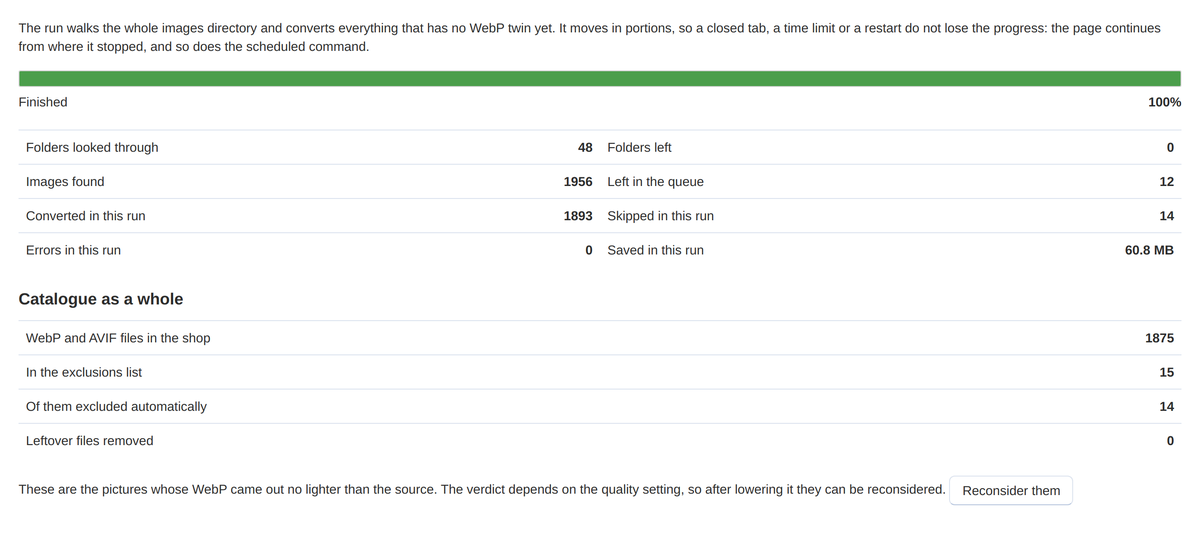
  • •  The Conversion page. A run over the whole images directory started by one button — with stop, continue and counters: images found, left in the queue, converted, skipped, errors and space saved.
  • •  The "How images are given to the browser" setting with three delivery modes.
  • •  The Web server section — ready lines for nginx and Apache and a check that the server has applied them.
  • •  The exclusions list with a reason for every entry, search by path and a filter.
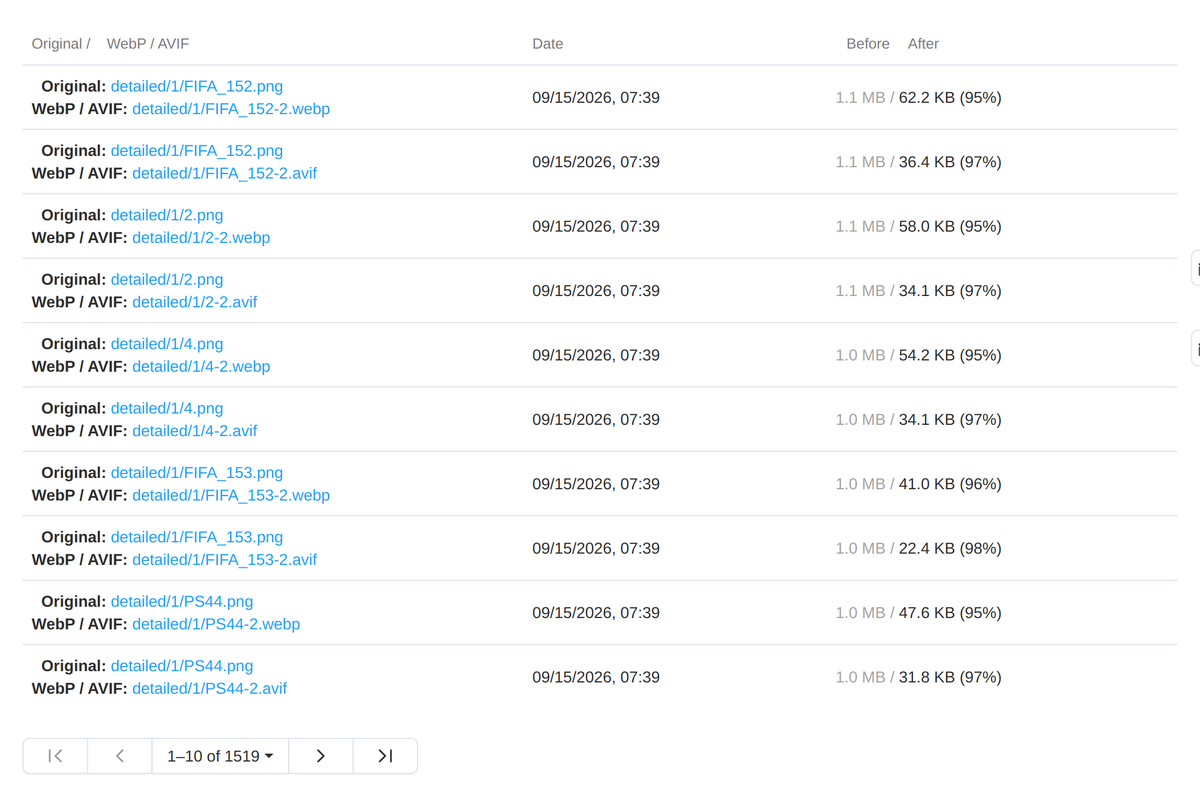
  • •  The conversion journal with sizes before and after, and a journal of scheduled runs.
  • •  Your own password for scheduled commands — generated on installation.
The Conversion page: run progress and totals — space saved, converted, left and errors.

Three delivery modes

The mode is a single setting. The choice depends on whether you can edit the web server configuration and whether full page cache is on.

  • •  Address substitution. The add-on puts the address of the converted file into the page markup — the way it has always worked, and still the default. The markup depends on the browser, so the block cache keeps it separately for browsers with and without WebP.
  • •  Chosen by the browser (picture). The image is wrapped in a picture tag while the img inside keeps the source address. The markup is the same for every visitor and goes into the full page cache whole; no server access is needed and no theme template is overridden.
  • •  Chosen by the web server. The file is stored next to the source as photo.jpg.webp, the page markup is not touched at all, and nginx or Apache picks the format by the Accept header. E-mails, feeds, the sitemap and social previews are unaffected: the image address stays the same.

Address substitution and full page cache

Together they would hand one browser's markup to everyone else. While full page cache is on, the add-on serves images through picture and shows a notice in the settings; the selected value is not changed.

The "How images are given to the browser" setting: address substitution, the picture tag or the web server.

nginx and Apache configuration with a check

STEP 1
Mode

Choose "Chosen by the web server" in the settings — the add-on creates files next to the sources.

STEP 2
Lines

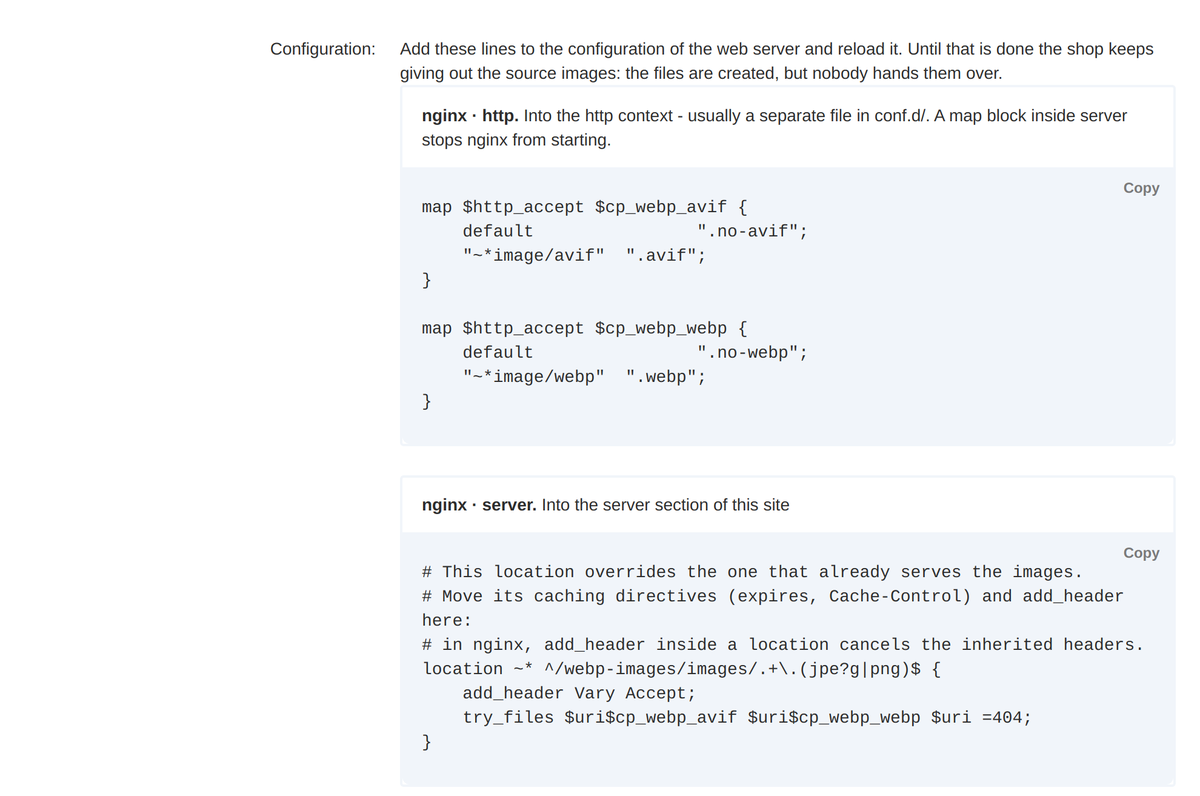
The Web server section shows ready blocks: for nginx, one for the http context and one for the site server section; for Apache, one for the .htaccess of the images directory.

STEP 3
Reload

Add the lines and reload the web server. Until then the store keeps serving the sources: the files exist, but the server does not hand them over.

STEP 4
Check

The button requests one of the store's own images and reports whether the converted file is served and the Vary: Accept header is present.

What the check reports

Everything is in place; the server returned the source — the configuration is not applied; the file is served without Vary: Accept — caches and CDNs will mix up browsers; nothing to check yet — convert at least one image.

The Web server section: lines for nginx and Apache with where to put them, and the check button.

Quality, quality search and AVIF

  • •  Three quality levels: low, default and high. Default is the usual choice.
  • •  Quality search. If the file at the chosen quality comes out no lighter than the source, the add-on tries 65 and 50 before setting the image aside. The paid ShortPixel service is not asked again.
  • •  AVIF alongside WebP. Offered when the server can encode it: Imagick with AVIF support or PHP 8.1 and above with the imageavif function. AVIF stays on disk only when it is lighter than the WebP of the same image; a browser that accepts it gets AVIF, others get WebP or the source.
  • •  A file no lighter than the source is removed right after conversion, so it does not reach the storefront in any delivery mode.

Measured on a test catalog

About 1,640 images, 77 MB of sources. WebP took 22 MB. With the Imagick encoder AVIF came out lighter than WebP for 91% of the images, and the lighter of the two formats took 12.2 MB; with GD, WebP was lighter almost every time and AVIF was kept for 2% of the images. At the high quality setting, WebP of the test photos came out heavier than the source JPEG — exactly the files the add-on discards.

The "Also create AVIF" setting: an AVIF file is kept only when it comes out lighter than the WebP of the same image.

Exclusions and the conversion journal

  • •  A reason for every entry: added by hand, no lighter than the source, or conversion kept failing — an image that fails three times leaves the queue and does not stop the run.
  • •  Search by path and a filter by reason, so manual entries do not get lost among automatic ones.
  • •  "Reconsider them": after a quality change, automatically excluded images go back to work with one button.
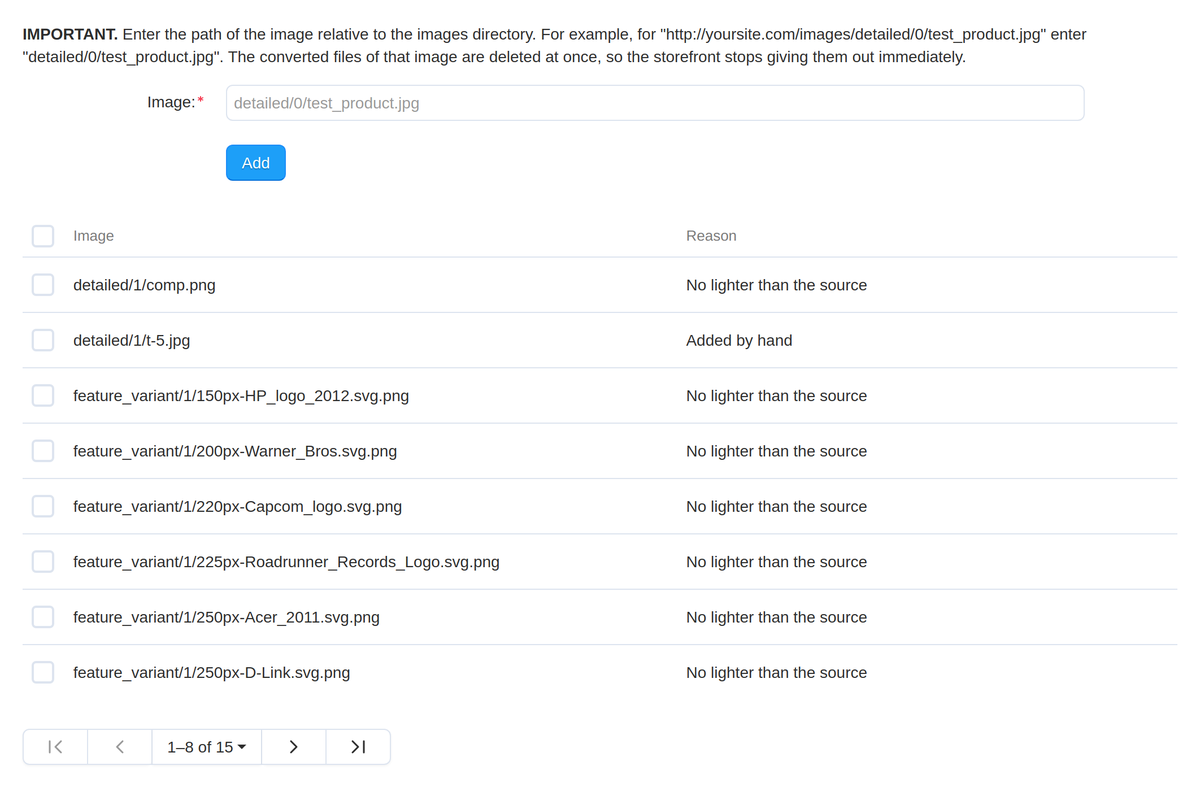
  • •  Adding by hand: a path from the images directory; a full address is normalized, a missing file is rejected. The converted files of the image are deleted at once, and the storefront stops serving them — in the web server mode too.
  • •  The conversion journal: size before and after, filters by date and path, adding an image to the exclusions right from the journal. Entries older than the set period are removed by the ordinary scheduled run.
The exclusions list: path and reason — added by hand, no lighter than the source or conversion kept failing — with search and a filter.
The conversion journal: the size of every file before and after conversion.

Converters, schedule and permissions

  • •  GD and Imagick run on your server; Imagick strips file metadata during conversion.
  • •  ShortPixel is an external service used with your key from the scheduled command. Its compression level follows the quality setting; AVIF is created locally.
  • •  Generation modes: instant — for small catalogs, no more than ten images per request; delayed — in the background after a page view; on schedule.
  • •  The run does not get in the storefront's way: the block cache is not cleared for every converted image, and the scheduled command and an open conversion page do not take the same image at once.
  • •  The scheduled command password is generated on installation; if the store still uses the standard one, the settings warn about it.
  • •  "View" and "Manage WebP images" permissions for administrator user groups. Storefront administrators in Ultimate — where storefronts share one image storage — and vendors in Multi-Vendor get no access to the add-on.

What the add-on does not do

  • •  It does not work with images in external S3 or CDN storage: conversion runs only for files in the images directory on the store server.
  • •  In the picture mode it leaves lazy-loaded images alone: they stay in the source format. The web server mode has no such gap — the image address does not change there.
  • •  It does not combine address substitution with full page cache: while the cache is on, images are served through picture, and the settings say so.
  • •  It does not convert GIF and does not change the source files: JPEG and PNG stay in place for browsers without format support.
  • •  It does not configure the web server itself: for the web server mode you or your hosting add the configuration lines.

Running costs

GD and Imagick are free and run on your server: conversion uses processor time, and AVIF encodes noticeably slower than WebP. A large catalog is convenient to convert on schedule — the number of images per run is set in the settings, 50 by default and 2000 at most.

Converted files are stored next to the sources and take disk space: on the test catalog the WebP copies took 22 MB next to 77 MB of sources. ShortPixel is a paid request to the service at its rates, and only if you turn it on; quality search does not send an image to the service again.

The web server mode needs the configuration lines added once, after which PHP takes no part in serving images. In address substitution mode the add-on checks that a file exists for every image of a page that is not in the block cache.

What is new in version 2.5

  • •  If removing the files ("Delete the files the add-on has created") was stopped with the "Stop" button, the storefront offered WebP again although part of the files had already been removed and the rest were removed after "Continue": broken images appeared on pages and in the cache. While the removal is paused, the storefront no longer offers WebP, the same as during the removal itself. Fixed.
  • •  Every scheduled run wrote a service mark into a table that every storefront page reads, so a page cache that watches table changes treated all pages as outdated every few minutes. The mark is now written only while the warning about a wrong schedule password is shown. Fixed.

Earlier, in version 2.4

  • •  The update from versions 1.22–1.24 through the Add-ons Manager stopped with the error "Duplicate entry … for key image_crc", after which neither the storefront nor the admin panel opened. Fixed: the update goes through from version 1.10 onwards, also while the store is serving visitors, and an interrupted update can simply be run again.
  • •  On the update from version 2.1 through the Add-ons Manager the file sizes in the conversion log were reset to zero. Fixed.
  • •  After the update from versions 1.x with the "translit" naming the add-on encoded every image again: in 2.x the WebP file names changed and the ready files were not found. Fixed: where the hosting allows hard links, a ready file gets the new name without encoding it again, and the old image address keeps working; otherwise the image is encoded again, as before.
  • •  A disabled add-on could not be updated through the Add-ons Manager, and its settings did not open. Fixed.
  • •  If an update of the add-on has not finished, the add-on stops replacing images for the time being and does not get in the way of the storefront, and its settings and pages ask to run the update again.

Frequently asked questions

What do visitors with older browsers see?

The source JPEG and PNG. WebP and AVIF go only to a browser that says it accepts them; social network preview robots get the sources too.

Which delivery mode should I choose?

If you can add lines to the nginx or Apache configuration, choose "Chosen by the web server": the markup does not change and PHP takes no part in serving images. If there is no server access or full page cache is on, choose "Chosen by the browser (picture)". Address substitution is the earlier mode of the add-on and stays the default.

Do I need to upload the photos again?

No. The Conversion page walks the images already uploaded, and new product and category photos are queued when saved. The sources stay in place.

Why did some images end up in the exclusions?

Their file came out no lighter than the source even at quality 65 and 50, or conversion failed three times. The reason is shown in the exclusions list; after a quality change the "Reconsider them" button returns automatically excluded images to work.

Do I need the paid ShortPixel service?

No. GD and Imagick run on the store server at no cost. ShortPixel is connected with your key if you prefer conversion on the service side.

Does it work with UniTheme2?

On a test stand with UniTheme2 (CS-Cart 4.19.1 Multi-Vendor) the theme attributes were kept in both the address substitution and picture modes: image sizes, zoom and the number of images. A theme that styles or scripts the img tag should be checked in the picture mode.

I use version 1.x. What happens on upgrade?

The delivery mode stays the same — address substitution; with full page cache on, images go through picture. If the scheduled command password was never changed by hand, the add-on replaces it with a generated one — put the new one into the scheduled command line. If the "Transliteration" naming was on, ready files get the new names without being converted again when the hosting allows hard links; otherwise they are created again, and the "Remove leftover files" button clears the old ones. The upgrade to 2.5 has been tested from versions 1.10, 1.22, 1.23, 1.24, 2.1, 2.3 and 2.4 through the Add-ons Manager and the Upgrade Center.

See the add-on on the demo store. The admin panel shows the conversion page, delivery modes and web server configuration; the storefront shows converted product images.
Product
  • Store Builder
  • Store Builder Plus
  • Store Builder Ultimate
  • Multi-Vendor
  • Multi-Vendor Plus
  • Multi-Vendor Ultimate
Compatible versions
  • 4.21.1
  • 4.20.1
  • 4.19.1.SP2
  • 4.19.1.SP1
  • 4.19.1
  • 4.18.4
  • 4.18.3
  • 4.18.2.SP1
  • 4.18.2
  • 4.18.1.SP1
  • 4.18.1
  • 4.17.2.SP3
  • 4.17.2.SP2
  • 4.17.2.SP1
  • 4.17.2
  • 4.17.1
  • 4.16.2
  • 4.16.1
  • 4.15.2
  • 4.15.1.SP4
  • 4.15.1.SP3
  • 4.15.1.SP2
  • 4.15.1.SP1
  • 4.15.1
  • 4.14.3.SP1
  • 4.14.3
  • 4.14.2.SP1
  • 4.14.2
  • 4.14.1.SP1
  • 4.14.1
  • 4.13.3
  • 4.13.2.SP2
  • 4.13.2.SP1
  • 4.13.2
Localizations
  • English
  • Русский
Вячеслав Тадтаев
Verified purchase
Advantages
Модуль "Изображения WebP" — это отличное решение для оптимизации изображений на сайте. После его установки и настройки я сразу заметил положительные изменения:
Скорость загрузки страниц улучшилась – WebP-изображения весят значительно меньше, чем JPEG или PNG, при этом сохраняя отличное качество.
Comment
Простота использования – Модуль автоматически конвертирует загружаемые изображения в формат WebP, не требуя ручного вмешательства.
Hocine Sahnoun
Verified purchase
Comment
This add on is a real game changer...increased the site performance by 30%...Simple to install and to configure...if you find any broken image you can just copy its path and excluded it from the conversion...Thx
iMode
Verified purchase
Comment
Good compression! After an initial hiccup, Cart Power Team quickly fixed the issue and WebP addon is working really well (up to 90% compression for us)
Anonymous
Advantages
Converts images over as described to greatly reduce the size and load times while also helping give an advantage with search engines.
Disadvantages
CRON can take a toll on your server for sites like mine that have tens of thousands but you don't have to use CRON as you can just have the images converted over only when they load.
Comment
Would buy again as I have bought several add-ons from this developer.
Jozef
Comment
Excellent supplement, I recommend it.
Support at a very high level!
Anonymous
Advantages
Great product for running your business where speed is of utmost importance.
Comment
Fantastic product. Easy to configure and does its job as described. The service from Cart Power is exceptional! Highly recommended.
Ahmed Moaaz
Comment
Very Nice Add-on
Людмила
Comment
Используем данный модуль, фотографии и баннер сжимаются до 50%. Работает корректно. Место на сервере не занимает. Рекомендуем!!
Сергей
Comment
Спасибо хорошо работает.
  CS-Cart development · in-house team · since 2013 We build, upgrade and

Contact information


CS-Cart development · in-house team · since 2013

We build, upgrade and speed up CS-Cart stores and marketplaces

Analysts, developers, designers, QA and support under one roof — no subcontractors. We ship add-ons you can buy on this page today, and we take on the work that no ready-made add-on covers.

2013

Working with
CS-Cart since

4.98

Rating from
184 reviews

200+

Solutions on this
marketplace

500+

E-commerce projects
delivered

Flagship products

Two add-ons that change how a store performs

Everything else we publish improves one screen. These two change the numbers: how customers find products, and how often they come back.


Add-on · Search & merchandising

Smart Search

Elasticsearch-powered search for large catalogues. The customer types two letters, sees products with images and prices, and buys from the dropdown — even after a typo or with the wrong keyboard layout.

Visitors who use the search bar are 24% of traffic and 44% of revenue, and convert about 2.5× better than people who only browse categories. If search returns nothing, up to 80% of them leave.
Constructor, Beyond Relevance Report 2025; Google Cloud × The Harris Poll, 2023

Catalogue size Sub-second results on 300,000+ products, Multi-Vendor included
Understands Typos, wrong keyboard layout, synonyms, word forms, SKUs, brands and attributes
Reporting Query analytics — what customers search for and which searches return nothing
Deployment Our cloud, or Elasticsearch on your own server

from $35/month

Plans by catalogue size · self-hosted from $1,215 one-time

Plans and details →

Try it on a live catalogue: open the demo store and search with a deliberate typo.


Add-on · Mobile commerce

PowerApp — mobile app for your store

A native iOS and Android app running on your CS-Cart data: the same products, prices, stock, promotions, reward points and orders. There is no second catalogue to maintain — everything stays in the admin panel you already use.

A mobile site brings a customer in once; an app brings them back for free. Push notifications replace the retargeting budget you spend to buy the same customer a second time.

Platforms Native iOS and Android, published under your own developer account
Home screen Built in the admin panel from six block types, the same way you build website pages
Time to launch Under a week from purchase to submission for App Store and Google Play review
Compatibility CS-Cart and Multi-Vendor 4.18–4.20 · 11 client apps already live in the stores

from $790

Buy outright, or $79/month on subscription

Open the add-on page →

Screens, block types and pricing tiers: see how the app is built.

Services

When no add-on solves it, we do the work

Fixed scope, written specification, a named project manager and a warranty on what we ship.

Custom CS-Cart development

Functionality the platform does not have: add-ons, marketplace mechanics, integrations with 1C, CRM, ERP, payment and delivery providers. We start from a written specification, not from an estimate on a phone call. Details →

CS-Cart upgrade

Move to the current version without losing data, custom code or add-ons. We audit every modification first, upgrade on a staging copy, adapt what breaks and switch over with little or no downtime. Details →

Speed and performance optimisation

Conversion falls by about 4.4% for every extra second of load time. We profile the server, the database and the front-end, then fix what actually costs the seconds — and show you the before-and-after numbers. Details →

Design for CS-Cart

Mobile-first storefront design built on CS-Cart's own template structure, so the layout survives the next platform upgrade instead of becoming a migration problem. Details →

SEO for CS-Cart

A technical audit of indexing, duplicates, redirects, structured data and Core Web Vitals — delivered as a prioritised fix list your developers can act on, or that we implement ourselves. Details →

How we work

What you get besides the code

Before we start

We discuss the goal, offer options and write the specification. You approve scope and price before development begins.

While we build

A named project manager reports progress on a fixed schedule. You always know what is in work and what is next.

Before release

A separate QA pass on every release — the developer who wrote the code is not the person who signs it off.

After handover

Documentation for everything we ship, plus a warranty on the modifications and the project.

Tell us what the store needs to do

Describe the task in a couple of sentences and we will come back with options, a scope and a price. The consultation is free, and we will say plainly if a ready-made add-on already solves it.

Write to us here

Use the Ask a question button at the top of this page — it reaches the same team.

Or reach us directly

sales@cart-power.com · cart-power.com
We work in English and Russian.

Client cases, our full add-on catalogue and 184 customer reviews are in the tabs above.

Similar products

Live search and Search history
5.0 (86)
$120.00
Live Search and Search History shows matching products, categories, brands and pages while the shopper types, with a category filter and typo suggestions in the same window. The admin gets four search history reports, synonyms, stop words, featured phrases and speed-up tools for large catalogs.
Live Search
4.9 (48)
$75.00
The customer types and immediately sees products with a photo, a price and an «Add to cart» button, next to categories, brands and store pages. The add-on understands synonyms, word forms and typos, searches by product code and features, puts your chosen products first for the queries that matter and shows what customers did not find. The word index keeps it fast on catalogs of hundreds of thousands of products. No subscription.
Full page CACHE addon for CS-CART + HTML minify
4.9 (42)
$85.00
$120.00
Save 29%
Full page CACHE + HTML minify stores finished storefront pages and serves them to the next visitors, so your server answers quickly at any traffic level. Pages refresh on their own when products, categories or pages change, and the cache can sit in gzipped files or Redis.
Simple import from Excel, XML, CSV files with Multivendor support
5.0 (29)
$219.00
$249.00
Save 12%
Import and update products and features. Addon can help you control stocks & prices via Excel, XML price lists.
Integration with Base.com (baselinker)
5.0 (20)
$299.00
Manage catalogue, stock, prices and orders from your store and every marketplace in one place: BaseLinker pulls your products and orders and sends back stock, statuses and tracking numbers. For Store Builder and Multi-Vendor.
Make purchases for 200$ from our entire offer and get 20% discount
Product currency add-on for CS-Cart
5.0 (17)
$50.00
Enter each product price in the currency you buy it in and let CS-Cart convert it at your store rates. Set currencies per product, per category or by import, round the results and keep order amounts fixed after rates change.