Custom Stock Statuses

Adds a directory of availability statuses and assigns them to products and variations: "special order", "future release", "last display unit" - your own wording per language instead of the stock "in stock" and "out of stock". The status shows on the product page, in Quick View and in catalogue listings. In advanced mode the wording follows the quantity.
Reviews: 1
Last update: 24.09.2026 Supports current CS-Cart version
cp-addon-1976
Select the CS-Cart edition on which you will use the add-on.
The update period determines the period of time when you can get access to the new versions of this add-on compatible with the new versions of CS-Cart software released during the chosen period.
To instal the add-on, we will need the FTP access to your server. Please send it along with the order number to sales@cart-power.com once the order is paid.
Tell shoppers about availability in your own words: special order, future release, last unit
Custom Stock Statuses
$36.00

Availability in your own words - in the catalogue and on the product page

Stock CS-Cart answers the availability question with two phrases: "in stock" and "out of stock". A real store needs more: special order, expected in November, last display unit, only a few left. The add-on keeps a directory of statuses with your own wording per language, assigns them to products and variations and shows them on the product page, in Quick View and in catalogue listings. Whether the product can be bought stays with the standard product setting: "special order" sells at zero quantity, "future release" does not.

Two modes
a status directory or wording by quantity
Products and variations
every variation has its own status
In bulk
standard product import and export
CS-Cart 4.10.1+
all editions, verified on 4.20.1 and 4.21.1

Why a store needs it

The availability line is what decides whether a shopper waits or leaves. "Out of stock" ends the visit even when the product is brought in on order within two weeks and the shopper is ready to buy. And "in stock" says nothing about the last unit left on the shelf.

The add-on gives the store its own wording: the shopper sees the term and the condition right in the catalogue instead of asking support. The text is written once in the directory and assigned to products - one by one or in bulk, through import.

Status directory

A name for the admin panel and the wording for the shopper, per language.

Special order still sells

At zero quantity the buy button stays when the product is allowed to be ordered.

Visible in the catalogue

The status stands in category and search listings, not only on the product page.

Bulk editing

Statuses travel through the standard CS-Cart product import and export.

A category listing: four products with four different answers about availability, and the "special order" product keeps its buy button at zero quantity.

Where the status appears

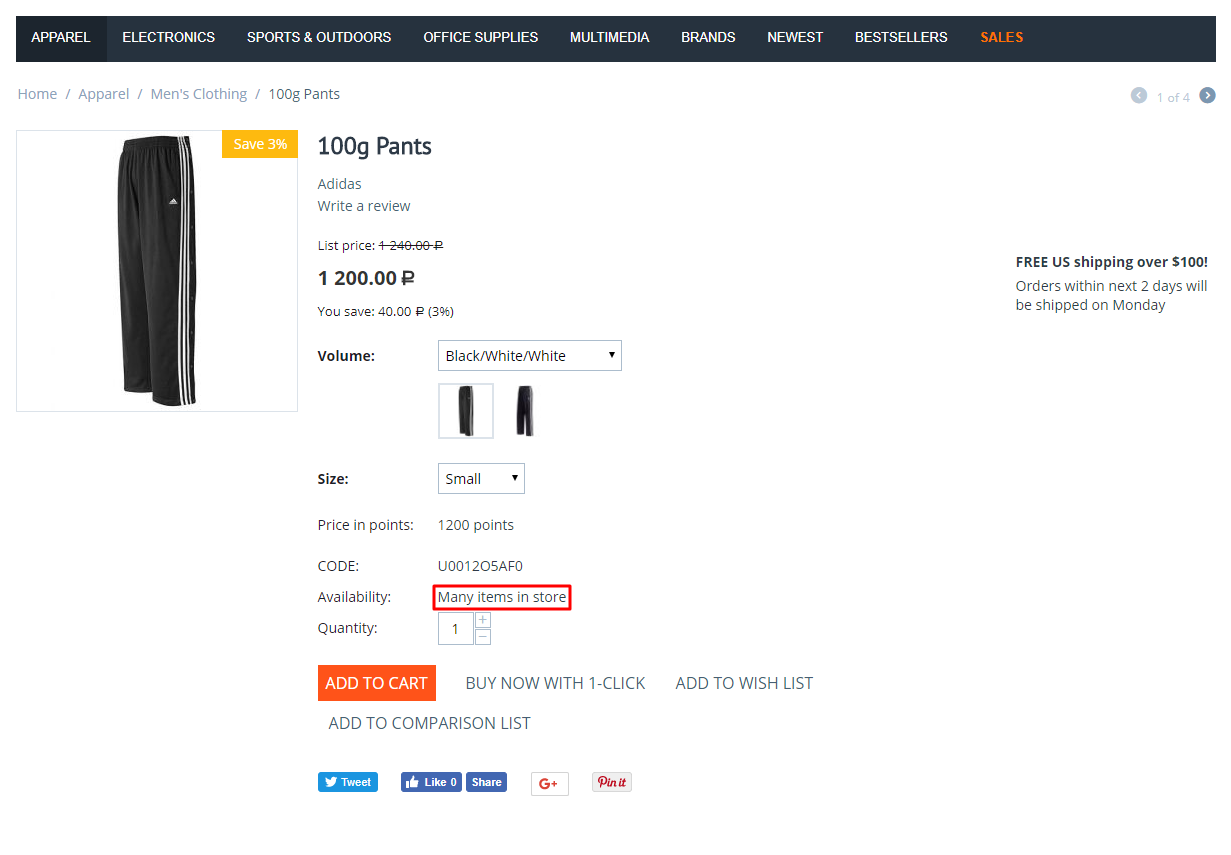
  • •  Product page. The status stands in the availability line, where the stock "in stock" and "out of stock" would be.
  • •  Catalogue listings and search results. Turned on by a setting: the status replaces the stock "out of stock" label and stands next to the price for products that can be ordered.
  • •  Quick View. The shopper does not have to open the product page to see the term.
  • •  Product blocks. Everywhere the theme prints the availability line: new arrivals, bestsellers, recommendations.
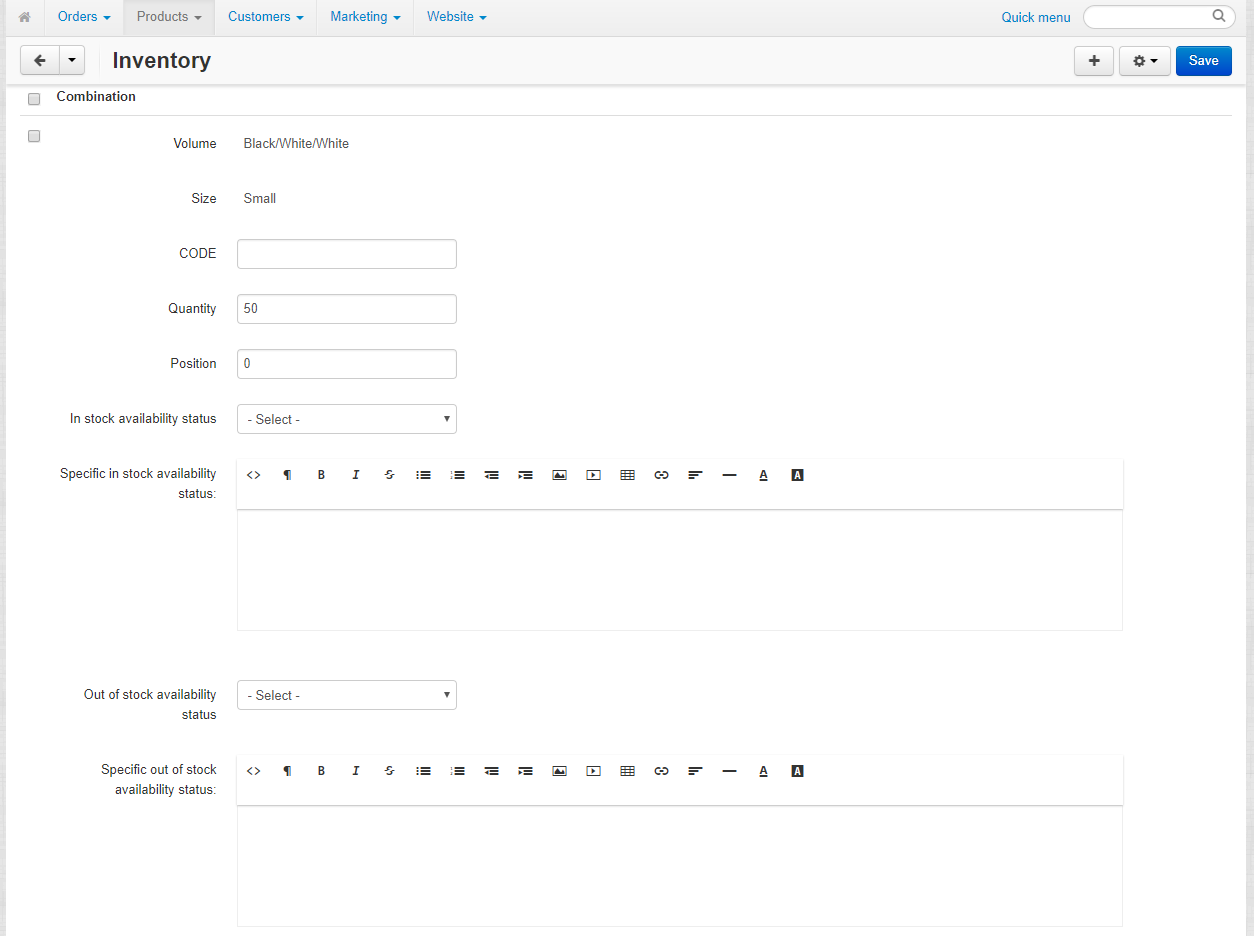
  • •  Variations. Each variation has its own quantity and its own status; switching the variation switches the line as well.
Search results: the found products carry their statuses - in stock, out of stock and special order.
Quick View: the same status and the same buy button as on the product page.

Availability and the right to buy

  • •  In stock. The product sells and the shopper reads your own wording, for example "ships today".
  • •  Zero quantity, buying allowed. The standard product setting "Allow backorder" keeps the button, and the status explains the term: "special order, 2-3 weeks".
  • •  Zero quantity, buying closed. There is no button, and the status says why: "expected in November".
  • •  Sign up for notification. The standard action keeps working: the add-on changes the wording, not the behaviour of the cart.
A "special order" product: zero quantity, the status explains the term, the add to cart button works.
A "future release" product: zero quantity as well, but buying is closed - no button.

What the administrator does

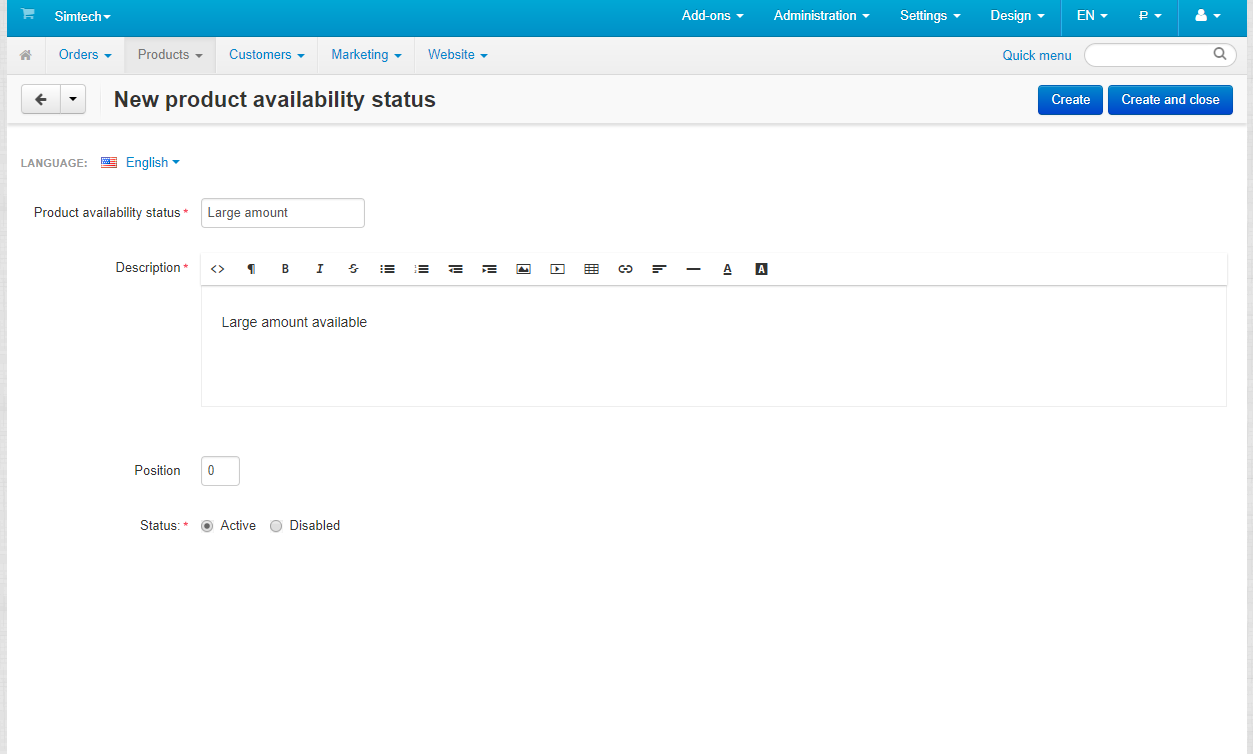
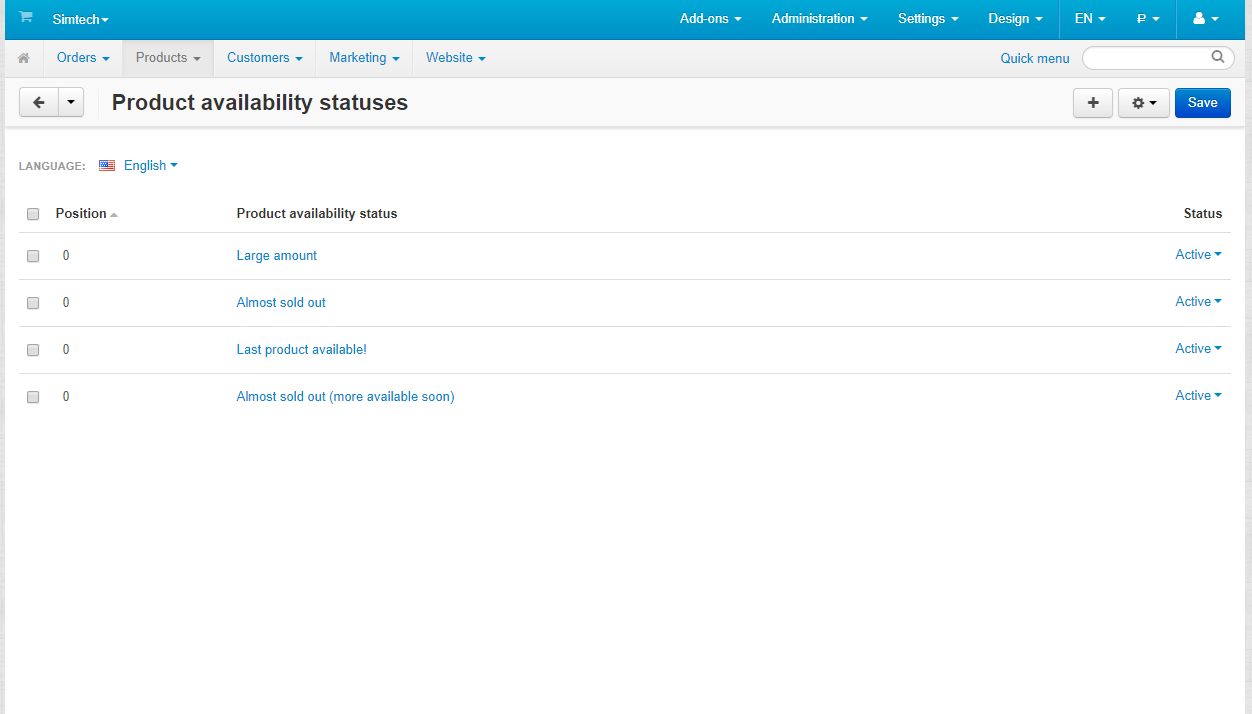
  • •  Creates the statuses. "Products -> Product availability statuses": a name, the wording for the shopper per language, a position, active or not.
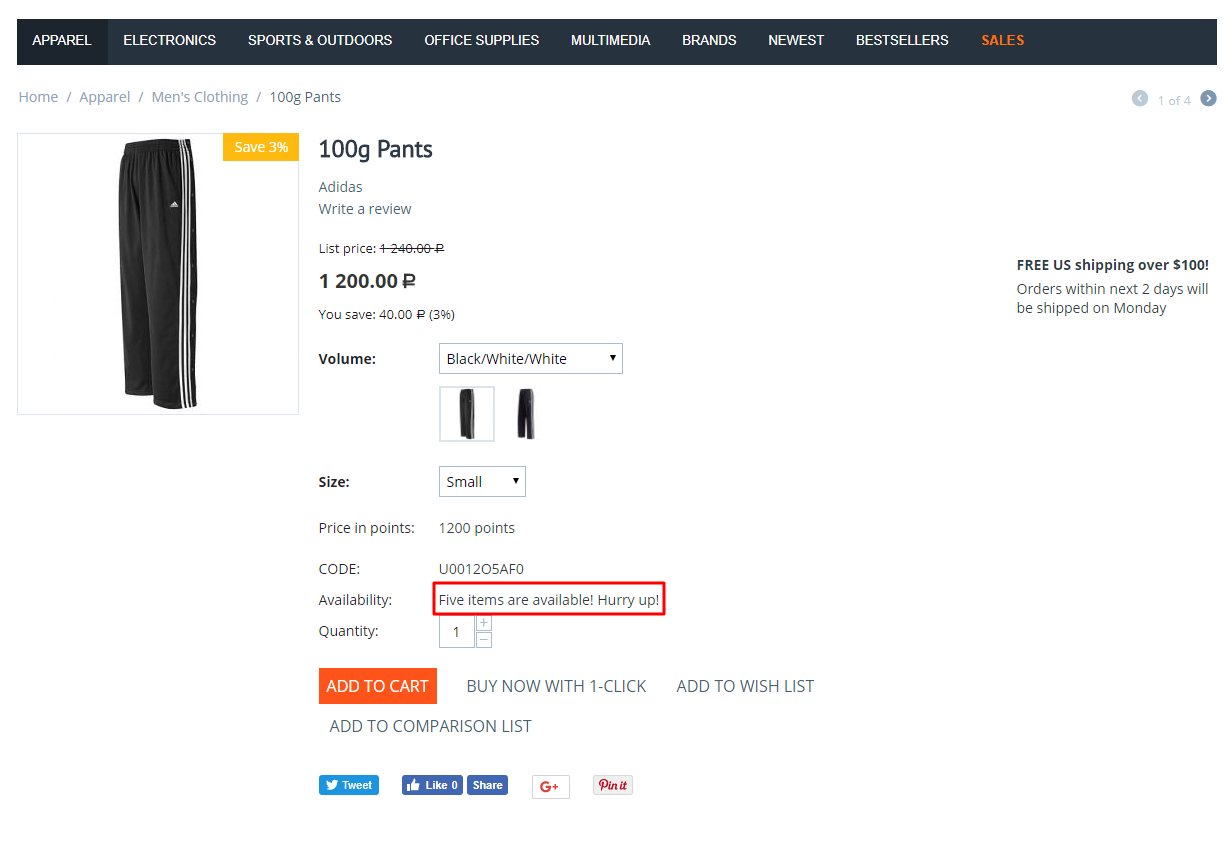
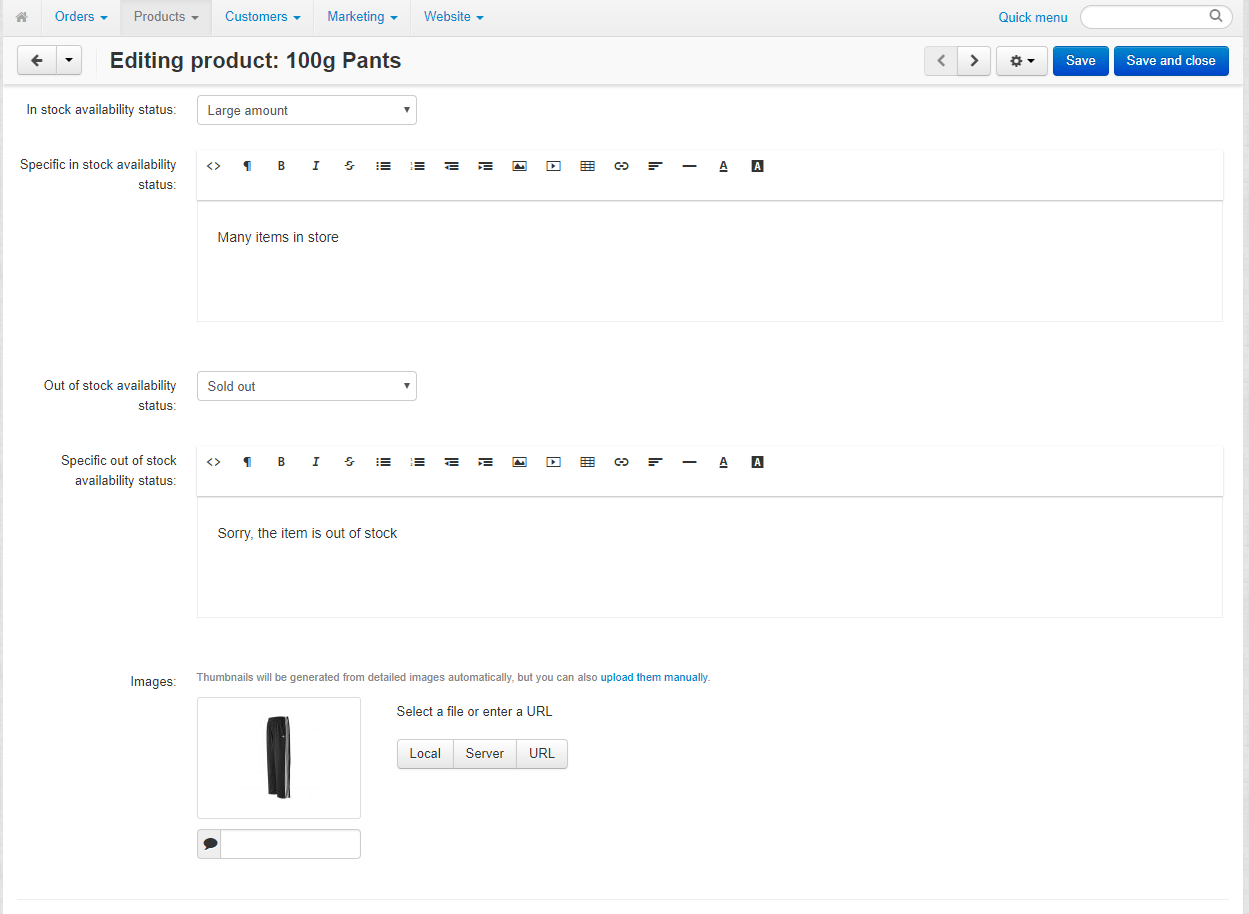
  • •  Assigns a status to a product. The product page has two lists, "In stock availability status" and "Out of stock availability status", with fields for a wording of that single product next to them.
  • •  Fills them in bulk. The product export gains the columns "In stock availability status" and "Out of stock availability status"; import matches them by the status name.
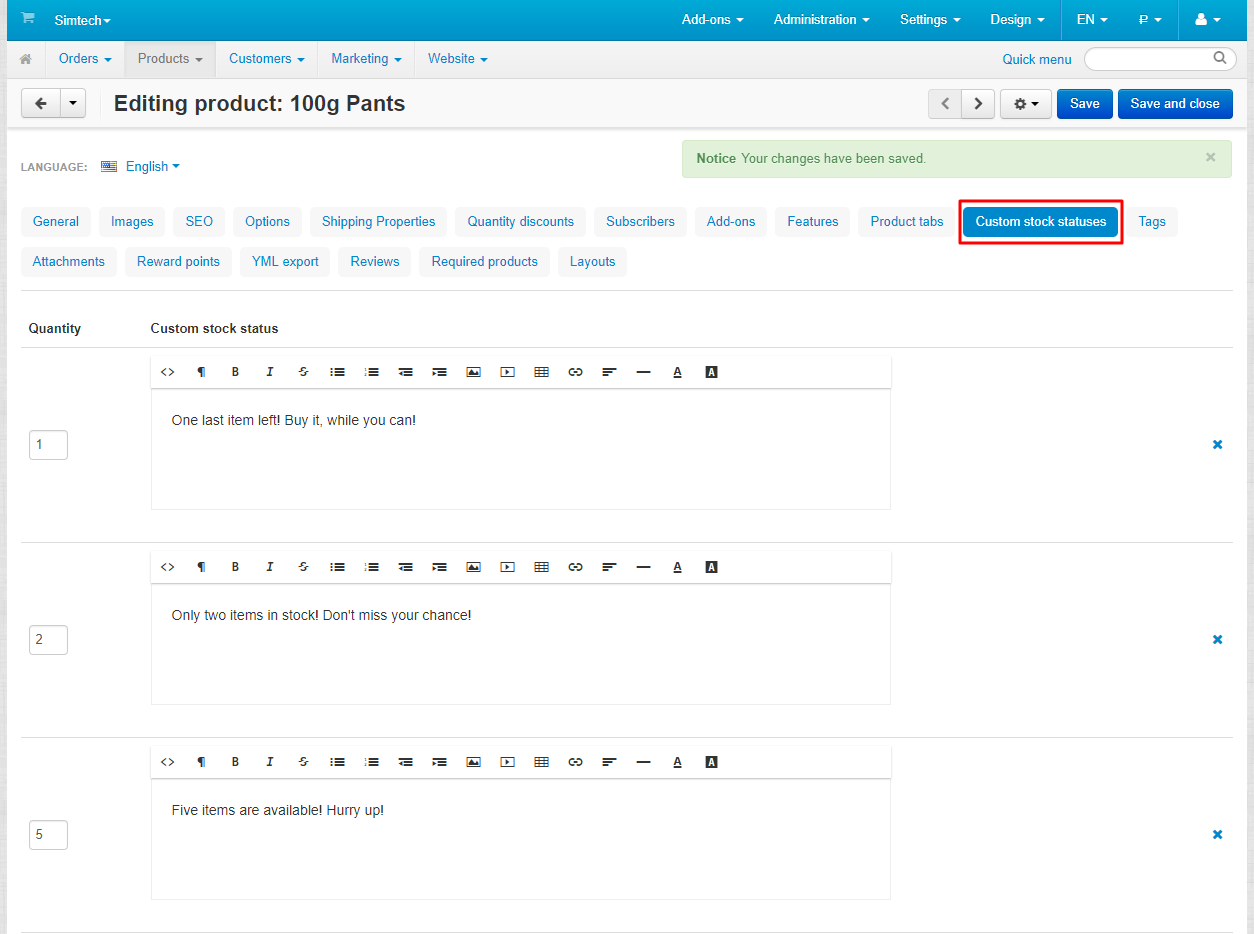
  • •  Picks the mode. "Basic" is the status directory; "Advanced" is a "quantity -> wording" table on the product.
The status directory: its own section in the Products menu, statuses are switched on and off one by one.
A status: a short name for the admin panel and the wording the shopper will see.
The product page: the status is picked from two lists, with fields for a wording of this product next to them.

Advanced mode: wording by quantity

The second mode solves a different task: the wording follows the quantity rather than the fact of availability. A table of thresholds is filled on the product - ">= 0", ">= 3", ">= 10" - and the shopper reads "special order", "only a few left" or "in stock" on the very same product as its quantity changes.

  • •  Thresholds are set per product and per variation.
  • •  The wording of every threshold has its own language.
  • •  They travel through the same standard import, in one column, "Custom stock statuses".
  • •  The mode is switched by a setting; the data of both modes is stored separately and is not lost when the mode changes.
Advanced mode: a "quantity -> wording" table on the product page, from "special order" to "in stock".

Settings and compatibility

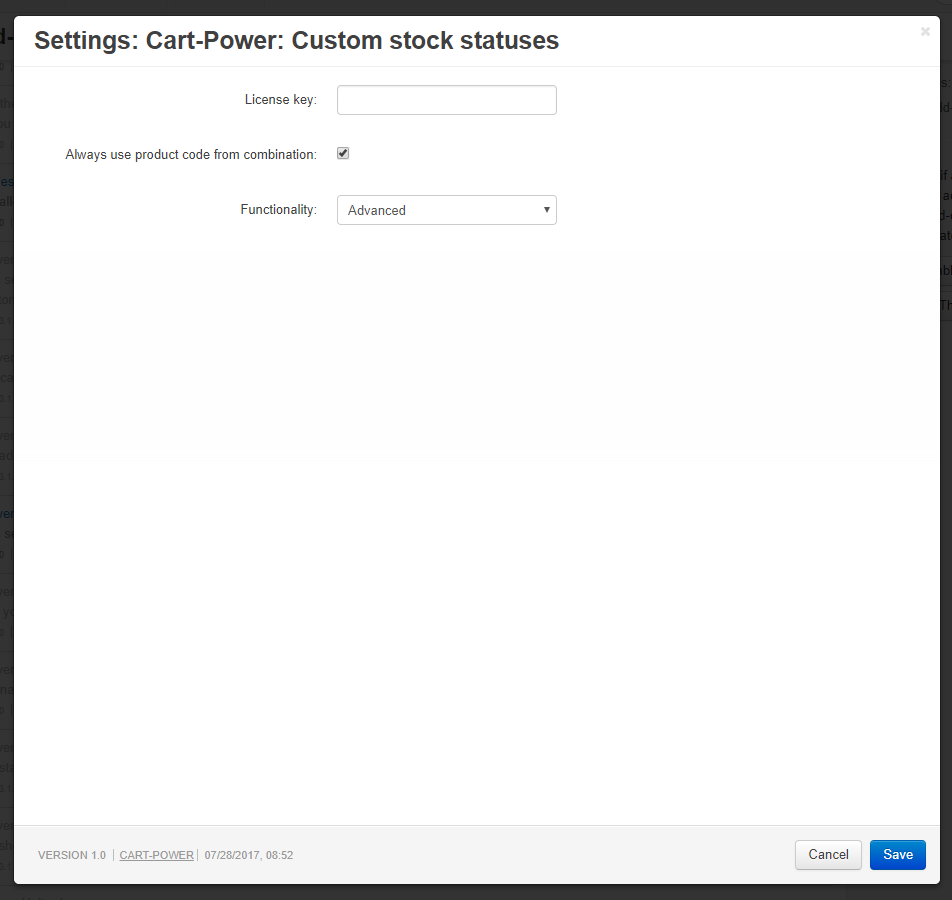
  • •  Two settings. The mode and the output of statuses in product lists. The output in lists is off by default: an upgrade does not change how the storefront looks until the store turns it on.
  • •  Themes. Templates for the CS-Cart theme and for Unitheme2 are included; themes inherited from the base one (Nova, Bright) work without changes.
  • •  Warehouses. Compatible with the Warehouses add-on: the status follows the quantity CS-Cart shows to the shopper.
  • •  All editions. CS-Cart, Ultimate, Multi-Vendor and Multi-Vendor Ultimate.
  • •  The core stays untouched. The add-on works through hooks and its own tables; on removal the status data goes with it and products return to the standard behaviour.
Add-on settings: the mode and the output of statuses in product lists, new in 2.3.

What is new in version 2.3

  • •  New setting "Show custom statuses in product lists": the status appears in category and search listings, in product blocks and in place of the stock "out of stock" label.
  • •  Products with backordering allowed show their own status in the default theme instead of the stock "on backorder" label.
  • •  Statuses inherit the standard availability colours, so what can be bought reads as available.
  • •  The availability markup follows CS-Cart 4.20 - themes that hide the "in stock" label no longer show it.
  • •  Unitheme2: the layout of the availability line and the status output with negative stock are fixed.

Frequently asked questions

Can a product show "special order" and still be sold at zero quantity?

Yes. The status is the wording, and the right to buy belongs to the standard product setting "Out of stock actions". Set it to "Allow backorder" and assign the "special order" status: the button stays and the shopper sees the term.

Are statuses translated into the languages of the store?

The wording of a status in the directory is written per language. The "Specific status" fields on the product page are the exception: they hold one value for every language.

How do we fill statuses in for a large catalogue?

Through the standard product import: in basic mode these are two columns, "In stock availability status" and "Out of stock availability status". The cell holds the name of a status from the directory.

Does the add-on work with product variations?

Yes. A variation is a product of its own with its own quantity, so it carries its own status; switching the variation switches the availability line with it.

What happens to the statuses when the add-on is upgraded?

Statuses and their assignment to products live in their own tables and survive the upgrade. Within the 2.x line the upgrade goes through the CS-Cart upgrade centre or the Cart-Power add-ons manager.

What is left in the store if the add-on is removed?

Nothing: its tables and product fields are dropped and products return to the standard "in stock" and "out of stock". Export the products with the status columns before removing the add-on - that file is the only way to restore them later.

Try the add-on on the demo stand. The home page links to a category where four statuses stand side by side and to the "special order" and "future release" products with different behaviour of the buy button.
Product
  • Store Builder
  • Store Builder Plus
  • Store Builder Ultimate
  • Multi-Vendor
  • Multi-Vendor Plus
  • Multi-Vendor Ultimate
Compatible versions
  • 4.21.1
  • 4.20.1
  • 4.19.1.SP2
  • 4.19.1.SP1
  • 4.19.1
  • 4.18.4
  • 4.18.3
  • 4.18.2.SP1
  • 4.18.2
  • 4.18.1.SP1
  • 4.18.1
  • 4.17.2.SP3
  • 4.17.2.SP2
  • 4.17.2.SP1
  • 4.17.2
  • 4.17.1
  • 4.16.2
  • 4.16.1
  • 4.15.2
  • 4.15.1.SP4
  • 4.15.1.SP3
  • 4.15.1.SP2
  • 4.15.1.SP1
  • 4.15.1
  • 4.14.3.SP1
  • 4.14.3
  • 4.14.2.SP1
  • 4.14.2
  • 4.14.1.SP1
  • 4.14.1
  • 4.13.3
  • 4.13.2.SP2
  • 4.13.2.SP1
  • 4.13.2
  • 4.13.1
  • 4.12.2
  • 4.12.1
  • 4.11.5
  • 4.11.4
  • 4.11.3
  • 4.11.2
  • 4.11.1
  • 4.10.4.SP1
  • 4.10.4
  • 4.10.3
  • 4.10.2
  • 4.10.1
Localizations
  • English
  • Русский
Anonymous
Advantages
Instead of see "in stock" you can write "1 week" or as you want for each product
Import/export helps you too
Comment
good support to keep it updated with warehouse addon..
  CS-Cart development · in-house team · since 2013 We build, upgrade and speed up

Contact information


CS-Cart development · in-house team · since 2013

We build, upgrade and speed up CS-Cart stores and marketplaces

Analysts, developers, designers, QA and support under one roof — no subcontractors. We ship add-ons you can buy on this page today, and we take on the work that no ready-made add-on covers.

2013

Working with
CS-Cart since

4.98

Rating from
184 reviews

200+

Solutions on this
marketplace

500+

E-commerce projects
delivered

Flagship products

Two add-ons that change how a store performs

Everything else we publish improves one screen. These two change the numbers: how customers find products, and how often they come back.


Add-on · Search & merchandising

Smart Search

Elasticsearch-powered search for large catalogues. The customer types two letters, sees products with images and prices, and buys from the dropdown — even after a typo or with the wrong keyboard layout.

Visitors who use the search bar are 24% of traffic and 44% of revenue, and convert about 2.5× better than people who only browse categories. If search returns nothing, up to 80% of them leave.
Constructor, Beyond Relevance Report 2025; Google Cloud × The Harris Poll, 2023

Catalogue size Sub-second results on 300,000+ products, Multi-Vendor included
Understands Typos, wrong keyboard layout, synonyms, word forms, SKUs, brands and attributes
Reporting Query analytics — what customers search for and which searches return nothing
Deployment Our cloud, or Elasticsearch on your own server

from $35/month

Plans by catalogue size · self-hosted from $1,215 one-time

Plans and details →

Try it on a live catalogue: open the demo store and search with a deliberate typo.


Add-on · Mobile commerce

PowerApp — mobile app for your store

A native iOS and Android app running on your CS-Cart data: the same products, prices, stock, promotions, reward points and orders. There is no second catalogue to maintain — everything stays in the admin panel you already use.

A mobile site brings a customer in once; an app brings them back for free. Push notifications replace the retargeting budget you spend to buy the same customer a second time.

Platforms Native iOS and Android, published under your own developer account
Home screen Built in the admin panel from six block types, the same way you build website pages
Time to launch Under a week from purchase to submission for App Store and Google Play review
Compatibility CS-Cart and Multi-Vendor 4.18–4.20 · 11 client apps already live in the stores

from $790

Buy outright, or $79/month on subscription

Open the add-on page →

Screens, block types and pricing tiers: see how the app is built.

Services

When no add-on solves it, we do the work

Fixed scope, written specification, a named project manager and a warranty on what we ship.

Custom CS-Cart development

Functionality the platform does not have: add-ons, marketplace mechanics, integrations with 1C, CRM, ERP, payment and delivery providers. We start from a written specification, not from an estimate on a phone call. Details →

CS-Cart upgrade

Move to the current version without losing data, custom code or add-ons. We audit every modification first, upgrade on a staging copy, adapt what breaks and switch over with little or no downtime. Details →

Speed and performance optimisation

Conversion falls by about 4.4% for every extra second of load time. We profile the server, the database and the front-end, then fix what actually costs the seconds — and show you the before-and-after numbers. Details →

Design for CS-Cart

Mobile-first storefront design built on CS-Cart's own template structure, so the layout survives the next platform upgrade instead of becoming a migration problem. Details →

SEO for CS-Cart

A technical audit of indexing, duplicates, redirects, structured data and Core Web Vitals — delivered as a prioritised fix list your developers can act on, or that we implement ourselves. Details →

How we work

What you get besides the code

Before we start

We discuss the goal, offer options and write the specification. You approve scope and price before development begins.

While we build

A named project manager reports progress on a fixed schedule. You always know what is in work and what is next.

Before release

A separate QA pass on every release — the developer who wrote the code is not the person who signs it off.

After handover

Documentation for everything we ship, plus a warranty on the modifications and the project.

Tell us what the store needs to do

Describe the task in a couple of sentences and we will come back with options, a scope and a price. The consultation is free, and we will say plainly if a ready-made add-on already solves it.

Write to us here

Use the Ask a question button at the top of this page — it reaches the same team.

Or reach us directly

sales@cart-power.com · cart-power.com
We work in English and Russian.

Client cases, our full add-on catalogue and 184 customer reviews are in the tabs above.

Similar products

Live search and Search history
5.0 (86)
$120.00
Fast and convenient smart search. Search history. Flexible search settings.
Live Search
4.9 (47)
$75.00
The customer types and immediately sees products with a photo, a price and an «Add to cart» button. The add-on understands synonyms, word forms and typos, searches by product code and features, shows what customers did not find and lets you add a synonym right from the report. The word index keeps it fast on catalogs of hundreds of thousands of products. No subscription.
One Step Checkout - Simple Layout
5.0 (20)
$119.00
The ultimate checkout experience
Integration with Base.com (baselinker)
5.0 (20)
$299.00
Manage catalogue, stock, prices and orders from your store and every marketplace in one place: BaseLinker pulls your products and orders and sends back stock, statuses and tracking numbers. For Store Builder and Multi-Vendor.
Make purchases for 200$ from our entire offer and get 20% discount
Wherefrom client + marketing report
5.0 (18)
$59.00
$89.00
Save 34%
This module can tell you order channel - paid channel, referall, search engine, social networks.
Mega Menu
5.0 (20)
$69.00
Adds new functionality in the standard menu. With display similar to Amazon.