Product accessories as one set
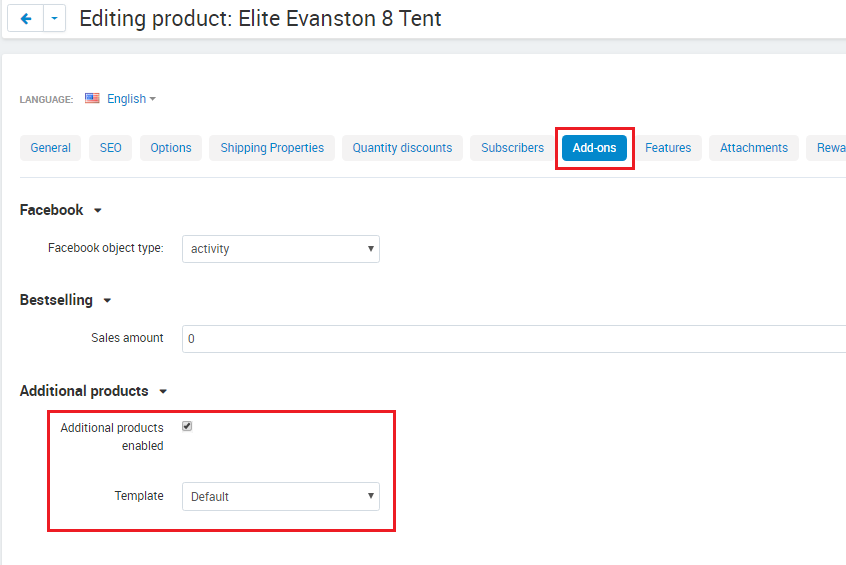
A smartphone often comes with headphones, a case and a cable, a tent with a mat and a sleeping bag. The add-on shows them right on the product page as slots of a set: in each slot the customer picks a suitable product, sees the total of the set and adds everything to the cart with one "Add set to cart" button.
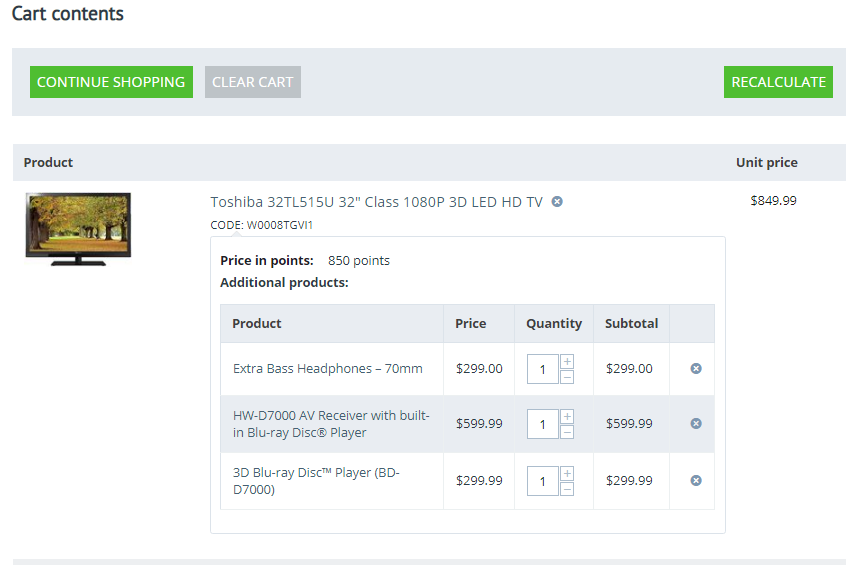
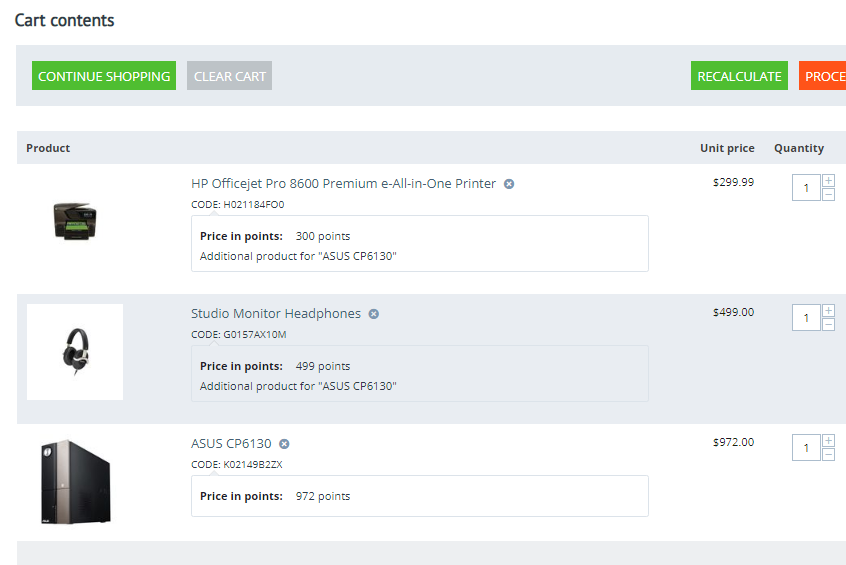
One line per set in the cart and order, contents in the invoice and e-mails
|
Four slot modes optional, required, any, all
|
Rule-based matching categories, features, brands, price
|
CS-Cart 4.17.1+ CS-Cart, Ultimate and Multi-Vendor
|
Why your store needs it
Customers browse a related products block apart from the purchase decision: each accessory has to be opened, checked for fit and added to the cart.
With the add-on the accessories are arranged on the main product page in slots: "Headphones", "Case", "Cable". A slot shows only suitable products, and the set goes to the cart with one button.
One button
"Add set to cart" adds the main product and the chosen variants at once. |
Only what fits
A rule picks variants by category, by features of the main product, by brand and by price. |
One line per set
In the cart and the order a set is one line with its contents; the quantity changes for the whole set. |
A fair price
A set costs the sum of the product prices with all their regular discounts; the savings are shown at once. |

What the customer sees
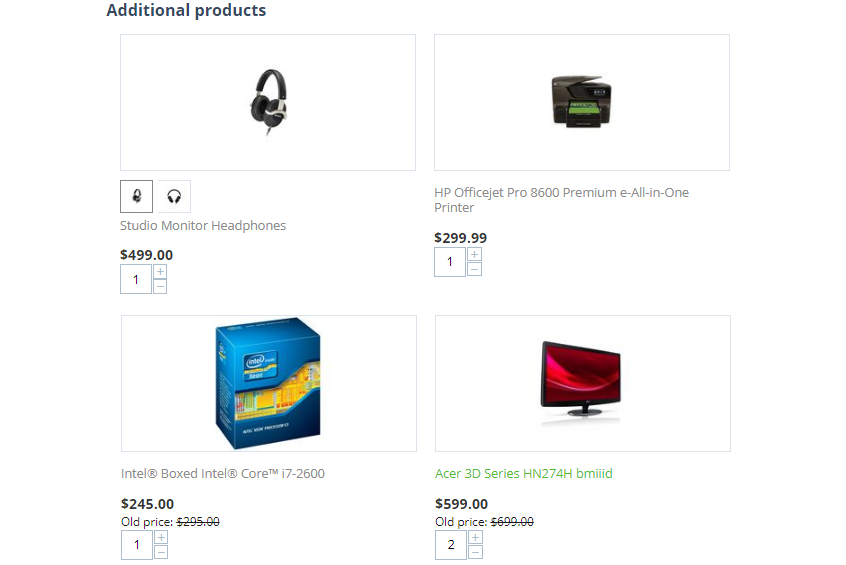
- • Set slots. A slot with a choice has a name, a "from" price and a "Choose from N" button; the products of an "All required" slot are included in the set at once. Without a choice in a required slot the set cannot be added to the cart.
- • Selection panel. Slot variants open in a side panel: each shows its price and stock, and a long list gets search, sorting by position, price or popularity and a "Show more" button.
- • Variations and options. A variation group is shown as one card with a size or colour switch, product options are chosen right in the panel, and the price is recalculated.
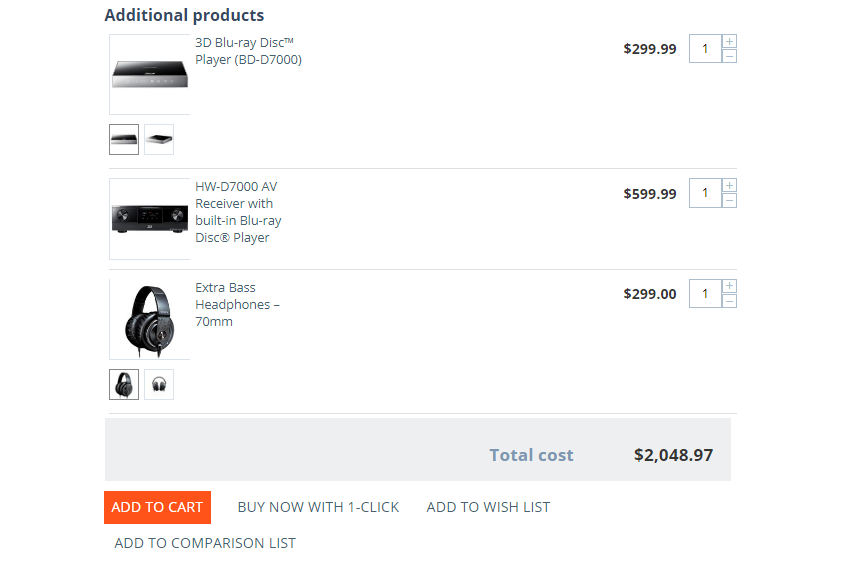
- • Total and savings. Under the block are the number of products, the set total and the savings: the sum of the regular discounts of the products. A sticky panel keeps the total and the button in view while scrolling.
- • Phone and tablet. On a phone the slots scroll in a row, on a tablet and a desktop they form a grid.


Cart and order
- • One line with contents. In the cart a set is the line of the main product with its contents under it. The quantity changes for the whole set, and an optional product can be removed from it.
- • Order and documents. The set contents are shown on the order page for the customer and in the control panel, in the invoice and in order e-mails.
- • Reorder. The reorder button restores the whole set.
- • Order editor. The set quantity follows the main product; a product whose quantity is changed leaves the set as a separate line.
- • Stock. Each product of the set is a regular order item: stock, taxes and shipping are counted as for separate products.


How slots are set up
A slot is a place in the set with a name and a list of variants. It can be a template for categories, so it appears for all products of these categories including subcategories, or an own slot of a particular product. A template is switched off for a single product with one button.
- • Selection mode. "One of N, optional", "One of N, required", "Any", "All required".
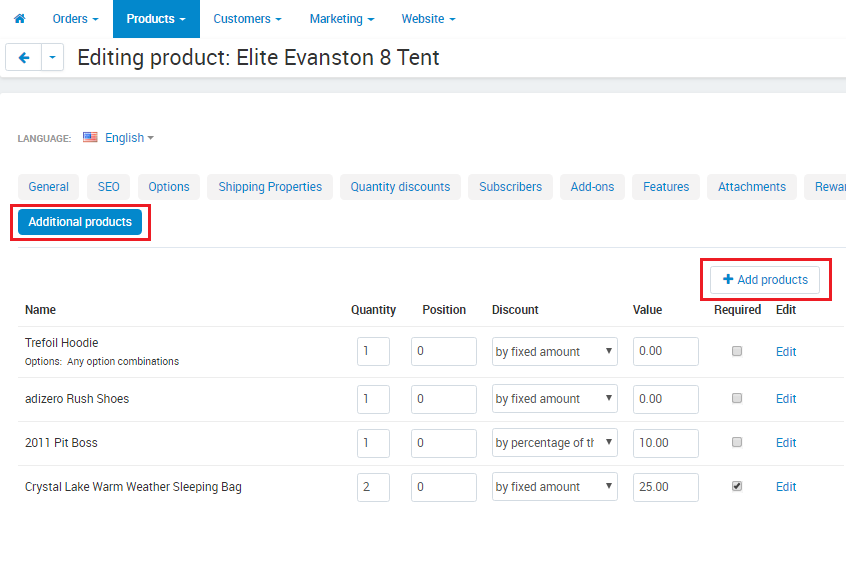
- • Variants from a list. Products are listed by hand, with a quantity per one main product and an order in the panel.
- • Variants by a rule. Variant categories, feature matches with the main product (the same size, the same model), brands, a price from and to, in stock only, exclusions. A product moved to a category gets into the slot at once.
- • Check. The "Check" tab shows which variants the slot gives a chosen product right now.
- • Default choice. A slot opens empty, with the marked variant or with the lowest-priced variant in stock.


Multi-Vendor and storefronts
- • One set, one vendor. An administrator template picks variants only from the vendor of the main product, so a set is never split between orders of different vendors.
- • Vendor slots. A vendor creates own slots for their products when the setting allows it, and can switch an administrator template off for their product.
- • "Common Products for Vendors". On a common product page the customer picks the set vendor right in the block and sees their price; slots of the common product work for vendor offers.
- • Separate payment. Sets work with the "Direct Customer-to-Vendor Payments" add-on and "Cart-Power: Checkout by vendor".
- • Ultimate and "Warehouses". Slots are set up for each storefront; with "Warehouses" on, variant stock is counted for the shipping region of the customer.

Embedding and data exchange
- • Placement. The block appears on the product page before the product tabs by itself; for a custom placement in a layout there is a separate block. Quick view shows a "Build a set with this product" link.
- • Export and import. Slots and their variants are transferred together with options: a slot is found by its code, a product by its code.
- • REST API. Slots are read and edited through the API (cp_ap_slots) with the same rights as in the control panel.
What the add-on does not promise
- • The add-on gives no set discount of its own: a set costs the sum of the product prices with all their regular discounts. A set discount can be set up with standard CS-Cart promotions.
- • One set holds products of one vendor.
- • A product with a required option of the "Text", "Text area" or "File" type does not get into slots: the selection panel sets only list and checkbox options.
- • The mobile app and the storefront REST API do not build sets.
- • Installation and updates require the "Cart-Power: Add-ons Manager" add-on; the license is bound to the store domain.
What's new in version 3.0
- • A set on the product page: the main product and slots with a choice of variants, the set total and the "Add set to cart" button.
- • Four slot modes: one optional product, one required, any from the list, all required.
- • Slot variants from a list or by a matching rule: categories, features with the same value as the main product, brands, a price range, in stock only.
- • Slot templates for categories with subcategories and own slots of a product; a template can be switched off for a single product.
- • A variant selection panel with search, sorting by price and loading more; a variation group as one card with a switch, product options chosen right in the panel.
- • A set in one cart line with its contents; set contents in the order, invoice and e-mails; reorder restores the set.
- • A sticky panel with the set total; slots in a row on a phone and in a grid on a tablet and a desktop.
- • Multi-Vendor: a set of one vendor, vendor slots, choosing the set vendor on a common product page, work with "Direct Customer-to-Vendor Payments" and "Cart-Power: Checkout by vendor".
- • Ultimate: slots per storefront; "Warehouses": stock for the shipping region of the customer.
- • Import and export of slots with options, REST API, a layout block, a link in quick view.
- • The order editor keeps the set: its quantity follows the main product.
- • The add-on no longer gives a set discount of its own: a set costs the sum of the product prices with all their regular discounts.
- • Requires CS-Cart or Multi-Vendor 4.17.1 or later.
Frequently asked questions
How is it different from a related products block?
Related products are a list of links: the customer opens each product and adds it to the cart separately. Here the accessories are arranged in slots on the main product page, chosen in a panel and added to the cart with one button together with the main product, and they stay one set in the cart and in the order.
Do I have to set up slots for every product?
No. A slot template is attached to categories, with subcategories, and works for all their products, including ones added later. If a product does not need the template, it is switched off for that product.
How do I offer only the cases that fit the phone?
With a matching rule on features: for example, the "Model" feature of the case must match the model of the phone. The "Check" tab shows which variants a particular product gets.
Is there a set discount?
The add-on gives no discount of its own: a set costs the sum of the product prices with all their regular discounts, and the savings are the sum of these discounts. A set discount can be set up with standard CS-Cart promotions.
What happens when a variant is out of stock?
It cannot be chosen. The "Out-of-stock variants" setting decides whether to list it last or hide it. If a required slot is out of stock, the customer sees a message that the set cannot be ordered now.
How does the add-on work in Multi-Vendor?
A set is built from products of the vendor of the main product and goes to that vendor's order as a whole. Vendors can create their own slots when the setting allows it. On a common product page the customer picks the set vendor right in the block.
- Store Builder
- Store Builder Plus
- Store Builder Ultimate
- Multi-Vendor
- Multi-Vendor Plus
- Multi-Vendor Ultimate
- 4.21.1
- 4.20.1
- 4.19.1.SP2
- 4.19.1.SP1
- 4.19.1
- 4.18.4
- 4.18.3
- 4.18.2.SP1
- 4.18.2
- 4.18.1.SP1
- 4.18.1
- 4.17.2.SP3
- 4.17.2.SP2
- 4.17.2.SP1
- 4.17.2
- 4.17.1
- English
- Русский
|
CS-Cart development · in-house team · since 2013 We build, upgrade and speed up CS-Cart stores and marketplacesAnalysts, developers, designers, QA and support under one roof — no subcontractors. We ship add-ons you can buy on this page today, and we take on the work that no ready-made add-on covers. |
|
2013 Working with |
4.98 Rating from |
200+ Solutions on this |
500+ E-commerce projects |
Flagship products
Two add-ons that change how a store performs
Everything else we publish improves one screen. These two change the numbers: how customers find products, and how often they come back.
|
Add-on · Search & merchandising Smart SearchElasticsearch-powered search for large catalogues. The customer types two letters, sees products with images and prices, and buys from the dropdown — even after a typo or with the wrong keyboard layout. Visitors who use the search bar are 24% of traffic and 44% of revenue, and convert about 2.5× better than people who only browse categories. If search returns nothing, up to 80% of them leave. | ||||||||
| ||||||||
Try it on a live catalogue: open the demo store and search with a deliberate typo. |
|
Add-on · Mobile commerce PowerApp — mobile app for your storeA native iOS and Android app running on your CS-Cart data: the same products, prices, stock, promotions, reward points and orders. There is no second catalogue to maintain — everything stays in the admin panel you already use. A mobile site brings a customer in once; an app brings them back for free. Push notifications replace the retargeting budget you spend to buy the same customer a second time. | ||||||||
| ||||||||
Screens, block types and pricing tiers: see how the app is built. |
Services
When no add-on solves it, we do the work
Fixed scope, written specification, a named project manager and a warranty on what we ship.
|
Custom CS-Cart development Functionality the platform does not have: add-ons, marketplace mechanics, integrations with 1C, CRM, ERP, payment and delivery providers. We start from a written specification, not from an estimate on a phone call. Details → |
|
CS-Cart upgrade Move to the current version without losing data, custom code or add-ons. We audit every modification first, upgrade on a staging copy, adapt what breaks and switch over with little or no downtime. Details → |
|
Speed and performance optimisation Conversion falls by about 4.4% for every extra second of load time. We profile the server, the database and the front-end, then fix what actually costs the seconds — and show you the before-and-after numbers. Details → |
|
Design for CS-Cart Mobile-first storefront design built on CS-Cart's own template structure, so the layout survives the next platform upgrade instead of becoming a migration problem. Details → |
|
SEO for CS-Cart A technical audit of indexing, duplicates, redirects, structured data and Core Web Vitals — delivered as a prioritised fix list your developers can act on, or that we implement ourselves. Details → |
How we work
What you get besides the code
|
Before we start We discuss the goal, offer options and write the specification. You approve scope and price before development begins. |
While we build A named project manager reports progress on a fixed schedule. You always know what is in work and what is next. |
|
Before release A separate QA pass on every release — the developer who wrote the code is not the person who signs it off. |
After handover Documentation for everything we ship, plus a warranty on the modifications and the project. |
Tell us what the store needs to doDescribe the task in a couple of sentences and we will come back with options, a scope and a price. The consultation is free, and we will say plainly if a ready-made add-on already solves it.
|
Client cases, our full add-on catalogue and 184 customer reviews are in the tabs above.
Similar products
Make purchases for 200$ from our entire offer and get 20% discount