Google Tag Manager (GTM) and GA4 Ecommerce

Puts the Google Tag Manager container on the storefront and feeds it the full set of GA4 ecommerce events: product and list views, the cart, checkout steps, purchases and refunds. Custom store events are set up without a developer - by a click, a form submission or a page view. Consent Mode v2, Yandex Metrica goals and server-side purchase reporting are included.
Reviews: 3
Last update: 12.11.2026
cp-addon-3647
Select the CS-Cart edition on which you will use the add-on.
The update period determines the period of time when you can get access to the new versions of this add-on compatible with the new versions of CS-Cart software released during the chosen period.
To instal the add-on, we will need the FTP access to your server. Please send it along with the order number to sales@cart-power.com once the order is paid.
Prepare purchase, cart and checkout events for GTM and GA4 without template edits
Google Tag Manager (GTM) and GA4 Ecommerce
$60.00

Full GA4 ecommerce in your own GTM container

For Google Analytics 4 to show revenue, the cart and the customer journey, the store has to put the events into dataLayer itself. The add-on does that for you: you enter the container ID and the storefront starts reporting product views, add-to-cart actions, checkout steps, purchases and refunds. Where those events go next is decided in GTM: GA4, ad platforms or your own tags.

15 events
from a product and list view to a purchase, a refund and a call request
Custom events
by a click, a form submission or a page view - with no template edits
Consent Mode v2
four Google consent signals and a consent window on the storefront
CS-Cart 4.15.1-4.21.1
and Multi-Vendor, every edition, updates via the Add-ons Manager

What the store reports

The add-on collects the events of the GA4 ecommerce schema and puts them into dataLayer with items, prices, quantity, category and brand. In GTM you bind them to the GA4 tag or to any other system - tags are configured in the Google interface, not in the store code.

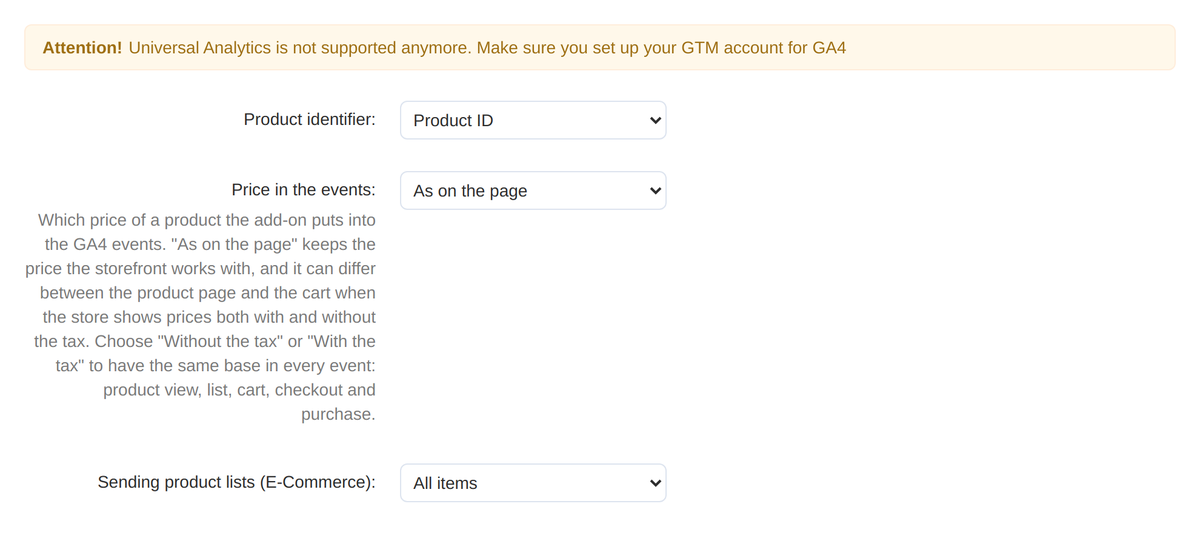
As on the page uses the price prepared by the storefront. Without the tax and With the tax select tax-exclusive or tax-inclusive product prices. Cart and checkout use the CS-Cart calculation result; purchases and refunds use the taxes saved with the order. This setting controls product prices; purchase value still follows the saved order amount and the shipping-exclusion setting.

Storefront event currency follows the existing "Use storefront selected currency" setting. Server events use the primary store currency.

The whole journey

Product and list views, a click on a product, the cart, checkout steps, purchases and refunds.

The event list is yours

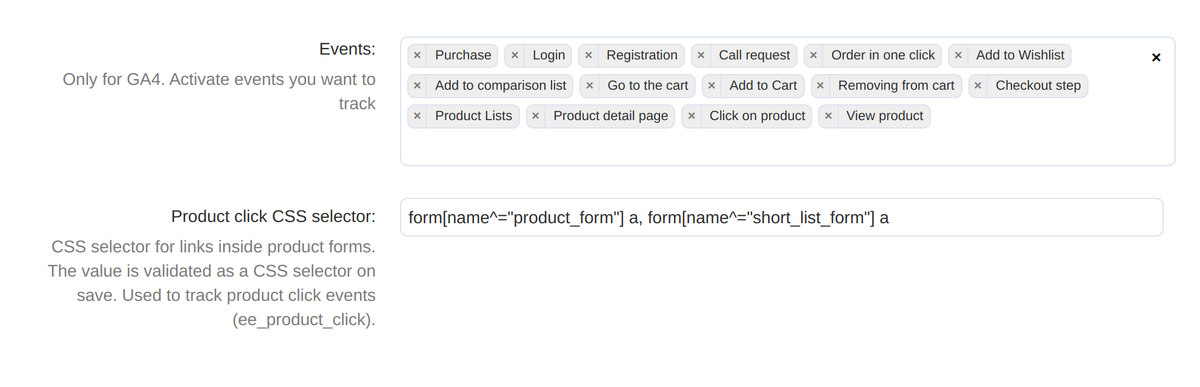
Every event is switched on separately: no noise in the reports and nothing important left out.

Items in the shape GA4 expects

The identifier is the product ID or product code; the brand comes from a chosen feature. Product prices follow the selected price mode, and currency follows the reporting channel setting.

Impressions of the cards actually seen

Product lists are reported in full or only for the cards the customer has actually seen.

GA4 ecommerce events: each one is switched on separately.
Product price setting: as on the page, without the tax or with it.

Custom events without a developer

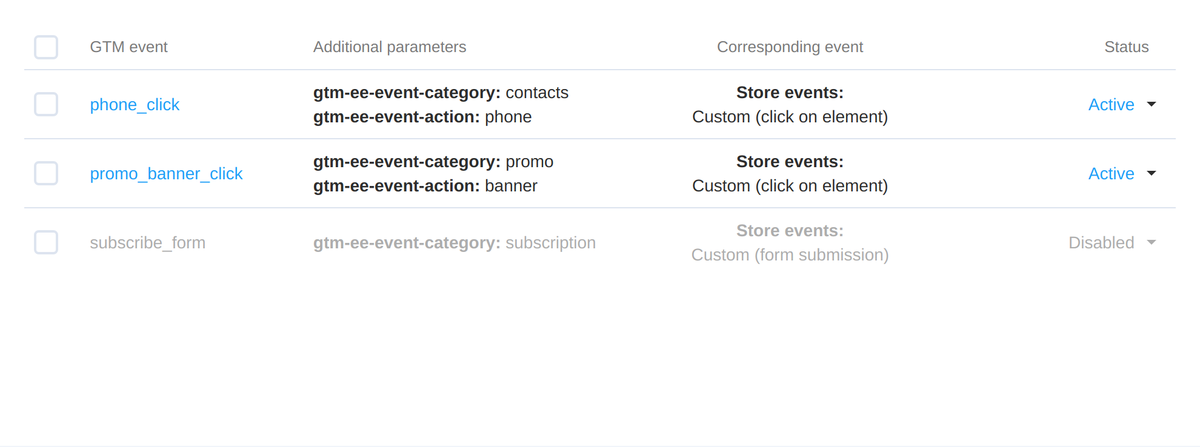
Besides ecommerce a store usually needs events of its own: a click on a promo banner, a tap on the phone number in the header, a newsletter form submission. The add-on keeps them as a list in the admin panel: the GTM event name, the way to catch the action and the additional parameters.

  • •  Click on an element - the condition is a CSS selector or an element name: one event catches every promo banner or every tel: link.
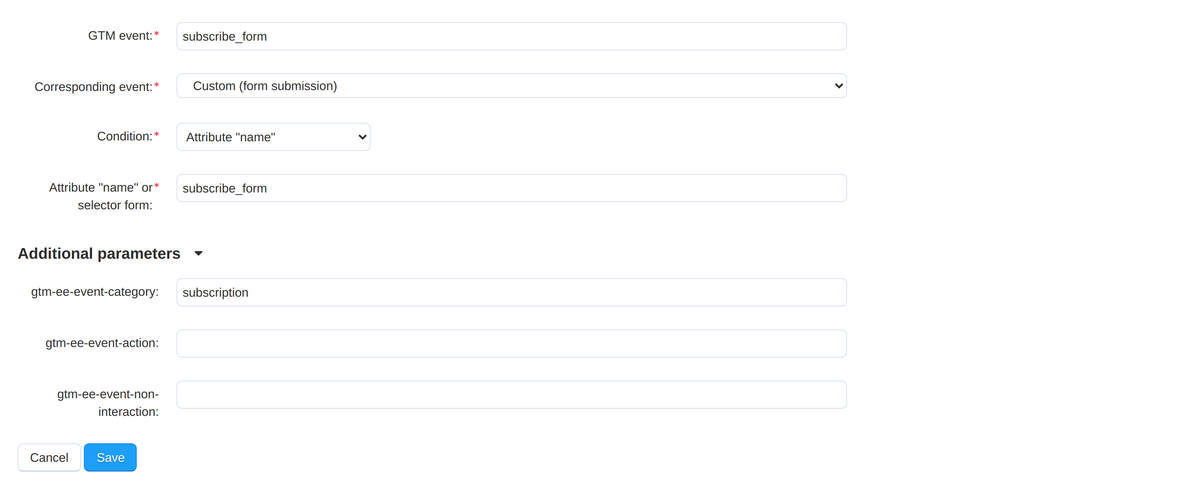
  • •  Form submission - by the form name attribute or by a selector; the event is sent at submission time, AJAX forms included.
  • •  Page view - for the pages you want counted on their own.
  • •  Additional parameters are listed in the settings and filled in per event - category, action, the non-interaction flag.
  • •  A Yandex Metrica goal is set in the same event, so one customer action reaches both GTM and Metrica.
  • •  An event can be switched off without being deleted - for the length of a promotion, say.
Custom store events: the GTM event name, parameters, binding and status.
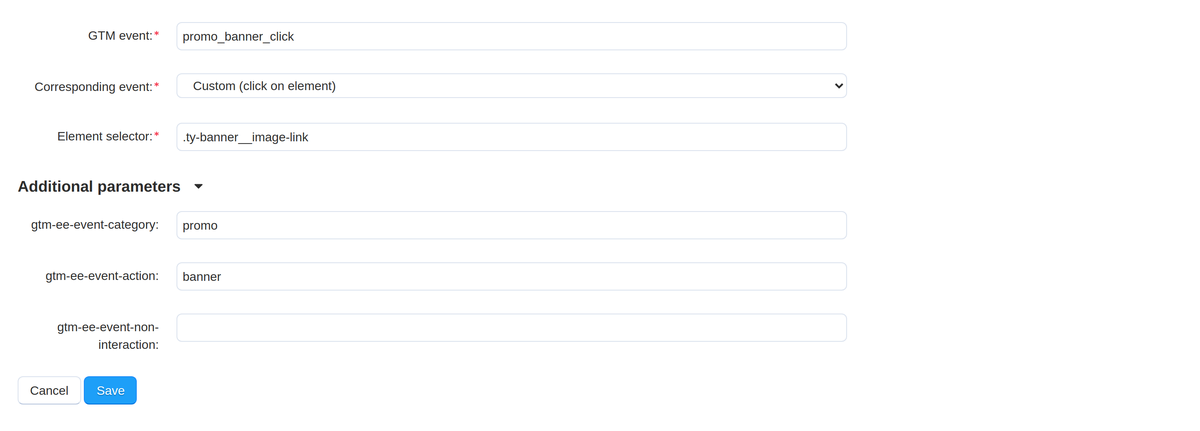
An event by a click: the condition is the CSS selector of the banner.
An event by a form submission: the condition is the name attribute of the newsletter form.

Customer consent and Consent Mode v2

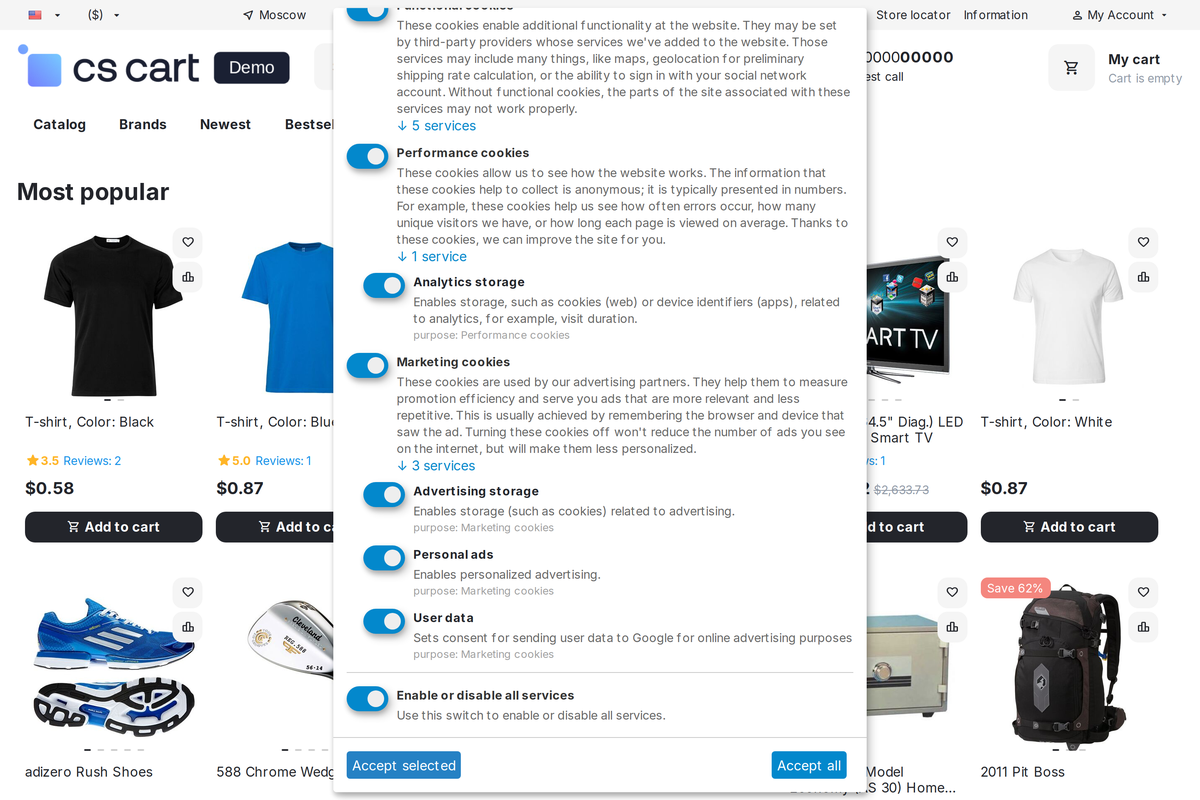
Google expects the consent state before the tags load. The add-on declares the four Consent Mode v2 signals - analytics storage, advertising storage, personalised ads and user data - and shows them to the customer in the consent window on the storefront. When the stock GDPR add-on is enabled, the services join its window instead of a second one.

  • •  Basic mode - no tags load until the customer agrees.
  • •  Advanced mode - the container loads right away, but until the customer decides Google receives anonymous signals; after consent the data becomes complete.
  • •  No consent request - for stores that collect consent another way.
  • •  Advertising consent - the three advertising permissions stay out of the window while the store runs no campaigns: the customer is asked about analytics only.
  • •  The decision is stored in the customer browser, and the events wait for it and are sent only after the answer.
  • •  If the customer refused analytics, the purchase of the order is not sent from the server either: the decision is remembered when the order is placed.
The consent window on the storefront: the Consent Mode v2 signals as separate switches.
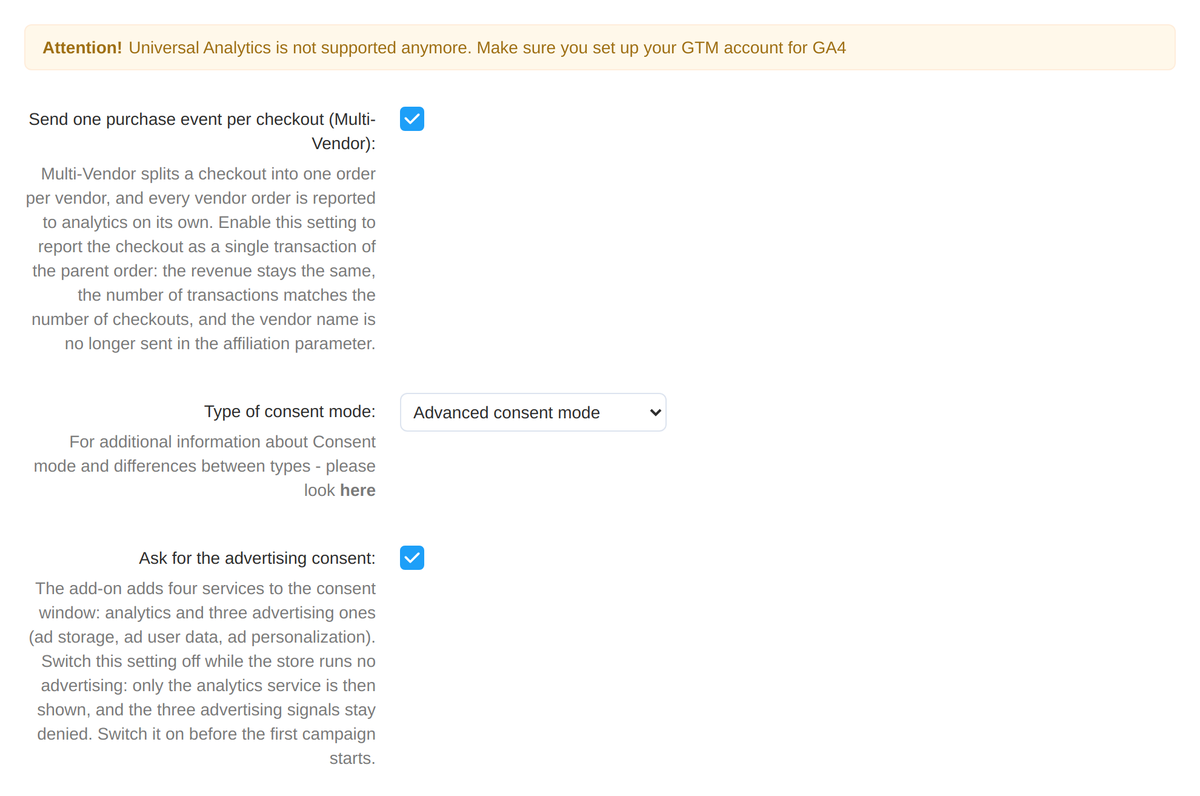
The consent settings: the mode, the advertising consent request and the single purchase event per checkout.

Server-side purchase reporting when the customer closes the tab

The purchase event is sent from the "Thank you" page, and not everyone gets there: when paying on the bank side customers often close the tab. The add-on reports the purchase from the server through the GA4 Measurement Protocol when the order becomes paid: on a status change in the admin panel, by an import or by a payment notification. While the scheduler runs, a payment made on the bank side is reported from the server only if the customer has not come back to the "Thank you" page. The add-on marks a processed purchase to prevent it from being sent again.

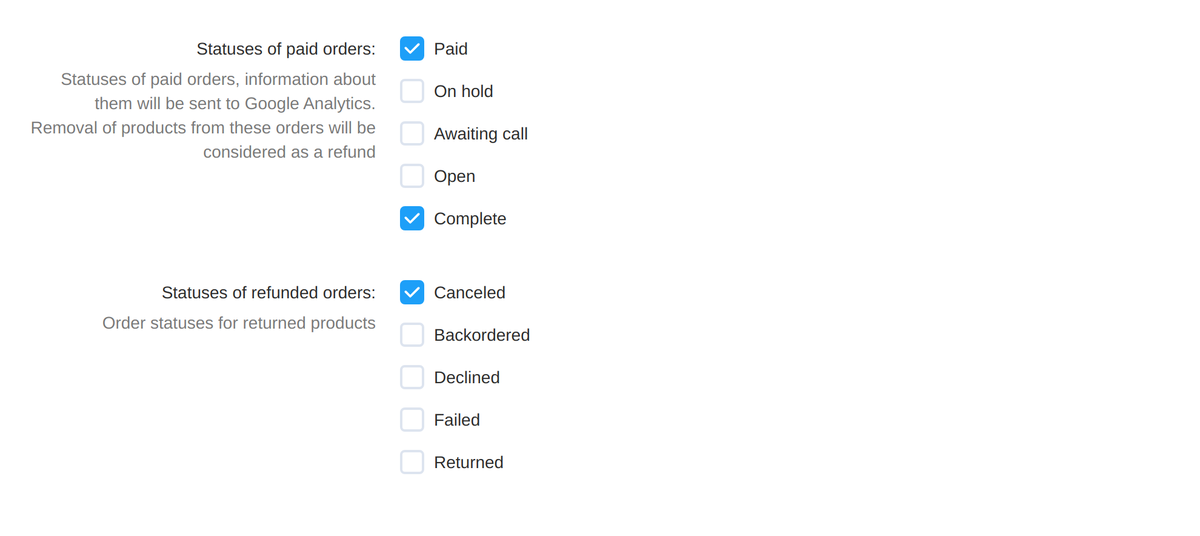
  • •  The statuses that mean a paid order and a refunded one are chosen in the settings.
  • •  Sending needs the GA4 data stream key and the Measurement Protocol secret - both fields sit next to the setting; if the secret is missing, the add-on warns on save.
  • •  A purchase the bank confirmed before the customer came back is pushed to dataLayer by the "Thank you" page, so the container tags that listen to the browser event see it - Meta Pixel, a server-side GTM container. A customer who has not come back within 30 minutes is reported by the scheduler.
  • •  The scheduler reports the paid orders that have not reached analytics yet: the cron command is printed ready to copy in the settings, with the time of the last run under it. It can also report orders without a visitor ID, following the setting of the storefront of the order. A saved refusal of analytics still blocks sending.
  • •  A server-side purchase carries the session ID and order time; linking it to the original visit and traffic source depends on Google processing.
  • •  Shipping costs can be excluded from the order total so that revenue is counted by items.
  • •  The add-on prepares user_data with e-mail, phone and address for selected events, in the Google format and subject to consent. Choose the field groups in the settings and configure their use in the tags of your GTM container.
Order statuses: which of them mean a paid and a refunded order for the add-on.
The scheduler command and the time of its last run.

Orders that do not belong in the reports

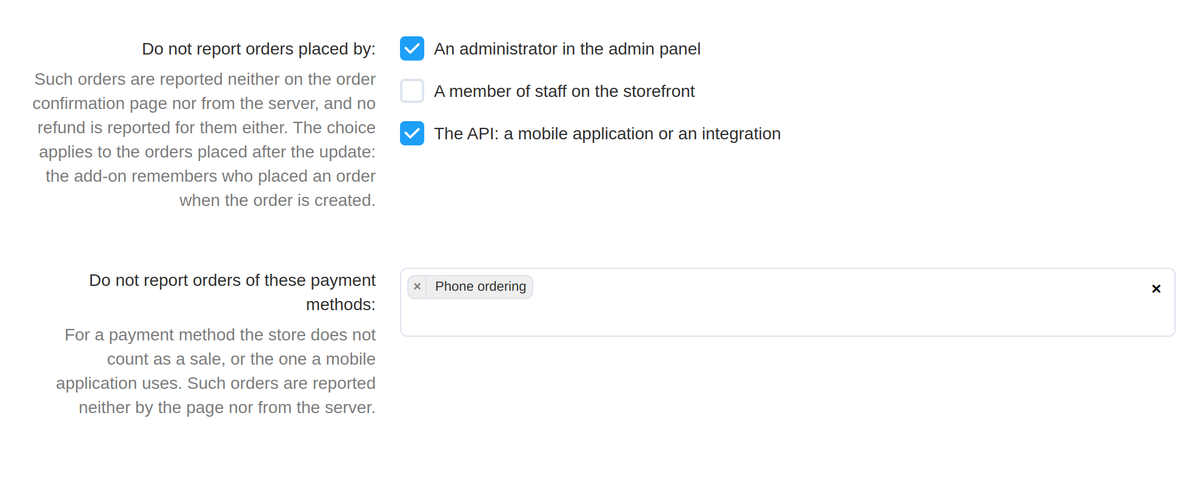
Not every order is a sale on the site: a manager places a phone order in the admin panel, a member of staff places one on the storefront for a customer, a mobile application places one through the API. In the reports such orders distort the traffic sources and the conversion rate of the site. The "Orders left out of the reports" settings leave them out.

  • •  Who placed the order - an administrator in the admin panel, a member of staff on the storefront or the API (a mobile application, an integration).
  • •  The payment method - the orders of the chosen payment methods, for example the ones the store does not count as a sale.
  • •  No purchase and no refund is reported for such orders - neither by the "Thank you" page nor from the server.
  • •  The add-on remembers who placed an order when the order is created, so that choice applies to the orders placed after the update to 2.11.
Orders left out of the reports: the orders of an administrator in the admin panel and of the API, the "Phone ordering" payment method.

The container from your own domain

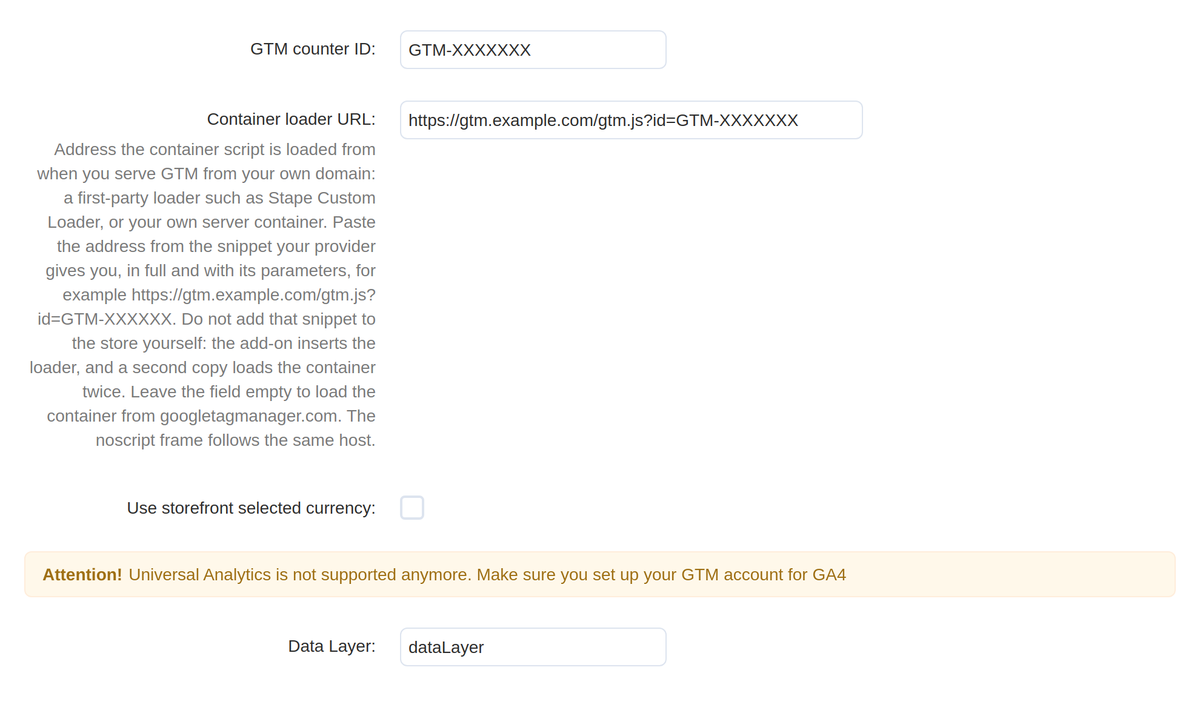
Ad blockers often cut off the requests to googletagmanager.com, and some visitors never reach analytics. If you serve the container from your own domain - with a loader such as Stape Custom Loader or your own server container - enter its address in the "Container loader URL" setting.

  • •  The add-on puts that address into both the container script and the noscript frame for browsers without JavaScript. For Stape Cookie Keeper there is the "Stape Cookie Keeper in Safari" setting: Safari on Mac and iPad gets the Cookie Keeper file, as with the Stape snippet.
  • •  There is no need to paste the loader snippet into the templates: a second copy loads the container twice.
  • •  The dataLayer events and server-side purchase reporting stay as they are.
  • •  The address is checked on save: a full https address is accepted. An empty field loads the container from googletagmanager.com, as before.
  • •  The address is set per storefront.
The container loader URL: GTM from your own domain.

Marketplace and several storefronts

  • •  Multi-Vendor. A marketplace checkout is split into orders per vendor. The add-on can report it as a single transaction of the parent order: revenue stays the same and the number of transactions matches the number of checkouts.
  • •  Several storefronts. The container ID, the event list, the consent mode and the order statuses are set per storefront or for all of them at once.
  • •  Your own dataLayer name - when the site already has a container using the default one.
  • •  User-ID - the customer identifier is passed to GA4 once the feature is enabled in the Google account.
The add-on in the list of add-ons of the admin panel.

What the add-on does not do

  • •  An event in dataLayer, local GA4 debug output or an HTTP response from Measurement Protocol does not confirm that a Google Ads tag fired or that a conversion was counted. Check this separately in Google services.
  • •  Set up the GTM container, GA4 and Google Ads tags, goals and Enhanced Conversions in their respective accounts. The add-on does not create or publish these automatically.
  • •  Event acceptance and purchase attribution depend on Google, customer consent, session identifiers and when the event is sent. Retaining the traffic source is not guaranteed.
  • •  Stape Cookie Keeper is supported with the Stape User ID identifier: with the "Stape Cookie Keeper in Safari" setting the add-on loads the Cookie Keeper file in Safari 16.4 and later on Mac and iPad, as the Stape snippet does; Safari on iPhone gets the regular file, as with the Stape snippet. Other identifier types and a Stape address on the store domain (same-origin) are not supported; Stape itself keeps the cookies.
  • •  Selecting tax-exclusive product prices does not automatically convert purchase value into revenue excluding tax and shipping. Check that the order-total settings and your tags match the requirements of the analytics system. The add-on does not reconstruct missing tax breakdowns for older or imported orders.

What is new in version 2.17

  • New setting "Stape Cookie Keeper in Safari". When the container is loaded through Stape Custom Loader and Cookie Keeper is enabled in Stape with the Stape User ID identifier, Safari 16.4 and later on Mac and iPad gets the Cookie Keeper file of the same loader, as with the code generated by Stape. The setting is off by default; other browsers are not affected.

Previously: version 2.16

  • In a cart with products of several vendors (Multi-Vendor) or suppliers, the tax-exclusive and tax-inclusive modes now share the order tax among all products it applies to. Previously it was shared among the products of the first vendor only, so the price of such an item in cart, checkout and purchase events could be wrong and even negative. The "As on the page" mode was not affected.
  • When a buyer has not answered the consent window, the server-side purchase follows the store's consent policy: with the implicit CS-Cart policy the purchase is sent as before; with the explicit policy and with the add-on's own consent window such an order is not sent from the server. A decision the buyer did make still takes priority. Orders placed before the update are not changed.

Previously: version 2.15

  • •  Product prices in purchases and refunds now use the taxes saved with the order and its storefront price setting for the tax-exclusive and tax-inclusive modes. Both unit-price and subtotal tax calculation are supported; partial refunds use the price recorded before the order was edited.
  • •  Cart and checkout events now use the CS-Cart tax calculation result for tax-exclusive and tax-inclusive prices. Prices for additions and quantity changes are updated after the cart is recalculated without adding a duplicate event.
  • •  Server events use the primary store currency regardless of the storefront currency.
  • •  This release also includes the tax-total refinement from version 2.14: storefront and Measurement Protocol purchases use the taxes saved with the order, including taxes included in product prices.

Previously: version 2.13

  • •  E-mail, phone and address can be selected for user_data in dataLayer events and server-side purchases. Phone numbers are validated and converted to E.164 before hashing; ambiguous or invalid numbers are omitted.
  • •  The "User data fields for enhanced conversions" setting selects e-mail, phone and address. Clearing all checkboxes omits user_data.
  • •  The buyer's decision on ad_user_data is saved with the order. A saved refusal is not replaced by consent in the current session or by profile data.
  • •  The log records the purchase processing stage, channel, reason and prepared field names without their values or hashes. Preparation for the storefront and the server HTTP response are identified separately; neither confirms that Google processed a conversion.
  • •  Adding a product to the wishlist with a regular (non-AJAX) POST no longer returns HTTP 500; the same fix applies to the buy-one-click / call-request form.
  • •  Product list events use the preloaded brand cache when a category or block does not include features. An existing brand value still takes precedence.
  • •  The cp_gtm_purchase_data hook lets developers supplement purchase parameters for storefront and server events without changing the add-on. Configure your tags separately.
  • •  When advertising user-data consent is denied, the add-on removes e-mail and phone from nested customer data before the event is actually pushed to dataLayer.

What came in versions 2.6-2.12

  • •  A consent withdrawn in the cookie window reaches Google at once on the same page - Consent Mode v2 (2.12).
  • •  The "Container loader URL" setting and the "Orders left out of the reports" section; no server-side purchase after an analytics refusal; the "Thank you" page skips a failed payment; editing a paid order in the panel no longer sends a minus/plus pair; the scheduler on a busy store; updates from below 1.2 and while the add-on is disabled (2.11).
  • •  A purchase the bank confirmed before the customer came back is pushed to dataLayer by the "Thank you" page while the scheduler runs, so Meta Pixel and a server-side GTM container see it (2.10).
  • •  The time of the last scheduler run is shown under its command (2.10).
  • •  A purchase on an order status change goes to Google from the server wherever the change comes from: the admin panel, a payment notification, the scheduler or an import (2.7).
  • •  The add-on prevents repeated purchase sends from the "Thank you" page, status changes and the scheduler (2.6).
  • •  The GTM container is loaded on the storefront only: visits to the admin panel do not reach analytics (2.7).
  • •  The begin_checkout event is sent every time the checkout opens - a returning customer gets into the funnel (2.7).
  • •  Product price modes were introduced: as on the page, without the tax or with it (2.6).
  • •  Server-side purchases and refunds carry the session of the visit, and the answer of Google is written to the log (2.6).
  • •  The scheduler can also report the orders of visitors without analytics - a setting of its own (2.6).
  • •  Server-side purchases and refunds include the order timestamp: within two days it can help Google associate the event with the earlier visit when its identifiers are available (2.8).
  • •  The visit session is read from both GA4 cookie formats and sent with a server-side purchase; Google determines the final traffic source (2.9).
  • •  The purchase can be reported for paid orders only: a store that sells on invoice sees the money it collected in the reports instead of the value of every order placed (2.8).
  • •  The add-on warns when server-side reporting is on and the API secret is empty (2.7).

Frequently asked questions

Do we need a separate Google account?

You need a Google Tag Manager container and a Google Analytics 4 property - both are created free of charge in a Google account. The add-on takes the container ID; the tags are then configured in the GTM interface.

Does the add-on send the data to Google Analytics itself?

The storefront puts the events into dataLayer and hands them to the GTM container - where they go next is decided by the tags in GTM. The add-on talks to GA4 directly only for the server-side purchase and refund, and only when that setting is on.

Do we have to edit the theme templates?

No. The container code and the event collection are attached through hooks; custom events are described by selectors and form names in the admin panel.

Does it work with full-page caching?

Yes. The events are collected by a script in the customer browser, and the order data is placed on the "Thank you" page, which is never cached.

What happens to analytics if the customer declines cookies?

In the basic consent mode the container is not loaded and no events are sent. In the advanced mode the container works, but until consent Google receives anonymous signals - as Consent Mode v2 requires.

Will Meta Pixel and a server-side GTM container see a purchase paid on the bank side?

Yes, if the scheduler runs. The bank often confirms the payment before the customer comes back to the store: the add-on waits for the customer up to 30 minutes, and the "Thank you" page pushes the purchase to dataLayer, where every container tag sees it. A customer who never comes back is reported from the server by the scheduler. Without the scheduler such a purchase goes to GA4 from the server at once and never reaches the tags in the browser.

Can we leave out the orders a manager placed by phone?

Yes. In the "Orders left out of the reports" settings tick "An administrator in the admin panel": such orders reach the reports neither as a purchase nor as a refund. The orders of a member of staff on the storefront, the orders placed through the API and the orders of the chosen payment methods are left out the same way.

Does the add-on fit when GTM is served through Stape or our own server container?

Yes. Enter the loader address in the "Container loader URL" setting, and the add-on loads the container from your domain - in the script and in the noscript frame. There is no need to add the loader snippet to the templates. If Cookie Keeper is enabled in Stape with the Stape User ID identifier, also turn on the "Stape Cookie Keeper in Safari" setting: Safari 16.4 and later on Mac and iPad gets the Cookie Keeper file, as with the Stape snippet.

What does it cost and how do we update it?

The add-on costs $60 per store licence. Updates are installed through "Cart-Power: Add-ons Manager", which checks for a new version and updates the add-on from the store.

See how it works. On the demo store open the browser console and watch dataLayer: the product view, add-to-cart and checkout step events show up on every page, while the admin panel shows how the custom store events are set up.
Product
  • Store Builder
  • Store Builder Plus
  • Store Builder Ultimate
  • Multi-Vendor
  • Multi-Vendor Plus
  • Multi-Vendor Ultimate
Compatible versions
  • 4.21.1
  • 4.20.1
  • 4.19.1.SP2
  • 4.19.1.SP1
  • 4.19.1
  • 4.18.4
  • 4.18.3
  • 4.18.2.SP1
  • 4.18.2
  • 4.18.1.SP1
  • 4.18.1
  • 4.17.2.SP3
  • 4.17.2.SP2
  • 4.17.2.SP1
  • 4.17.2
  • 4.17.1
  • 4.16.2
  • 4.16.1
  • 4.15.2
  • 4.15.1.SP4
  • 4.15.1.SP3
  • 4.15.1.SP2
  • 4.15.1.SP1
  • 4.15.1
Localizations
  • English
  • Русский
Mohamed Imam
Verified purchase
Advantages
A powerful and well-designed add-on that turns raw data into clear insights. It helps optimize Google Ads performance, understand user behavior in depth, and make smarter marketing decisions based on real data.
Disadvantages
Nothing noticeable at this stage.
Comment
This module adds real value from day one, and its impact becomes stronger over time as data accumulates. What truly makes the experience exceptional is the technical support—fast, knowledgeable, and genuinely committed to helping users get the best results. The team doesn’t just solve issues; they actively support your success. Highly recommended.
Soner Aydin
Verified purchase
Advantages
A perfect add-on. It's especially suitable if you want to analyze Google ads accurately, examine visitor behavior, and develop strategies accordingly.
Disadvantages
none
Comment
I have just started using it, but I see that it will be more useful to me as the data comes in. Also, the technical support team is excellent. They quickly find solutions and immediately help. They also patiently listen to you and try to solve the problem. I would also like to thank the team again.
Anonymous
Advantages
Easy installation and configuration.
Great job.
Disadvantages
No
Comment
Acquired the Google Tag Manager (GTM) module. The installation went without any problems. Small problems of the module's operation were solved by the development team very quickly. I recommend both the module and the developers - everything is at the highest level!
  CS-Cart development · in-house team · since 2013 We build, upgrade and

Contact information


CS-Cart development · in-house team · since 2013

We build, upgrade and speed up CS-Cart stores and marketplaces

Analysts, developers, designers, QA and support under one roof — no subcontractors. We ship add-ons you can buy on this page today, and we take on the work that no ready-made add-on covers.

2013

Working with
CS-Cart since

4.98

Rating from
184 reviews

200+

Solutions on this
marketplace

500+

E-commerce projects
delivered

Flagship products

Two add-ons that change how a store performs

Everything else we publish improves one screen. These two change the numbers: how customers find products, and how often they come back.


Add-on · Search & merchandising

Smart Search

Elasticsearch-powered search for large catalogues. The customer types two letters, sees products with images and prices, and buys from the dropdown — even after a typo or with the wrong keyboard layout.

Visitors who use the search bar are 24% of traffic and 44% of revenue, and convert about 2.5× better than people who only browse categories. If search returns nothing, up to 80% of them leave.
Constructor, Beyond Relevance Report 2025; Google Cloud × The Harris Poll, 2023

Catalogue size Sub-second results on 300,000+ products, Multi-Vendor included
Understands Typos, wrong keyboard layout, synonyms, word forms, SKUs, brands and attributes
Reporting Query analytics — what customers search for and which searches return nothing
Deployment Our cloud, or Elasticsearch on your own server

from $35/month

Plans by catalogue size · self-hosted from $1,215 one-time

Plans and details →

Try it on a live catalogue: open the demo store and search with a deliberate typo.


Add-on · Mobile commerce

PowerApp — mobile app for your store

A native iOS and Android app running on your CS-Cart data: the same products, prices, stock, promotions, reward points and orders. There is no second catalogue to maintain — everything stays in the admin panel you already use.

A mobile site brings a customer in once; an app brings them back for free. Push notifications replace the retargeting budget you spend to buy the same customer a second time.

Platforms Native iOS and Android, published under your own developer account
Home screen Built in the admin panel from six block types, the same way you build website pages
Time to launch Under a week from purchase to submission for App Store and Google Play review
Compatibility CS-Cart and Multi-Vendor 4.18–4.20 · 11 client apps already live in the stores

from $790

Buy outright, or $79/month on subscription

Open the add-on page →

Screens, block types and pricing tiers: see how the app is built.

Services

When no add-on solves it, we do the work

Fixed scope, written specification, a named project manager and a warranty on what we ship.

Custom CS-Cart development

Functionality the platform does not have: add-ons, marketplace mechanics, integrations with 1C, CRM, ERP, payment and delivery providers. We start from a written specification, not from an estimate on a phone call. Details →

CS-Cart upgrade

Move to the current version without losing data, custom code or add-ons. We audit every modification first, upgrade on a staging copy, adapt what breaks and switch over with little or no downtime. Details →

Speed and performance optimisation

Conversion falls by about 4.4% for every extra second of load time. We profile the server, the database and the front-end, then fix what actually costs the seconds — and show you the before-and-after numbers. Details →

Design for CS-Cart

Mobile-first storefront design built on CS-Cart's own template structure, so the layout survives the next platform upgrade instead of becoming a migration problem. Details →

SEO for CS-Cart

A technical audit of indexing, duplicates, redirects, structured data and Core Web Vitals — delivered as a prioritised fix list your developers can act on, or that we implement ourselves. Details →

How we work

What you get besides the code

Before we start

We discuss the goal, offer options and write the specification. You approve scope and price before development begins.

While we build

A named project manager reports progress on a fixed schedule. You always know what is in work and what is next.

Before release

A separate QA pass on every release — the developer who wrote the code is not the person who signs it off.

After handover

Documentation for everything we ship, plus a warranty on the modifications and the project.

Tell us what the store needs to do

Describe the task in a couple of sentences and we will come back with options, a scope and a price. The consultation is free, and we will say plainly if a ready-made add-on already solves it.

Write to us here

Use the Ask a question button at the top of this page — it reaches the same team.

Or reach us directly

sales@cart-power.com · cart-power.com
We work in English and Russian.

Client cases, our full add-on catalogue and 184 customer reviews are in the tabs above.

Similar products

Live Search
4.9 (48)
$75.00
The customer types and immediately sees products with a photo, a price and an «Add to cart» button, next to categories, brands and store pages. The add-on understands synonyms, word forms and typos, searches by product code and features, puts your chosen products first for the queries that matter and shows what customers did not find. The word index keeps it fast on catalogs of hundreds of thousands of products. No subscription.
Wherefrom client + marketing report
5.0 (18)
$59.00
$89.00
Save 34%
This module can tell you order channel - paid channel, referall, search engine, social networks.
Extended Email Marketing
5.0 (14)
$120.00
Six emails the store sends without you: abandoned cart, wishlist and recently viewed products, a review request after delivery, a birthday greeting and a campaign to an audience. Every email carries the customer's products and a personal promo code, and the admin panel shows the queue, the sending log and the statistics. Since version 1.36 — subscription to Power Blog articles and the mailing about new articles.
Customer refund rate and order history on the order page in the admin area
5.0 (12)
$55.00
This addon adds list of last customer orders and number of orders on the order details page.
Email Log and Background Sending
5.0 (6)
$60.00
Takes email sending out of the page request: messages are queued and sent by a cron command, so checkout and registration load fast. Every notification is logged with its status and can be previewed or resent.
Products cost and order profit
5.0 (5)
$53.90
Addon allows you to add cost price to your CS-cart store. You can check profit for all orders.