Sell products in packages - with accessories, as a gift set or a whole outfit
A customer buying a TV looks for a player and a cable, a customer buying a hoodie looks for pants to match. The add-on builds such sets from catalog products, gives a discount on the items and adds the package to the cart with one button: one line with its items, while stock is taken from every item.
3 package types with the main product, without it and separate - in a tab of every item
|
Item discount as a percentage, an amount or a fixed price; required and optional items
|
One line a package with its items in the cart, the order, the invoice and the order editor
|
CS-Cart 4.10.1-4.21.x and Multi-Vendor, every edition; tested on 4.21.1 with the Nova theme
|
Why a store needs packages
A customer takes a related product when it stands next to the main one and the saving is clear. A package shows exactly that in the buy block: what is included, what can be taken out and what the price is together.
More items per order
A player and a home theater for the TV, headphones for the phone: the customer checks what they need and adds it all with one button. |
A discount where it works
Every item gets its own discount: a percentage, an amount or a fixed price. |
Stock of every item
Package items are real catalog products: each has its own stock, options and shipment. |
Clear to the customer
The package description, a package switcher and the price recalculated right on the product page. |

Three package types
- • With the main product. The package is attached to a product: the product itself and the checked items go to the cart. A product can have several packages, and the customer picks one.
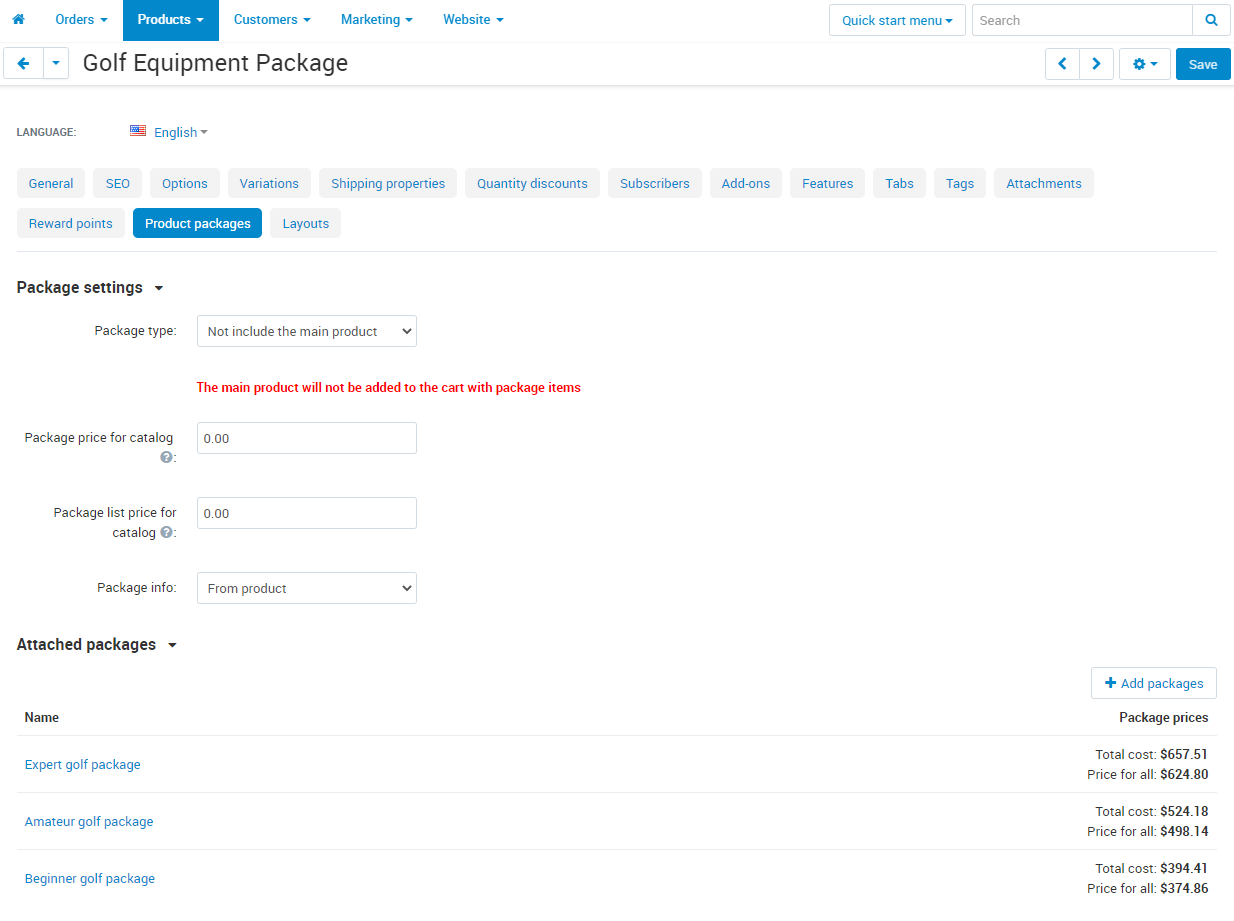
- • Without the main product. The product becomes a showcase of the set: a "Gift set" sells the package items only, and the cart line is named after the product or the package, as configured.
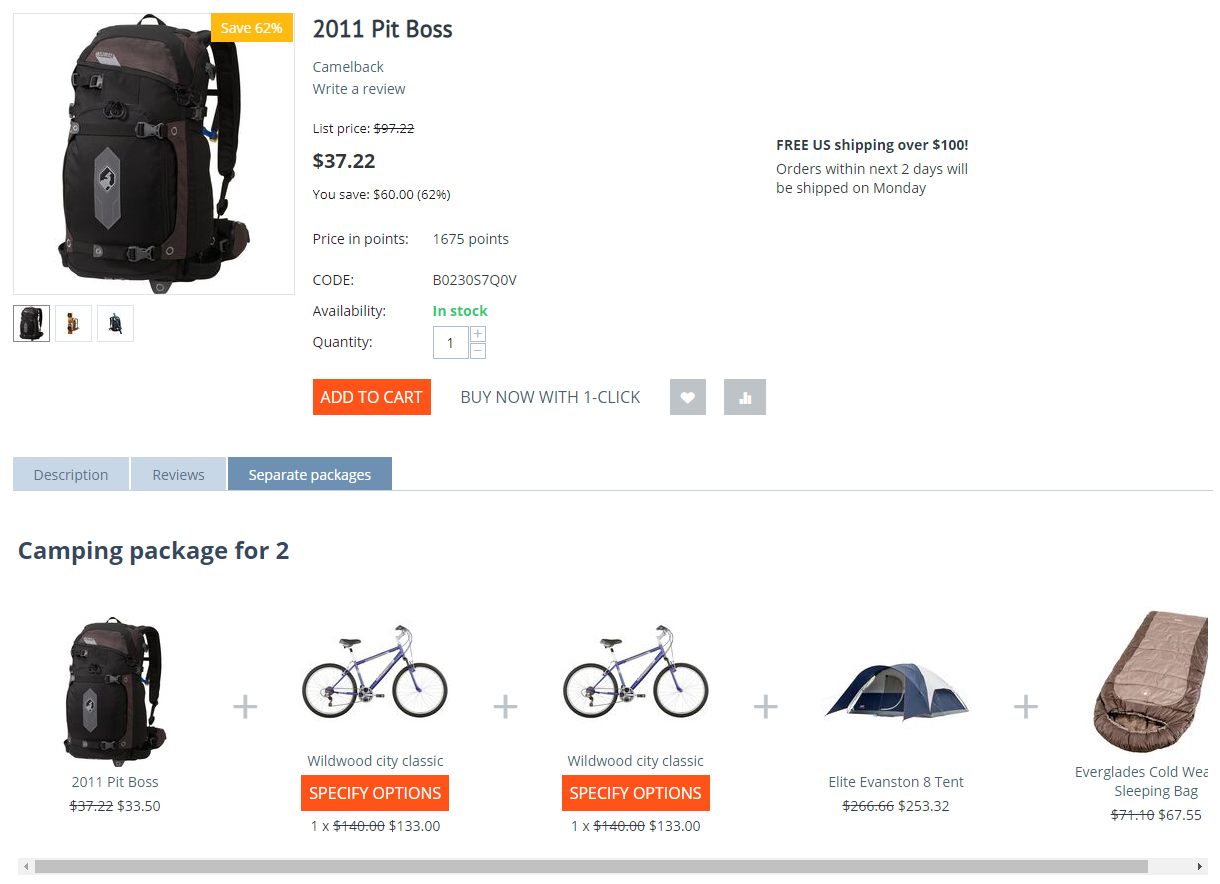
- • Separate package. A set of several products is shown in the "Separate packages" tab of each of them; all items are required, and the customer chooses the options of each item.
- • Items are required or optional, and an optional item can be checked in advance.
- • A package can be limited to a period.


Cart, order and invoice
- • In the cart a package is one line with its items below; the quantity changes for the whole package.
- • A package stays one line after the customer signs in again and on another device.
- • The customer order and the order in the admin panel show the items of every package.
- • Package items in the invoice carry the package price; a setting groups them into one line.
- • Stock is taken from every item, and the shipment is created by package items.


Management in the admin panel
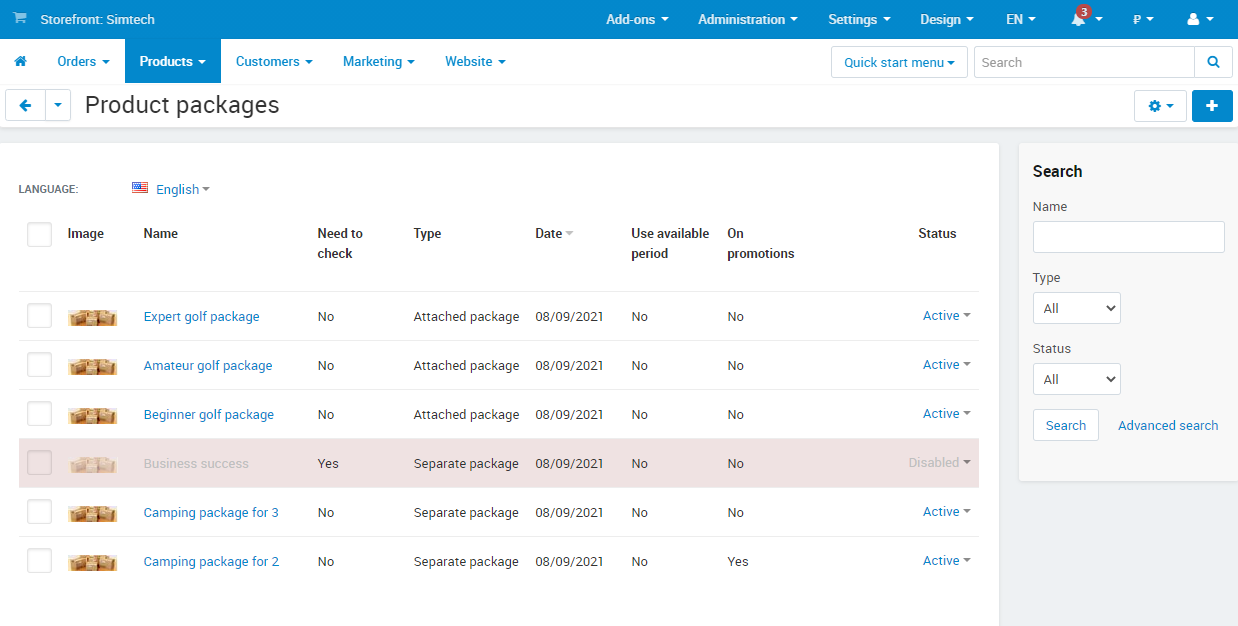
- • The "Products - Product packages" section: a list of packages with the type, the period and the status.
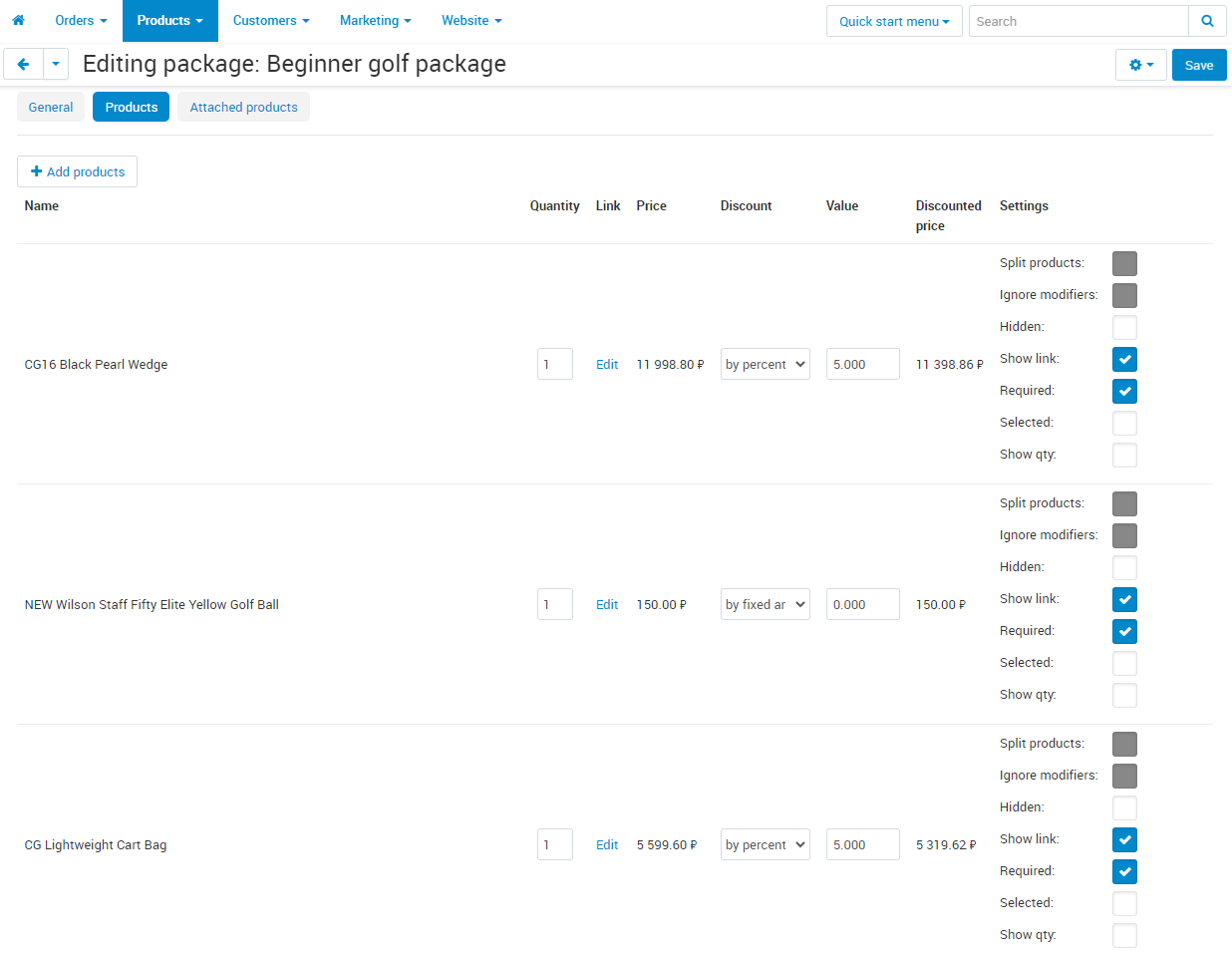
- • The package page lists the items with the discount, the "Required" and "Selected" flags, the quantity and the options; items the storefront does not show are marked "Not on the storefront" with the reason.
- • The "CP: Product packages" tab of a product holds the package type, the attached packages and the catalog price: set by hand or taken from the cheapest package.
- • The list of incomplete packages: a package with an item the storefront does not show is disabled and goes there by itself.


Orders from the admin panel
- • An order with a package in the admin panel shows the package as one line with its items.
- • In the order editor the package is changed with a switcher, items are checked with checkboxes, and a separate package is added with its own picker.
- • The new shipment window lists the items by package.


Settings, storefront and phones
- • Separate package style: Modern - item cards with the price for all next to them, Classic - items in a row with the button below.
- • Hidden products can be sold as package items only: they are not in categories and search.
- • Grouping of package items in invoices.
- • Disabling of incomplete packages.
- • On phones and in a narrow buy block a package item takes two lines, and long names wrap.

Marketplace and several stores
- • Multi-Vendor. Packages are created by the vendor: a package holds only their products, and only their packages are attached to their products. The administrator opens the packages of a vendor after selecting the vendor in the panel.
- • CS-Cart Ultimate. Packages are created in each store, and the settings are set for all stores at once or for each one.
- • Variations. A package is attached to a product with variations: the items come from the main variation or are set for each one.
What's new in version 1.8
- • The package description is shown on the storefront.
- • The package page marks the items customers cannot see on the storefront, with the reason.
- • Package items are easier to read in a narrow buy block and on phones.
- • The "Add all to cart" and "View package" buttons use the main button style of the theme.
- • After a new sign-in or on another device the package in the cart stays one line.
- • The customer order shows the own items of every package; in the invoice the item price matches the total.
- • The order editor, the cart and the shipment window are based on the current CS-Cart templates.
- • Improved package price calculation, availability check and work in the vendor panel.
Frequently asked questions
Do we need a separate product for every package?
No. A package with the main product is attached to an existing product, and a separate package is shown on the products it is made of. A product of its own is needed only for a package without the main product, as a showcase of the set.
How is stock counted?
Package items go to the order as regular catalog products, so stock is taken from every item, and a shortage of any of them keeps the package out of the cart.
Can only some items get a discount?
Yes. The discount is set for each item - as a percentage, an amount or a fixed price; an item without a discount is sold at its own price.
Does the add-on work with options and variations?
Yes. The options of an item can be set in the package or left to the customer; a package is attached to a product with variations by the main variation or with its own set for each one.
Can a package be added to an order created by a manager?
Yes. In the order editor the package of a product is chosen with a switcher, and a separate package is added with its own picker.
What does the add-on not do?
On Multi-Vendor it does not build one package of products from different vendors: a vendor manages packages of their own products. All items of a separate package are required. A package with an item the storefront does not show is not displayed, and the reason is on the package page.
How is the add-on licensed?
A license is bought for one store and bound to its domain. Updates come through the "Cart-Power: Add-ons Manager" add-on and the CS-Cart Upgrade Center.
What do we do when upgrading from 1.7?
Nothing: packages and settings stay, and the upgrade copies the new templates and clears the cache by itself. If you edited copies of the add-on templates right in a theme folder, save the changes before the upgrade.
- Store Builder
- Store Builder Plus
- Store Builder Ultimate
- Multi-Vendor
- Multi-Vendor Plus
- 4.21.1
- 4.20.1
- 4.19.1.SP2
- 4.19.1.SP1
- 4.19.1
- 4.18.4
- 4.18.3
- 4.18.2.SP1
- 4.18.2
- 4.18.1.SP1
- 4.18.1
- 4.17.2.SP3
- 4.17.2.SP2
- 4.17.2.SP1
- 4.17.2
- 4.17.1
- 4.16.2
- 4.16.1
- 4.15.2
- 4.15.1.SP4
- 4.15.1.SP3
- 4.15.1.SP2
- 4.15.1.SP1
- 4.15.1
- 4.14.3.SP1
- 4.14.3
- 4.14.2.SP1
- 4.14.2
- 4.14.1.SP1
- 4.14.1
- 4.13.3
- 4.13.2.SP2
- 4.13.2.SP1
- 4.13.2
- 4.13.1
- 4.12.2
- 4.12.1
- 4.11.5
- 4.11.4
- 4.11.3
- 4.11.2
- 4.11.1
- 4.10.4.SP1
- 4.10.4
- 4.10.3
- 4.10.2
- 4.10.1
- English
- Български
- Dansk
- Deutsch
- Ελληνικά
- Español
- Français
- Georgian
- Italiano
- Nederlands
- Norsk
- Polska
- Română
|
CS-Cart development · in-house team · since 2013 We build, upgrade and speed up CS-Cart stores and marketplacesAnalysts, developers, designers, QA and support under one roof — no subcontractors. We ship add-ons you can buy on this page today, and we take on the work that no ready-made add-on covers. |
|
2013 Working with |
4.98 Rating from |
200+ Solutions on this |
500+ E-commerce projects |
Flagship products
Two add-ons that change how a store performs
Everything else we publish improves one screen. These two change the numbers: how customers find products, and how often they come back.
|
Add-on · Search & merchandising Smart SearchElasticsearch-powered search for large catalogues. The customer types two letters, sees products with images and prices, and buys from the dropdown — even after a typo or with the wrong keyboard layout. Visitors who use the search bar are 24% of traffic and 44% of revenue, and convert about 2.5× better than people who only browse categories. If search returns nothing, up to 80% of them leave. | ||||||||
| ||||||||
Try it on a live catalogue: open the demo store and search with a deliberate typo. |
|
Add-on · Mobile commerce PowerApp — mobile app for your storeA native iOS and Android app running on your CS-Cart data: the same products, prices, stock, promotions, reward points and orders. There is no second catalogue to maintain — everything stays in the admin panel you already use. A mobile site brings a customer in once; an app brings them back for free. Push notifications replace the retargeting budget you spend to buy the same customer a second time. | ||||||||
| ||||||||
Screens, block types and pricing tiers: see how the app is built. |
Services
When no add-on solves it, we do the work
Fixed scope, written specification, a named project manager and a warranty on what we ship.
|
Custom CS-Cart development Functionality the platform does not have: add-ons, marketplace mechanics, integrations with 1C, CRM, ERP, payment and delivery providers. We start from a written specification, not from an estimate on a phone call. Details → |
|
CS-Cart upgrade Move to the current version without losing data, custom code or add-ons. We audit every modification first, upgrade on a staging copy, adapt what breaks and switch over with little or no downtime. Details → |
|
Speed and performance optimisation Conversion falls by about 4.4% for every extra second of load time. We profile the server, the database and the front-end, then fix what actually costs the seconds — and show you the before-and-after numbers. Details → |
|
Design for CS-Cart Mobile-first storefront design built on CS-Cart's own template structure, so the layout survives the next platform upgrade instead of becoming a migration problem. Details → |
|
SEO for CS-Cart A technical audit of indexing, duplicates, redirects, structured data and Core Web Vitals — delivered as a prioritised fix list your developers can act on, or that we implement ourselves. Details → |
How we work
What you get besides the code
|
Before we start We discuss the goal, offer options and write the specification. You approve scope and price before development begins. |
While we build A named project manager reports progress on a fixed schedule. You always know what is in work and what is next. |
|
Before release A separate QA pass on every release — the developer who wrote the code is not the person who signs it off. |
After handover Documentation for everything we ship, plus a warranty on the modifications and the project. |
Tell us what the store needs to doDescribe the task in a couple of sentences and we will come back with options, a scope and a price. The consultation is free, and we will say plainly if a ready-made add-on already solves it.
|
Client cases, our full add-on catalogue and 184 customer reviews are in the tabs above.
Similar products
Make purchases for 200$ from our entire offer and get 20% discount